Digital.ai Release 26.3.x Release Notes
Release 26.3 is focused on AI features. With Release, agents become first-class citizens in delivery pipelines: fully governed, repeatable and at scale. Check out our MCP server, Agent Orchestration tasks and Release AI chat assistant. These AI capabilities are available for both on-premises installations and the Release SaaS edition.
This release includes:
Announcements
Release 26.3.0 introduced a backward-compatibility issue with script editing permissions. Release 26.3.1 is a follow-up patch release that resolves this issue. Skip 26.3.0 and upgrade directly to 26.3.1 or later. For more information, see Create and Edit Scripts Permission on Upgrade.
Breaking Changes
Please review these breaking changes in Release 26.3 before upgrading:
Java Platform Changes
Release 26.3 ships as a single distribution that supports both JDK 21 and JDK 25. JDK 21 remains the default, and no JDK-related configuration changes are required to continue using it after upgrading.
JDK 25 is available as an optional runtime. Switching to JDK 25 requires updating the wrapper configuration. JDK 25 does not support the Java Security Manager that earlier Release versions use to sandbox script execution. If you use scripts, switching to JDK 25 changes the security model for script execution and requires you to review your script security configuration and test affected functionality before deploying to production.
Action Required If: You want to run Release on JDK 25.
No Action Required If: You want to run Release on JDK 21, the default.
For more information, see Java Platform Changes: JDK 25 Support.
Custom Dashboard Chart Rendering Library Upgrade
The charting library ECharts used for dashboard tiles has been upgraded from version 3 to version 6 (see the changes ↗). If you have custom dashboard tiles built via plugins that use ECharts, either via the <echarts> directive or direct API calls, you may need to update your chart configuration. Default visual styling (colors, fonts, spacing) has also changed, so tiles relying on implicit defaults may render differently.
Action Required If: You have custom dashboard tiles built via plugins that use ECharts, either via the <echarts> directive or direct API calls.
No Action Required If: You don't have custom ECharts-based dashboard tiles.
We advise verifying customized dashboards in a non-production environment before upgrading.
NGINX and HAProxy Ingress Controllers Removed
The Bitnami NGINX Ingress Controller, HAProxy Ingress Controller, and the community ingress-nginx-controller are removed from the Helm chart, operator, and installer.
Action Required If: Your current installation uses one of these bundled ingress controllers.
No Action Required If: You already provide your own ingress class and controller.
For more information, including the full migration procedure, see Kubernetes Installation Updates: Ingress Controller Removal.
TLS 1.0 and TLS 1.1 Protocol Support Removed
Following a security assessment, Release 26.3 removes support for the deprecated TLS 1.0 and TLS 1.1 protocols. Only TLS 1.2 and later are supported.
Action Required If: Any client or integration connects to Release over TLS 1.0 or TLS 1.1.
No Action Required If: Your clients and integrations already connect to Release using TLS 1.2 or later.
For more information, see Release Security.
End-of-Life Notifications
The following features are deprecated or nearing end of support.
Apache Derby Removal
As announced in Release 26.1, Apache Derby is no longer packaged with or supported by Release 26.3. Derby was previously available for configuring Live and Archive databases in demo or test environments, but was not supported for production use. This change follows the official retirement of the Apache Derby project ↗ in October 2025.
For more information, see Configure the SQL repository.
Standalone Release MCP Server Deprecation
Digital.ai is deprecating the standalone Release MCP Server. It will remain supported through Release 26.1.5 and will be sunset on December 31, 2026. It now ships with a built-in MCP server via the bundled Release MCP Tools plugin, so no separate download or install is needed for supported Release versions.
Action Required If: You're using the standalone MCP Server. Migrate to the built-in MCP server before the sunset date.
No Action Required If: You're already using the built-in MCP server.
For more information, see Release MCP Tools Plugin.
Analytics Removal from the Premium Edition
As of Release 26.3, the Digital.ai Release Premium Edition no longer includes the Analytics option. This change follows a shift in product focus toward AI-based solutions and insights. This applies to the Analytics dashboards, served through the Digital.ai Analytics Server connection.
The Digital.ai account team will contact customers using Analytics to discuss available options. If you are using Analytics and have questions, reach out to your Digital.ai account representative or Customer Success Manager.
AI Features
Digital.ai Release 26.3 introduces new AI capabilities and expands existing ones across Agent Orchestration and AI Assistant.
AI Assistant
AI Assistant (formerly Ask Release) is now available for on-premises Release instances. AI Assistant is an AI-powered, read-only, permission-scoped assistant that answers natural-language questions about your Release data, such as status, risks, blockers, and overdue tasks. On-premises, you deploy it with Docker alongside your existing Release instance. AI Assistant requires Digital.ai Release 26.1.5 or later with the built-in MCP server enabled through the bundled Release MCP Tools plugin.
Two deployment paths are available:
- Lab Deployment Using Docker: Deploys Release, Keycloak, PostgreSQL, and the AI Assistant services on a single host over HTTP for testing and demos. It is not for production use and is not covered by Digital.ai support.
- Production Deployment Using Docker: Deploys AI Assistant against your existing Release instance, identity provider, PostgreSQL database, and LLM provider.
AI Assistant has been validated with a defined set of Anthropic and OpenAI models. Check the supported list before you configure a model provider.
For more information, see
AI Agents
AI Assistant now routes each conversation to an agent tuned for a specific kind of question. You select the agent when you start a chat, and the conversation stays with it. To ask a different kind of question, start a new chat and select another agent. The following agents are available on-premises:
- Generic Agent: the default agent for general questions about your Release data, such as release status, tasks, templates, folders, variables, and configurations.
- Reporting Agent: answers data questions with charts and tables, and can add results to a custom dashboard. It requires the View reports permission and runs queries against the Release archive database.
The Reporting Agent is a Tech Preview feature. It is available for evaluation and is subject to continuous improvement.
AI Assistant also includes Task Troubleshooting, which explains why a task failed. You launch it from the failed task's Explain error button in the task drawer rather than from the agent selector.
The agents you see depend on your permissions. Every agent respects your Release permissions, and results include only data you are authorized to view.
For more information, see:
Release MCP Server
The Release MCP Server is now bundled with Release by default and requires no separate installation. The Release MCP Tools Plugin provides the tools for the MCP server. It is enabled by default and can be turned on or off, along with read-only mode, in System Settings > AI Settings. It provides the tools that AI Assistant and other MCP-compatible clients, such as Claude Code, Cursor, Claude Desktop, Visual Studio Code, and GitHub Copilot, use to work with releases, templates, tasks, and variables.
For more information, see Release MCP Tools Plugin.
Agent Orchestration
The following updates are introduced for Agent Orchestration:
- The Agent Orchestration Container plugin is now released as an official Digital.ai plugin. It was previously available as a community plugin.
- Added Anthropic as a supported LLM provider, alongside OpenAI, Gemini, and Digital.ai LLM. The AI: Prompt, AI: Chat, and AI: Agent tasks can now connect to Anthropic Claude models through an AI Model: Anthropic connection, which takes an API key and a model name (for example
claude-opus-4-5). - The MCP Server connection and the Digital.ai LLM AI Model connection now support OAuth2 as an authentication method, alongside the existing options. Both support a
Client CredentialsorPasswordgrant type, using the same set of fields: Access token URL, Username, Password, Client secret, and Scope. MCP Server connections also gained two optional Secret Header fields, for sending sensitive header values without exposing them in the plain Headers table. - Starting with Release 26.3, Release LLM Integration Container plugin has been renamed to Agent Orchestration Container plugin.
- The AI Model: Digital.ai LLM connection now supports model aliases. The Model field is renamed Model or Alias, and it accepts either a provider model ID or a system model alias, such as
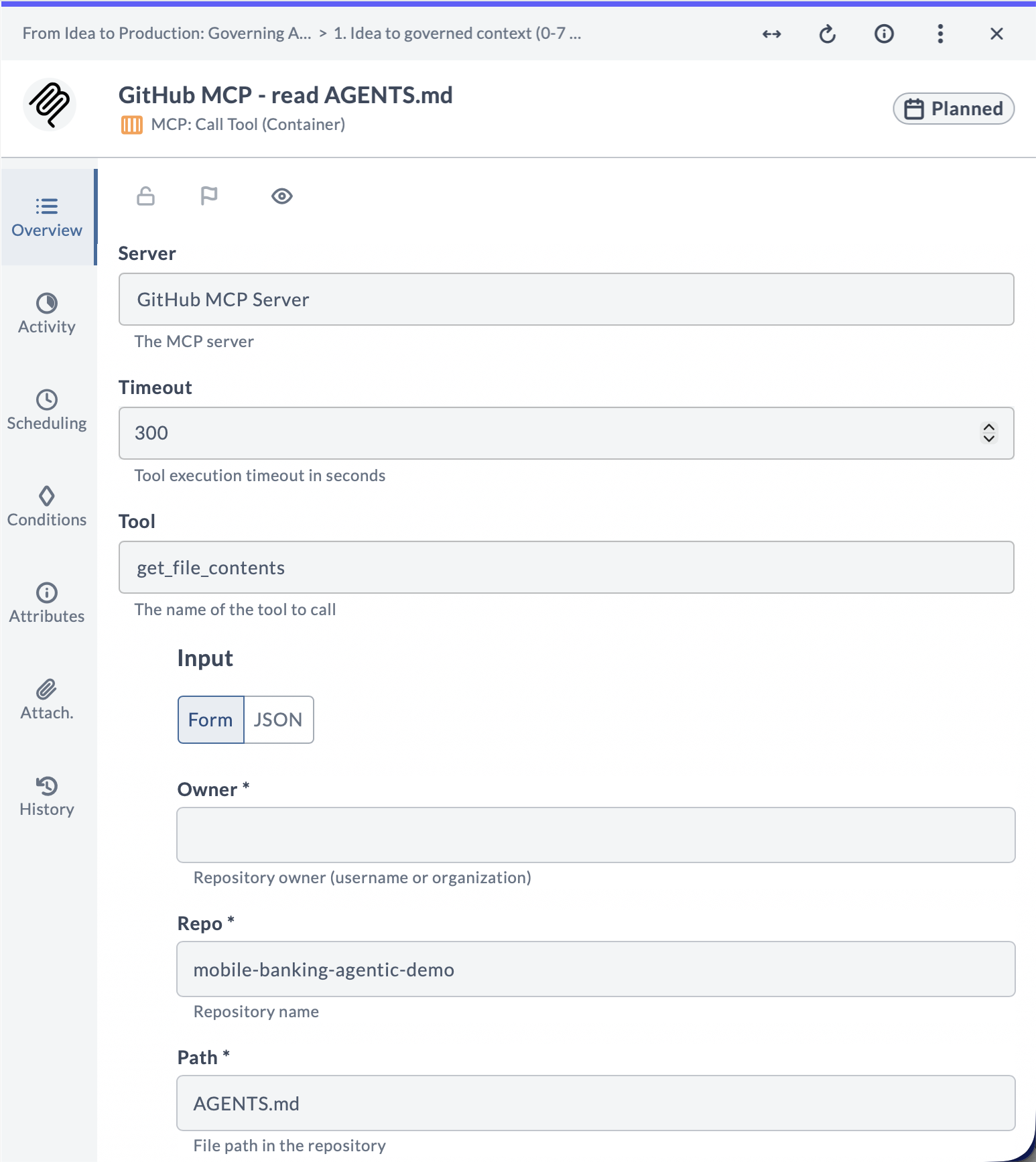
dai-chat-general. A platform administrator maps the alias to a list of provider models in priority order, and the Digital.ai LLM Service resolves it to a concrete model, so the connection keeps working when the underlying models change. System alias names start withdai-. - The MCP: Call Tool task now renders a Tool input form generated from the selected tool's JSON Schema, instead of a raw JSON textarea. Required fields are marked as required, and fields with a schema default value are pre-filled automatically. Complex or unsupported schema types, such as nested objects or
oneOf/anyOfcompositions, fall back to a JSON textarea for that field. If the tool's schema cannot be loaded, the raw JSON textarea is shown for the entire Input property as before.
For more information, see Agent Orchestration Container Plugin.
Python 3 Support for Release Automation
This release extends Python support for Release automation with a standalone API client, a new SDK task, and direct API access from the Python 3 Script (Container) task.
Python 3 Script Task
ApiBaseTask for the Python SDK
Added ApiBaseTask, a BaseTask subclass that provides a pre-configured, cached Release API client. It exposes each com.xebialabs.xlrelease.api.v1 wrapper as a property, such as releaseApi, phaseApi, and taskApi.
For more information, see Digital.ai Release Integration Python SDK Overview.
Direct API Access in the Python 3 Script (Container) Task
The Python 3 Script (Container) task now provides direct access to the Release API and current-context helpers. Scripts can read and update releases, phases, tasks, and variables without writing boilerplate.
For more information, see Python 3 Script (Container) task.
Jython to Python 3 Migration Guide
Added a guide for migrating Release automation from the Jython Script task to the Python 3 Script (Container) task. A helper tool is available in a public repository to automate parts of the conversion. It is not officially supported by Digital.ai.
For more information, see Migrate Jython Script to Python 3 Script (Container).
Python 3 Release API Client
Added a standalone Python 3 client library, digitalai-release-api-client, for the Release REST API. It connects to a Release instance and exposes each REST endpoint as a method, using the same imports, domain classes, and camelCase methods as the Jython API, and returns typed Pydantic models. The client works with both Release SaaS and self-hosted instances.
For more information, see Digital.ai Release API Client.
Deployment Visibility and Versioning
Live Deployments
This release introduces the following Live Deployments updates:
Live Deployment Cards
Live Deployments page usability has been improved so each deployment card shows the most essential information, cards are shorter and easier to scan, and additional details are shown on hover.
For more information, see Live Deployment Dashboard.
External Links on Live Deployment Cards
Live Deployment cards now display external links supplied by the Argo CD deployment provider. Links are populated from Argo CD application annotations that use the link.argocd.argoproj.io/ prefix, giving you quick access to related external resources directly from the Live Deployments dashboard.
For more information, see Live Deployment Dashboard.
Folder-Level Applications and Environments
The View Live deployments and Edit Live deployments folder permissions now also apply to the Applications and Environments pages in a folder. See Permission Updates.
Git Folder Versioning
This release introduces the following Git folder versioning improvements:
Relative Path References
Previously, all path template and folder references were stored as absolute paths. Now, references within a versioned folder structure are stored as relative paths, which makes versions portable across environments.
When applying a version to a different folder, internal references resolve automatically to the new location, with no broken links or manual path fixes. External references (outside the versioned folder) remain absolute.
For more information, see GitOps-enabled Folder Versioning.
Preserve Inheritance State in Git Folder Versioning
Git folder versions now remember whether a folder inherits its permissions and notifications from its parent. Previously, even when a folder was set to inherit, applying a version stopped the inheritance and gave the folder its own fixed copy of those settings (for notifications, this unchecked the Inherit notifications from parent folder option). Now, applying a version keeps the folder inheriting from its parent, just as it was when you saved.
Separately, if a task points to a team that no longer exists, applying a version now removes that team from the task automatically, and Release shows a warning listing the affected tasks.
For more information, see Inheritance Configuration in Folder Versioning.
Reporting, Automation and APIs
This release introduces the following reporting and export enhancements:
Webhook Container Task
Added a new Webhook Container plugin with the JSON Webhook (Container) task. Unlike the built-in Webhook task, which runs on the Release server, this task runs on a Release Runner. This lets your pipelines call endpoints that the server cannot reach, such as applications inside your own network.
The task can send GET, PUT, POST, DELETE, and PATCH requests, sign in with a username and password or a token, add custom and hidden headers, connect through a proxy, and pull up to three values out of the response.
For more information, see Webhook Container Task.
Reporting and Export
Custom Logo in Exported Reports
Exported reports now display the custom logo configured in System Settings > General > Logo. This applies to audit reports (including user permission and runner reports) and custom dashboard PDF exports. If no custom logo is configured, reports continue to use the default Digital.ai logo.
For more information, see General Settings.
Dashboard PDF Export
PDF exports for custom dashboards now capture the dashboard at 100% screen resolution regardless of your browser zoom level. If the dashboard content does not fit on a single page, Release splits it across multiple pages and adds a continuation note.
For more information, see Using Release Dashboards.
Blackout Management API
Blackout period management is now exposed as a public API. Available through the REST API and the Jython API, it supports:
- Adding, retrieving, listing, updating, and deleting blackout periods.
- Checking whether the current time falls within a blackout.
For more information, see Manage Blackouts via API.
Connections and Variables
This release introduces the following connection updates:
Connection Improvements
Duplicate Connection
You can now duplicate an existing connection at the folder and global level to quickly set up a new connection with the same configuration. The copy is created in the same location. This is ideal for configuring connections across multiple environments like DEV, STAGE, and PROD.
Duplicating a connection carries over all configuration fields, except credential fields such as passwords and API keys, which must be re-entered. Password variables are preserved when the source connection uses variable references. After duplicating, update the title (suffixed with "copy"), credentials, and any environment-specific settings.
For more information, see Duplicating a Connection.
Connection Deletion
Completed and aborted releases that reference a connection no longer prevent the connection from being deleted. A connection can be deleted as long as it is not referenced by an active release, trigger, or other active configuration.
For more information, see When a Connection Cannot Be Deleted.
Connection Title Check
When creating or editing a connection, Release now warns if another connection of the same type already uses that title. This makes connections easier to tell apart when selecting one in a task. The warning is informational, and the connection can still be saved. Global connections are checked against other global connections. Folder-level connections are checked across the folder hierarchy, including parent folders and subfolders.
For more information, see Duplicate Connection Title Check.
View Connections Permission
Added a new View connections folder-level permission for read-only access to configured connections. See Permission Updates.
Variable Enhancements
This release includes the following improvements to working with variables:
Variable Autocomplete in Description Fields
Description fields on the Template, Release, and Workflow properties pages now suggest and resolve variables, including folder variables. Typing ${ in a description field displays a suggestion list, and a saved description shows the resolved variable values.
For more information, see Variable Autocomplete in Description Fields.
List and List Box Variable Value Search
On the Create Release page and the Triggers page, you can now search List and List box variable values by typing a substring. This makes it easier to find and set the correct value in variables that have long lists of possible values.
For more information, see Searching List and List Box Variable Values.
Variable List Improvements
The variable search now indicates when a filter is applied, and a variable counter reflects the filtered results. The list header stays fixed while you scroll, which helps with long variable lists.
On a release variable list, the release and folder variable toggle displays total variable counts. These totals do not change when a filter is applied.
For more information, see Searching Release Variables.
Run As Password Variables Preserved in Child Releases
When the Password release property references a password variable, a Create Release task now passes the variable reference to the child release instead of the password value. The child release resolves the variable when its tasks run.
The Enable passing Run As password variables to child releases setting in System Settings > Tasks controls this behavior and is selected by default.
The password variable must be in scope for the child release. Global password variables and secret manager references are always in scope. A folder password variable is in scope only when the destination folder for the child release is in the same folder or a child of that folder. A release password variable is never in scope of the child release. If the password variable is not in scope for the child release, the Create Release task will fail.
For more information, see Passing the Run As Password to Child Releases.
Working with Releases
This release introduces the following user interface and functional enhancements:
Timezone Support
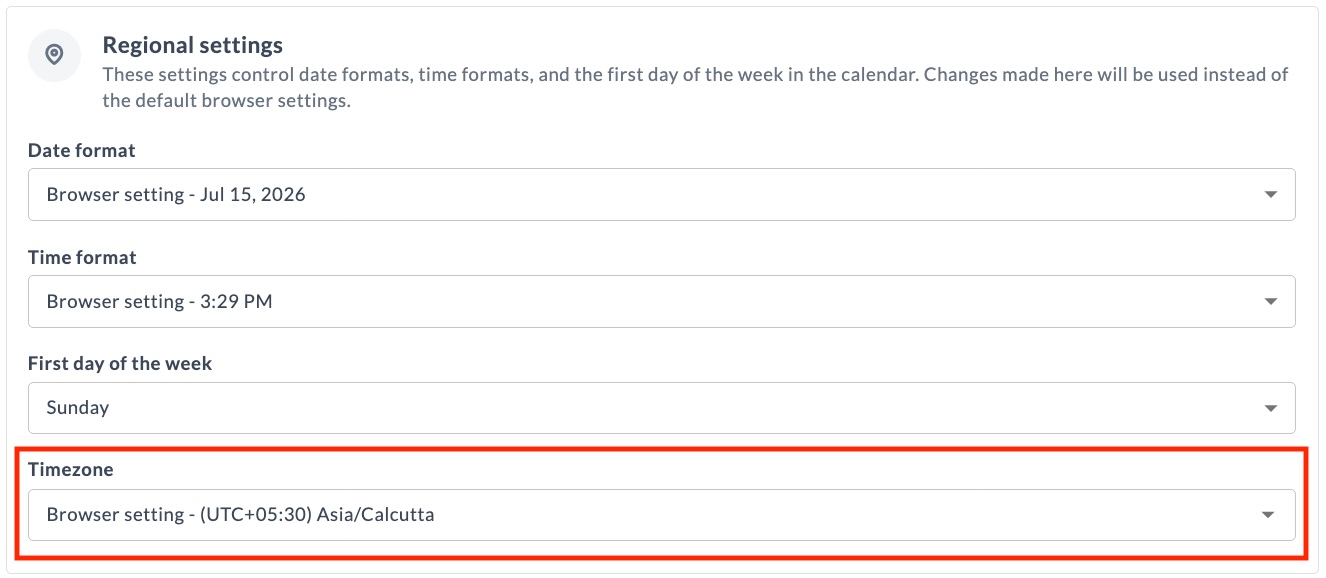
Each user can now individually set the timezone Release uses to display dates and times, instead of relying only on their browser's timezone. Set this under Profile settings > Personal Regional Settings, choosing from the list of available timezones, each shown with its UTC offset, for example UTC+01:00 Europe/Amsterdam.
Changing your timezone updates dates and times to reflect the newly chosen timezone, including the Release flow page, Task details, list pages, filters, and other pages. Every release page also shows a timezone pill with the current UTC offset, for example UTC+02:00. Hover over the pill to see the full timezone name.
YAML representations of releases and templates, including the template code preview and Git folder versioning, and audit reports continue to use the server timezone where Release is running. The audit report includes details indicating the timezone used.
For more information, see Timezone.
Task Drawer Changes
This release introduces the following Task Drawer changes:
Unsaved Changes in Script Fields
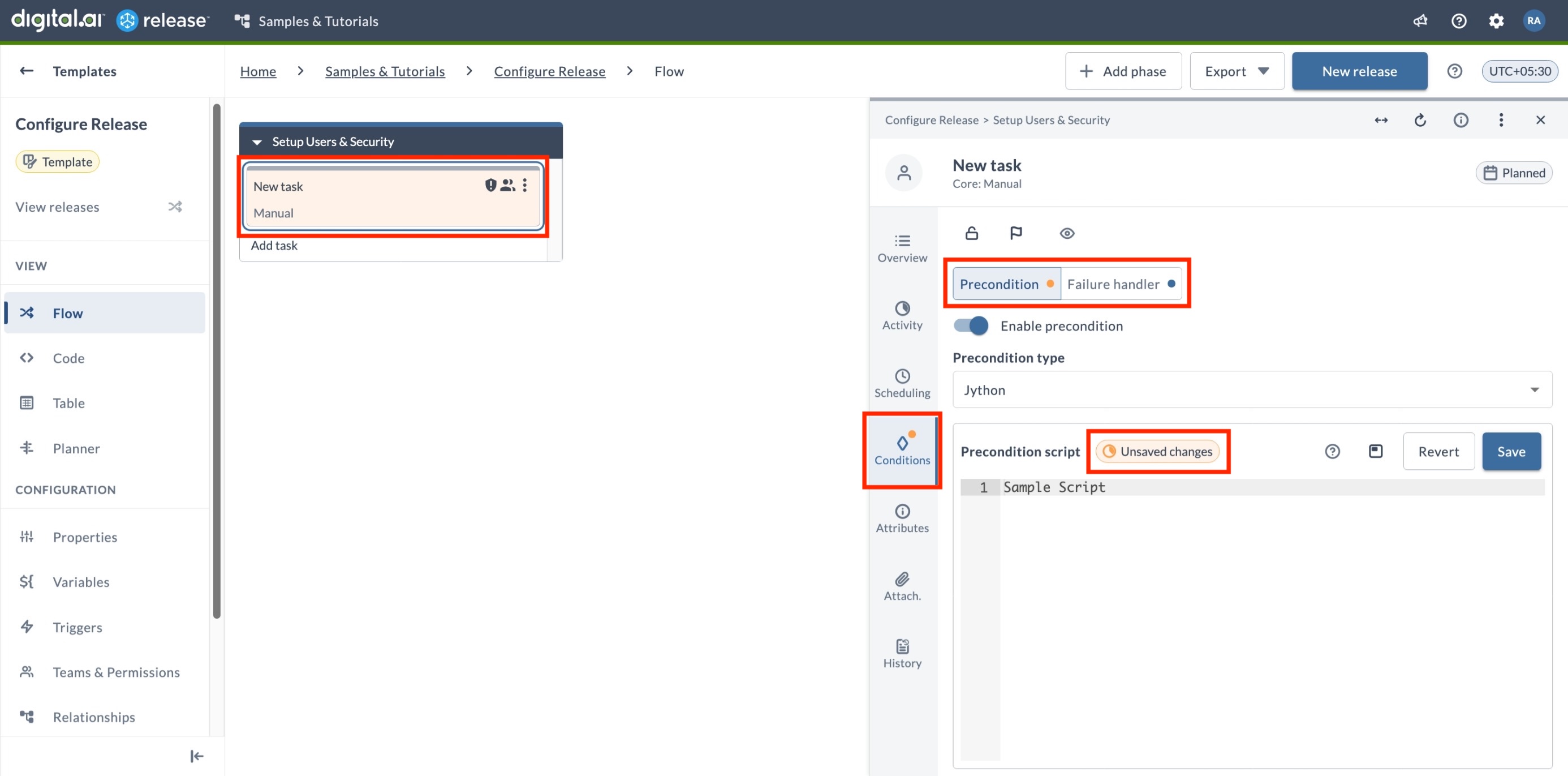
Release now preserves unsaved changes to script fields in the Task Drawer within your session so you don't lose work when navigating away from a task. This applies to the Script field in Jython Script, Groovy Script, and Webhook: Wait for JSON Event tasks, to precondition and failure handler scripts, and to custom tasks that include a script editor component. Unsaved changes are cleared on login. Unsaved changes are not considered when a task starts executing.
When a script field has unsaved changes, an unsaved changes badge appears in the Script editor field, an orange badge marks the affected tab in the Task Drawer, and the task card turns orange in the Template and Release Flow pages.
For more information, see Managing Tasks with the Task Drawer.
Configuration Indicators for Preconditions and Failure Handlers
The Conditions tab in the Task Drawer now shows a badge indicating the configuration state of preconditions and failure handlers, so you can see at a glance what is configured.
- Blue badge – the precondition or failure handler is configured and saved.
- Orange badge – the precondition or failure handler script has unsaved changes.
For more information, see Managing Tasks with the Task Drawer.
Connection Selection
The connection picker in the Task Drawer now groups connections by folder, either global or a specific folder path, and displays the URL for each connection when it's configured in the connection settings. This helps you pick the right one when connections share similar names. Each entry also includes a link to open the connection details, available if you have the View connections or Edit connections permission for the folder where the connection is defined.
For more information, see Using the Saved Connection.
Filtering Improvements
This release introduces the following filtering improvements:
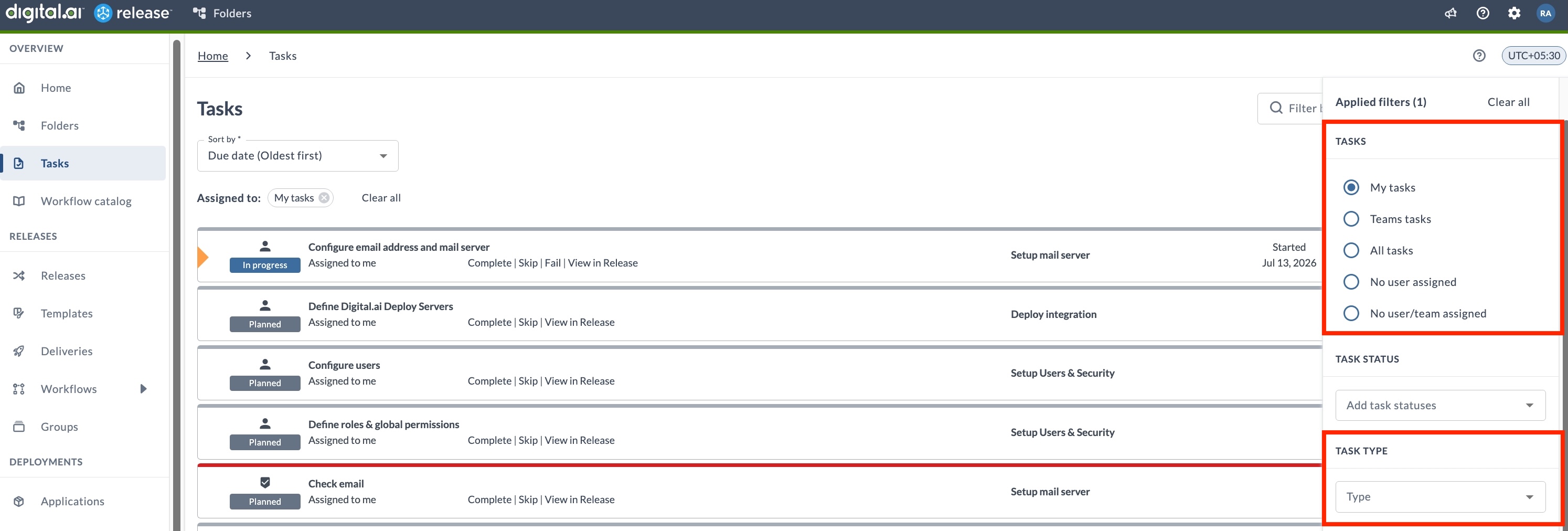
Task Filtering
-
The Task Ownership filter on the Tasks page has been updated with more granular options for filtering unassigned tasks:
- No user assigned – Shows tasks that have no user assigned. A team may or may not be assigned to these tasks.
- No user/team assigned (renamed from Unassigned tasks) – Shows tasks that have neither a user nor a team assigned.
-
A new Task Type filter has been added to narrow down tasks based on their type. You can select the task type from the dropdown, which includes:
- Core tasks (for example, GATE, Manual, Notification)
- Script tasks (Groovy, Jython, External scripts)
- Integration tasks (for example, Agility, Argo CD, Jira, OpenShift)
For more information, see Filtering Tasks.
Inline Filtering
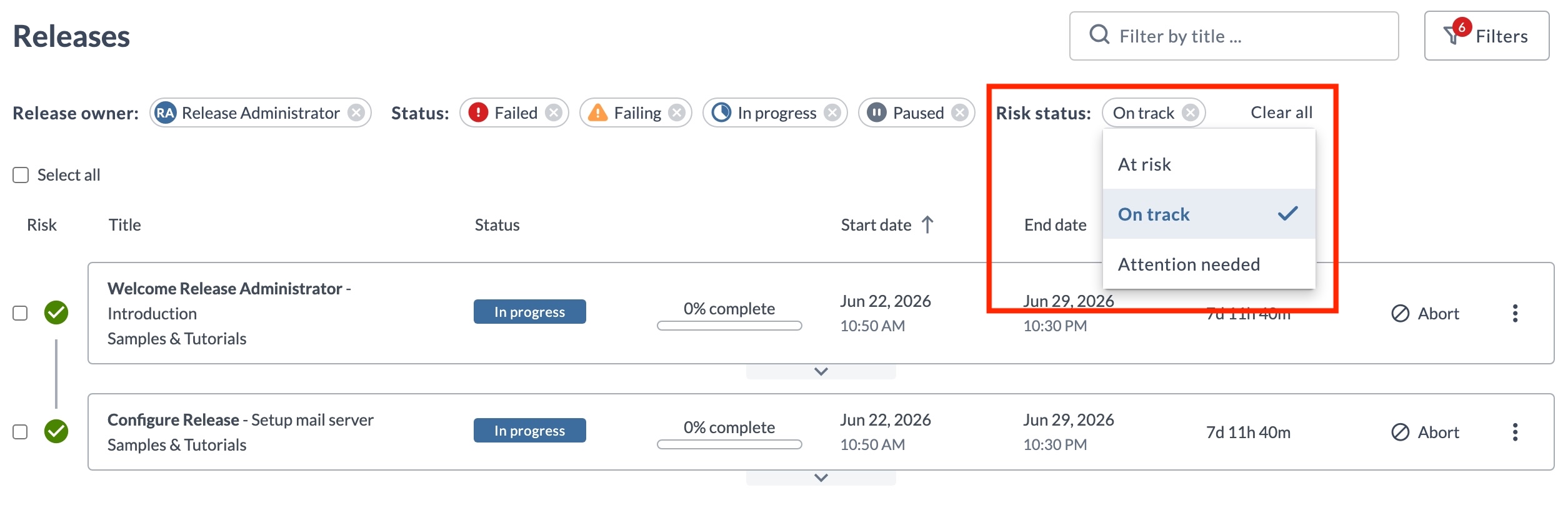
You can now change a filter's value directly from its pill. Click the value displayed and choose a new one. This works on every page that uses the new filters, including Releases, Templates, Tasks, Workflow Templates, Workflow Executions, and Runners.
Comments Preserved in Status-Change Dialogs
Comments entered in status-change dialogs for tasks or releases (such as Completing, Failing, Skipping, or Aborting) are now saved in your browser. This prevents comments from being lost if you accidentally click away. Your comment will be restored the next time you open the same dialog, and will only be cleared when the status change is submitted or explicitly canceled.
Homepage Layout Updates
The default Homepage layout has an updated tile layout, including a My tasks tile listing tasks assigned to the user In progress, Pending, or Failed states, sorted by due date, soonest first.
- If you haven't customized the Homepage before, no action is required. The updated layout appears after upgrading, when setting up a new environment, or when enabling the Homepage for the first time.
- If you've customized the Homepage, there's no impact. The current layout is preserved, and you can add the My tasks tile manually after the upgrade.
For more information, see Release Homepage.
Plugins and Integrations
The following plugins and integrations have been updated or added in this release.
Argo CD Container Plugin
The following updates are introduced for the Argo CD Container plugin:
- Added App Annotations and App Labels fields to the Create Application (Container) and Update Application (Container) tasks. Define these as key-value pairs to apply annotations and labels to the Argo CD application.
- Added a Refresh field to the Sync Application (Container) task to control manifest refresh before sync. Set it to
nonefor no refresh,normalto re-fetch and re-render using the repo cache, orhardto ignore the repo cache.
- Added a Cluster Name field to the Create Application (Container), Update Application (Container), and Check if ArgoCD Application Already Exists (Container) tasks. Use it to identify the destination Kubernetes cluster by name instead of by URL. Provide either Cluster URL or Cluster Name, not both.
For more information, see Argo CD Container Plugin.
Argo CD Plugin
The following updates are introduced for the Argo CD plugin:
- Added a new Terminate Argo CD Operation task to force-stop a running Argo CD operation (sync, pre-hook, post-hook, or rollback) on an application. Useful for resolving stalled synchronizations without manual intervention.
- The Create Or Update Application task now supports an Ignore Differences YAML field. Use it to add
ignoreDifferencesrules to the Argo CD application manifest so that Argo CD excludes specific fields from drift detection. - Enhanced the Sync Application task to reliably refresh and sync application changes.
For more information, see Argo CD Plugin.
Conjur Plugin
The Conjur plugin now supports OAuth 2.0 authentication for server connections, enabling token-based (JWT) authentication for CyberArk Conjur Cloud (SaaS) connections.
For more information, see Conjur Plugin.
Deploy Plugin
The following updates are introduced for the Deploy plugin:
- The Deploy plugin now supports PAT (Personal Access Token) as a new authentication method for the Deploy Server connection.
- The Digital.ai Deploy CI task now fails a search for a non-existent CI only when the Throw on fail option is enabled.
- Deploy tasks now support Unicode characters, such as emoji, in deployment output.
- Deployment errors from Deploy are now shown in the corresponding Release task output, making it easier to identify the cause of a deployment failure.
- The plugin now uses the JDK truststore instead of the Python certificate bundle for API requests to Deploy, adding support for user-configured custom certificates.
For more information, see Deploy Plugin.
GitLab Plugin
The following updates are introduced for the GitLab plugin:
- Added
Retry wait timeandMaximum retriesfields to the Trigger Pipeline task to control polling behavior when checking pipeline status.
- Enhanced the Query Project task. Added a Kind input field to filter projects by namespace kind (for example, group or user), and expanded the output properties to return HTTP URL, Project Name, Namespace, Default Branch, Web URL, SSH URL, and Visibility in addition to Project ID.
For more information, see GitLab Plugin.
HashiCorp Vault Plugin
The following updates are introduced for the HashiCorp Vault plugin:
- Fixed namespace handling so the plugin works correctly with Vault Enterprise. The
X-Vault-Namespaceheader is now sent on both authentication and secret requests when a namespace is configured, and only when the namespace is set. - External variable lookup now works with the KV v2 secrets engine, in addition to the engines already supported.
For more information, see HashiCorp Vault Plugin.
Jira Plugin
The following updates are introduced for the Jira plugin:
- Cloud connections now use version 3 of the Jira APIs. Server connections continue to use version 2.
- The Create Issue Json task now converts rich text fields, such as description and environment, to Atlassian Document Format when a cloud connection is used.
For more information, see Jira Plugin.
Remote Completion Plugin
Remote Completion now accepts replies in which an email watermarking gateway has replaced the spaces after ACTION:, TASK_ID:, and SIGNATURE: with non-ASCII characters.
For more information, see Use Remote Completion Task.
ServiceNow App Integration
Added support for Personal Access Token (PAT) authentication in the ServiceNow extension's Release connection configuration. You can now connect to Release instances using PAT authentication instead of basic credentials.
For more information, see ServiceNow App Integration for Release.
ServiceNow Plugin
The following updates are introduced for the ServiceNow plugin:
- The Wait for Status task now processes structured response data returned while polling.
- The Find Records by Query task now returns records that have empty field values, including on Oracle databases.
For more information, see ServiceNow Plugin.
Tekton Container Plugin
The following updates are introduced for the Tekton Container plugin:
- Get Pipeline Run (Container) now exposes Tekton
status.resultsas a new Pipeline run results output property. Results are returned as key-value pairs, allowing Release to retrieve custom pipeline outputs such as plan hashes or deployment statuses produced by downstream Tekton tasks. - Added a new Delete Pipeline Run (Container) task to delete an existing Tekton
PipelineRunfrom the cluster. Use this to clean up runs generated during a release and avoid accumulation in the cluster.
For more information, see Tekton Container Plugin.
Terraform Enterprise Plugin
Added a new plugin that integrates Terraform Enterprise ↗ and Terraform Cloud into release pipelines.
This plugin enables you to manage Terraform infrastructure using the following tasks:
- Apply Run – Apply an existing Terraform run by its run ID.
- Create Config Version – Create an upload-ready configuration version and return its upload URL.
- Create Run – Queue a Terraform plan and apply run against a workspace.
- Create Variable – Create or update a workspace variable, including HCL and sensitive values.
- Create Workspace – Create a workspace in the configured organization.
- Delete Workspace – Delete an existing workspace.
- Get Run – Retrieve a run by ID, or the latest run for a workspace.
- Get Workspace State – Read a workspace's state serial, resource count, and Terraform outputs.
For more information, see Terraform Enterprise Plugin.
Installation and Upgrades
Support Policy
See Digital.ai Support Policy.
Upgrade Instructions
The upgrade process depends on your current and target Digital.ai Release versions.
For upgrade instructions, see:
Updated System Requirements
Release 26.3 supports the following latest versions of Java, operating systems, and databases. Before upgrading, ensure your environment meets the following requirements:
-
JDK: Supports JDK 21 (default) and JDK 25
(JDK 25 requires configuration changes. See Configure the JDK Version for Release. The JDK 21 limitations described below apply only when the recommended JDK 25 configuration changes are made.) -
Windows Server: 2025
(2022 is no longer supported) -
RHEL: 9.x / 10.x
(8.x is no longer supported) -
PostgreSQL: 18.3 / 17.9
(18.0 and 17.6 are no longer supported) -
MySQL: 9.7 LTS / 8.4 LTS
-
Oracle: 26ai LTS / 19c LTS
(23ai LTS is no longer supported) -
SQL Server: 2025 (17.0) / 2022 (16.0)
(2019 (15.0) is no longer supported)
For more information, see Installation Prerequisites.
Kubernetes Installation Updates
This release introduces the following Kubernetes installation updates:
New xl kube apply Command
A new xl kube apply command lets you apply previously generated Kubernetes manifest files directly to a cluster without requiring an answers file or blueprints. Use it to reuse generated files from a dry run or a previous install/upgrade in another compatible environment, or to repeat an install or upgrade without regenerating templates.
Required options: -f (path to generated templates directory), -n (namespace), and --server-type (deploy, release, or release-runner).
For more information, see xl kube apply Command Reference.
Ingress Controller Removal
The bundled Bitnami NGINX, HAProxy, and community ingress-nginx-controller components are removed. The installer no longer installs or manages an ingress controller. The default value for the ingress type prompt on non-OpenShift platforms is now external. You must bring your own ingress controller or select none and configure ingress later.
For more information, see Migrate to an External Ingress Controller.
OpenShift: CNPG Operator SCC Troubleshooting
On OpenShift, the CloudNativePG (CNPG) PostgreSQL operator pod may fail to start when no Security Context Constraint grants its service account the required UID (runAsUser: 10001). A troubleshooting entry with the remediation command is now documented.
For more information, see Troubleshoot Install or Upgrade on Kubernetes.
xl kube clean Improvements
xl kube cleannow generates or gracefully skips a missingkubernetes/templatedirectory instead of failing with a "no such file or directory" error.xl kube cleannow detects both 25.3.x naming (ingress-nginx-controller) and 26.1+ naming (dai-ingress-nginx-controller) and prompts to remove the old resources.
Administration
Java Platform Changes: JDK 25 Support
Release 26.3 ships as a single distribution that supports both JDK 21 and JDK 25. JDK 21 remains the default, and no JDK-related configuration changes are required to continue using it after upgrading. JDK 25 is available as an optional runtime.
If you use script tasks, switching to JDK 25 changes the security model for script execution and should be treated as a breaking change. Review your script security configuration and test your scripts in a lab environment before deploying Release with JDK 25.
- JDK 21 (default): Existing deployments can continue using JDK 21 after upgrading. The Java Security Manager and the
script.policyfile continue to provide sandboxing for script tasks. Free security updates for some JDK 21 distributions end in September 2026. - JDK 25 (optional): The Java Security Manager is no longer available. Release uses its script security configuration, rather than the Security Manager and
script.policy, to restrict script behavior. Review Configure Script Security before running scripts on JDK 25. To switch JDK versions, see Configure the JDK Version for Release.
Action Required If:
- You use script tasks with sandboxing enabled on JDK 21 and your JDK 21 distribution stops receiving free security updates after September 2026.
- You use script tasks and switch to JDK 25.
No Action Required If:
- You do not use script tasks in Release.
- You use script tasks with sandboxing disabled and remain on JDK 21.
- You remain on JDK 21 and your JDK distribution continues to receive free security updates after September 2026.
If you are unsure whether sandboxing is enabled, check your Release runtime configuration or contact Customer Support ↗.
JDK 21 distributions with free support beyond September 2026 include Eclipse Temurin, Microsoft Build of OpenJDK, Amazon Corretto, OpenLogic, Red Hat, Ubuntu, and Azul Zulu builds. Support policies and lifecycles can change, so verify the support lifecycle for your distribution with its vendor.
This release introduces the following script security hardening changes on JDK 25:
-
Java class access: Configure Java class access with the
xl.security.scripting.sandbox.allowedJavaClassesandxl.security.scripting.sandbox.deniedJavaClassessettings inxl-release.conf. Thescript.policyfile is not used to control Java class access on JDK 25. -
Script authoring permission: A new Create and edit scripts global permission controls who can author scripts and script-based configuration. Restrict this permission to trusted users, particularly in JDK 25 deployments where the Java Security Manager is unavailable. See Permission Updates.
Known IssueCreate and Edit Scripts Permission on Upgrade
Release 26.3.0 does not assign this permission to any role by default, so after upgrade, non-administrator users can no longer edit script tasks, precondition and failure handler scripts, trigger filter rule scripts, or connection authentication scripts.
Workaround: add the Authenticated Users role to the Create and edit scripts permission in Settings > Users and permissions > Permissions.
Release 26.3.1 fixes this by granting the permission to all authenticated users by default, so skip 26.3.0 and upgrade directly to 26.3.1 or later.
-
Restricted Jython functions: The recommended Jython restricted-functions configuration described in Static Script Validation can prevent scripts that previously ran successfully from executing. These restrictions are recommendations and can be customized to meet the security requirements for your deployment. If you apply the recommended restrictions on JDK 25, test functionality that executes scripts in a non-production environment before deploying the configuration to production.
Local Logout for OIDC
Release now supports a local-only logout for OIDC single sign-on (SSO) setups. A new optional configuration property, xl.security.auth.providers.oidc.localLogoutRedirectUri, controls the logout behavior:
- When not set (default), logout works as before. Release directs the user to the Identity Provider's end-session endpoint, the IDP session is terminated, and the user is presented with the IDP login screen.
- When set, logging out of Release clears only the local Release session and redirects the user to the specified URL. Release does not call the IDP end-session endpoint, so the SSO session at the Identity Provider stays active.
This is useful when Release shares an SSO session with other services. For example, if you point localLogoutRedirectUri to a second SSO-enabled service, a user who logs out of Release is redirected to that service without being prompted to log in again.
For more information, see Set up the OpenID Connect (OIDC) Authentication for Release.
Permission Updates
This release introduces the following permission updates:
Added permissions:
- Create and edit scripts, a new global permission that controls who can author scripts and script-based configuration. Restrict this permission to trusted users, particularly on JDK 25 deployments where the Java Security Manager is unavailable. See Configure Script Security.
- View connections, a new folder-level permission that lets users view configured connections and their details, without allowing them to create, edit, delete, or test connections. See Folder Teams and Permissions.
Updated permission behavior:
- The View Live deployments and Edit Live deployments folder permissions now also apply to the Applications and Environments pages in a folder. See Folder Teams and Permissions.
- Users who have the Edit security permission but not the Admin permission no longer see roles that include the Admin permission. Such a role is not listed in the Roles column on the Permissions page and does not appear in the dropdown when you type a role name, so these users cannot assign permissions to it or remove permissions from it. See The Permissions Page.
Release Archiving
You now have more control over when a finished release is archived or deleted. Release administrator users can configure a custom archiving age for individual releases or templates.
- Custom archiving or deletion age – Set a custom age, in hours or days, on a release or template to override the global setting. The age determines how long a completed or aborted release waits before it is eligible to be archived or deleted. Leave the value empty to use the global setting. Set it to
0to make the release eligible for archiving or deletion immediately after it completes or aborts. - Archive on demand – Archive a release without waiting for its archiving age to elapse. Select Archive release from the three-dot menu on the Releases page, select multiple releases and choose Archive from the main actions, or use the Release REST API. The release becomes eligible for archiving immediately and is picked up by the next archiving job run.
For more information, see Setting a Custom Archiving Age and How to Archive a Release on Demand.
Runner Updates
This release introduces the following Runner updates:
CA Certificate Propagation to Executors
The runner can now automatically propagate the same CA certificate to all executor environments (Kubernetes pods and Docker containers) instead of setting it on every connection separately. When RELEASE_RUNNER_REST_CLIENT_CA is configured with a path to a PEM file, the certificate is shared with all task executors launched by that runner.
For more information, see Run Release Runner With TLS Support.
Runner Configuration Templates
You can now create runner configuration templates in Connections and automatically apply them to newly registered runners.
The active template, selected on the Runners page, overrides runner defaults only for the fields it defines. Fields left empty keep the runner's default values.
Templates can define capabilities, capacity, eviction time, idle time to live, and registry settings, making it easier to standardize runner configurations and support autoscaling.
For more information, see Runner Configuration Templates.
Runner Token Expiry Handling
Runners now receive the license token expiry date during registration with Release. This lets a Runner monitor its own token status and transition to a controlled degraded state when the token expires, instead of failing abruptly. As the expiry date approaches, the Runner logs a warning 24 hours and again 12 hours before the token expires.
For more information, see Token Expiry Handling.
Runner Capability Name Validation
Release now validates capability names when you add them to a runner. A capability name can contain letters, numbers, and hyphens (-), such as prod, k8s, or remote-script. Release removes surrounding spaces when you add a capability, and rejects a name that contains any other character.
For more information, see Runner Capabilities.
System Settings Search
Release administrators can now search across System settings to locate a specific setting without browsing each section. Search is available in the General, Release and Triggers, Tasks, Reports, AI settings, Advanced, and Experimental settings sections.
For more information, see System Settings Search.
Bug Fixes-26.3.1
- D-43989 – Fixed an issue on fresh installations where non-admin users could not edit Jython scripts in script tasks. The Create and Edit Scripts permission, which is granted by default when no role has it explicitly assigned, was missing from the permission set loaded at login.
- D-43394 – Fixed an issue where output properties larger than the configured maximum size were silently truncated, allowing the task to complete successfully. The task can now be configured to fail instead when truncation occurs.
Bug Fixes-26.3.0
- D-42858 – Fixed an issue where custom health check groups, such as readiness and liveness, defined in
xl-release.confprevented the Release server from starting. This affected multi-datacenter setups that use these endpoints for load balancer and failover checks. - D-42858 – Fixed an issue where generating a support package on a cluster node with stopped services failed with an error.