Regression Planning
Regression Planning is an Increment Planning feature that allows you to define and manage coordinated testing activities to ensure your existing functionality continues to work as designed. This is particularly critical for development projects in which new features are added.
Permission requirement: Viewing regression plans requires read access to the projects containing the plans. Creating and managing plans, suites, and tests requires modify permissions on the project. The Regression Planning feature can be enabled or disabled by administrators.
Who Uses Regression Planning
Regression planning supports quality assurance and testing coordination:
- QA Managers create regression testing frameworks with plans and suites organized by product lines, feature areas, or test priorities.
- Test Leads schedule regression suites to sprint iterations by creating test sets and linking them to suites for execution tracking.
- Scrum Masters monitor regression test execution during releases using test set reports to identify testing bottlenecks and adjust schedules.
- Product Owners decide whether to enable regression features based on team testing approaches, balancing manual testing needs against feature overhead.
Overview
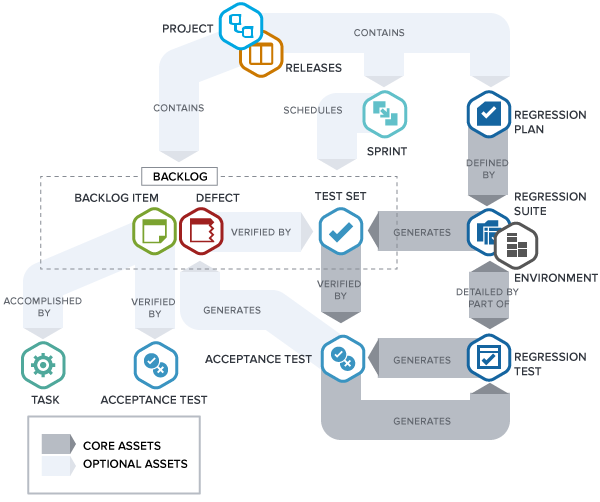
A regression plan organizes your testing activities into a hierarchical structure:
- Regression Plan: Top-level container for coordinated testing activities across an increment
- Regression Suite: Set of related regression tests within a plan that ensure proper functioning within a given aspect of the application
- Regression Test: Individual test cases that verify specific functionality
Teams can build and manage an inventory of regression tests, create test plans for each new increment, and manage testing activities within the course of their sprint or iteration schedule.
Regression Testing is an optional feature that can be enabled or disabled through the Administration component.
Key Capabilities
Regression Planning supports the following activities:
- Plan Management: Create, edit, and organize regression plans for each increment
- Suite Organization: Group related tests into suites based on functional areas or testing strategies
- Test Assignment: Assign regression tests to specific suites and manage test inventory
- Test Tagging: Use tags to filter and organize regression tests across projects
- Execution Tracking: Monitor testing progress and identify gaps in test coverage
Access Regression Planning
To access Regression Planning:
- Click the hamburger menu
 > Increment > Regression Planning
 - The Regression Planning page displays your plans in the left panel and suite/test details in the main area
Use Cases
QA Manager Setting Up Regression Structure for Multiple Products
A QA manager creates a regression testing framework for three product lines. They create a top-level Regression Plan "Q2 2024 Regression Testing" covering the entire quarter. Under this plan, they add three Regression Suites: "E-commerce Platform", "Mobile Apps", and "Payment Gateway". Within "E-commerce Platform" suite, they create 45 Regression Tests covering checkout flow, product catalog, user authentication, and search functionality. They assign Test Owners to each test based on expertise: Sarah owns checkout tests, Mike owns catalog tests. This hierarchical structure allows teams to organize hundreds of tests logically while maintaining clear ownership and enabling selective execution for different release cycles.
Test Lead Scheduling Regression Suites to Sprint Iterations
A test lead prepares for Sprint 15 regression testing. They navigate to the Team Planning Board and create a Test Set workitem "Sprint 15 Regression Testing" scheduled to the current sprint. They open the test set and link it to the "Core Features" regression suite containing 30 tests. During sprint planning, they estimate the test set at 20 hours based on historical execution times. The test set appears on the sprint board alongside development stories and defects. As testing progresses, team members update test statuses within the regression suite. The test set provides sprint-level visibility of regression testing effort while the underlying regression suite maintains the permanent test inventory independent of sprint scheduling.
Scrum Master Tracking Regression Test Execution During Release
A scrum master monitors regression testing for a major release. The team has scheduled three test sets to the release, each linked to different regression suites: "Smoke Tests" (15 tests), "Core Functionality" (60 tests), and "Integration Tests" (35 tests). They open the Test Sets report showing execution status across all three test sets. The smoke tests show 15 of 15 complete (green), core functionality shows 48 of 60 complete (yellow), and integration tests show 12 of 35 complete (red). Based on these metrics, they identify that integration testing is behind schedule. They assign two additional testers to integration tests and extend the testing window by 3 days to ensure full regression coverage before release.
Product Owner Deciding Whether to Enable Regression Feature
A product owner for a new agile team evaluates whether to enable the Regression Planning feature. Their team focuses on continuous delivery with automated testing, rarely needing manual regression test tracking. They review the feature documentation and determine the overhead of maintaining regression plans, suites, and tests doesn't provide value given their automation-first approach. They decide to keep the feature disabled, relying instead on automated test results reported through their CI/CD pipeline. Six months later, regulatory requirements change, requiring documented manual test execution. They enable the feature and create a "Compliance Testing" regression plan to track required manual validations, demonstrating the flexibility to adopt regression planning when organizational needs change.
Test Manager Reusing Regression Suites Across Multiple Releases
A test manager maintains regression suites that apply across releases. They've created "Smoke Tests" suite with 20 critical-path tests executed for every release, and "Full Regression" suite with 200 comprehensive tests executed quarterly. For Release 8.5 (minor release), they create Test Set "8.5 Smoke Tests" scheduled to the release and link it to the existing "Smoke Tests" suite. For Release 9.0 (major release), they create Test Set "9.0 Full Regression" linked to the "Full Regression" suite. This reuse approach maintains a single authoritative test inventory while creating lightweight test sets for scheduling purposes. When they add a new test to "Smoke Tests" suite, it automatically applies to future releases that reference that suite, ensuring consistent test coverage without duplication.
Frequently Asked Questions
Is Regression Planning a required feature in Digital.ai Agility?
No, Regression Planning is optional and can be disabled by administrators. The feature is most valuable for teams performing significant manual regression testing or needing traceability between test cases and execution cycles. Many teams using primarily automated testing choose to disable this feature. Administrators can enable or disable it through system settings. If you don't see Regression Planning in your menu, contact your administrator to enable it.
What's the difference between a Regression Test and a Test Set?
A Regression Test is a permanent test case in your test inventory describing what to test and expected results. Regression Tests live in Regression Suites and persist across releases. A Test Set is a schedulable workitem that references regression suites for execution during a specific sprint or release. Think of Regression Tests as the test library and Test Sets as scheduled execution activities.
How should I organize Regression Suites for maximum reusability?
Organize suites by feature area, risk level, or scope rather than by release. Create suites like "Core User Workflows", "Payment Processing", "High-Priority Features" that remain stable across releases. This allows creating lightweight test sets for different scenarios: link only "High-Priority Features" suite for minor releases, or link multiple suites for major releases. Avoid creating release-specific suites that duplicate test content.
What happens to Test Sets when a sprint or release completes?
Test Sets remain in the system as historical records of test execution. Completed test sets show which regression suites were executed and provide audit trails for quality activities. For the next sprint or release, create new test sets and link them to the appropriate regression suites. This separates the permanent test inventory (Regression Suites and Tests) from time-bound execution activities (Test Sets).
Why can't I create a regression plan or why do my test sets show outdated tests?
Creating regression plans requires modify permissions on the project. Verify you have appropriate project permissions and ask your administrator to grant access if needed.
Test sets are snapshots created when you generate them from regression suites. If you update regression tests after generating a test set, the changes don't affect existing test sets. Only new test sets generated after the update will include the changes. This design preserves historical execution records.