Agility User Interface
Digital.ai Agility provides an intuitive user interface with simplified navigation and flexible workspace features to help you focus on your work.
Who benefits from this overview
This overview helps all users understand the interface layout and navigation patterns:
- New users: Learn where to find key features and how to navigate efficiently
- All roles: Understand workspace customization options to match your workflow
- Mobile users: Learn about responsive layout features for different devices
Note on menu visibility: The features available in your hamburger menu depend on your role and permissions. Administrators see additional Admin menu options, while team members see menus relevant to their project access.
Navigation features
The Agility interface includes key navigation elements:
Hamburger menu
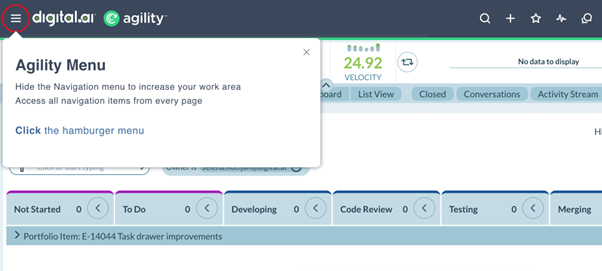
Access all product features through the collapsible hamburger menu  . Collapse the menu to maximize your workspace.
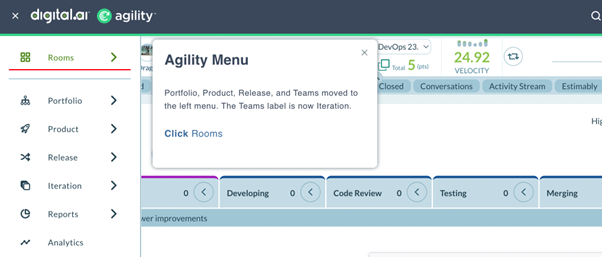
Organized sub-menus
Features are logically grouped into sub-menus for quick access to related functionality.
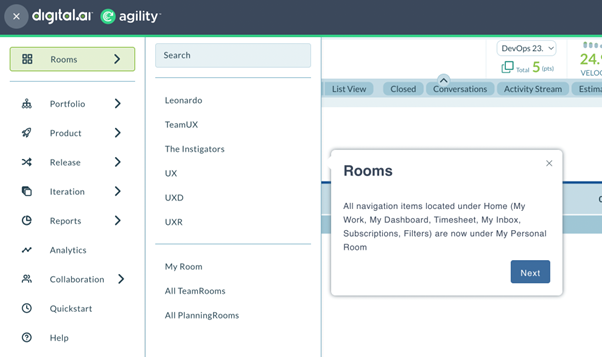
My Home workspace
Access your personal workspace with customized views of your work, dashboards, and team activities.
Header tools
The top navigation bar provides quick access to frequently used features:
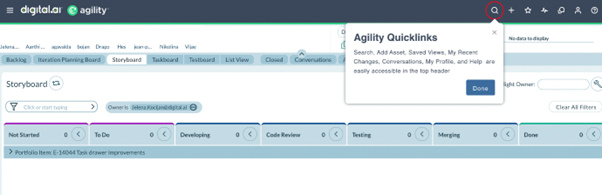
- Quick Search: Find work items, projects, and content instantly
- Quick Add: Create new work items without navigating away from your current page
- Notifications: Stay informed about updates and mentions
- User Profile: Access your account settings and preferences
Workspace flexibility
- Collapsible navigation: Hide the hamburger menu to maximize screen space for your work
- Responsive layout: Interface adapts to your screen size and preferences
- Customizable views: Save and switch between personalized grid views
Related Topics
- Feature Guidance - Get contextual help
- Use the Hamburger Menu - Navigate core features
- Use the Header - Access quick tools
- My Views - Save custom grid views