Cascade OKRs in Agility
Cascading Objectives and Key Results (OKR) creates a hierarchical structure that breaks down company goals into smaller, clear objectives for teams and individuals. This alignment means everyone's work contributes to manager, team, department, or organizational objectives.
By establishing cascading relationships between OKRs, you create a clear line of sight from individual objectives up through the organizational hierarchy. This helps everyone understand how their work connects to strategic goals.
Cascading OKRs creates a hierarchical structure where objectives cascade from higher-level objectives or key results. This shows direct contribution and accountability.
Linked Objectives create related connections for broader context without strict hierarchy. See Link Objectives for flexible objective relationships.
How OKR Hierarchy Works
Agility supports flexible cascading relationships that flow through organizational levels:
- Objectives can cascade from objectives - Align with higher-level organizational, department, or team objectives
- Objectives can cascade from key results - Contribute to a specific key result for precise outcome alignment
- One cascading source per objective - Each objective cascades from only one source (objective or key result)
- Multiple cascaded objectives - A single objective or key result can have multiple objectives cascading from it
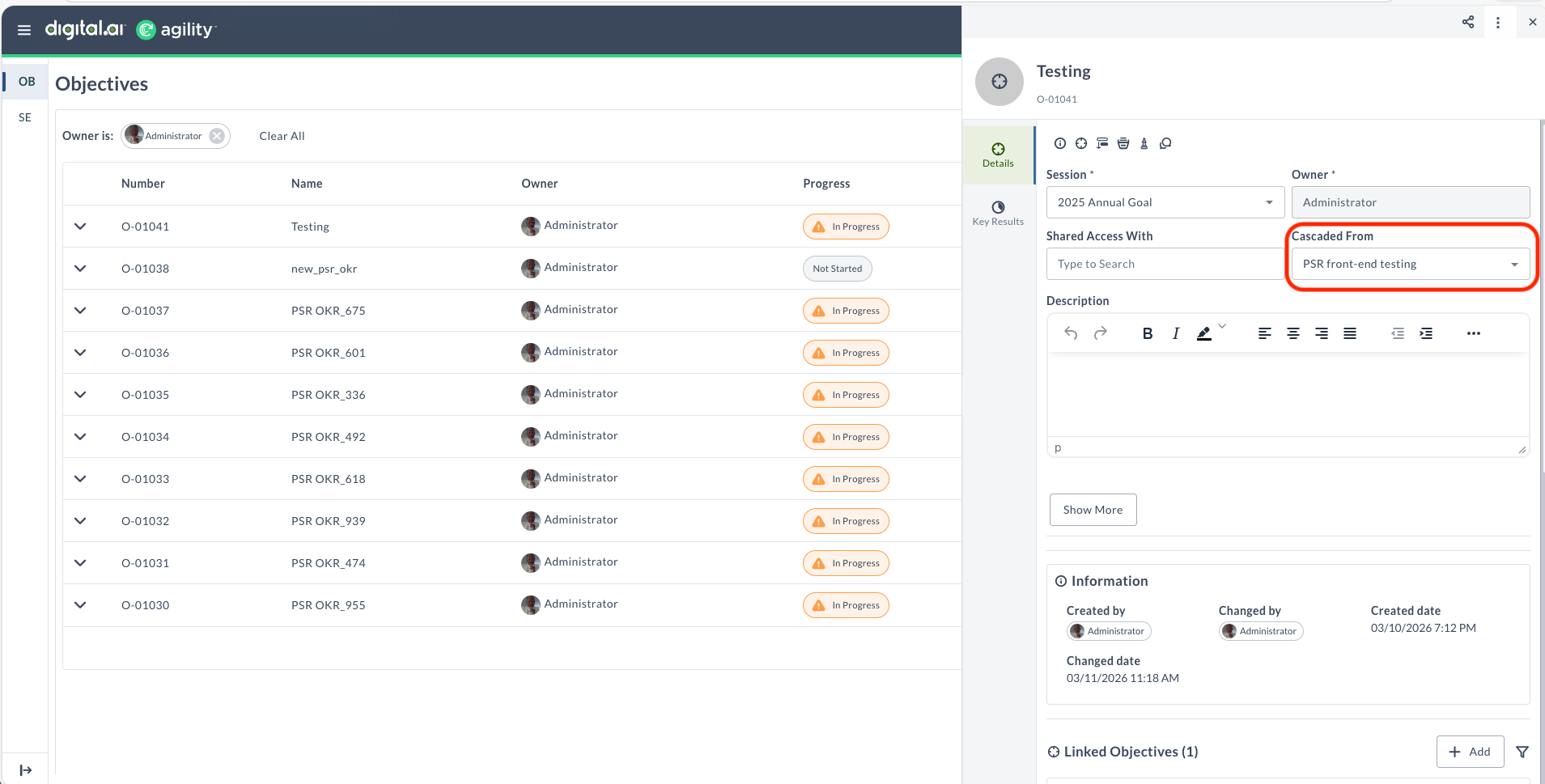
Cascade an Objective
You can configure your objective to cascade from either a higher-level objective or a key result. Cascading from an objective provides broader strategic alignment, while cascading from a key result creates precise alignment to a specific measurable outcome.
- Log in to Agility, click the hamburger menu > OKRs.
- From the OKR list, click the objective you want to cascade.
- In the objective details drawer, locate the Cascaded From field.
- Click the Cascaded From dropdown or search field.
- Enter the objective ID or title (or key result ID or title) in the search field.
- Select the objective or key result from the results.
Result: The objective now cascades from the selected source. The cascading source appears in the Cascaded From field of the Details tab.
Cascade from a key result when your objective directly supports achieving a specific measurable outcome. Cascade from an objective for broader strategic alignment.
View Cascading Relationships
Once cascading relationships are established, you can view them in the objective details drawer:
- Cascaded From field - Shows the objective or key result this objective cascades from
- Cascaded To section - Shows objectives that cascade from this objective or its key results
Remove a Cascading Relationship
To remove the cascading source from an objective:
- Open the objective details drawer.
- In the Details tab, locate the Cascaded From field.
- Click the X icon next to the cascaded source.
The objective is no longer cascaded from the source objective or key result, but remains in the system as a standalone objective.
Benefits of Cascading OKRs
Cascading relationships provide:
- Alignment: See how individual objectives support higher-level goals across teams, departments, and the organization
- Traceability: Understand the path from company strategy to individual execution
- Transparency: Everyone sees how their work contributes to organizational success
- Planning: Make informed decisions based on understanding dependencies
- Progress Tracking: Track how cascaded objectives contribute to their source
- Accountability: Clarify ownership and responsibility across organizational levels
- Start by aligning objectives with your immediate manager's or team's objectives.
- Review and update cascading relationships when organizational priorities change.
- Ensure each objective has a clear cascading source to maintain alignment visibility.
Related Topics
- Link Objectives - Create related objective connections
- Add a New OKR - Create objectives and key results