Portfolio Tracking
Who tracks portfolio progress: Portfolio managers monitor feature delivery and strategic alignment. Executives review high-level progress and milestone achievement. Program managers track cross-team dependencies and coordinate release trains. Product owners monitor feature status and identify risks.
Portfolio Tracking displays visibility into higher level features and epics as teams execute iterative delivery, showing both progress within deliverables and advancement of strategic business initiatives.
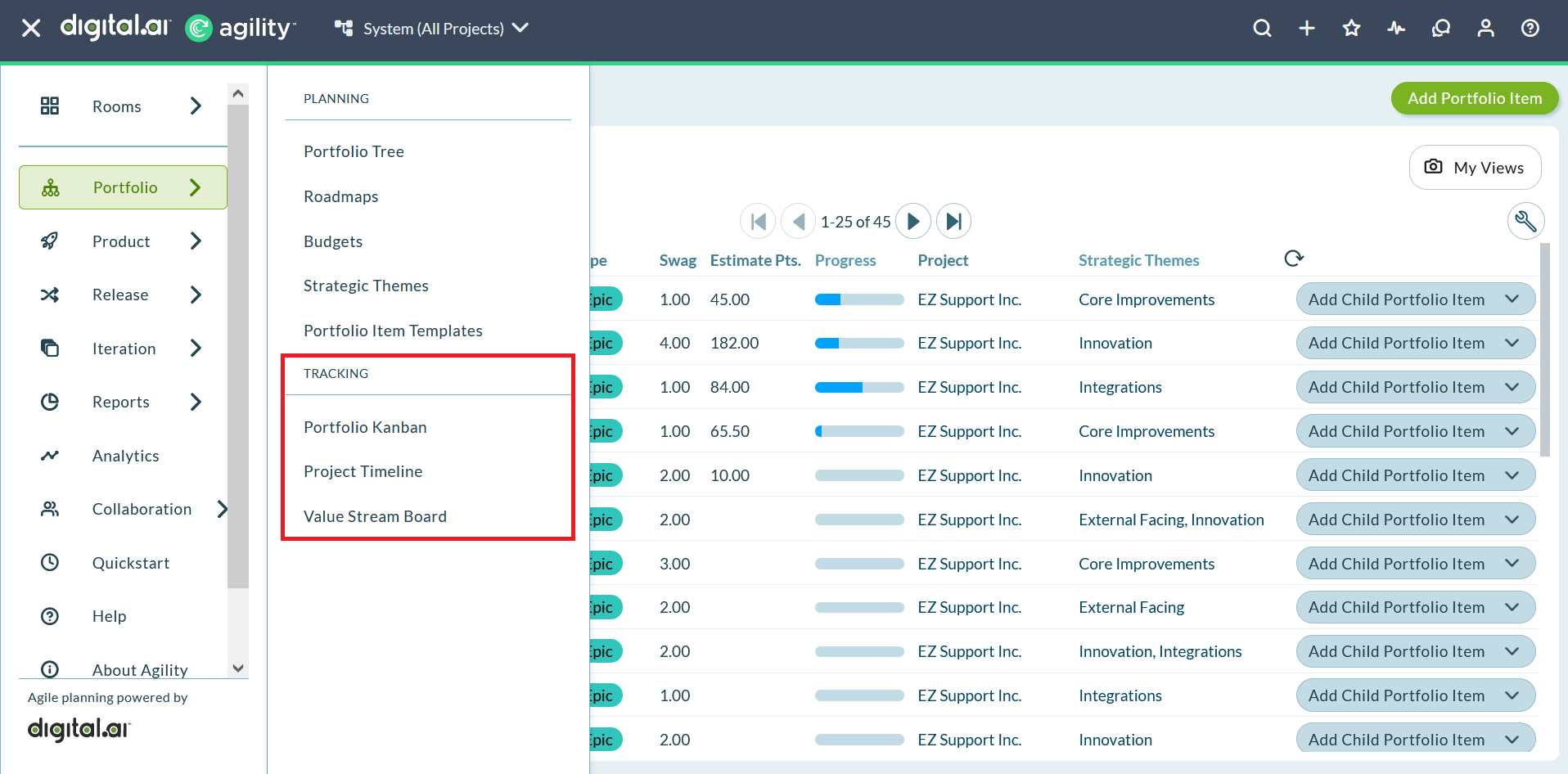
Portfolio Tracking Capabilities
Portfolio tracking provides visibility into strategic work across your organization:
- Portfolio item progress: Monitor features, epics, and themes as teams deliver backlog items
- Cross-team dependencies: Identify and manage dependencies that span multiple teams or release trains
- Strategic alignment: Track how execution aligns with strategic themes and business objectives
- Capacity utilization: Understand how portfolio items flow through your delivery pipeline
- Historical delivery: Review past performance to inform future planning
Portfolio Tracking Tools
Digital.ai Agility provides three primary tools for tracking portfolio work:
Portfolio Kanban Board
Visualize portfolio items in a card-based board view with status columns. Use drag-and-drop to move items through your workflow, apply WIP limits to control flow, and generate reports on portfolio item progress. Best for teams practicing Kanban or those who prefer visual board-based tracking.
Project Timeline
View planned and historical projects over time in a Gantt-style timeline. Set project start and end dates, apply filters to focus on specific work, and publish timeline snapshots for stakeholder communication. Best for executives and program managers who need long-range planning visibility.
Solution Board
Track cross-organization capability level dependencies throughout iterations and sprints. Visualize which release trains are delivering work for each capability and identify upstream dependencies that require coordination. Best for scaled agile environments practicing SAFe or managing complex multi-team dependencies.
When to Use Each Tool
Choose the tracking tool that best fits your needs:
Use Portfolio Kanban when:
- You practice Kanban at the portfolio level
- You want to limit work in progress with WIP limits
- You need quick visual status updates
- You want to drag and drop items to update status
- You're tracking features within a single release train
Use Project Timeline when:
- You need long-range planning visibility (quarters or years)
- You want to publish timeline snapshots for stakeholders
- You're planning capacity across multiple projects
- You need to set formal project start and end dates
- You want to compare historical delivery with future plans
Use Solution Board when:
- You're managing multiple release trains
- You need to track cross-team dependencies
- You're practicing SAFe at the solution or portfolio level
- You want to visualize when dependencies will be delivered
- You need to coordinate work across organizational boundaries
Best Practices
Start with one tool: Begin with the Portfolio Kanban Board if you're new to portfolio tracking. It provides the most intuitive interface and quickest learning curve.
Establish regular review cadence: Review portfolio tracking boards in leadership meetings, PI planning sessions, or quarterly business reviews to maintain alignment.
Keep portfolio items current: Ensure teams update portfolio item status as they complete backlog items to maintain accurate progress visibility.
Use filters strategically: Apply filters to create focused views for different stakeholders (executives see themes, product managers see features).
Coordinate across tools: Use multiple tools together (Portfolio Kanban for active work, Project Timeline for long-range planning, Solution Board for dependency management).
Use Cases
Portfolio Manager Selecting Right Tool for Stakeholder Meeting
A portfolio manager prepares for three different stakeholder meetings this week. For Monday's executive review, they use Project Timeline to show the 18-month roadmap with key milestone dates, giving executives long-range visibility into strategic initiatives. For Wednesday's product owner sync, they use Portfolio Kanban Board filtered to show active features in "In Progress" and "Ready for Dev" columns, facilitating discussion about WIP limits and prioritization. For Friday's SAFe PI planning preparation, they use Solution Board to visualize dependencies between five release trains for the upcoming program increment. Each tool serves a different audience and planning horizon, and the portfolio manager leverages all three tools throughout the week based on specific stakeholder needs.
Product Owner Tracking Feature Progress Using Portfolio Kanban
A product owner monitors eight features scheduled for Q3 delivery. They open Portfolio Kanban Board and see features distributed across five columns: "Backlog" (1 feature), "Analysis" (2 features), "Development" (3 features), "Testing" (1 feature), and "Done" (1 feature). The "Development" column shows a WIP limit indicator at 3 of 3, alerting them not to pull more features into development until current ones complete. They drill into the "Checkout Optimization" feature showing 12 of 20 stories complete (60% progress). The visual board makes it easy to communicate portfolio status in weekly stakeholder meetings and identify features at risk of missing Q3 targets, allowing proactive intervention before deadlines approach.
Release Manager Communicating Long-Range Plans with Project Timeline
A release manager prepares for board meeting communication about next year's delivery roadmap. They open Project Timeline and configure it to display the next four quarters. The timeline shows eight major projects with colored bars representing their planned duration: "Mobile App Redesign" (Q1-Q2), "Payment Gateway Upgrade" (Q2), "Data Privacy Enhancement" (Q2-Q3), "Cloud Migration Phase 2" (Q3-Q4). They apply strategic theme filters to highlight only "Customer Experience" projects, showing executives which projects contribute to that strategic priority. They publish a timeline snapshot that stakeholders can access without logging in. The Gantt-style view provides intuitive visual communication of what's planned, when it's happening, and how projects overlap.
SAFe Program Lead Managing Dependencies with Solution Board
A SAFe program lead coordinates PI 2024.2 across four agile release trains: Customer Solutions, Platform Services, Data Analytics, and Infrastructure. They open Solution Board and see eight capabilities planned for the PI. The "Real-Time Notifications" capability shows dependencies across three release trains: Platform Services delivers the notification engine (Sprint 1), Infrastructure provisions message queuing (Sprint 1), and Customer Solutions integrates notifications into UI (Sprint 2). The board visualizes that Customer Solutions has a dependency on Platform Services, helping the lead identify coordination points. During PI planning, they use Solution Board to facilitate dependency discussions, ensuring teams sequence work correctly and coordinate hand-offs between trains.
Executive Comparing Historical vs. Planned Delivery Using Project Timeline
An executive reviews organizational delivery capacity to inform next year's strategic planning. They open Project Timeline and adjust the view to show the past two years plus the next year (3-year span). Historical data shows the organization completed 12 major projects in 2022, 15 in 2023, demonstrating increasing capacity. Looking forward, the current plan shows 20 projects scheduled for 2024. The executive questions whether the 33% increase is realistic given historical performance. They filter by "High Confidence" projects, reducing the 2024 count to 16, aligning better with historical capacity. This analysis informs board discussions about realistic strategic commitments versus aspirational plans, grounding strategy in demonstrated organizational capability.
Frequently Asked Questions
When should I use Portfolio Kanban vs. Project Timeline?
Use Portfolio Kanban for short-to-medium term tracking (current quarter or release) with emphasis on workflow status and WIP management. It's ideal for product managers and teams practicing Lean/Kanban at the portfolio level who need tactical visibility into active work. Use Project Timeline for long-range planning (multiple quarters or years) with emphasis on delivery dates and milestone communication. It's ideal for executives and release managers who need strategic visibility and stakeholder communication tools. Many organizations use both: Project Timeline for annual/quarterly planning, Portfolio Kanban for execution tracking within active periods.
What is the Solution Board and when would I use it?
Solution Board is designed for SAFe implementations at the solution or portfolio level, tracking capabilities that span multiple agile release trains (ARTs). Use Solution Board when you have multiple teams or ARTs delivering work for the same capability and need to visualize dependencies between them. For example, a "Mobile Payment Integration" capability might require work from Mobile Development ART, Payment Services ART, and Security ART. Solution Board shows which ART is delivering which pieces and when, helping program leads coordinate dependencies across organizational boundaries. If you're not practicing SAFe or don't have cross-ART dependencies, you likely don't need Solution Board.
Can I use multiple portfolio tracking tools simultaneously?
Yes, and many organizations do. The three tools pull from the same underlying portfolio item data but provide different views optimized for different purposes. You might use Project Timeline for annual planning and executive reporting, Portfolio Kanban for quarterly execution tracking, and Solution Board for PI planning dependency management. Each tool serves different stakeholders and planning horizons. The key is establishing which tool each stakeholder uses for which purpose, preventing confusion about "the source of truth" (all tools show the same underlying data, just in different formats).
How do portfolio items move between Portfolio Kanban columns?
Portfolio Kanban columns represent workflow statuses (e.g., "Backlog", "Analysis", "Development", "Testing", "Done"). Move items between columns by dragging and dropping cards or by changing the status field on the portfolio item detail page. As teams complete backlog items (stories) associated with a portfolio item, the portfolio item progresses through workflow stages. Some organizations automate status updates based on child story completion (e.g., when all stories for a feature are done, auto-move the feature to "Done"). Others require manual status updates by product owners or project managers based on broader criteria beyond just story completion.
What are WIP limits on Portfolio Kanban and why use them?
WIP (Work in Progress) limits cap the number of portfolio items allowed in specific columns, enforcing focus and limiting multitasking. For example, setting a WIP limit of 3 on the "Development" column prevents pulling more than three features into development simultaneously. When the column reaches its WIP limit, teams must complete and move out existing features before starting new ones. WIP limits improve flow by reducing context switching, encouraging completion of started work, and preventing resource overallocation. They're a core Lean practice. Typical WIP limits are 2-4 items per team in active development columns, adjusted based on team size and portfolio item complexity.
How far into the future should I plan on Project Timeline?
Most organizations plan 12-18 months into the future on Project Timeline, with decreasing confidence as you move further out. Near-term projects (next 1-3 months) have firm dates and scope. Mid-term projects (3-9 months) have planned dates subject to adjustment. Far-term projects (9-18 months) are placeholders indicating strategic intent rather than committed delivery. Beyond 18 months, plans become too uncertain for meaningful timeline representation. Review and update the timeline quarterly to keep it current: firm up near-term project dates, adjust mid-term plans based on capacity, and add new far-term placeholders for emerging strategic initiatives.
Do portfolio tracking tools show progress based on backlog item completion?
Yes, all three tools (Portfolio Kanban, Project Timeline, Solution Board) can show portfolio item progress based on completion of associated backlog items (stories). For example, if a feature has 20 stories and 15 are done, the feature shows 75% complete (assuming stories have equal estimates). This rollup provides automatic progress tracking without manual status updates. However, portfolio item progress can also be manually updated based on other criteria like acceptance of milestones or stakeholder approval. Many organizations use a hybrid approach: automatic rollup for development progress, manual updates for broader completion criteria including documentation, training, and release activities.
How do I publish timeline snapshots for stakeholders without Agility access?
Project Timeline includes a "Publish Timeline" feature that creates a shareable snapshot viewable by stakeholders without Digital.ai Agility accounts. From Project Timeline, configure the view (date range, filters, project selection), then click "Publish Timeline". The system generates a public URL with a snapshot of the current timeline state. Share this URL with board members, customers, or other external stakeholders. Published timelines are read-only snapshots frozen at publication time; they don't update as the underlying data changes. Create new snapshots periodically (monthly or quarterly) to provide updated views while maintaining historical snapshots for comparison.
Troubleshooting
Why aren't portfolio items showing progress?
Portfolio item progress rolls up from completed child stories. Verify that stories are properly associated with portfolio items using the Portfolio Item field. Ensure stories are marked as closed when complete. Check that automatic rollup is enabled in system configuration.
Why can't I move items on Portfolio Kanban Board?
You need modify access to portfolio items. Some organizations restrict portfolio item status changes to specific roles. Contact your administrator to verify permissions. Also check that the item isn't locked by WIP limits in the target column.
Why doesn't Solution Board show my release trains?
Solution Board requires SAFe configuration with properly defined release trains. Verify that release trains are configured in system settings and that capabilities are properly associated with release trains. Contact your administrator if SAFe features aren't enabled.
Related Topics
- Portfolio Kanban Board - Visualize and track portfolio items with card-based board view
- Using the Project Timeline - Plan and communicate projects over time
- Using the Solution Board - Track cross-organization dependencies
- Portfolio Planning - Plan strategic portfolio work
- Portfolio Item Overview - Understand portfolio items and their structure
- Using the Portfolio Tree - Navigate and manage portfolio hierarchy