Using the Solution Board
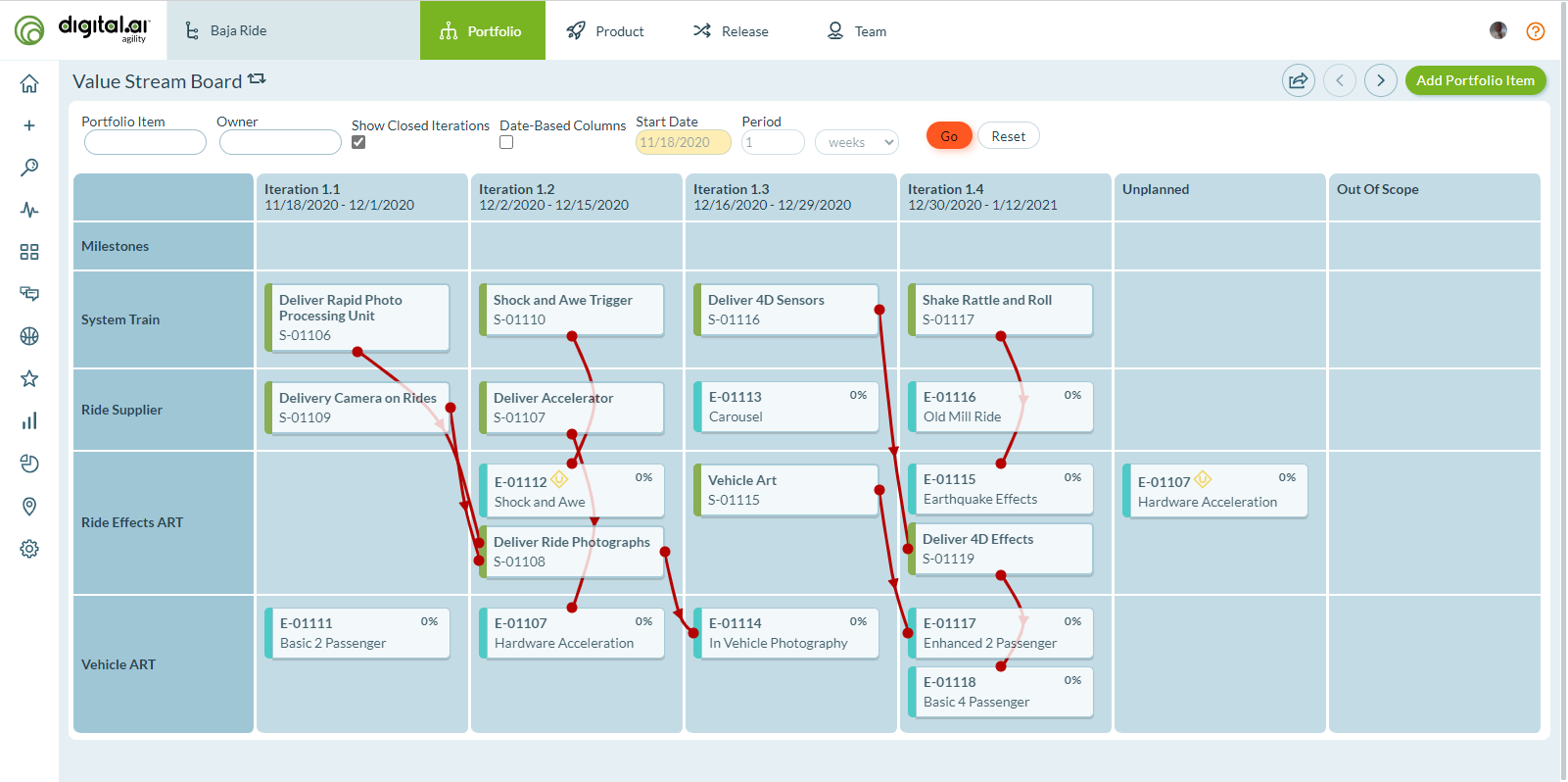
The Solution Board, also known as the Value Stream Board, summarizes cross-organization capability dependencies throughout iterations or sprints. This board identifies cross-organization communications that matter most and supports planning session verification and delivery progress tracking.
Who uses the Solution Board: Release train engineers coordinate dependencies across ARTs, program managers verify PI planning results, solution architects track capability delivery, portfolio managers monitor strategic initiative progress across value streams.
Permission requirement: All users with project access can view the Solution Board. The board requires SAFe configuration (release trains, value streams) to display correctly.
The Solution Board is most effective when your organization uses SAFe (Scaled Agile Framework) and has configured release trains and value streams. Without SAFe configuration, board functionality is limited.
Solution Board Capabilities
The Solution Board provides the following visibility:
- Which release trains are delivering work for each capability (portfolio item) and when that capability will be delivered based on backlog items planned into iterations
- Which portfolio items have not been planned
- Which release trains are responsible for delivering the portfolio item
- Upstream dependencies that cross release trains or organizational boundaries
Access the Solution Board
- Click the hamburger icon
 > Portfolio > Solution Board or Value Stream Board.
 - Click the project selector dropdown in the top navigation bar to open the Project Navigator.
- Select a project from the Project Tree.
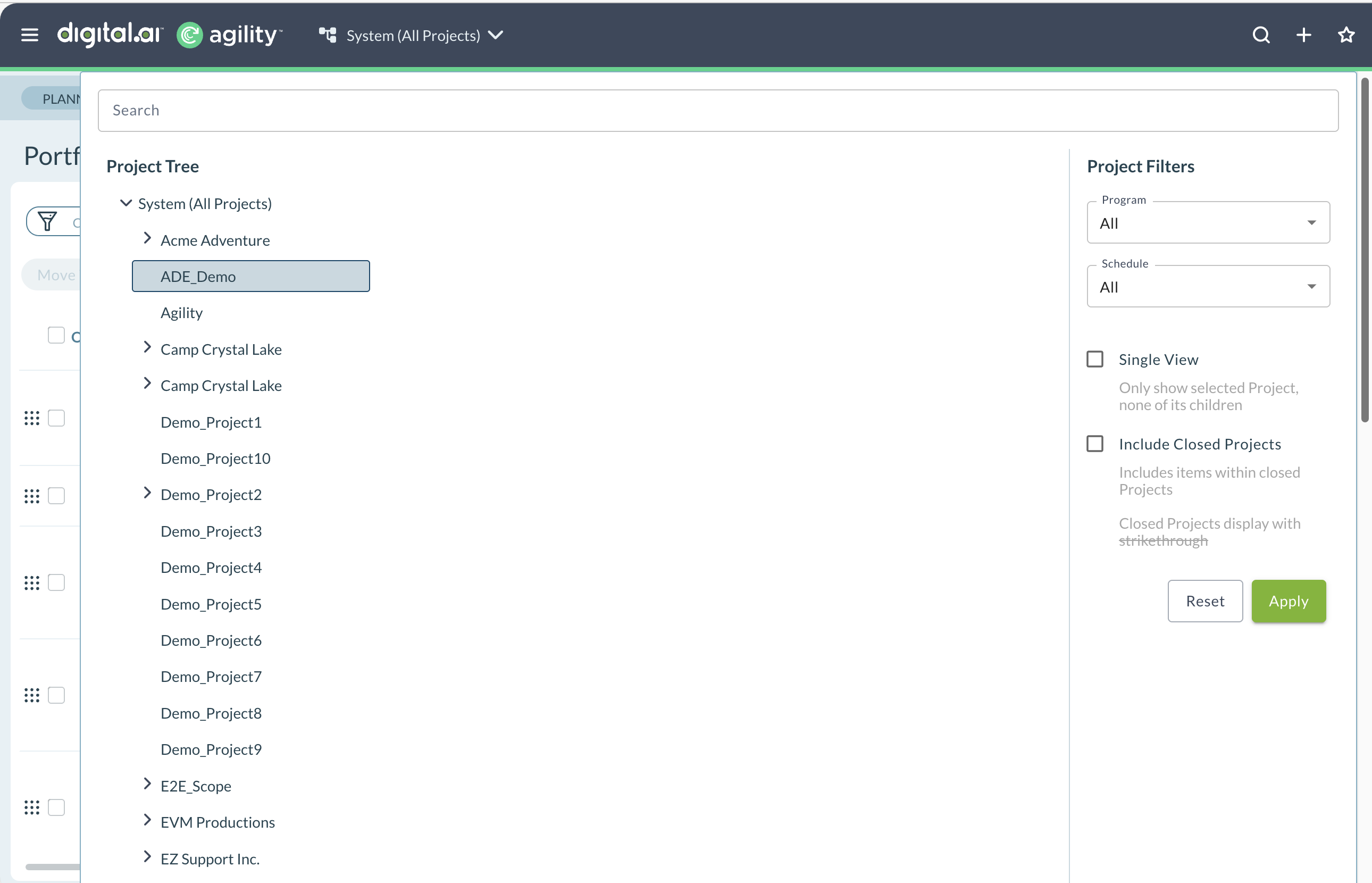
The Project Navigator opens as a dropdown panel from the top of the page when you click the project selector. It displays your organization's project hierarchy in a tree structure, with a search box to quickly find projects and filters to refine your view.
Solution Board Layout
Understanding the layout helps you interpret the information presented on the board.
Rows
When a planning level is selected in the Context Navigator, each row on the board represents an immediate child of the selected planning level. If you are practicing SAFe and viewing the board at the value stream level, each child planning level would represent a release train.
When a Digital.ai Agility program is selected in the Context Navigator, each row represents a planning level in the selected program. The board also contains rows representing other planning levels that contain upstream dependencies backlog items.
Columns
When the Date Based option is not selected, each column represents sprints or iterations with begin or end dates in the date range defined by the selected planning level or program.
When the Date Based option is selected, each column represents a date range defined by the Period option.
Unplanned Column
The Unplanned column identifies unplanned work. This can be either:
- A portfolio item in this column indicates that no backlog items have been planned into iterations
- An upstream dependency backlog item in this column indicates that the backlog item has not been planned into an iteration
Out Of Scope Column
The Out Of Scope column indicates when items you intend or need to deliver in the selected planning level context are not part of the same schedule and an end date cannot be determined.
Solution Board Cards
The board displays two types of cards representing different work items.
Portfolio Item Cards
When the Date Based option is not selected, portfolio item cards are placed in the last sprint or iteration where backlog items are planned.
When the Date Based option is selected, portfolio item cards are placed in the column containing the end date of the last sprint or iteration where backlog items are planned.
Regardless of Date Based option:
- If work (backlog items) for a portfolio item exists in multiple planning levels, then the portfolio item card will exist on the board multiple times
- Only the highest level portfolio items in the selected planning level context are visible (the same portfolio items you would see on the Portfolio Kanban or Portfolio Tree)
- The portfolio item type is indicated by the colored bar on the left side of the card
- If the portfolio item has planned and unplanned work, a yellow "U" icon will appear next to the portfolio item ID (the portfolio item may not be delivered in the iteration where the card appears)
- Until the portfolio item is delivered, there is a percent complete indicator in the top right corner of the card (determined either by count or total estimate based on your tracking preferences)
- Progress is indicated with card shading (as work is delivered, the card is shaded darker from left to right)
Upstream Dependency Backlog Item Cards
Upstream dependency backlog items (also known as provider or source backlog items) must be completed before the portfolio item can be completed.
Upstream dependency backlog items are shown only when the dependency is being satisfied in another planning level. Dependencies contained within the same planning level are not indicated on the Solution Board.
Upstream dependency backlog items are connected to the portfolio item they impact with a red line.
When the Date Based option is not selected, these backlog items are placed in the column representing the sprint or iteration where the provider intends to complete the work.
When the Date Based option is selected, these backlog items are placed in the column containing the end date of the sprint or iteration where the provider intends to complete the work.
Understand Dependency Lines
Red lines connecting cards represent dependencies between work items. Ideally, there are no dependencies, and when they exist they are all completed by the same release train. However, this is not always the case.
When a backlog item requires input from another release train or another part of the organization, the upstream backlog item (or the source) is displayed in the sprint or iteration for the responsible party. The upstream backlog item is connected to the portfolio item that needs the work with a red line. If there are additional upstream dependencies from other parts of the organization, those are also visible and connected with red lines.
Dependency Direction
The red arrow on the dependency line indicates the direction of flow. The arrow always points from the upstream item (source or provider) to the downstream item (dependent or consumer).
Ideal flow (right to left): Arrows pointing from right (→) across iteration boundaries indicate healthy dependency planning.
Problem flow (left to right): An arrow pointing left (←) indicates that the upstream dependency (source) has been planned after the downstream dependent (consumer). This is a problem that needs to be addressed.
Same iteration flow (up or down): An arrow pointing up or down to another item in the same iteration indicates that both the upstream dependency and the downstream dependent are being completed in the same iteration. This situation requires additional coordination to make sure everything is completed on time.
Available Reports
From the Solution Board, you can access the following reports:
- Portfolio Item Dependencies Report: View detailed dependency information across portfolio items
- Dependencies: Analyze all dependency relationships in the selected context
Best Practices
Review dependencies regularly: Check the Solution Board during planning sessions to identify and address cross-team dependencies early.
Address backward dependencies immediately: When you see arrows pointing left (upstream work planned after downstream work), reprioritize to fix the dependency order.
Coordinate same-iteration dependencies: When upstream and downstream work are in the same iteration, establish clear communication protocols between teams.
Track unplanned work: Monitor the Unplanned column and work to schedule those items into iterations to improve predictability.
Use for PI planning: Leverage the Solution Board during program increment planning to visualize and optimize dependency management across release trains.
Troubleshooting
Why is my Solution Board empty or showing limited information?
The Solution Board requires SAFe configuration to function properly. Verify your organization has configured release trains, value streams, and planning levels that align with SAFe practices. Additionally, ensure the selected project and all child projects share the same schedule (same sprint or iteration cadence and dates). If schedules don't align, the board cannot accurately display cross-organization dependencies.
Why don't I see upstream dependency cards on my Solution Board?
Upstream dependency cards only appear when backlog items have explicit dependency relationships defined. To create dependencies, open a backlog item and add predecessor or successor relationships to items in other teams or release trains. Without defined dependencies, the board cannot visualize cross-team coordination needs. Also verify the dependency is truly "upstream" (a different release train or planning level that delivers work consumed by your team).
Why are some portfolio item cards showing a yellow "U" icon?
The yellow "U" icon indicates the portfolio item has both planned and unplanned work. This means some backlog items for that portfolio item are scheduled into iterations, but others remain unplanned. The portfolio item may not be delivered in the iteration where the card appears because unplanned work still needs scheduling. To resolve this, review the portfolio item's child backlog items and schedule all remaining work into appropriate iterations.
What does it mean when I see arrows pointing backward (to the left) on the board?
Backward-pointing arrows indicate problematic dependency ordering - upstream work is planned in a later iteration than the downstream work that depends on it. This represents a planning conflict that will likely cause delivery issues. To fix backward dependencies, either move the downstream work to a later iteration (after the upstream work delivers) or accelerate the upstream work to deliver earlier. Address these immediately during planning sessions.
Related Topics
- Portfolio Tracking - Overview of portfolio tracking capabilities
- Portfolio Kanban Board - Alternative portfolio visualization and tracking
- Portfolio Item Overview - Understand portfolio items and their structure
- Using the Portfolio Tree - Navigate portfolio hierarchy
- Using the Project Timeline - Track project progress over time