PressWhileNotFound
Description
Use this command to press on an element while another element is not found.
Parameters
| Name | Type | Description |
|---|---|---|
| Zone | String | Zones which define the way the element will be identified. Possible values: * NATIVE * WEB * TEXT |
| ElementToClick | String | Element to click on when ElementToFind is not found |
| ElementToClickIndex | Integer | Index of ElementToClick |
| ElementToFind | String | Element to look for |
| Timeout | Integer | Waiting Timeout in milliseconds |
| Delay | Integer | Time to wait between rounds |
Usage
Example
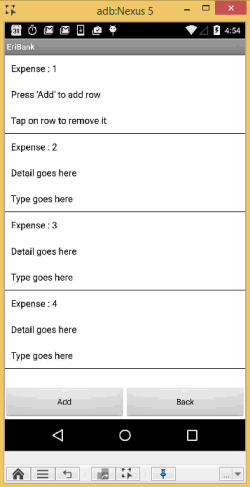
In this example, while element "Expense : 4" is not found, Add is clicked.
**
**
info
Replace <server> with the appropriate URL.
- Public Digital.ai Testing Cloud - https://cloud.seetest.io/wd/hub/.
- Dedicated Digital.ai Testing Cloud environment - Your own domain. For example: https://company.experitest.com/wd/hub/
- On-premises Digital.ai Testing Cloud environment - Your designated URL. For example: https://company.com/wd/hub
PressWhileNotFound
DesiredCapabilities dc = new DesiredCapabilities();
driver = new AndroidDriver(new URL("<server>"), dc);
seetest = new SeeTestClient(driver);
dc.setCapability(MobileCapabilityType.UDID, "<deviceid>");

...
...

//Press until we find element with text "Expense :4"
seetest.pressWhileNotFound("NATIVE", "text=Add", 0, "text=Expense :4", 0, 10000, 100);