Closing a Project or Increment
This article explains how to close a Project or Increment in Agility.
Overview
Follow these steps to close a project or increment when all work is complete and it is no longer needed for planning, tracking, or reporting. Note that closing a project removes it from the project tree.
Before you close a project, keep the following in mind:
- Closing a project does not delete it from the system, it simply hides it from view in the project tree.
- You cannot create a child project under a closed parent project.
- Make sure that all child projects or increments are closed.
Steps
Your project role on the project must be set to a level that allows you to manage the project.
- Click the hamburger menu
 > Admin > Projects.
 - Click on the + icon to expand the project hierarchy.
- Click on the Add Child Project dropdown and click Close Project.
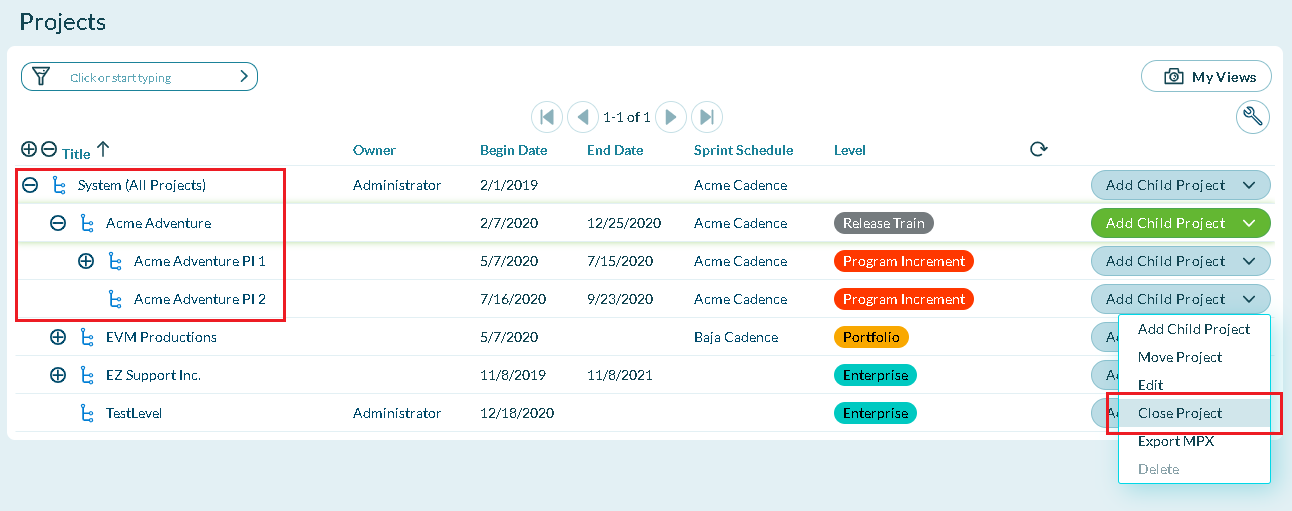
If the Close Project option is not available, make sure you close or delete any associated child projects or assets.
Viewing Closed Projects
- Click the hamburger menu > Admin > Projects.
- Click the Filter area and check the Show Closed Projects box.