Receive Notification Alerts by Email
Enable the Email Notifications feature to receive subscription-based alerts in your email client. Keep track of changes to work items without staying logged into Digital.ai Agility.
Who receives email notifications: All team members can configure email notifications for their subscriptions. Your administrator must configure SMTP settings for email delivery to work.
Prerequisites:
- You must have active subscriptions or watch assets
- Your Digital.ai Agility administrator must configure SMTP settings
Configure Your Email Address and Email Notifications
To receive notification alerts by email:
- Click on your avatar on the header and click My Details.
- Type your email address in the Email field.
- Select the Notifications by email checkbox.
- Click the digital.ai icon.
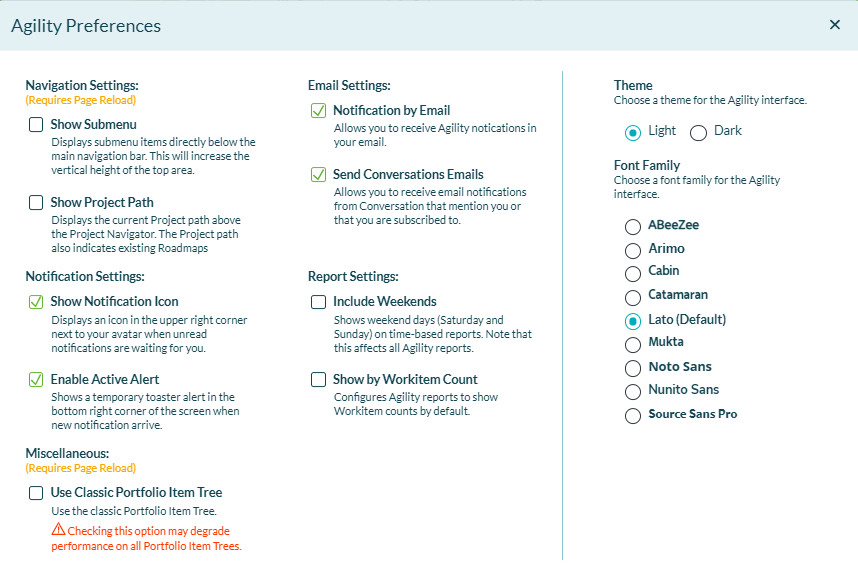
- Click on your avatar again, and click Agility Preferences.
- Select all of the options in the Email Settings and Notification Settings sections.
- Click the x to close the window.
Once configured, you will receive email alerts for all your active subscriptions and watched items.
Troubleshooting
Why am I not receiving email notifications?
Check these common issues:
- Your administrator must configure SMTP settings for the instance
- Verify your email address is correct in My Details
- Confirm Notifications by email checkbox is selected
- Check your spam/junk folder for emails from Digital.ai Agility
- Ensure you have active subscriptions or watched items
If the issue persists, contact your administrator to verify SMTP configuration.
Related Topics
Manage Notifications and Subscriptions