TeamForge 26.0 Overview
Release Information
- Released on: Jul 20, 2026
- GA Version: 26.0.0.192
Favorites View in Trackers
Mark the artifacts you care about most as Favorites and reach them from a dedicated Favorites view in the New Trackers module. Marking frequently used artifacts gives you one-click access, reducing repeated searches and navigation.
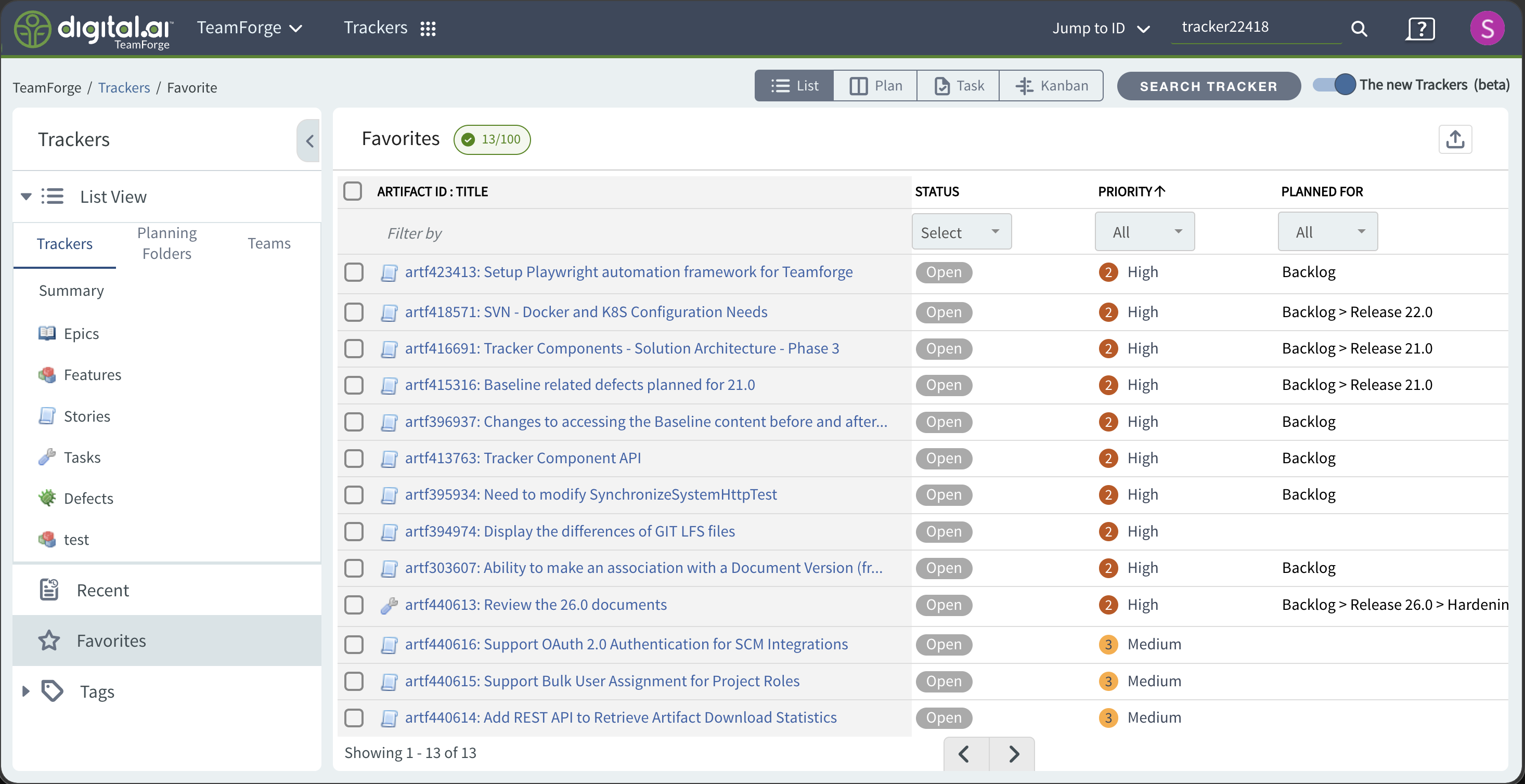
- A Star icon lets you add or remove favorites from the artifact detailed view, the list-view hover and bulk-action menus, the Plan Board cards, and the Quick Edit slider. Favorites are marked with a filled star and a star at the end of the artifact title.
- The dedicated Favorites view lists your favorites (most recent first) with column and status filtering and export, and lets you bulk Unfavorite.
- A maximum of 100 artifacts can be favorited per project. The Favorites tab is hidden for public projects and does not apply to the Old Trackers list view.
For more information, see Favorites View.
Planning Board - Filtering and Card Configuration
Two Plan Board improvements make it faster to find work and to see the details that matter to you.
Filtering
Filter the Planning Board by Tags, Priority, and Assigned To using multiple selections. Filters apply on Apply, appear as removable chips above the swimlanes, and persist when you reopen the slider. Invalid filter values are highlighted when the board data changes, and you can clear everything with Clear all.
Card Detailed View Configuration
Personalize Plan Board cards through the Detailed View Configuration dialog by showing or hiding tags and custom fields, so cards surface the details relevant to your planning without clutter.
For more information, see Filter the Planning Board and Configure the Card Detailed View.
Real-time Toastr Notifications
TeamForge now shows lightweight, real-time Toastr notifications across all applications for key actions, giving you clear, contextual feedback on success, warning, and error outcomes without interrupting your workflow.
- Success messages dismiss automatically after 5 seconds. Error and Warning messages remain until you dismiss them.
- Notifications appear in the top-right corner, stack without overlapping, do not block the UI, and are accessible to screen readers.
Flexible Reviewer Comment Requirements
When starting or editing a document review, the initiator can now decide how many required reviewers must comment before the review can be closed, so review policies can align with your team's governance needs.
A new Reviewer Comment Requirement setting offers two options:
- All required reviewers must comment (default)
- At least one required reviewer must comment
This selection is available on the Create and Edit Review screens. It is not shown in the Review tab or the View Review screen.
For more information, see Document Reviews.
TeamForge SCM—Support for Gerrit
TeamForge SCM now supports Gerrit 3.12, bringing upstream enhancements along with usability and performance improvements.
TeamForge—Git Integration 26.0.1-3.12.7.
For upstream details, see the Gerrit 3.12 release highlights.
TeamForge SCM—Enforce Strict Association Validation
Administrators can now enforce stricter validation of artifact associations during source code commits, helping teams meet process-compliance requirements.
- When enabled, all work items associated with a commit must be in an Open for SCM state before the commit is allowed.
- This prevents commits from being linked to artifacts that are not approved for SCM.
- Enforcement is configurable, so administrators can enable strict association validation based on organizational needs.
Title and Description Authoring in Trackers Using Assist
TeamForge introduces Assist, AI-assisted authoring for tracker artifacts that helps you create clear, consistent artifacts faster.
- Accelerate artifact creation - Use the Assist action on the Create Artifact and Edit Artifact screens to draft or improve an artifact's Title and Description.
- Improve content quality - Produce consistent and comprehensive artifact details.
- Increase efficiency - Reduce manual writing so teams can focus on execution.
Assist is powered by an AI service that a site administrator connects and enables under Admin > System Tools > Assist. AI-generated content may be incomplete or inaccurate, so always review Assist output before saving.
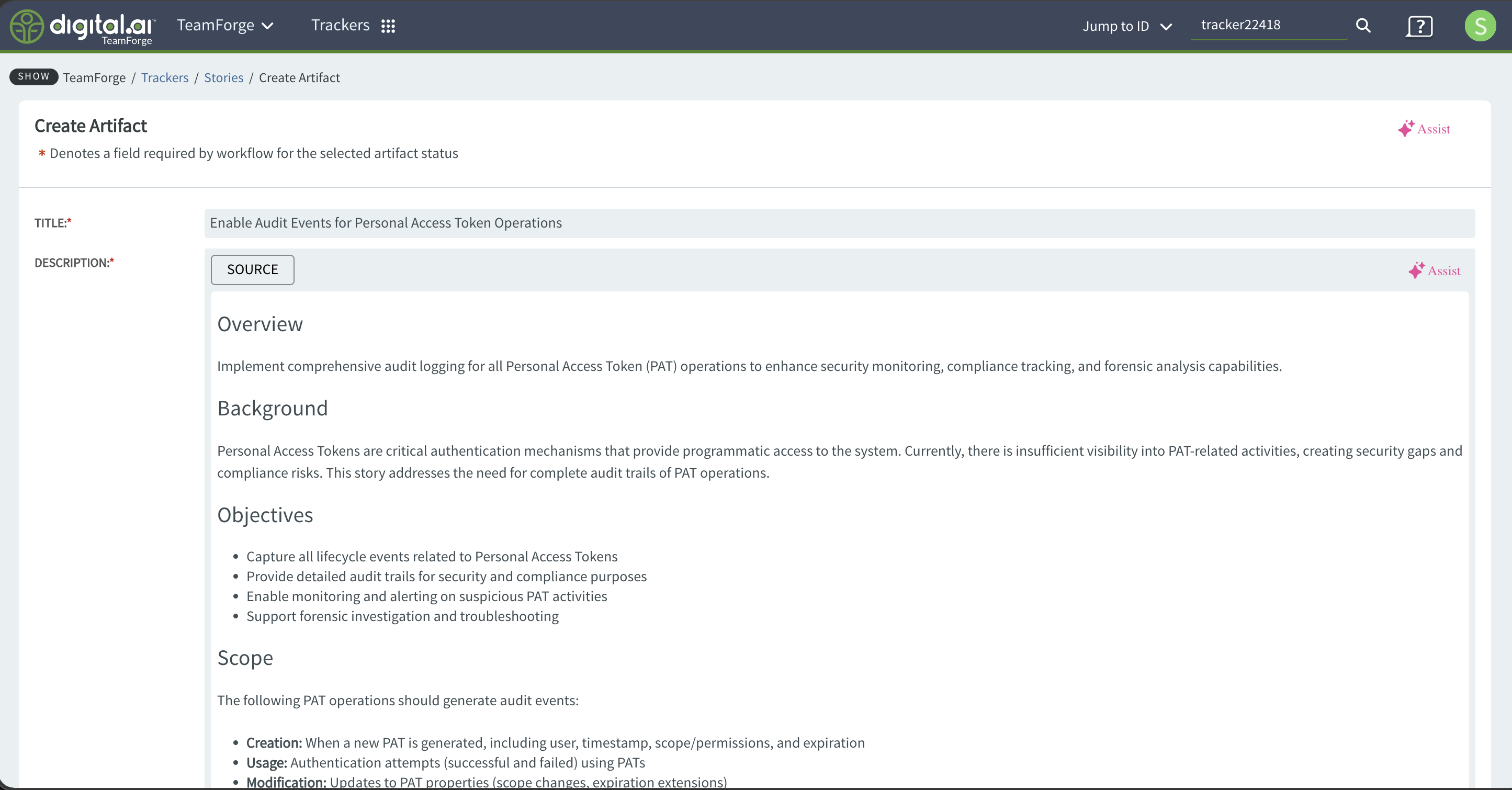
For configuration and usage, see Assist-AI-Assisted Authoring in Trackers.
Consistent UI with Dot Components
TeamForge 26.0 standardizes icons and controls across the Trackers and Documents modules using Dot Components for a consistent look and feel.
- Documents module icons - The document icons for Folder, Recent, Favorites, Tags, Options, Monitoring, Copy link, Edit document, More, Delete, Mark as active, Versions, Change Log, Associations, Review, and Download now use Dot Component icons instead of Font Awesome.
- Trackers module buttons - Buttons in the Trackers module now use Dot Components. In the List view, selecting a planning folder, team, or tracker now uses tabs.
Secure Email Relay Using STARTTLS
TeamForge now supports STARTTLS for its built-in Apache James mail server, enabling secure SMTP submission and encrypted inbound and outbound mail connections. This lets TeamForge relay emails to mail servers (such as Microsoft Exchange) that require a STARTTLS switch to accept messages.
Configure the following tokens in site-options.conf to enable STARTTLS:
JAMES_SMTP_PORT=25 or 587
JAMES_OUTBOUND_STARTTLS_ENABLED=true
JAMES_OUTBOUND_STARTTLS_REQUIRED=true
JAMES_INBOUND_STARTTLS_ENABLED=true
JAMES_INBOUND_STARTTLS_REQUIRED=true
- JAMES_SMTP_PORT - The SMTP port used for mail submission (
25or587). - JAMES_OUTBOUND_STARTTLS_ENABLED / JAMES_OUTBOUND_STARTTLS_REQUIRED - Enable and enforce STARTTLS for outbound mail connections.
- JAMES_INBOUND_STARTTLS_ENABLED / JAMES_INBOUND_STARTTLS_REQUIRED - Enable and enforce STARTTLS for inbound mail connections.
For more information, see Manage TeamForge Email Settings.
Additional Enhancements and Fixes
TeamForge 26.0 also includes the following New Trackers and Documents refinements. For the full behavior, follow the linked topics.
- Default sort order in Planning Folder and Teams views - Sorts by Priority ascending, then by the tracker display order set in Tracker Settings. See Default Sort Order.
- @mentions and Markdown editor in sliders and Mass Update - The artifact slider Description and the Mass Update Comment are now Markdown editors with @mentions support. See Add Artifacts Quickly.
- Select the tracker type before creating an artifact - On the Plan Board, choose the tracker first and the slider loads the matching fields. See Add Artifacts Quickly.
- Saved Filters and Status filter enhancements - A Saved Filters dropdown and a consolidated Status dropdown. See Saved Filters and Status Filter Enhancements.
- All/Open Only/Closed status filter refreshes the artifact list - In the Planning Folders and Teams views, selecting All, Open only, or Closed now refreshes both the underlying statuses and the artifacts shown in the table. Open only is selected by default. See Planning Folder List Artifacts View.
- Clearer card-move errors - Toastr notifications explain why a card cannot be moved to a swimlane. See Reassign (Move) a Card.
- Document Type source behavior - Clear messaging that only the active source tab is saved, uploaded files are now retained. See Create a Document.
- "Planned For" column in default list views - The "Planned For" column now appears by default across all List view sections (Trackers, Planning Folders, Teams, Recent, Favorites, and Tags).
- Planning Folder and Team dropdown updates - The Planning Folder and Team dropdowns in the Plan Board swimlanes now show the search control first, followed by the None (and All artifacts for Team) options, then the hierarchical list.
- Faster left and right pane updates - Selecting a tracker, planning folder, or team in the left pane now refreshes only the artifact list and the relevant lists instead of reloading the entire pane.
- Priority color coding in inline edit and Mass Update - Priority values now display their color coding when edited inline or through Mass Update, consistent with the earlier UI.
Install and Upgrade
- TeamForge 26.0 supports the following operating systems:
- RHEL 9.6 and AlmaLinux 9.6
- RHEL 8.10 and AlmaLinux 8.10
- OpenJDK 21.0
- Tomcat 11.0.18
- Elasticsearch 8.19.12
- JBoss Wildfly 38.0
- PostgreSQL Server 18.1
- Git/Gerrit 3.12
- Apache James 3.9.0
- Liquibase 4.28.0
- Angular 20.3.12
For the one-hop upgrade compatibility and the recommended upgrade path, see One-hop Upgrade Compatibility.
For more information, see Installation Requirements.