SeeTest Client - StartAudioRecording
Please note that this tool is classified as a Legacy tool. We recommend transitioning to our updated solutions to maintain optimal performance and security in your workflows. For more information on this matter, please reach out to technical support .
Description
Start Recording to a file, from the device.
When recording from a local device, the recording will stop at the end of the test run or when StopAudioRecording is executed.
Parameters
Full path to file.
Usage
This command will record the in line from the device to a file.
The recorded files will be saved as *.wav or *.flac formats, according to user preference .
If necessary to hold next command until the recording will end, use the sleep command.
Example
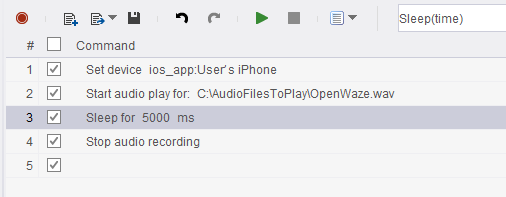
In the following example we will start recording, wait for 5 seconds and stop.
This will create a 5 seconds long recording file.
Code Examples
Java Example
client.startAudioRecording("C:\\AudioFilesToPlay\\OpeningWaze.wav");
C# Example
client.StartAudioRecording("C:\\AudioFilesToPlay\\OpeningWaze.wav");
VBScript Example
client.StartAudioRecording "C:\\AudioFilesToPlay\\OpeningWaze.wav"
Report
Python Example
self.client.startAudioRecording("C:\\AudioFilesToPlay\\OpeningWaze.wav")
Perl Example
$client->startAudioRecording("C:\\AudioFilesToPlay\\OpeningWaze.wav");