Dependency List Reports
Dependency list reports display open upstream and downstream dependencies, helping teams identify and manage work item relationships that impact delivery.
Understanding Dependencies
Dependencies represent relationships between work items where one item relies on another to be completed first. Managing dependencies is critical for:
- Release planning and scheduling
- Risk identification and mitigation
- Cross-team coordination
- Program-level visibility
Available Reports
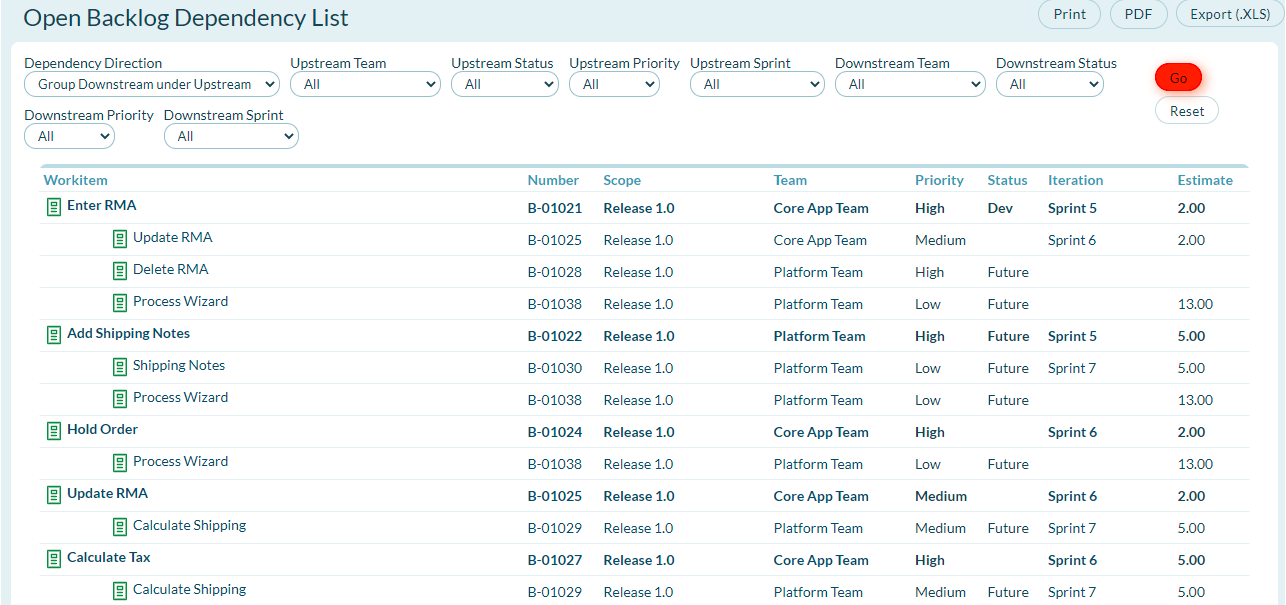
Open Backlog Dependency List Report
Shows a list of open downstream and upstream dependencies for backlog items (stories, defects, tasks) in a project or release.
Use this report when you need to:
- Identify backlog items blocked by other work
- Track dependencies within a release or project
- Coordinate work across teams at the story level
- Plan sprint commitments considering dependencies
Open Portfolio Item Dependency List Report
Shows a list of open downstream and upstream portfolio item dependencies (epics, features, capabilities) in a project or release.
Use this report when you need to:
- Identify portfolio items blocked by other initiatives
- Track strategic dependencies across programs
- Coordinate work at the portfolio level
- Plan roadmaps considering cross-portfolio dependencies
Note: This information is also available visually on the Portfolio Item Dependency Report.
Accessing Dependency List Reports
Backlog Dependency List
- Click the hamburger menu
 > Reports > All Reports.
 - In the Project or Release Reports section, click Open Backlog Dependency List.
- Select from the available filters and click Go.
- To clear filters, click Reset.
Portfolio Item Dependency List
- Click the hamburger menu > Reports > All Reports.
- In the Planning Reports section, click Open Portfolio Item Dependency List.
- Select from the available filters (optional) and click Go.
- To clear filters, click Reset.
Report Filters
Both reports support standard filtering options to narrow the dependency view:
Project / Release Filter
- Limits dependencies to specific projects or releases
- Helps focus on relevant delivery timeframes
Team Filter
- Shows dependencies for specific teams
- Useful in multi-team environments
Status Filter
- Filters by dependency status (open, closed, blocked)
- Focus on active dependencies requiring attention
Date Range Filter
- Shows dependencies within specific timeframes
- Helps with release planning
Understanding the Report Output
Columns Displayed
Dependency Type
- Upstream: Work items this item depends on (blockers)
- Downstream: Work items that depend on this item
Source Item
- The work item with the dependency relationship
- Click to view item details
Target Item
- The related work item in the dependency
- Click to view item details
Status
- Current status of both items in the dependency
- Helps identify if blocking items are progressing
Owner / Team
- Who is responsible for each item
- Facilitates cross-team coordination
Target Date
- Planned completion dates
- Highlights schedule risks
Using Dependency Reports Effectively
Sprint Planning
- Review backlog dependency list before sprint planning
- Identify stories blocked by external dependencies
- Coordinate with other teams to resolve blockers
- Consider dependency completion dates when committing to sprints
Release Planning
- Review portfolio item dependency list during PI planning
- Identify features dependent on external work
- Sequence releases based on dependency relationships
- Communicate cross-program dependencies to stakeholders
Risk Management
- Monitor open dependencies as potential risks
- Track aging dependencies that haven't closed
- Escalate dependencies blocking critical work
- Plan mitigation strategies for risky dependencies
Cross-Team Coordination
- Export dependency reports for program sync meetings
- Share reports with dependent teams
- Use as agenda for dependency resolution discussions
- Track coordination effectiveness over time
Dependency Management Best Practices
Creating Dependencies
- Be specific: Clearly define what one item depends on in another
- Document context: Add notes explaining why the dependency exists
- Set target dates: Establish when the blocking item needs completion
- Assign owners: Ensure both items have clear ownership
Monitoring Dependencies
- Review regularly: Check dependency reports weekly or during standups
- Update status: Keep dependency status current as work progresses
- Escalate blocks: Raise visibility on dependencies causing delays
- Close promptly: Mark dependencies resolved when blocking work completes
Reducing Dependencies
- Challenge necessity: Question if dependencies are truly required
- Refactor work: Break down items to reduce coupling
- Parallelize when possible: Structure work to enable concurrent progress
- Build interfaces early: Create contracts between dependent items
Communicating Dependencies
- Visualize: Use dependency reports in team and program ceremonies
- Be transparent: Share dependency status openly
- Coordinate proactively: Don't wait for dependencies to become blockers
- Follow up: Track resolution of identified dependencies
Common Dependency Patterns
Sequential Dependencies
- One item must complete before another can start
- Common in infrastructure or architecture work
- Requires careful scheduling and buffering
Bi-directional Dependencies
- Two items depend on each other
- Often indicates need for refactoring
- May require parallel development with clear interfaces
Many-to-One Dependencies
- Multiple items depend on a single blocking item
- High-risk pattern requiring close monitoring
- Consider prioritizing the blocking item
External Dependencies
- Dependencies on items outside your control
- Require stakeholder management
- Need contingency planning
Integration with Other Reports
Dependency reports complement other planning reports:
- Velocity Reports: Factor dependencies into velocity-based forecasts
- Project or Release Burndown Report: Understand how dependencies impact burndown
- Program Predictability Report: Track impact of dependencies on commitments
- Workitem Trend Report: Monitor dependency trends over time
Troubleshooting Dependencies
Problem: Too Many Dependencies
- Symptom: Teams constantly blocked by external work
- Solution: Review architecture, increase team autonomy, reduce coupling
Problem: Stale Dependencies
- Symptom: Dependencies marked open but blocking work completed
- Solution: Implement dependency review in team ceremonies, automate closure
Problem: Hidden Dependencies
- Symptom: Teams discovering dependencies during execution
- Solution: Improve planning rigor, conduct dependency mapping exercises
Problem: Cross-Program Dependencies
- Symptom: Dependencies across organizational boundaries causing delays
- Solution: Establish program sync meetings, escalation paths, program-level coordination
Related Topics
- Portfolio Item Dependencies Report: Visual dependency mapping
- Project or Release Reports: Overview of project-level reporting
- Using the Portfolio Tree: Navigate portfolio hierarchy
- Applying Filters to a Report: Learn how to use report filters