Building a Custom Dashboard
This article explains how to build a Custom Dashboard in Agility.
Overview
The Report Management page contains a list of all reports that are available to you. You can create new reports and dashboards, organize them in folders, and depending on the options schedule and subscribe to reports.
Accessing Custom Reports
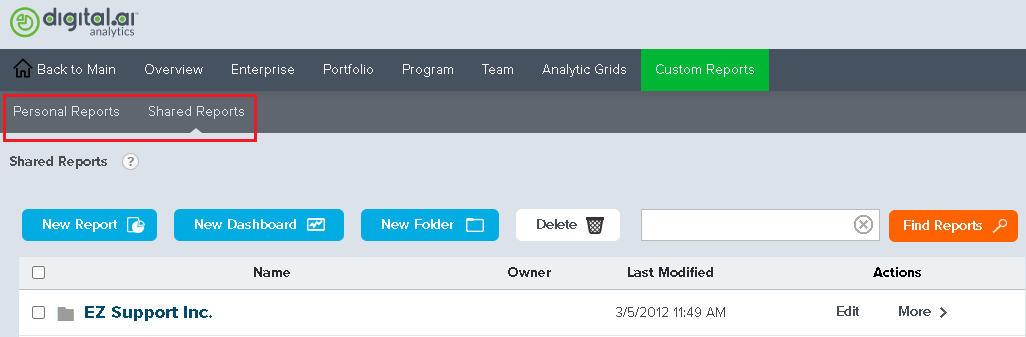
To access Custom Reports, click the hamburger menu  > Analytics, and click the Personal Reports or Shared Reports tab.
- The Personal Reports tab displays the list of custom report definitions, custom dashboard definitions, or folders that you created.
- The Shared Reports tab displays a list of custom report definitions, custom dashboard definitions, and folders available to everyone in the organization.
If no report definitions have been created, these lists are empty.
Working with Custom Reports
- For each item in the list, we see who created the item and the last date the definition was modified. The last column, Actions, contains a hidden menu of actions that you can perform on an individual definition. In Personal Reports, these actions are: Modify, Rename, Copy, Move, Delete. These are the same actions you see in Shared Reports if you are the definition owner. If you are not the definition owner, you can only copy the definition, unless you are a System Administrator in Digital.ai Agility. Members who are System Administrators in Digital.ai Agility may also move or delete a definition in the Shared Reports area. Click the ">" character to reveal the list of available actions.
Creating a New Custom Dashboard
- Click the New Dashboard button.
- In the Create New Dashboard page, enter a name in the Dashboard Name field, and click Add a Panel.
- Enter the required information in the Panel Settings dialog box.
- In the Panel Content section, select the reports you want to see in the dashboard and click Save Panel.
Dashboards
Dashboards are created by adding and configuring different panels. A panel is built with one of the following content types:
- Pre-defined reports - Canned reports that provide a quick view of a user's most:
- Frequently Viewed Reports
- Recently View Reports
- Favorites - A user specified list of reports contained with a folder accessible from the My Personal Reports page.
- URL - Any valid URL the user has access to.
- Reports - A user specified report accessible from the My Personal Reports or Shared Reports pages.
Panels are organized into columns in the dashboard. A column may contain none to many panels but as a minimum, a dashboard must contain at least one panel to be saved.
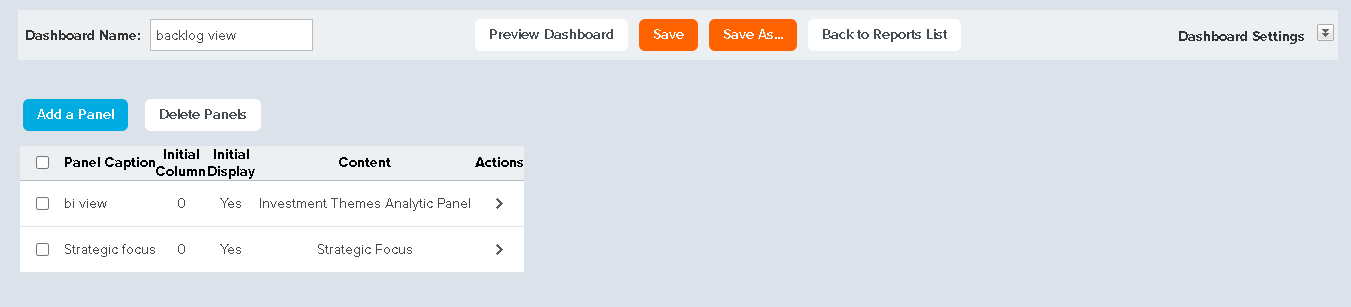
The Dashboard Builder Panel Interface
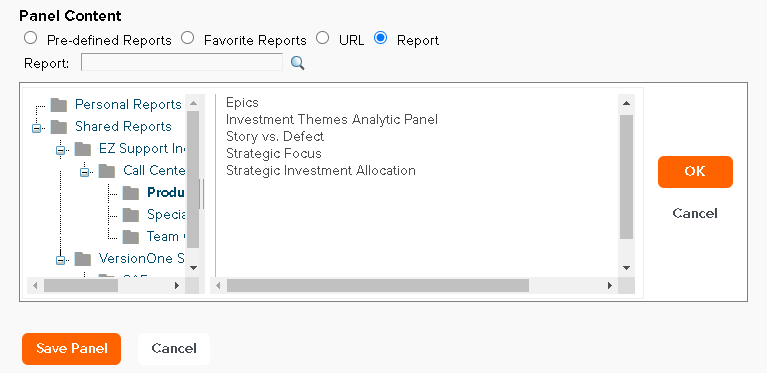
To add a dashboard panel:
An unlimited number of panels can be added to a dashboard. The panels can be configured to appear in the dashboard layout using panel settings and the panel drag feature controls provided.
- Click the Add a Panel button to view the Panel Settings panel.
- Type a Caption and Description for the panel in the fields provided.
- Change the Initial Column value based on where the panel should appear in the dashboard. The default value is 1.
- Change the Initial Display setting based on:
- Yes - display the panel at initial viewing of the dashboard (default).
- No - do not display the panel at initial viewing of the dashboard.
- Adjust the panel Height. Default value is 300 pixels. The value range of possible settings is 10 to 5000 pixels.
- Select the Panel Content type (default is Report).
- Specify the report, folder or URL in the field provided.
- If Pre-defined reports, then select one of the listed reports and click OK.
- If Favorites, then locate and select a Personal Reports folder and click OK.
- If URL, then specify a URL address. Click Test URL to confirm that the URL can be viewed.
- If Reports, then locate and select a report located in the Personal Reports or Shared Reports.
- Click Save Panel and return to the Dashboard Builder interface.
- If the dashboard had not been previously saved, then type a name for the dashboard in the field provided.
- Rearrange panels as necessary with the up or down arrows
- Click Save to store the dashboard.
To modify a dashboard panel:
- Hover the mouse over the >icon for a panel and select Modify Dashboard Panel from the dropdown list.
- Modify the panel as desired.
- Click Save Panel and return to the Dashboard Builder interface.
- If the dashboard had not been previously saved, then type a name for the dashboard in the field provided.
- Click Save to store the dashboard definition.
To delete one or more dashboard panels:
- Select the desired panel(s) by enabling its respective checkbox(es).
- Click the Delete Panels button.
- Click OK to confirm the removal.
- If the dashboard had not been previously saved, then type a name for the dashboard in the field provided.
- Click Save to store the dashboard definition.
To modify a Dashboard's Settings:
Click the Dashboard Settings button at the top-right corner to expand the page and customize the general dashboard appearance.

The Dashboard Settings panel, offers the ability to configure a dashboard's general appearance and provide an optional description. A panel's appearance is controlled by the selected Dashboard Style, which gives the dashboard a specific "look and feel". The available dashboard styles are:
- (None)
- Classic
- Gray
- Harmony
- LemonLime
- Light
- Mocha
- Nature
- Ocean
- Professional
- RedWine
- Technical
- Tropical
Note: The Dashboard Style will not control the appearance of any of the reports viewed in a panel.
As necessary, specify or modify the Description, Dashboard Expiration Date and header content.
Click the Dashboard Settings button to collapse or hide the Dashboard Settings panel.
Note: The description appears under the dashboard's name in the Reports list in the Personal Reports and Shared Reports areas.
Deleting a Custom Dashboard
- On the Personal Reports or Shared Reports page, select the dashboard to be deleted and click Delete.