Dimension Tables Reference
Dimension tables in the Digital.ai Agility Data Mart provide descriptive attributes used to analyze and classify data in fact tables.
Overview
In a star schema, dimensions classify and provide context for the measurement data contained in fact tables. In the Digital.ai Agility Data Mart, all Dimension tables are in a database namespace (schema) known as "Dim".
Dimension Types
Dimensions in the Agility Data Mart are organized into several categories:
- Core Entity Dimensions - Fundamental entities (Project, Team, Member, Iteration)
- Workitem Entity Dimensions - Primary workitem types (Story, Defect, Epic, Theme)
- Workitem Attribute Dimensions - Workitem properties (Status, Priority, Type, Source)
- Supporting Dimensions - Additional classification (Asset State, Boolean values, Dates)
- Custom Fields - User-defined dimensions specific to your instance
All dimension tables use Type 1 slowly changing dimension methodology, meaning attribute changes overwrite existing values rather than creating historical records.
Core Entity Dimensions
Core entity dimensions represent the fundamental organizational structures in Digital.ai Agility.
Dim.AssetState
Asset State indicates whether an asset is Active, Inactive (Closed), or Deleted.
| Column Name | Description | DataType |
|---|---|---|
| AssetStateKey | Datamart unique identifier | int |
| AssetStateOid | Digital.ai Agility value for the AssetState | int |
| AssetStateName | Digital.ai Agility name for the AssetState | varchar |
Dim.AssetType
Asset Type defines the types of assets available in the Datamart.
| Column Name | Description | Datatype |
|---|---|---|
| AssetTypeKey | Datamart unique identifier | int |
| AssetTypeName | Digital.ai Agility name for the AssetType | varchar |
Dim.Date
The Date dimension provides extensive date attributes for time-based analysis.
Key Columns:
| Column Name | Description | Datatype |
|---|---|---|
| DateKey | Data Mart unique identifier for this date | int |
| Date | Date value | datetime |
| YearNumber | Year component as a number (2026) | int |
| YearName | Year component as a string ('2026') | varchar(10) |
| SemesterNumber | Semester of the year as a number (202601, 202602) | int |
| QuarterNumber | Quarter and year as a number (202601, 202602, etc.) | int |
| QuarterName | Quarter component as a string ('Q1', 'Q2', etc.) | varchar(10) |
| MonthNumber | Month and year as a number (202601 = January 2026) | int |
| MonthFullName | Full Month Name ('January') | varchar(20) |
| MonthShortName | Short Name for the month ('Jan') | varchar(3) |
| DayNumber | Day component as a number (1, 2, 3...) | int |
| DateDisplayDate | Complete Date as a string with full month ('January 1, 2026') | varchar(20) |
| DisplayDateShort | Complete Date as a string with abbreviated month ('Jan 1, 2026') | varchar(20) |
Use the Date dimension to create custom date hierarchies (Year → Quarter → Month → Day) in your reporting tools.
Dim.Iteration
Iterations represent the basic planning period of an agile project (often called Sprints).
Key Columns:
| Column Name | Description | DataType |
|---|---|---|
| IterationKey | Data Mart unique identifier for the iteration | int |
| IterationOid | Identifier for the iteration | int |
| IterationName | Iteration Name | nvarchar |
| IterationFullName | Full name of the Iteration | nvarchar |
| IterationBeginDate | Iteration Begin Date | datetime |
| IterationEndDate | Iteration End Date (inclusive) | datetime |
| IterationTargetEstimate | Target estimate for the iteration | real |
| IterationOwnerName | Name of the person owning the iteration | nvarchar |
| IterationScheduleName | Name of the Schedule that owns this Iteration | nvarchar |
| IterationAssetState | Asset State for the iteration | varchar |
| IterationScheduleKey | Foreign Key to the Schedule owning this Iteration | int |
| IterationBeginDateKey | Foreign Key to the Iteration Begin Date | int |
| IterationEndDateKey | Foreign Key to the Iteration End Date | int |
| IterationOwnerMemberKey | Foreign Key for the Iteration Owner | int |
Dim.Member
Member dimension contains information about users in the system.
Key Columns:
| Column Name | Description | DataType |
|---|---|---|
| MemberKey | Data Mart unique identifier for the Member | int |
| MemberOid | Identifier for the Member | int |
| MemberName | Member Name | nvarchar |
| MemberUserName | Member User Name | nvarchar |
| MemberShortName | Member Short Name | nvarchar |
| MemberPhone | Phone Number on Member Record | nvarchar |
| MemberEmail | Email address on Member Record | nvarchar |
| MemberAssetState | Indicates if the Member is active | varchar |
| MemberCreateDateUTC | UTC Date the Member was created | datetime |
| MemberLastModifiedDateUTC | UTC Date the Member was last modified | datetime |
Dim.MemberGroup
MemberGroups collect Members for convenience (e.g., Contractors, DBAs, Technical Writers).
Key Columns:
| Column Name | Description | DataType |
|---|---|---|
| MemberGroupKey | Data Mart identifier | int |
| MemberGroupOID | Identifier | int |
| MemberGroupName | Name | nvarchar |
| MemberGroupCreateDate | Date created | datetime |
| MemberGroupLastModifiedDate | Date last modified | datetime |
Dim.Program
Programs are cross-hierarchical collections of projects used for filtering and reporting.
Key Columns:
| Column Name | Description | Datatype |
|---|---|---|
| ProgramKey | Datamart unique identifier for this Program | int |
| ProgramOid | Identifier for the Program | int |
| ProgramName | Program Name | nvarchar |
| ProgramCreateDateUTC | UTC Date Program was created | datetime |
| ProgramLastModifiedDateUTC | UTC Date Program was last modified | datetime |
Dim.Project
Projects are collections of workitems organized using releases, sprints, and themes.
Key Columns:
| Column Name | Description | Datatype |
|---|---|---|
| ProjectKey | Datamart unique identifier for this Project | int |
| ProjectOid | Identifier for the Project | int |
| ProjectName | Project Name | nvarchar |
| ProjectCreateDateUTC | UTC Date Project was created | datetime |
| ProjectLastModifiedDateUTC | UTC Date Project was last modified | datetime |
Dim.Team
Teams represent cross-functional members who work together within a project.
Key Columns:
| Column Name | Description | DataType |
|---|---|---|
| TeamKey | Data Mart unique identifier | int |
| TeamOid | Identifier | int |
| TeamName | Name | nvarchar |
| TeamCreateDateUTC | Date Created | datetime |
| TeamLastModifiedDateUTC | Date Last Modified | datetime |
Workitem Entity Dimensions
These dimensions represent specific types of workitems in Digital.ai Agility.
Dim.PrimaryWorkitem
Primary Workitems include Stories, Defects, and TestSets.
Key attribute categories:
- Identifiers (PrimaryWorkitemKey, PrimaryWorkitemOid, PrimaryWorkitemNumber)
- Names and descriptions
- Project, Team, Iteration, and Epic associations
- Status, Priority, Type, and Source attributes
- Estimate and tracking level values
- Owner and customer information
- Create and modification tracking
- Custom fields configured for Stories, Defects, and TestSets
This is one of the most frequently joined dimensions, containing detailed attributes for all Stories, Defects, and TestSets.
Dim.SecondaryWorkitem
Secondary Workitems include Tasks and Tests.
Key attribute categories:
- Identifiers (SecondaryWorkitemKey, SecondaryWorkitemOid, SecondaryWorkitemNumber)
- Names and descriptions
- Parent Primary Workitem associations
- Task-specific attributes (Task Status, Type, Source)
- Test-specific attributes (Test Status, Type)
- Estimate and tracking values
- Owner information
- Custom fields configured for Tasks and Tests
Dim.Epic
Epics (Portfolio Items) represent large initiatives that span multiple projects or iterations.
Key attribute categories:
- Identifiers (EpicKey, EpicOid, EpicNumber)
- Names and descriptions
- Program and Project associations
- Epic Status, Priority, and Type
- Risk and complexity attributes
- Estimate and actual values
- Custom fields configured for Epics
Dim.Theme
Themes (Feature Groups) organize related Stories within an Epic or project.
Key attribute categories:
- Identifiers (ThemeKey, ThemeOid, ThemeNumber)
- Names and descriptions
- Project and Epic associations
- Theme Status, Type, and Source
- Risk and complexity attributes
- Custom fields configured for Themes
Dim.Goal
Goals represent objectives that can be associated with workitems.
Key attribute categories:
- Identifiers (GoalKey, GoalOid, GoalNumber)
- Names and descriptions
- Goal Priority and Type
- Target and actual dates
- Custom fields configured for Goals
Dim.Issue
Issues track impediments and problems affecting work delivery.
Key attribute categories:
- Identifiers (IssueKey, IssueOid, IssueNumber)
- Names and descriptions
- Project and Team associations
- Issue Priority, Category, Resolution, and Status
- Owner information
- Custom fields configured for Issues
Dim.Request
Requests capture feature requests and enhancement ideas from stakeholders.
Key attribute categories:
- Identifiers (RequestKey, RequestOid, RequestNumber)
- Names and descriptions
- Request Priority, Category, Resolution, and Status
- Owner and source information
- Custom fields configured for Requests
Workitem Attribute Dimensions
These dimensions provide lookup values for workitem properties.
Workitem Status and Priority
- Dim.WorkitemStatus - Status values for workitems (In Progress, Accepted, Done)
- Dim.WorkitemPriority - Priority values (Critical, High, Medium, Low)
- Dim.WorkitemSource - Source of workitems (Customer Feedback, Technical Debt)
Story-Specific Attributes
- Dim.StoryType - Story Category values
- Dim.StoryRisk - Workitem Risk values (High, Medium, Low)
Defect-Specific Attributes
- Dim.DefectType - Defect Category values
- Dim.DefectResolution - Defect Resolution values
Task and Test Attributes
- Dim.TaskStatus - Task Status values
- Dim.TaskType - Task Category values
- Dim.TaskSource - Task Source values
- Dim.TestStatus - Test Status values
- Dim.TestType - Test Type values
Epic Attributes
- Dim.EpicStatus - Epic Status values
- Dim.EpicPriority - Epic Priority values
- Dim.EpicType - Epic Type or Epic Category values
Theme Attributes
- Dim.ThemeStatus - Theme Status values
- Dim.ThemeType - Theme Type or Theme Category values
- Dim.ThemeSource - Theme Source values
- Dim.ThemeComplexity - Theme Risk values
Issue and Request Attributes
- Dim.IssueCategory - Issue Type or Issue Category values
- Dim.IssuePriority - Issue Priority values
- Dim.IssueResolution - Issue Resolution values
- Dim.IssueStatus - Issue Status values
- Dim.RequestCategory - Request Type or Request Category values
- Dim.RequestPriority - Request Priority values
- Dim.RequestResolution - Request Resolution values
- Dim.RequestStatus - Request Status values
Supporting Dimensions
Build and Testing Dimensions
- Dim.BuildProject - Build Project information
- Dim.BuildSource - Build Source values
- Dim.BuildStatus - Build Status values
- Dim.Environment - Environment information
- Dim.RegressionPlan - Regression Plan details
- Dim.RegressionSuite - Regression Suite details
- Dim.RegressionTest - Regression Test details
- Dim.RegressionTestStatus - Regression Test Status values
- Dim.TestSuite - Test Suite information
Other Supporting Dimensions
- Dim.AttachmentCategory - Attachment Type or Attachment Category values
- Dim.BooleanAttribute - Boolean (checkbox) attribute values
- Dim.ClassOfService - Class of Service values
- Dim.GoalPriority - Goal Priority values
- Dim.GoalType - Goal Type or Goal Category values
- Dim.NoteCategory - Note Type or Note Category values
- Dim.ProjectStatus - Project Status values
- Dim.Schedule - Schedule information
- Dim.StrategicTheme - Strategic Theme information
- Dim.StrategicThemeLevel - Strategic Theme Level information
Custom Fields Dimension
Dim.CustomFields
Custom fields are user-defined attributes created in your Digital.ai Agility instance to capture additional information specific to your organization's needs.
Integration with Fact Tables:
Custom fields appear as additional columns in fact tables where applicable:
- Primary Workitem custom fields in Fact.PrimaryWorkitem and Fact.Workitem
- Secondary Workitem custom fields in Fact.Workitem
- Epic custom fields in Fact.Epic
- Issue custom fields in Fact.Issue
- Request custom fields in Fact.Request
Custom field columns follow the naming convention Custom_[FieldName] in fact tables.
Dimension Types Reference
The Dim.Dimension_Types table provides metadata about all dimensions in the Data Mart.
Purpose: Query this table to discover available dimensions and their characteristics programmatically.
Use Cases:
- Build dynamic reporting interfaces
- Document available dimensions
- Validate dimension references in queries
Using Dimensions Effectively
Joining Dimensions to Facts
Basic Join Pattern:
SELECT
    d.ProjectName,
    d.IterationName,
    SUM(f.Estimate) AS TotalEstimate
FROM Fact.PrimaryWorkitem f
INNER JOIN Dim.Project d ON f.ProjectKey = d.ProjectKey
INNER JOIN Dim.Iteration i ON f.IterationKey = i.IterationKey
WHERE f.DateKey = @SpecificDateKey
GROUP BY d.ProjectName, i.IterationName
Common Dimension Hierarchies
Project Hierarchy:
Program
└── Project
    ├── Iteration
    └── Team
Workitem Hierarchy:
Epic
└── Theme
    └── Primary Workitem (Story/Defect)
        └── Secondary Workitem (Task/Test)
Time Hierarchy:
Year
└── Semester
    └── Quarter
        └── Month
            └── Date
Best Practices
Performance Optimization:
- Dimension table joins are generally fast due to their small size
- Use INNER JOIN when you need dimension attributes
- Consider dimension filtering to reduce fact table scans
- Index custom fields used frequently in WHERE clauses
Data Quality:
- Missing dimension keys (NULL) indicate relationships not yet established
- AssetState identifies active vs. closed entities
- Check CreateDate and LastModifiedDate for data freshness
Reporting Considerations:
- Use display names (e.g., ProjectName) not keys in reports
- Join to Member dimension twice when you need both Owner and Creator
- Date dimension provides pre-calculated hierarchies for time analysis
- Custom field availability depends on your instance configuration
Attribute Lookup Pattern
When you need to filter or display attribute values:
SELECT
    pw.PrimaryWorkitemName,
    ws.WorkitemStatusName,
    wp.WorkitemPriorityName
FROM Fact.PrimaryWorkitem f
INNER JOIN Dim.PrimaryWorkitem pw ON f.PrimaryWorkitemKey = pw.PrimaryWorkitemKey
INNER JOIN Dim.WorkitemStatus ws ON f.WorkitemStatusKey = ws.WorkitemStatusKey
INNER JOIN Dim.WorkitemPriority wp ON f.WorkitemPriorityKey = wp.WorkitemPriorityKey
WHERE f.DateKey = @DateKey
Dimension Maintenance
Type 1 Slowly Changing Dimensions
All Agility Data Mart dimensions use Type 1 methodology:
- Updates overwrite existing values
- No history is maintained in dimension tables
- Historical accuracy must come from fact table snapshots
- Change tracking via LastModifiedDate columns
Implications:
- Report on historical facts using dimension attributes as they exist today
- For historical attribute values, query fact tables from specific dates
- Dimension attribute changes affect all historical reporting
Example: If a Project is renamed from "Platform v1" to "Platform v2", all historical reports will show "Platform v2" even for work done when it was named "Platform v1".
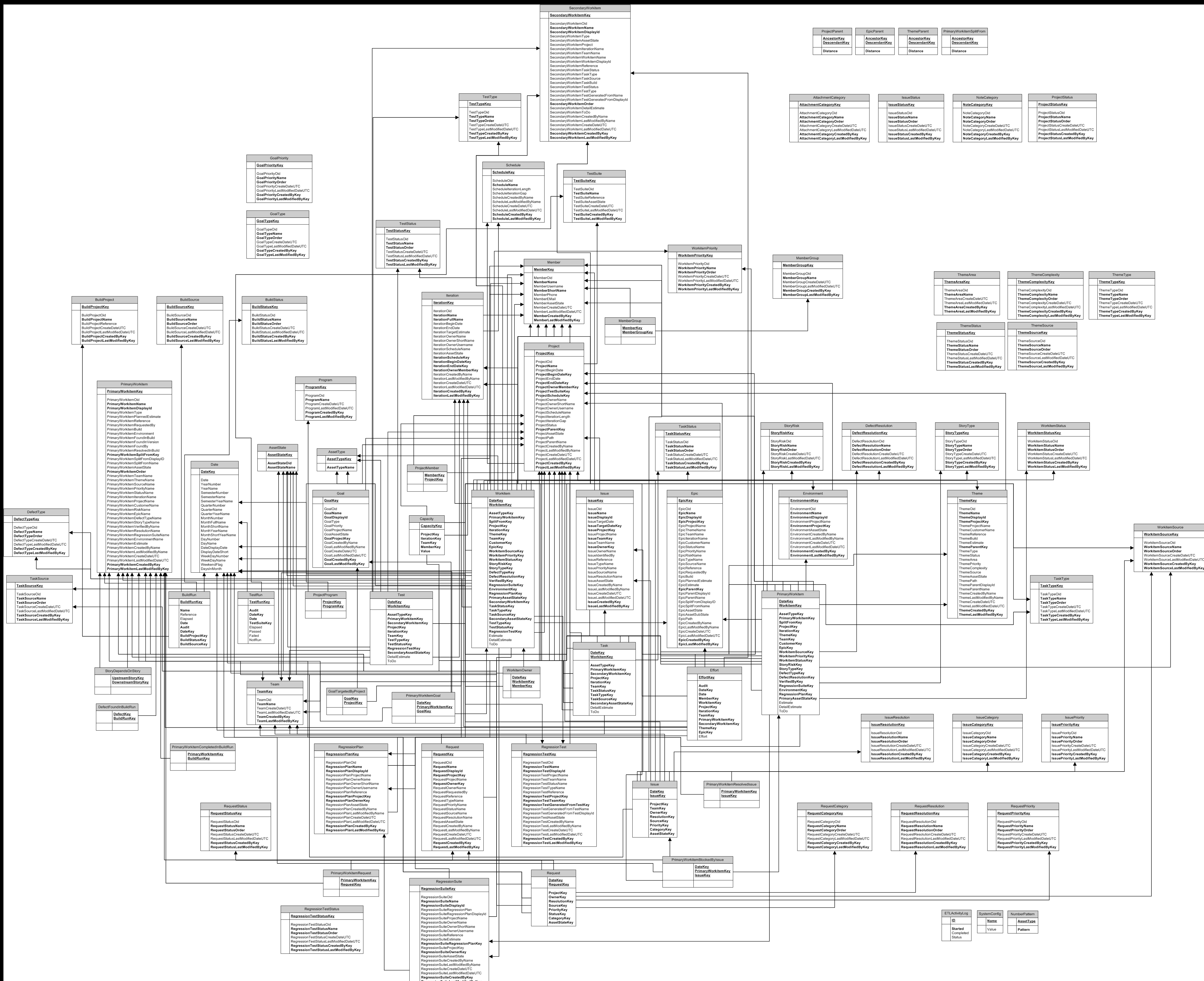
Data Mart Schema Diagram
This image is the data mart schema from a VersionOne instance with no custom fields.
To view larger version of this image, open the image in new tab and click the image.
Related Topics
- Fact Tables Reference - Complete fact table documentation
- Data Mart Query Examples - Sample queries using dimensions
- Bridge Tables - Many-to-many relationship tables
- Data Mart - Data Mart overview and architecture
- Build Custom Reports - Use dimensions in custom reports