Using Artifactory to Store Plugins
Overview
You can now configure JFrog Artifactory as a proxy for plugins that are currently hosted on the official Nexus repository.
This allows Artifactory to act as a mirror for your plugin repository in secure, airtight environments where Deploy cannot directly access the public plugin repository.
When configured, the Deploy Plugin Manager will fetch plugins from Artifactory instead of Nexus.
Setting Up JFrog Artifactory
Before configuring Deploy, you must set up JFrog Artifactory as a proxy for the Nexus plugin repository.
Prerequisites
Install JFrog Artifactory using Docker or another method. For installation instructions, see Install Artifactory Using Docker.
Create a Remote Repository
- Log in to your JFrog Artifactory instance.
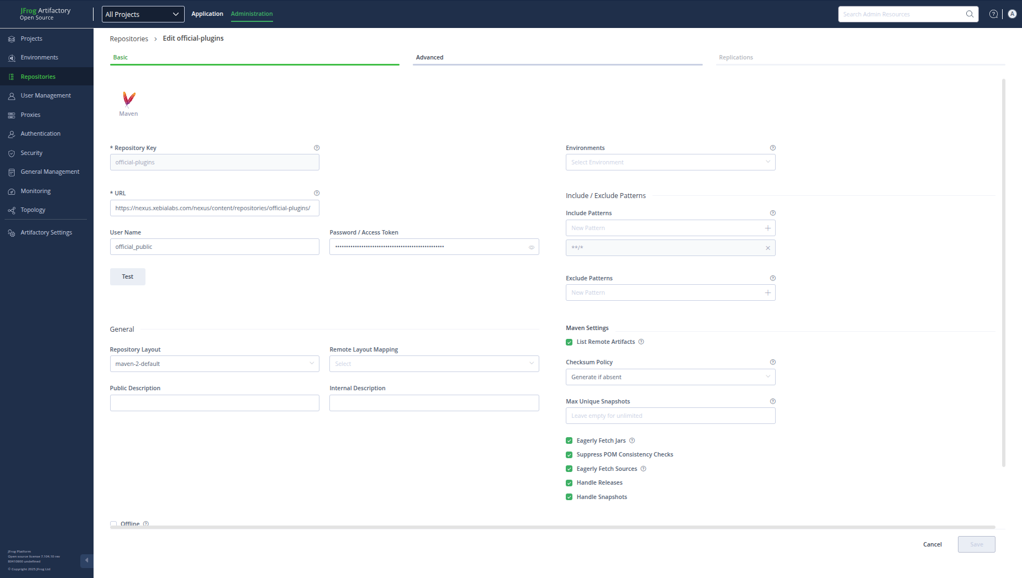
- Navigate to Administration → Repositories → Remote.
- Create a new remote repository with the following settings:
| Field | Value |
|---|---|
| Repository Key | official-plugins |
| URL | https://nexus.xebialabs.com/nexus/content/repositories/official-plugins/ |
| Username | official_public |
| Password | Your Nexus credentials |
- Save the repository configuration.
Verify the Repository
After creating the repository:
- Click the Artifactory icon in the left sidebar.
- Navigate to Artifacts.
- The downloaded plugins will be stored in
official-plugins-cache.
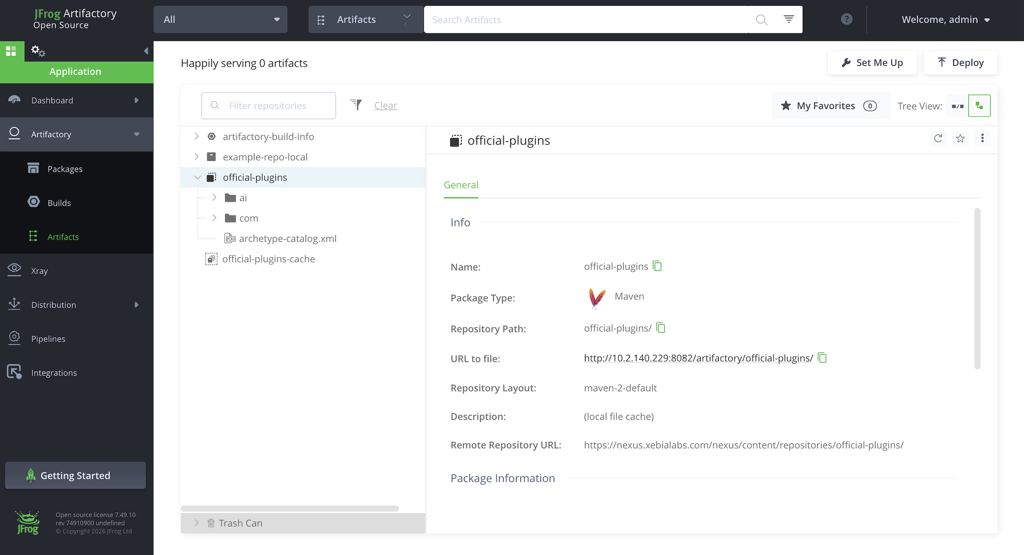
Plugins are downloaded on-demand when requested by Deploy. Once downloaded, they are automatically cached in the Artifactory Remote Repository cache and will be served locally for subsequent requests.
Configure Deploy
To configure JFrog Artifactory as the plugin repository, update the deploy-plugins.yaml file.
- Set the
server-typeproperty for your plugin server toartifactory(instead ofnexus). - Update the
url,username, andpasswordfields to match your Artifactory server’s credentials and URL.
This configuration ensures that the Plugin Manager seamlessly transitions to the new repository.
Example deploy-plugins.yaml
deploy:
  plugins:
    repositories:
      - enabled: true
        name: xld-official
        nexus-group-id: com.xebialabs.xldeploy.plugins
        nexus-metadata-artifact:
          artifact-id: xld-plugins-metadata
          group-id: com.xebialabs.xldeploy.plugins.metadata
        nexus-packaging-type: xldp
        nexus-repository-id: official-plugins
        repository-type: nexus-by-group-id
        server-ref: xebialabs-internal
        xl-component: xl-deploy
    servers:
      - name: xebialabs-internal
        server-type: artifactory
        url: http://artifactory.example.com:8082
        credentials:
          username: admin
          password: "{cipher}<your-encrypted-password>"
Replace <your-encrypted-password> with your own encrypted password. To generate an encrypted password, use the Deploy encryption utility. Never commit real credentials to documentation or version control.
In the above yaml change only the server-type, url and the credentials according to the server details and re-start the server.
Airtight Environment Use Case
When using Artifactory as a Nexus proxy:
- Create a Remote Repository in Artifactory pointing to:
https://plugins.xebialabs.com/nexus/content/groups/official-plugins/
-
Enable caching so that once fetched, plugin artifacts are stored locally.
-
Configure Deploy to point to the Artifactory remote repository using the example above.
Verification Run the following command to confirm that plugins are fetched from Artifactory:
xl pm list
If Artifactory is configured as a proxy, plugins will be cached locally after the first fetch.
For more information, see how to Migrate from Sonatype Nexus repository to JFrog Artifactory.