Create and Manage Customizations
When you map the fields from two different tools, you may have to, at times, resolve certain field-level incompatibilities. You may have to do some data transformations to make the data from the source system acceptable by the destination system.
Agility Sync Customizations is a Python-based framework that lets you define such transformational customizations required when you create a mapping. This framework has a set of predefined functions that are readily consumable from within the UI in the form of code templates.
The Customization Code editor has been templatized with a predefined code snippet. You can simply use one of the available customization functions to define your customizations with little or no coding knowledge. However, the possibilities are limited only to your imagination as you can even write advanced code to define more complex customizations in case you are well versed with Python.
Create Customizations
Here is an example use case to illustrate how it works.
Let us assume you want to map the Description fields of Jira and Digital.ai Agility and in doing so you want to truncate the description field values from Digital.ai Agility to 20 characters before syncing with Jira.
- Set out to create a mapping as usual and in doing so, click the settings icon (cogwheel) of the Digital.ai Agility's Description field.
- Click Customize Jira Description. The Customization Code Editor shows up.
You can work with the Customization Code Editor in two different modes: Basic and Advanced. The default is the Basic mode that lets you drag and drop customization methods and conditions. You can switch to the Advanced mode by selecting Advanced from the Customization Type drop-down list.
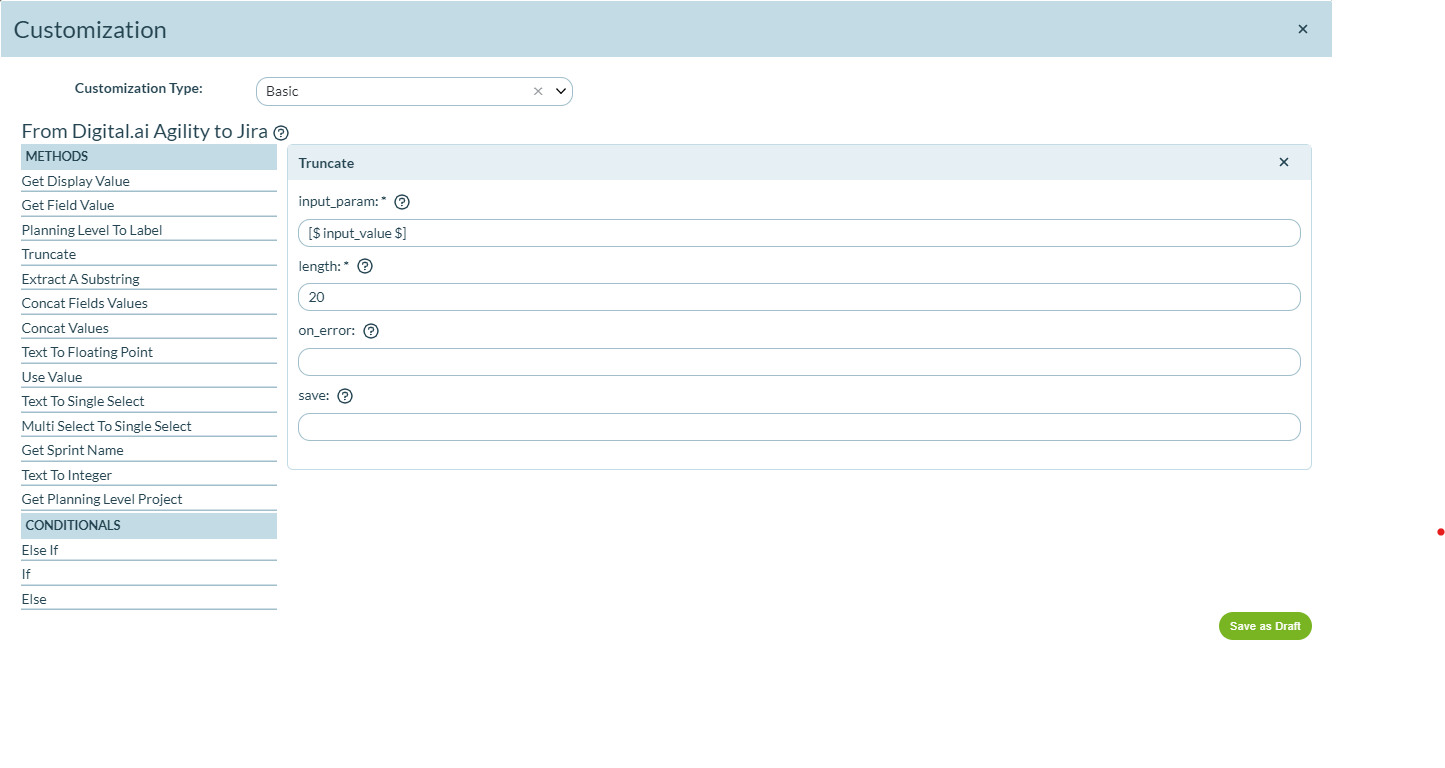
Here's an example of how to define a customization to truncate the Digital.ai Agility Description field values to 20 characters before syncing it with the Jira Description field.
Basic Mode
- Drag and drop the Truncate method from the left pane.
- Leave the Input_param field's value as [$ input_value $]. This is the notation to pass the Digital.ai Agility asset's Description field value to the Truncate method.
- Type the length of the output text in the length field.
- Click Save as Draft.
Advanced Mode
- Select Advanced from the Customization Type drop-down list. A default code snippet shows up.
- Now, edit the second line of the code which is
output_value = input_valueand make itoutput_value = utils.truncate(input_value, 20). - Now, click Save as Draft to save the code and proceed with the mapping creation process as discussed earlier.
That's it. You have now created a mapping with customization that truncates the Digital.ai Agility Description field values to 20 characters before syncing it with the Jira Description field.
Some of the customization features such as building complex customizations using two or more methods (using conditional operators If, Else, and Else If), on_error directives, and save the output in a variable are still evolving and are not fully functional.
Customization Functions Reference
Here's the complete list of customization functions available for use with your mappings:
Text Manipulation
utils.truncate()
Truncates the input string beyond the given length parameter and returns the remainder of the string.
Syntax:
utils.truncate(input_value, length)
Parameters:
input_value: String (mandatory)length: Integer (mandatory)
utils.extract_substring()
Splits the input_value string based on the separator provided and returns the value at the index denoted by ind. The ind value can be negative too. A negative value is equivalent to indexing from the end of the string, so a value of -1 means the last part after the splitting of the string.
For example, if the string is 'val1_val2_val3_val4' and the separator provided is '_' then the ind value of 0, 1, 2 and 3 return 'val1', 'val2', 'val3' and 'val4' respectively. An ind value of -1 returns 'val4' and -2 returns 'val3'.
Syntax:
utils.extract_substring(input_value, separator, ind)
Parameters:
input_value: String (Mandatory)separator: String (Mandatory)ind: Integer (Optional, defaults to 0)
utils.concat_fields_values()
Concatenates the input_value with the values of each of the fields provided in the list of field_names. Unless you pass a separator, the separator used for the concatenation by default is a comma and space. If a default value is provided and if any of the fields in the field_names doesn't have a value this default value will be used. The separator and default_value are keyword arguments and so ordering is not needed if the argument name is used in the method call such as utils.concat_fields_values('value 1', ['field2', 'field3'], default_value='defval'). An error occurs if any of the field names provided in the field_names list is invalid.
Syntax:
utils.concat_fields_values(input_value, field_names, separator, default_value)
Parameters:
input_value: String (Mandatory)field_names: List of strings (Mandatory)separator: String (Optional, defaults to a comma and space)default_value: String (Optional)
Data Type Conversion
utils.text_to_int()
Converts the input_value to an integer and returns it, provided it's a valid integer in string format. Otherwise, if a default value is provided then that will be returned. Else an exception is raised.
Syntax:
utils.text_to_int(input_value, default_value)
Parameters:
input_value: String (mandatory)default_value: Integer (optional)
utils.text_to_float()
Converts the input_value to a float and returns it, provided it's a valid float in string format. Otherwise if a default value is provided then that will be returned. Else an exception is raised.
Syntax:
utils.text_to_float(input_value, default_value)
Parameters:
input_value: String (mandatory)default_value: Float (optional)
Field Value Manipulation
utils.multi_to_single()
Picks one choice from the possibly many values in the input_value, based on the priority_list provided. If no value in the priority_list matches any of the values in the input_value then the first value is returned. If the priority_list is empty then too the first value is returned.
Syntax:
utils.multi_to_single(input_value, priority_list)
Parameters:
input_value: An array of selected values for the multi-select field. (Mandatory)priority_list: An array of display values in order of priority to be considered when mapping it to the single select field on the other side. The array is allowed to be empty. (Mandatory)
utils.text_to_single()
The input_value must match the display value of the mapped single select field. In that case, the method returns that single select field's value. Else, if a default_value is provided then the same is attempted with that value. Otherwise, an exception is raised. The fetch_latest flag when set to True fetches the latest values from the ALM tool. This is useful to always fetch the latest values from the ALM tool (such as Jira) as you may have new values added to a drop-down type Jira field for example in the aftermath of mapping creation in Agility Sync. The default_value and fetch_latest are keyword parameters and so either or both can be given in any order as long as the argument name is used. For example, we can skip the default_value and pass the input_value and fetch_latest. For example, utils.text_to_single('value1', fetch_latest=True).
Syntax:
utils.text_to_single(input_value, default_value, fetch_latest)
Parameters:
input_value: String (Mandatory)default_value: String (Optional)fetch_latest: Boolean (Optional, defaults to False)
utils.get_display_value()
Returns the display value of the provided input_value. The drop-down fields have predetermined values and are usually internally represented by ids in certain ALM systems like Digital.ai Agility. This method comes in handy in case you want the display value fetched for some reason.
Syntax:
utils.get_display_value(input_value)
Parameters:
input_value: String (Mandatory)
utils.get_field_value()
Fetches the value of the field referred to by the input field_name. An error occurs for invalid field names.
Syntax:
utils.get_field_value(field_name)
Parameters:
field_name: String (Mandatory)
Digital.ai Agility Specific
utils.get_planning_level()
Similar to the utils.get_display_value but it's specific to child planning levels in Digital.ai Agility. It returns the entire planning level path from the parent to the child separated by '/'.
Syntax:
utils.get_planning_level(input_value)
Parameters:
input_value: String (Mandatory)
utils.planning_level_to_label()
Use this method to map Digital.ai Agility's planning levels to the tags/labels field on the other side. Providing the entire planning level path as input splits it based on the separator and writes each value as a tag/label to the other side.
Syntax:
utils.planning_level_to_label(input_value, separator)
Parameters:
input_value: String (Mandatory)separator: String (Optional, defaults to '/')
utils.get_planning_level_project()
Use this method to get the project id of a planning level in Digital.ai Agility. The input_value refers to the planning level's name. The optional default_value refers to the default project/planning level name in case the provided planning level couldn't be located.
Syntax:
utils.get_planning_level_project(input_value, default_value)
Parameters:
input_value: String (Mandatory)default_value: String (Optional)
Jira Specific
utils.get_sprint_name()
Use this method to get the name of the Jira sprint. The Jira sprint value that comes from Jira is a string that has more than just the sprint's name. This method extracts just the sprint name and returns the same.
Syntax:
utils.get_sprint_name(sprint_object)
Parameters:
sprint_object: String (Mandatory, value as returned by Jira for Sprint)