Set a Precondition on a Task
You can control when tasks run in your release flow by setting preconditions. This helps you create more flexible releases that adapt to different conditions and skip unnecessary tasks, saving time and preventing errors.
A precondition is an if statement for tasks that determines whether a task should be executed. If the precondition evaluates to true, the task is started. If the precondition evaluates to false, the task is skipped. If an exception is raised or a compilation error occurs when Release is evaluating the precondition, the task fails. You can fix the precondition and retry the task.
Common use cases for preconditions include:
- Skip deployment tasks when the environment is already up to date
- Run different tasks based on the target environment (development, staging, production)
- Execute tasks only when specific conditions are met (like successful previous steps)
- Avoid running tasks when certain variables indicate they aren't needed
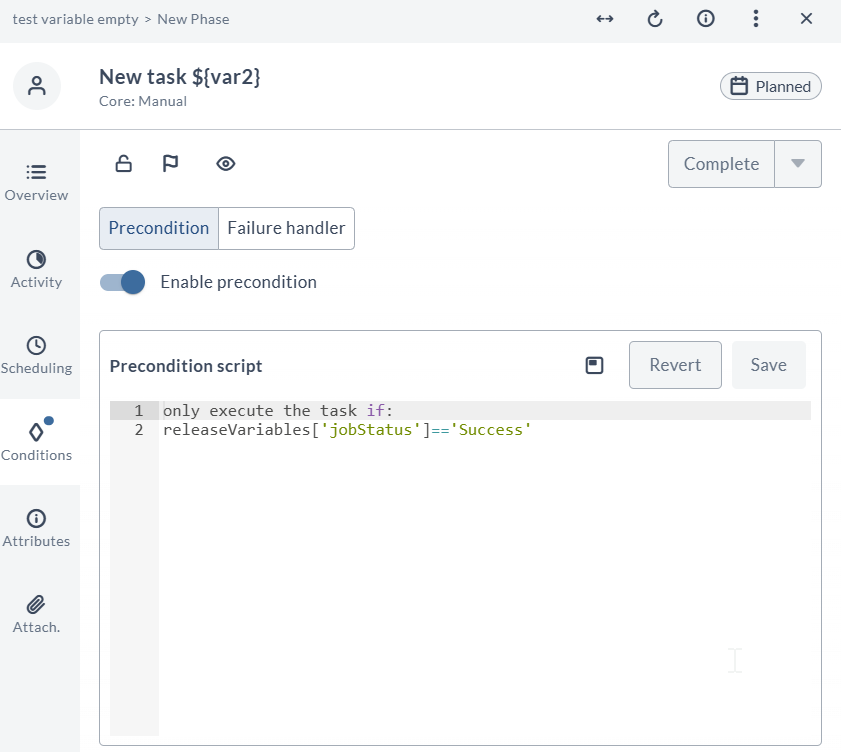
You can define task preconditions using Expression Language, which provides a fast, secure, and simple way to write preconditions.
Select the precondition type from the Precondition type drop-down in the task configuration.
Expression Language Preconditions
Expression language preconditions provide a fast, secure, and simple way to write preconditions using single-line expressions. This is the recommended approach for most scenarios.
Expression language supports commonly available methods and properties for most precondition scenarios. You can access all release, task, and phase properties with simple, direct syntax (no getter methods like getTitle() or getDescription()).
Expression language does not support multi-line expressions; your condition must be a single line.
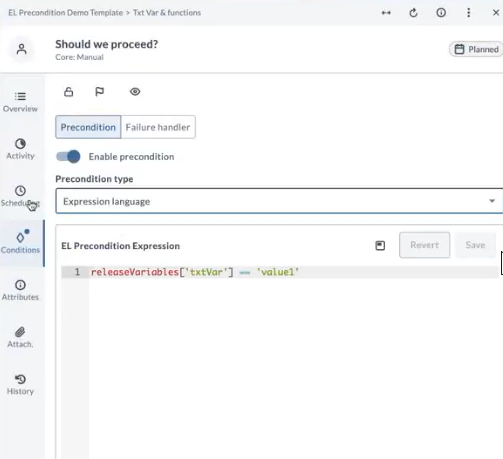
Set Up Preconditions Using Expression Language
- Open the task conditions panel.
- Select Enable precondition.
- From the Precondition type drop-down, select Expression language.
- In the EL Precondition Expression field, enter your expression.
Common Expression Patterns
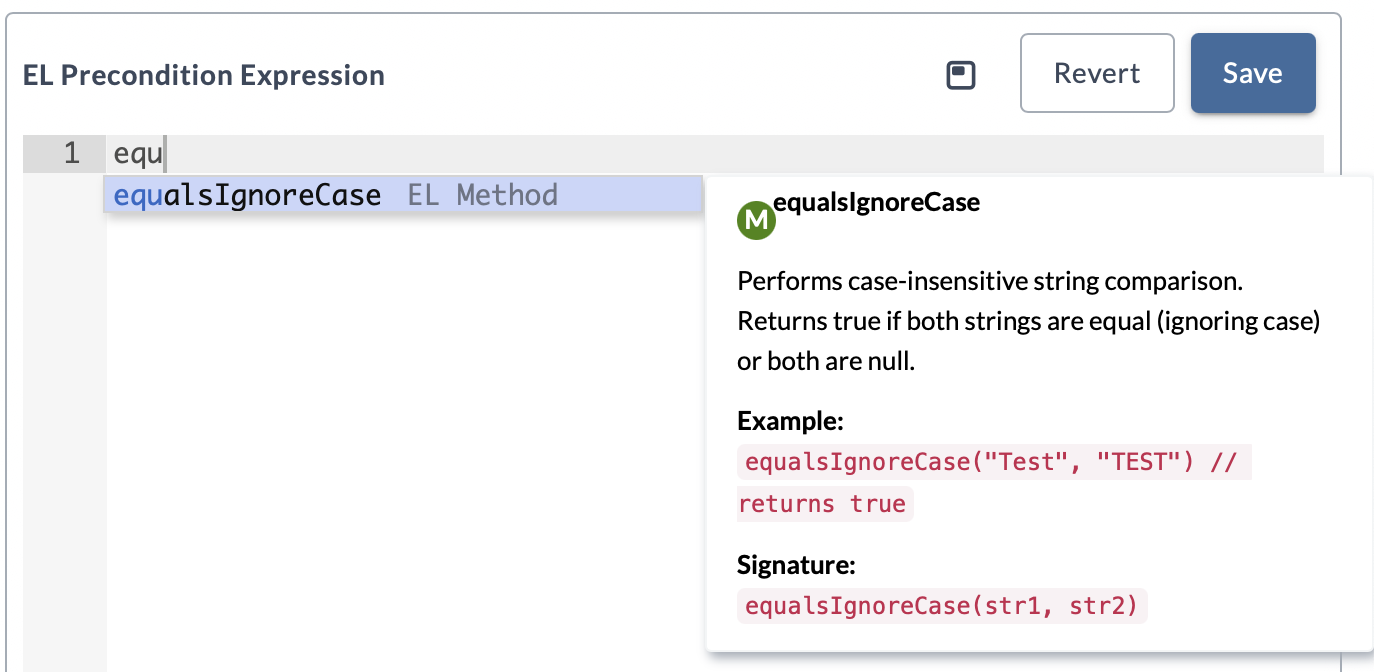
The EL Precondition Expression editor provides code completion.
As you type, the editor displays available EL methods and functions with inline documentation, including a description, example, and method signature.
Use this feature to quickly discover and apply the correct expressions directly in the editor.See example
Here are typical patterns you'll use in your preconditions. These examples demonstrate common use cases, but expression language supports many more properties and methods than shown here:
Variable comparisons:
releaseVariables['variableKey1'] == 'value1'
globalVariables['global.user'] == 'admin'
releaseVariables['environment'] == 'production'
Variable existence and safety checks:
hasVariable('jsonVariable')
getVariable('global.password') != null
hasVariable('deploymentFlag')
String comparison functions:
equalsIgnoreCase('Test', 'TEST')
containsIgnoreCase('Production Environment', 'PROD')
startsWith('Production Environment', 'Prod')
startsWithIgnoreCase('Production Environment', 'PROD')
endsWith('Production Environment', 'ment')
endsWithIgnoreCase('Production Environment', 'MENT')
String content checks with contains:
contains('Hello world', 'llo')
contains('Production Environment', 'PROD')
contains('Test String', 'test')
Working with numbers and mixed types:
contains(123456, '234')
contains('123', 123)
JSON data access and collection checks:
contains(parseJson(releaseVariables['jsonVariable'])['roles'], 'admin')
contains(parseJson(releaseVariables['jsonVariable'])['roles'], 'ADMIN')
contains(parseJson(releaseVariables['jsonVariable'])['id'], '123')
parseJson(releaseVariables['config'])['environment'] == 'prod'
Edge case handling:
contains('', '') == true
contains('Hello', '') == true
!contains(null, 'abc')
!contains('abc', null)
startsWith('Hello World', '')
endsWith('Hello World', '')
!startsWith(null, 'test')
!endsWith('test', null)
startsWith('Production', 'Production')
endsWith('Environment', 'Environment')
Task and Release property access:
task.id != null
task.title.length() > 0
task.release.title.length() > 0
task.release.id != null
task.phase.title != null
task.phase.id != null
containsIgnoreCase(task.release.description, 'demo')
containsIgnoreCase(task.phase.title, 'deployment')
These examples show just a few of the many properties available. All task, release, and phase properties are accessible through expression language using property names directly, without getter methods.
Combining Conditions with Logical Operators:
releaseVariables['environment'] == 'prod' and hasVariable('approvalToken')
containsIgnoreCase(task.release.title, 'emergency') or releaseVariables['priority'] == 'high'
getVariable('global.password') != null and hasVariable('deploymentFlag')
task.phase.title == 'Production Phase' and task.release.id != null
Additional capabilities:
The expression language in Release is based on the Spring Expression Language. It supports a wide range of features such as string methods, mathematical operations, property access patterns, and more.
For a more information, see Spring Expression Language reference.
Expression Language Syntax and Property Access
Expression language provides a standardized way to access properties and evaluate expressions. The syntax is designed to be simple and intuitive, supporting common programming constructs and data access patterns.
What You Can Access
You can access all the standard release, task, and phase properties through expression language:
- Release variables:
releaseVariables['variableName'] - Global variables:
globalVariables['global.variableName'] - Folder variables:
folderVariables['folder.variableName'] - Task properties: Access through
task.propertyName(liketask.id,task.title,task.description) - Release properties: Access through
task.release.propertyName(liketask.release.title,task.release.id,task.release.description) - Phase properties: Access through
task.phase.propertyName(liketask.phase.title,task.phase.id) - Variable operations: Check existence with
hasVariable('variableName')or get values withgetVariable('variableName') - String operations: Use functions like
contains(),equalsIgnoreCase(),startsWith(),endsWith(), and many other standard string methods - JSON data: Parse and access with
parseJson(releaseVariables['jsonVariable'])['property']
All release, task, and phase properties are available through expression language. You access release and phase properties through the task object (task.release.title, task.phase.title) using property names directly.
Security and Restrictions
Expression language includes built-in security measures to protect your release environment. Some operations that could be potentially dangerous are automatically restricted, ensuring that preconditions remain safe and secure.
If you encounter a security-related error message (like "method is not permitted on type"), it means you're trying to use a function that's been restricted for safety reasons. In most cases, there are alternative approaches you can use to achieve the same result.
Performance Benefits
Expression language preconditions are fast. Expression language evaluates your conditions instantly — similar to how a calculator immediately processes mathematical expressions.
Best Practices
- Use expression language for simple conditions to get better performance
- Test preconditions thoroughly before you deploy to production releases
- Keep expressions readable by using clear variable names and logical operators
Troubleshooting
When a precondition fails with a security error (for example, "method repeat is not permitted on type string"), check the expression to make sure it doesn't use restricted methods. Consider using alternative approaches or consult with your administrator about security configuration when you need advanced functionality.