Digital.ai Release SaaS Release Notes
This page lists new features, enhancements, and bug fixes for Digital.ai Release SaaS.
July 2026
Version: 26.3.0-713.1100
Timezone Support
Each user can now individually set the timezone Release uses to display dates and times, instead of relying only on their browser's timezone. Set this under Profile settings > Personal Regional Settings, choosing from the list of available timezones, each shown with its UTC offset, for example UTC+01:00 Europe/Amsterdam.
Changing your timezone updates dates and times to reflect the newly chosen timezone, including the Release flow page, Task details, list pages, filters, and other pages. Every release page also shows a timezone pill with the current UTC offset, for example UTC+02:00; hover over the pill to see the full timezone name.
YAML representations of releases and templates—including the template code preview and Git folder versioning—and audit reports continue to use the server timezone where Release is running. The audit report includes details indicating the timezone used.
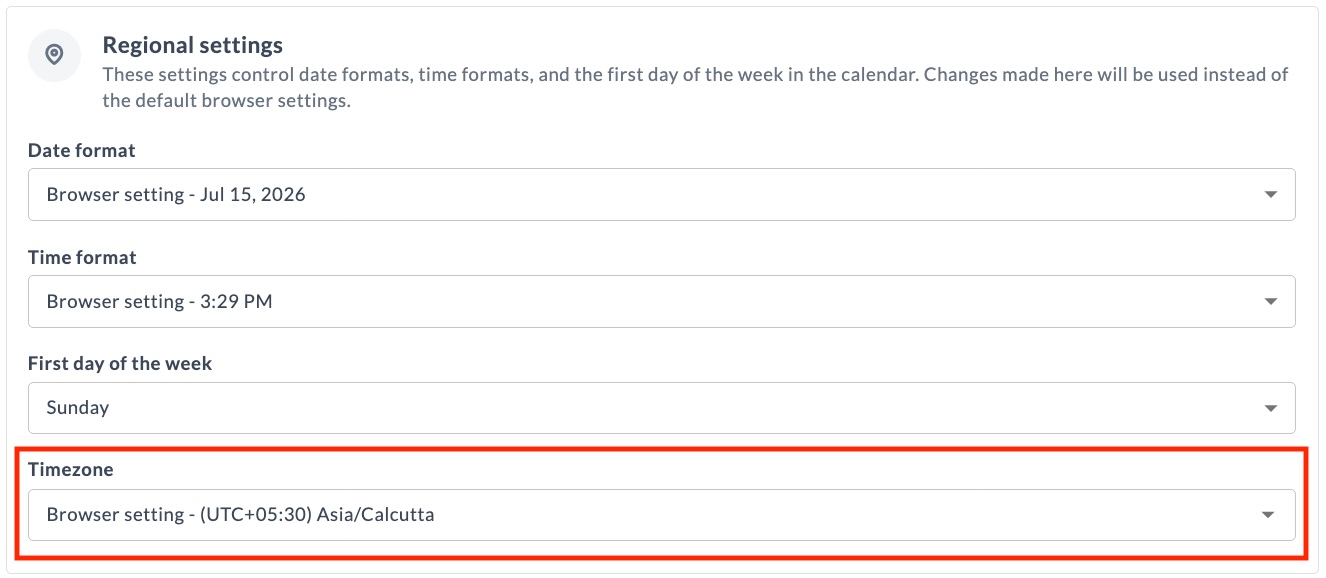
For more information, see Timezone.
Python Support for Release Automation
This release extends Python support for Release automation with direct API access from the Python 3 Script (Container) task and a standalone Python API client for the Release REST API.
Direct API Access in the Python 3 Script (Container) Task
The Python 3 Script (Container) task now provides direct access to the Release API and current-context helpers. Scripts can read and update releases, phases, tasks, and variables without writing boilerplate. The task runs isolated in a container through the Release Runner, providing a modern Python 3 alternative to server-side script tasks.
For more information, see Python 3 Script (Container) task.
Migrate Jython Scripts to Python 3
If you are migrating from on-premises to SaaS, use this guide to move automation from the Jython Script task to the Python 3 Script (Container) task. The helper APIs and context helpers keep the same names and camelCase methods, so most scripts port with mechanical changes.
For more information, see Migrate Jython Script to Python 3 Script (Container).
Python API Client for the Release REST API
Added a standalone Python 3 client library, digitalai-release-api-client, for the Release REST API. It connects to a Release instance and exposes each REST endpoint as a method, returning typed Pydantic models. The client works with both Release SaaS and self-hosted instances.
For more information, see Digital.ai Release Python API Client.
Task Drawer Improvements
Unsaved Changes in Script Fields
Release now preserves unsaved changes to script fields in the Task Drawer within your session so you don't lose work when navigating away from a task. This applies to the Script field in Jython Script, Groovy Script, and Webhook: Wait for JSON Event tasks, to precondition and failure handler scripts, and to custom tasks that include a script editor component. Unsaved changes are cleared on login. Unsaved changes are not considered when a task starts executing.
When a script field has unsaved changes, an unsaved changes badge appears in the Script editor field, an orange badge marks the affected tab in the Task Drawer, and the task card turns orange in the Template and Release Flow pages.
For more information, see Managing Tasks with the Task Drawer.
Configuration Indicators for Preconditions and Failure Handlers
The Conditions tab in the Task Drawer now shows a badge indicating the configuration state of preconditions and failure handlers, so you can see at a glance what is configured.
- Blue badge – the precondition or failure handler is configured and saved.
- Orange badge – the precondition or failure handler script has unsaved changes.
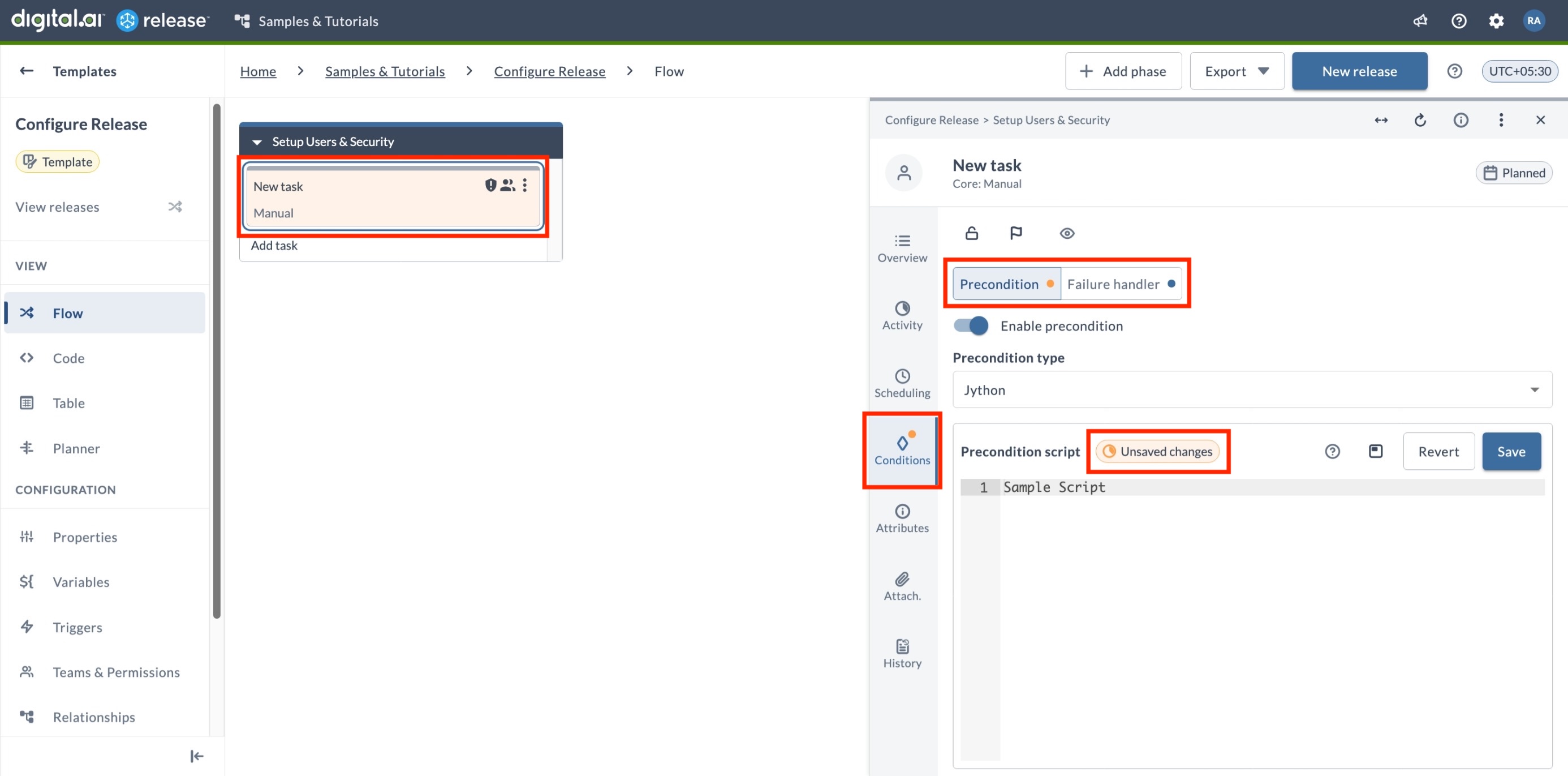
For more information, see Managing Tasks with the Task Drawer.
Connection Selection
The connection picker in the Task Drawer now groups connections by folder — global or a specific folder path — and displays the URL for each connection when it's configured in the connection settings. This helps you pick the right one when connections share similar names. Each entry also includes a link to open the connection details, available if you have the View connections or Edit connections permission for the folder where the connection is defined.
For more information, see Using the Saved Connection.
Filtering Improvements
Inline Filtering
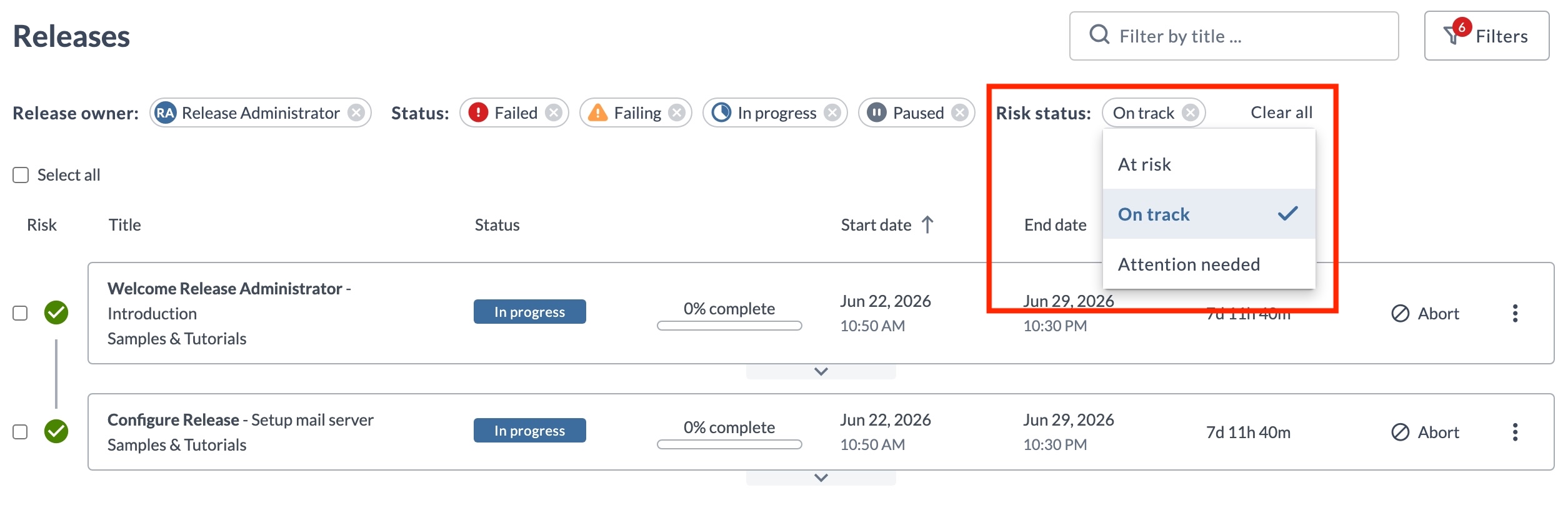
You can now change a filter's value directly from its pill — click the value displayed and choose a new one. This works on every page that uses the new filters, including Releases, Templates, Tasks, Workflow templates, Workflow executions, and Runners.
Reporting and Export
Dashboard PDF Export
PDF exports for custom dashboards now capture the dashboard at 100% screen resolution regardless of your browser zoom level. If the dashboard content does not fit on a single page, Release splits it across multiple pages and adds a continuation note.
For more information, see Using Release Dashboards.
UI and Functional Enhancements
Homepage Layout Update
The default Homepage layout has been updated with new wording and an updated tile layout.
- No action required if you have not customized the Homepage — the updated layout is visible after upgrading, when setting up a new environment, or when enabling the Homepage for the first time.
- No impact if you have customized the Homepage — your custom layout is preserved and continues to display as configured.
For more information, see Release Homepage.
Variable Enhancements
This release includes the following improvements to working with variables:
Variable Autocomplete in Description Fields
Description fields on the Template, Release, and Workflow properties pages now suggest and resolve variables, including folder variables. Typing ${ in a description field displays a suggestion list, and a saved description shows the resolved variable values.
For more information, see Variable Autocomplete in Description Fields.
List and List Box Variable Value Search
On the Create Release page and the Triggers page, you can now search List and List box variable values by typing a substring. This makes it easier to find and set the correct value in variables that have long lists of possible values.
For more information, see Searching List and List Box Variable Values.
Git Folder Versioning
Preserve Inheritance State in Git Folder Versioning
Git folder versions now remember whether a folder inherits its permissions and notifications from its parent. Previously, even when a folder was set to inherit, applying a version stopped the inheritance and gave the folder its own fixed copy of those settings (for notifications, this unchecked the Inherit notifications from parent folder option). Now, applying a version keeps the folder inheriting from its parent, just as it was when you saved. Separately, if a task points to a team that no longer exists, that team is now removed from the task automatically, and Release shows a warning listing the affected tasks.
For more information, see Inheritance Configuration in Folder Versioning.
Runner Updates
On-Prem Runner Support
In addition to the cloud-based Release Runner managed by Digital.ai, you can now install and connect your own on-prem runners to your Release SaaS instance. Install a runner using Docker or the xl kube install command.
For more information, see Overview of Release Runner.
Runner Configuration Templates
You can now create runner configuration templates in Connections and automatically apply them to newly registered runners.
The active template, selected on the Runners page, overrides runner defaults only for the fields it defines. Fields left empty keep the runner's default values.
Templates can define capabilities, capacity, eviction time, idle time to live, and registry settings, making it easier to standardize runner configurations and support autoscaling.
For more information, see Runner Configuration Templates.
Runner Performance Improvements
Runner executor pods for container-based tasks now use higher default CPU and memory allocation. This reduces execution time for container plugin tasks noticeably. No configuration changes are required.
Runner Token Expiry Handling
Runners now receive the license token expiry date during registration with Release. This lets a Runner monitor its own token status and transition to a controlled degraded state when the token expires, instead of failing abruptly. As the expiry date approaches, the Runner logs a warning 24 hours and again 12 hours before the token expires.
For more information, see Token Expiry Handling.
Cloud-Based Runner for Release SaaS Trial
A cloud-based Release Runner is now provided and maintained by Digital.ai for Release SaaS Trial instances. It runs container-based plugin tasks and requires no setup.
Release MCP Server
Digital.ai Release SaaS now includes a built-in Model Context Protocol (MCP) server. MCP capabilities are provided through the bundled Release MCP Tools Plugin, which ships with Release SaaS.
For more information, see Release MCP Tools Plugin.
Plugins and Integrations
Argo CD Container Plugin
- Added App Annotations and App Labels fields to the Create Application (Container) and Update Application (Container) tasks. Define these as key-value pairs to apply annotations and labels to the Argo CD application.
- Added a Refresh field to the Sync Application (Container) task to control manifest refresh before sync. Set it to
nonefor no refresh,normalto re-fetch and re-render using the repo cache, orhardto ignore the repo cache.
For more information, see Argo CD Container Plugin.
Argo CD Plugin
The Create Or Update Application task now supports an Ignore Differences YAML field. Use it to add ignoreDifferences rules to the Argo CD application manifest so that Argo CD excludes specific fields from drift detection.
For more information, see Argo CD Plugin.
Conjur Plugin
The Conjur Plugin now supports OAuth 2.0 authentication for server connections, enabling token-based (JWT) authentication for CyberArk Conjur Cloud (SaaS) connections.
For more information, see Conjur Plugin.
GitLab Plugin
Enhanced the Query Project task. Added a Kind input field to filter projects by namespace kind (for example, group or user), and expanded the output properties to return HTTP URL, Project Name, Namespace, Default Branch, Web URL, SSH URL, and Visibility in addition to Project ID.
For more information, see GitLab Plugin.
HashiCorp Vault Plugin
Fixed namespace handling so the plugin works correctly with Vault Enterprise. The X-Vault-Namespace header is now sent on both authentication and secret requests when a namespace is configured, and only when the namespace is set.
For more information, see HashiCorp Vault Plugin.
Release LLM Integration Container Plugin
The LLM Integration plugin is now released as an official Digital.ai plugin. It was previously available as a community plugin.
Added Anthropic as a supported LLM provider, alongside OpenAI, Gemini, and Digital.ai LLM. The AI: Prompt, AI: Chat, and AI: Agent tasks can now connect to Anthropic Claude models through an AI Model: Anthropic connection, which takes an API key and a model name (for example claude-opus-4-5).
For more information, see Release LLM Integration Container Plugin.
May 2026
Version: 26.3.0-518.1100
Breaking Changes
Custom Dashboard Chart Rendering Library Upgrade
The charting library ECharts used for dashboard tiles has been upgraded from version 3 to version 6 (see the changes ↗). If you have custom dashboard tiles built via plugins that use ECharts — either via the <echarts> directive or direct API calls — you may need to update your chart configuration. Default visual styling (colors, fonts, spacing) has also changed, so tiles relying on implicit defaults may render differently.
Git Folder Versioning Improvements
Relative Path References
Previously, all path template and folder references were stored as absolute paths. Now, references within a versioned folder structure are stored as relative paths — making versions portable across environments.
When applying a version to a different folder, internal references resolve automatically to the new location — no broken links, no manual path fixes. External references (outside the versioned folder) remain absolute.
For more information, see GitOps-enabled Folder Versioning.
Permission Updates
View Connections Permission
The Connections permission now allows more granular control at the folder level. A new read-only option has been added alongside the existing Edit connections permission.
- View connections (new) – View configured connections and their details within a folder. Does not allow creating, editing, deleting, or testing connections.
For more information, see Folder Teams and Permissions.
Connection Enhancements
Duplicate Connection
You can now duplicate an existing connection at the folder and global level — the copy is created in the same location — to quickly set up a new connection with the same configuration. This is ideal for configuring connections across multiple environments like DEV, STAGE, and PROD.
Duplicating a connection carries over all configuration fields, except credential fields such as passwords and API keys, which must be re-entered. Password variables are preserved when the source connection uses variable references. After duplicating, update the title (suffixed with "copy"), credentials, and any environment-specific settings.
For more information, see Duplicating a Connection.
UI and Functional Enhancements
Task Filtering Updates
-
The Task Ownership filter on the Tasks page has been updated with more granular options for filtering unassigned tasks:
- No user assigned – Shows tasks that have no user assigned. A team may or may not be assigned to these tasks.
- No user/team assigned (renamed from Unassigned tasks) – Shows tasks that have neither a user nor a team assigned.
-
A new Task Type filter has been added to narrow down tasks based on their type. You can select the task type from the dropdown, which includes:
- Core tasks (for example, GATE, Manual, Notification)
- Script tasks (Groovy, Jython, External scripts)
- Integration tasks (for example, Agility, Argo CD, Jira, OpenShift)
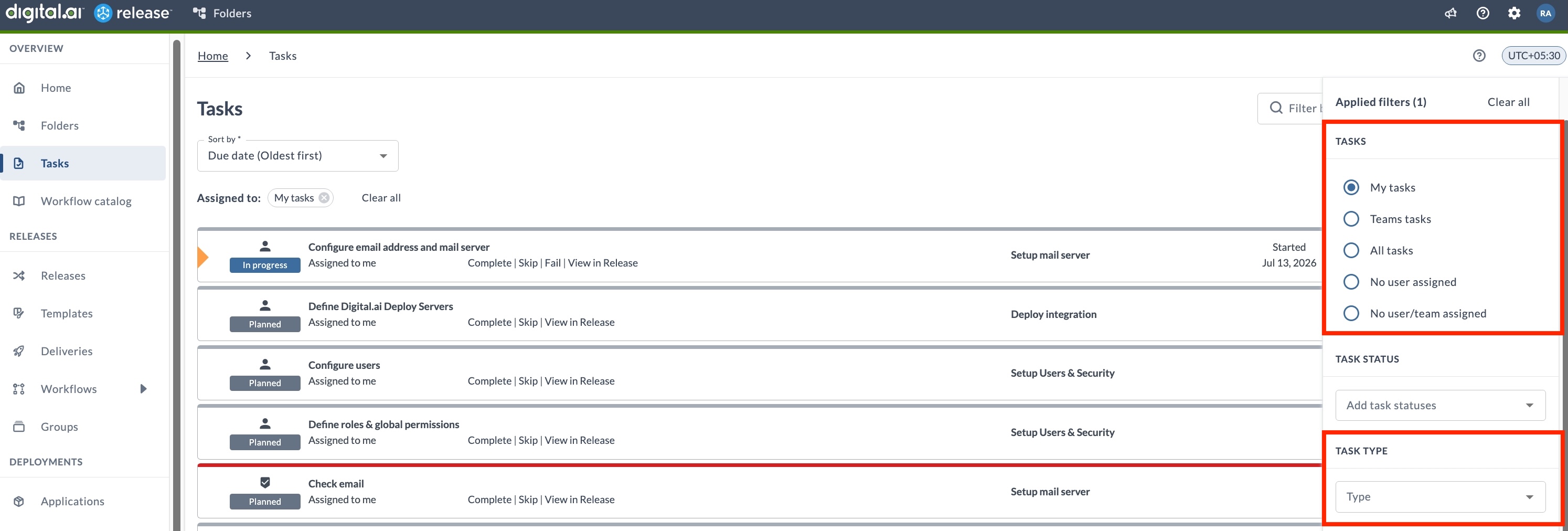
For more information, see Filtering Tasks.
Comments Preserved in Dialog Box for Changing Status
Comments entered in status-change dialogs for tasks or releases (such as Completing, Failing, Skipping, or Aborting) are now saved in your browser. This prevents comments from being lost if you accidentally click away. Your comment will be restored the next time you open the same dialog, and will only be cleared when the status change is submitted or explicitly canceled.
API Enhancements
Blackout Management Public API
Blackout period management is now exposed as a public API. Available through the REST API, it supports:
- Adding, retrieving, listing, updating, and deleting blackout periods.
- Checking whether the current time falls within a blackout.
For more information, see Manage Blackouts via API.
Live Deployments
External Links on Live Deployment Cards
Live Deployment cards now display external links supplied by the Argo CD deployment provider. Links are populated from Argo CD application annotations that use the link.argocd.argoproj.io/ prefix, giving you quick access to related external resources directly from the Live Deployments dashboard.
For more information, see Live Deployments in Release.
Plugins and Integrations
The following plugins received updates in this release.
Argo CD Container Plugin
The following updates are introduced for the Argo CD Container plugin:
- Added a Refresh field to the Sync Application (Container) task to control manifest refresh before sync. Set it to
nonefor no refresh,normalto re-fetch and re-render using the repo cache, orhardto ignore the repo cache.
For more information, see Argo CD Container Plugin.
Argo CD Plugin
Added a new Terminate Argo CD Operation task to force-stop a running Argo CD operation (sync, pre-hook, post-hook, or rollback) on an application. Use this task to resolve stalled synchronizations without manual intervention.
For more information, see Argo CD Plugin.
Deploy Plugin
Added PAT (Personal Access Token) as a new authentication method for the Deploy Server connection.
For more information, see Deploy Plugin.
GitLab Plugin
Added Retry wait time and Maximum retries fields to the Trigger Pipeline task to control polling behavior when checking pipeline status.
For more information, see GitLab Plugin.
April 2026
Release SaaS provides a dedicated instance with enterprise-grade capabilities.
- Dedicated instance - Isolated environment per customer instead of a shared tenant.
- Multi-user access - Platform-managed authentication with preconfigured user-groups.
- Higher resource limits - Resource limits are approximately 10x higher than the trial edition.
- Broader feature set - Dashboards, workflow catalog, global and folder variables, connections, triggers, applications, and environments.
- Integrations - 30+ pre-installed plugins (standard and container-based), XL CLI and REST API.
- Cloud-based Release Runner - Limited default runners provided by Digital.ai for container plugin tasks.
For more information, see Release SaaS.
Ask Release
Ask Release is actively evolving. New capabilities and improvements are being added regularly.
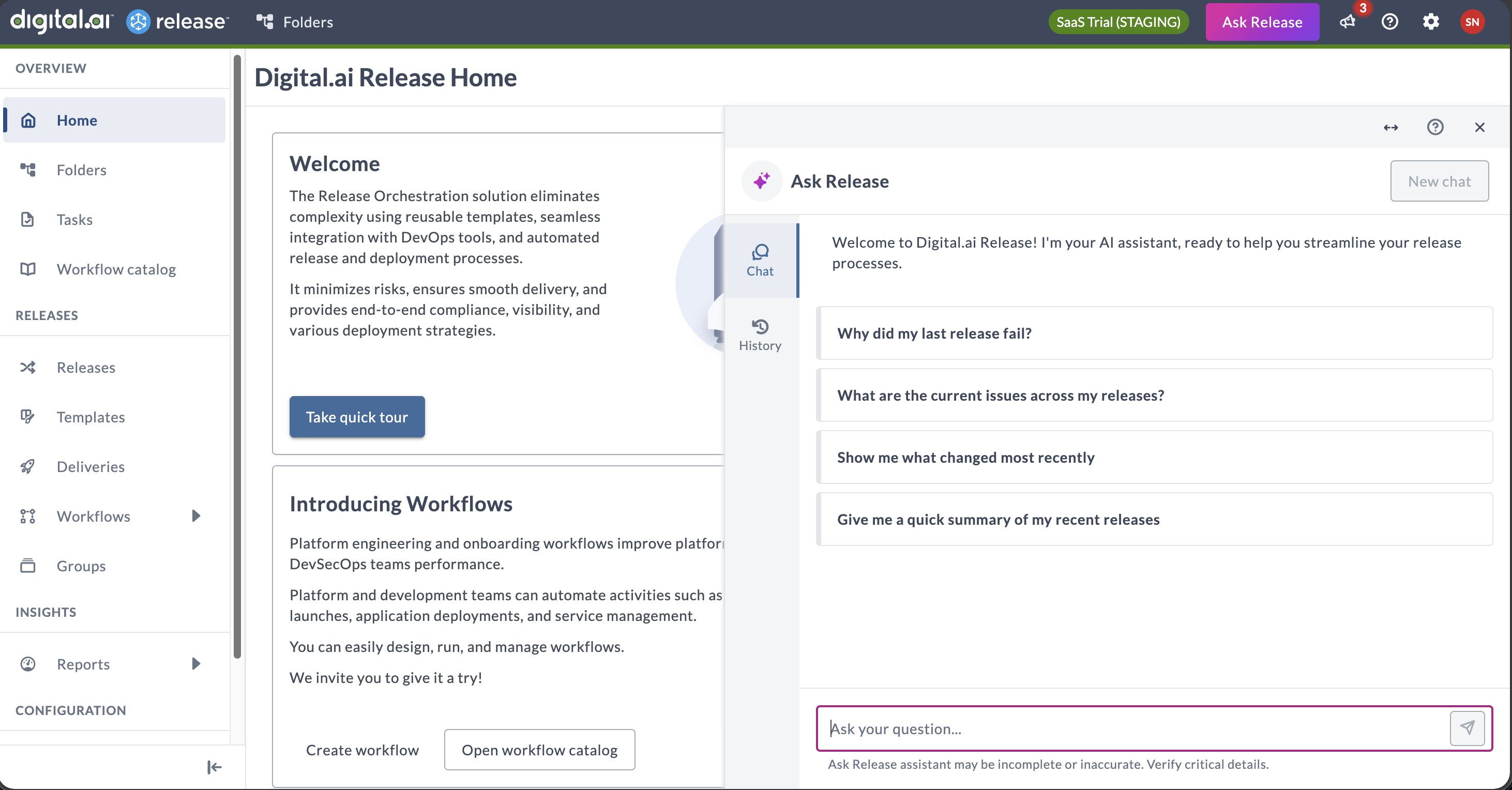
Ask Release is an AI-powered assistant embedded in Digital.ai Release that lets you interact with the platform using natural language. Instead of navigating multiple screens and manually searching for information, you can ask questions and get immediate, contextual answers about what is happening across your release operations.
Why Ask Release
Release managers and teams often struggle to get accurate, contextual answers quickly as information is scattered across pipeline views, dashboards, and configuration screens. Ask Release solves this by analyzing your system data and delivering instant answers grounded in the operational context of your Release instance.
Unlike generic AI tools, Ask Release is:
- Embedded in Release - available directly in the UI, no context switching
- Permission-aware - only returns data you are authorized to see
- Grounded in live Release data - answers come from your actual system data via Release MCP tools, not general knowledge
Key Highlights
- Conversational AI: Ask questions about your releases and get instant, actionable answers with clickable links, tables, and structured summaries.
- Status Awareness: Query the status of releases, tasks, approvals, blockers, integrations, and more without navigating multiple screens.
- Context awareness: Ask Release scopes results based on where you open it—global, folder, or release view.
- Conversation history: Resume previous conversations from the History tab.
- Permission-based access: Results follow your existing Release permissions. Ask Release cannot access data you cannot see in the UI.
- Read-only and secure: Ask Release retrieves and displays information only. It cannot start releases, approve tasks, or modify any data. All interactions are audit logged.
Ask Release is enabled by default in all SaaS environments. For more details, see Ask Release.
Release SaaS Trial - Sep 2025
Release SaaS Trial provides a 30-day, self-service environment for evaluating Release SaaS.
- Single-user tenant with auto-provisioned credentials
- Access to core release orchestration: pipelines, tasks, and REST API
- Preconfigured demo template to explore an end-to-end delivery flow
For more information, see Release SaaS Trial.