November 2026
Version: 27.1.0-1102.1100
AI Features
Digital.ai Release 26.1 adds a Troubleshooting Agent to AI Assistant, expands the questions the Generic Agent can answer, and includes Reporting Agent enhancements.
Troubleshooting Agent
AI Assistant now includes a Troubleshooting Agent that investigates failed releases and tasks. Start a new chat and select Troubleshooting from the agent selector. Then ask why a release failed, which tasks failed and with what errors, or whether the same tasks fail across your recent failed releases. When a question covers more than one release, the agent analyzes up to five of the most recent matching failed releases.
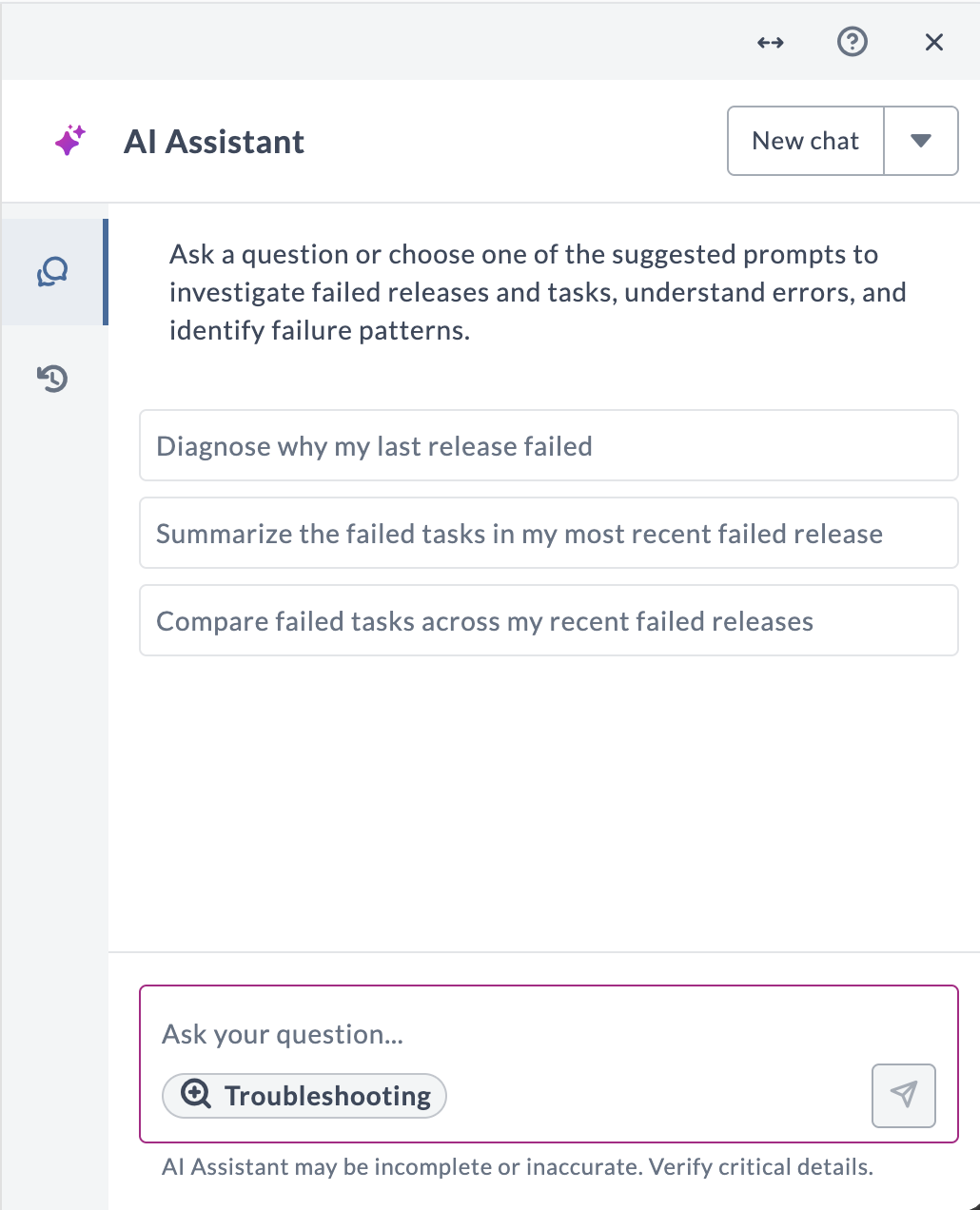
Task Troubleshooting is still available from a failed task's Explain error button and covers the failure of that one task.
For more information, see:
Trigger and Plugin Questions in AI Assistant
The Generic Agent can now answer questions about release triggers and plugins. Ask it to list triggers, or to show a trigger's definition, conditions, enabled state, and the template it starts. You can also ask which plugins are installed and at what versions, and search the plugin gallery for available plugins and updates. These queries are read-only, so AI Assistant cannot change a trigger or install a plugin.
For more information, see What You Can Query.
Reporting Agent
The Reporting Agent in AI Assistant, a Tech Preview feature, includes the following enhancements.
Release and Workflow Tag Filter for Reporting Tiles
Reporting tiles saved from the Reporting Agent now support the Release/Workflow tags filter. When your question filters by tags, the tile is saved with those tags and with how they are matched, contains all or contains any. You can review and change the tags when you configure the tile.
For more information, see Tile Filters.
Single-Color Charts
You can now ask the Reporting Agent to show a chart in a single color, such as "Show task count by type as a bar chart in a single color." This applies to bar, horizontal bar, stacked bar, line, pie, and donut charts. By default, the agent continues to color charts by category or series.
For more information, see Use a Single Color.
Donut Charts
The Reporting Agent now supports donut charts in AI Assistant and in custom dashboard tiles. Ask for one in your question or in a follow-up, such as "Show release status as a donut chart."
For more information, see Chart Types.
Connections and Variables
This release introduces the following connection updates:
Referenced Connection Deletion
Release prevents deleting a connection that a Reference type variable still uses, at the release, folder, or global level. Previously, you could delete such a connection, and the variable then pointed to a connection that no longer existed.
For more information, see When a Connection Cannot Be Deleted.
Working with Releases
This release introduces the following user interface and functional enhancements:
UI and Functional Enhancements
Copy Title and ID
When you need an ID for API calls, scripts, or support requests, you can now copy it instead of looking it up manually.
On an open release, template, workflow execution, or workflow template, click the ellipsis icon next to the title, then select Copy title or Copy ID.
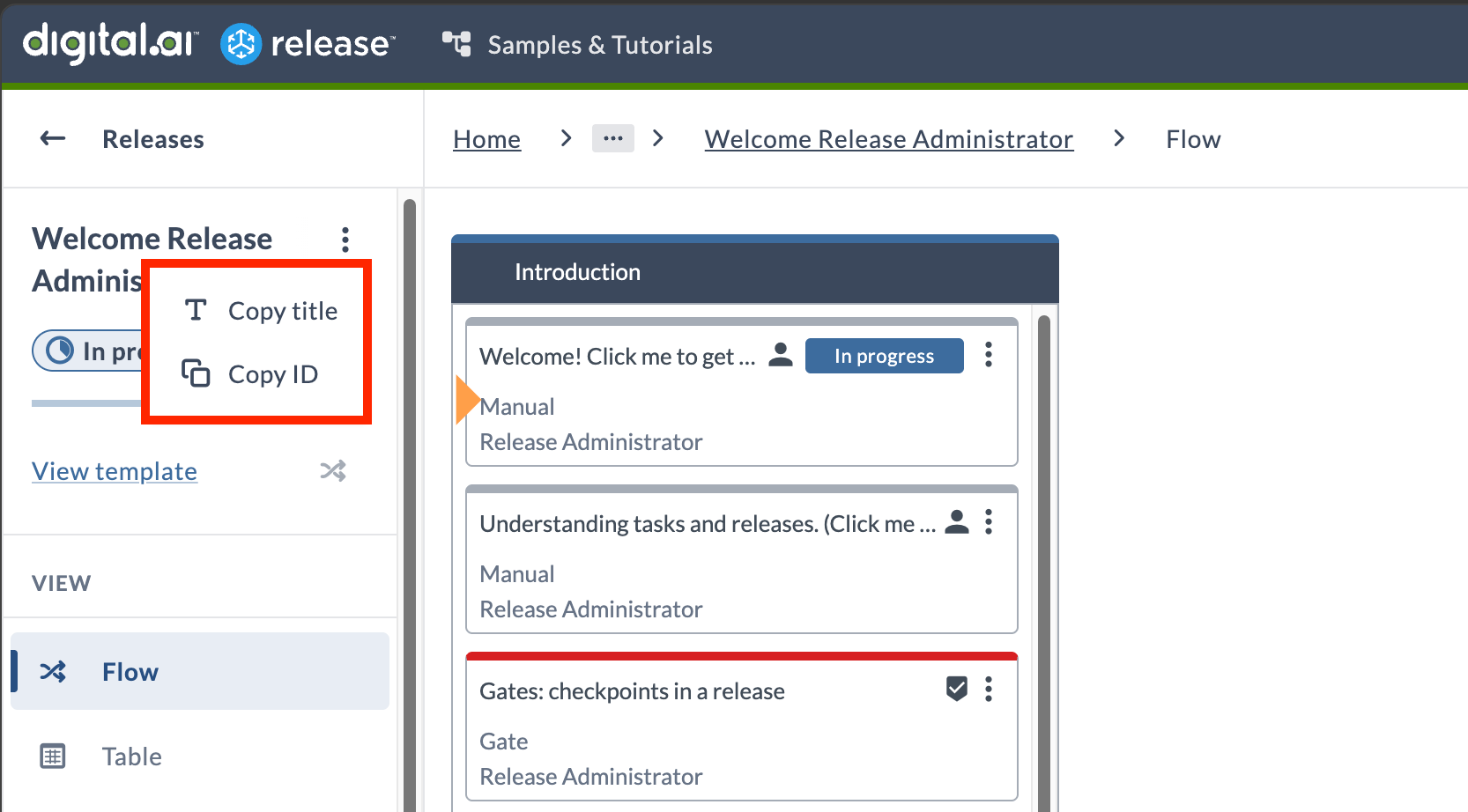
From the Releases, Templates, Workflow executions, Workflow templates, and Folders list pages, you can copy IDs directly.
For more information, see Copy the Title or ID, and the Copy ID steps for releases, templates, workflows, and folders.
Right-Click Task Menu
You can now right-click a task in the release flow editor to open its task menu at the pointer, instead of selecting the ellipsis icon. The menu has the same actions, such as assigning the task to yourself, changing its type, and copying its ID.
For more information, see Working with Tasks.
Variable Values in the Target Folder
When you create a release in a folder other than the one that holds the template, variables now take their possible values from the target folder. Previously they came from the template's folder, so the Create new release page could offer values that did not exist in the folder the release was going to.
This covers values from a List variable, applications, environments, a script value provider, or a referenced connection. Changing Save to folder refreshes them.
For more information, see Create Release in Another Folder.
Accessibility Improvements
Following the Release accessibility evaluation, this release improves keyboard navigation and screen reader support:
- Skip to main content - Jump past the navigation and header straight to the main content of the page.
- Search and filter labels - Screen readers now announce the available search criteria for each field.
- Folder page - The Add folder button is now reachable with Tab.
- Side menu - Navigate with Tab and press Enter to open a page.
- Drop-down menus - Buttons and menus that open drop-down menus now let screen readers announce that a menu will open and whether it is currently expanded. This applies across the toolbar, sidebar, dashboards, Task Drawer, list pages and actions, cards, and more.
Plugins and Integrations
The following plugins and integrations have been updated or added in this release.
Agent Orchestration Container Plugin
Two new connections configure how an agent runs:
- AI: Agent Profile (Container) holds reusable agent instructions and a tool policy.
- AI: Agent Execution Policy (Container) holds reusable runtime limits, timeouts, loop detection, and termination behavior.
Reference them from the new Agent Profile and Agent Execution Policy fields on the AI: Agent task. An existing agent task that sets neither keeps working.
Every agent run is now bounded, stopping at 20 iterations, 50 tool calls, or 30 minutes by default, and hung model and MCP calls time out instead of running indefinitely. The task has three new output properties alongside Result: Completed, Termination Reason, and Total Tokens. The On Limit Reached setting controls whether reaching a limit fails the task or completes it with the partial result.
The AI: Agent task now writes its activity report on every run, not only on success. The MCP: List Tools, MCP: Call Tool, AI: Prompt, AI: Chat, and AI: Agent tasks show a status line on the task card while they run. AI Model connections no longer set the temperature to 0, so each provider applies its own default.
For more information, see Agent Orchestration Container Plugin.
AWS Container Plugin
The AWS plugin has been updated to work with the AWS libraries upgraded in this release.
For more information, see AWS Container Plugin.
Administration
This release introduces the following administration updates:
Custom Plugin Uploads
Release Administrators can now upload custom container-based plugins to a Release SaaS instance. Previously, only the plugins that were bundled and maintained by Digital.ai were available.
To upload a plugin, go to Settings > Manage Plugins, select the Installed plugins tab, and select Upload. The plugin is ready to use as soon as the upload finishes, and its task types are available in templates right away. You can upload only container-based plugins.
A new Upload plugins global permission controls who sees the Upload button. Users of the Release Admin user group have this permission.
Custom plugin uploads are turned off by default. To enable this setting for your instance, submit a request to Digital.ai Support.
For more information, see Plugin Manager.
Automated Task Retry Limit
A task failure handler that retries a failed task now stops after 15 automated retries and marks the task as failed. Previously it retried indefinitely, so a task that kept failing was retried without end. Resolve the cause of the failure, then retry the task manually.
For more information, see Task Failure Handler.
Runner Updates
This release introduces the following Runner updates:
Docker Registry Credentials
For the runners you install and connect yourself, runner registry settings now include a Docker registry credentials section. Each entry takes a Registry URL, Username, and Password, and lets a runner sign in to a registry when it pulls images. These credentials apply only to runners that use the Docker profile. Runners that use the Kubernetes profile continue to authenticate through registry pull secrets.
For more information, see Configuring Digital.ai Release Runner Registry Settings.
Runner Settings Synchronization
A runner now retrieves all of its settings from Release every 10 minutes. Settings changes are applied to a runner as soon as you save them, and this periodic synchronization is a safeguard that corrects a runner whose settings have drifted from what Release shows. To change the interval, set the release.runner.control-channel.settings-sync-interval property on the runner.
For more information, see Configuration Parameters for Release Runners.