May 2026
Version: 26.3.0-518.1100
Deployment Visibility and Versioning
Git Folder Versioning Improvements
Relative Path References
Previously, all path template and folder references were stored as absolute paths. Now, references within a versioned folder structure are stored as relative paths — making versions portable across environments.
When applying a version to a different folder, internal references resolve automatically to the new location — no broken links, no manual path fixes. External references (outside the versioned folder) remain absolute.
For more information, see GitOps-enabled Folder Versioning.
Live Deployments
External Links on Live Deployment Cards
Live Deployment cards now display external links supplied by the Argo CD deployment provider. Links are populated from Argo CD application annotations that use the link.argocd.argoproj.io/ prefix, giving you quick access to related external resources directly from the Live Deployments dashboard.
For more information, see Live Deployments in Release.
Reporting, Automation and APIs
API Enhancements
Blackout Management Public API
Blackout period management is now exposed as a public API. Available through the REST API, it supports:
- Adding, retrieving, listing, updating, and deleting blackout periods.
- Checking whether the current time falls within a blackout.
For more information, see Manage Blackouts via API.
Connections and Variables
Connection Enhancements
Duplicate Connection
You can now duplicate an existing connection at the folder and global levels — the copy is created in the same location — to quickly set up a new connection with the same configuration. This is ideal for configuring connections across multiple environments like DEV, STAGE, and PROD.
Duplicating a connection carries over all configuration fields, except credential fields such as passwords and API keys, which must be re-entered. Password variables are preserved when the source connection uses variable references. After duplicating, update the title (suffixed with "copy"), credentials, and any environment-specific settings.
For more information, see Duplicating a Connection.
Working with Releases
UI and Functional Enhancements
Task Filtering Updates
-
The Task Ownership filter on the Tasks page has been updated with more granular options for filtering unassigned tasks:
- No user assigned – Shows tasks that have no user assigned. A team may or may not be assigned to these tasks.
- No user/team assigned (renamed from Unassigned tasks) – Shows tasks that have neither a user nor a team assigned.
-
A new Task Type filter has been added to narrow down tasks based on their type. You can select the task type from the dropdown, which includes:
- Core tasks (for example, GATE, Manual, Notification)
- Script tasks (Groovy, Jython, External scripts)
- Integration tasks (for example, Agility, Argo CD, Jira, OpenShift)
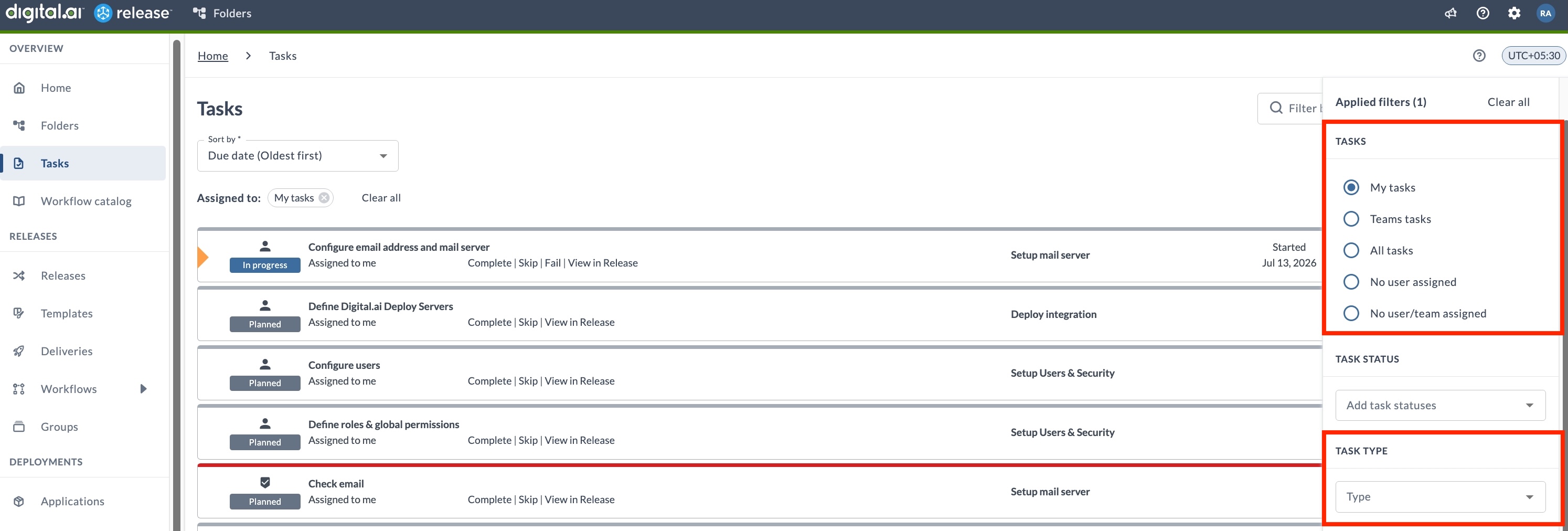
For more information, see Filtering Tasks.
Comments Preserved in Dialog Box for Changing Status
Comments entered in status-change dialogs for tasks or releases (such as Completing, Failing, Skipping, or Aborting) are now saved in your browser. This prevents comments from being lost if you accidentally click away. Your comment will be restored the next time you open the same dialog, and will only be cleared when the status change is submitted or explicitly canceled.
Plugins and Integrations
The following plugins received updates in this release.
Argo CD Container Plugin
The following updates are introduced for the Argo CD Container plugin:
- Added a Refresh field to the Sync Application (Container) task to control manifest refresh before sync. Set it to
nonefor no refresh,normalto re-fetch and re-render using the repo cache, orhardto ignore the repo cache.
For more information, see Argo CD Container Plugin.
Argo CD Plugin
Added a new Terminate Argo CD Operation task to force-stop a running Argo CD operation (sync, pre-hook, post-hook, or rollback) on an application. Use this task to resolve stalled synchronizations without manual intervention.
For more information, see Argo CD Plugin.
Deploy Plugin
Added PAT (Personal Access Token) as a new authentication method for the Deploy Server connection.
For more information, see Deploy Plugin.
GitLab Plugin
Added Retry wait time and Maximum retries fields to the Trigger Pipeline task to control polling behavior when checking pipeline status.
For more information, see GitLab Plugin.
Administration
Permission Updates
View Connections Permission
The Connections permission now allows more granular control at the folder level. A new read-only option has been added alongside the existing Edit connections permission.
- View connections (new) – View configured connections and their details within a folder. Does not allow creating, editing, deleting, or testing connections.
For more information, see Folder Teams and Permissions.