July 2026
Version: 26.3.0-713.1100
AI Features
Release MCP Server
Digital.ai Release SaaS now includes a built-in Model Context Protocol (MCP) server. MCP capabilities are provided through the bundled Release MCP Tools Plugin, which ships with Release SaaS.
For more information, see Release MCP Tools Plugin.
Python Support for Release Automation
This release extends Python support for Release automation with direct API access from the Python 3 Script (Container) task and a standalone Python API client for the Release REST API.
Direct API Access in the Python 3 Script (Container) Task
The Python 3 Script (Container) task now provides direct access to the Release API and current-context helpers. Scripts can read and update releases, phases, tasks, and variables without writing boilerplate. The task runs isolated in a container through the Release Runner, providing a modern Python 3 alternative to server-side script tasks.
For more information, see Python 3 Script (Container) task.
Migrate Jython Scripts to Python 3
If you are migrating from on-premises to SaaS, use this guide to move automation from the Jython Script task to the Python 3 Script (Container) task. The helper APIs and context helpers keep the same names and camelCase methods, so most scripts port with mechanical changes.
For more information, see Migrate Jython Script to Python 3 Script (Container).
Python API Client for the Release REST API
Added a standalone Python 3 client library, digitalai-release-api-client, for the Release REST API. It connects to a Release instance and exposes each REST endpoint as a method, returning typed Pydantic models. The client works with both Release SaaS and self-hosted instances.
For more information, see Digital.ai Release Python API Client.
Deployment Visibility and Versioning
Git Folder Versioning
Preserve Inheritance State in Git Folder Versioning
Git folder versions now remember whether a folder inherits its permissions and notifications from its parent. Previously, even when a folder was set to inherit, applying a version stopped the inheritance and gave the folder its own fixed copy of those settings (for notifications, this unchecked the Inherit notifications from parent folder option). Now, applying a version keeps the folder inheriting from its parent, just as it was when you saved. Separately, if a task points to a team that no longer exists, that team is now removed from the task automatically, and Release shows a warning listing the affected tasks.
For more information, see Inheritance Configuration in Folder Versioning.
Reporting, Automation and APIs
Reporting and Export
Dashboard PDF Export
PDF exports for custom dashboards now capture the dashboard at 100% screen resolution regardless of your browser zoom level. If the dashboard content does not fit on a single page, Release splits it across multiple pages and adds a continuation note.
For more information, see Using Release Dashboards.
Connections and Variables
Variable Enhancements
This release includes the following improvements to working with variables:
Variable Autocomplete in Description Fields
Description fields on the Template, Release, and Workflow properties pages now suggest and resolve variables, including folder variables. Typing ${ in a description field displays a suggestion list, and a saved description shows the resolved variable values.
For more information, see Variable Autocomplete in Description Fields.
List and List Box Variable Value Search
On the Create Release page and the Triggers page, you can now search List and List box variable values by typing a substring. This makes it easier to find and set the correct value in variables that have long lists of possible values.
For more information, see Searching List and List Box Variable Values.
Working with Releases
Timezone Support
Each user can now individually set the timezone Release uses to display dates and times, instead of relying only on their browser's timezone. Set this under Profile settings > Personal Regional Settings, choosing from the list of available timezones, each shown with its UTC offset, for example UTC+01:00 Europe/Amsterdam.
Changing your timezone updates dates and times to reflect the newly chosen timezone, including the Release flow page, Task details, list pages, filters, and other pages. Every release page also shows a timezone pill with the current UTC offset, for example UTC+02:00; hover over the pill to see the full timezone name.
YAML representations of releases and templates—including the template code preview and Git folder versioning—and audit reports continue to use the server timezone where Release is running. The audit report includes details indicating the timezone used.
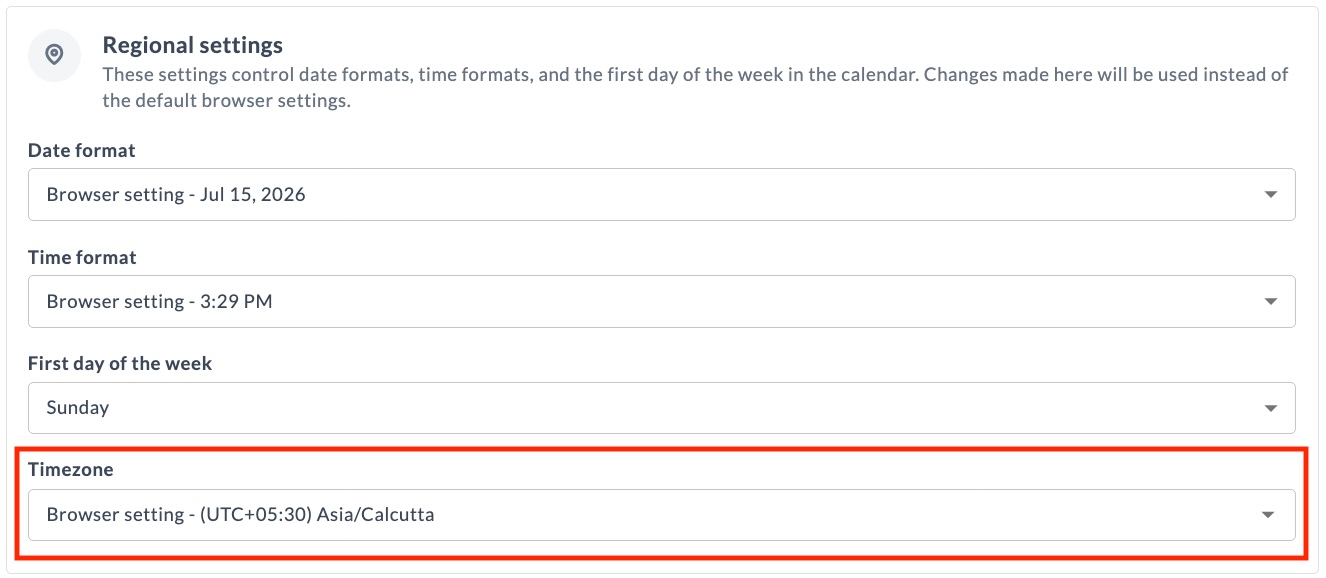
For more information, see Timezone.
Task Drawer Improvements
Unsaved Changes in Script Fields
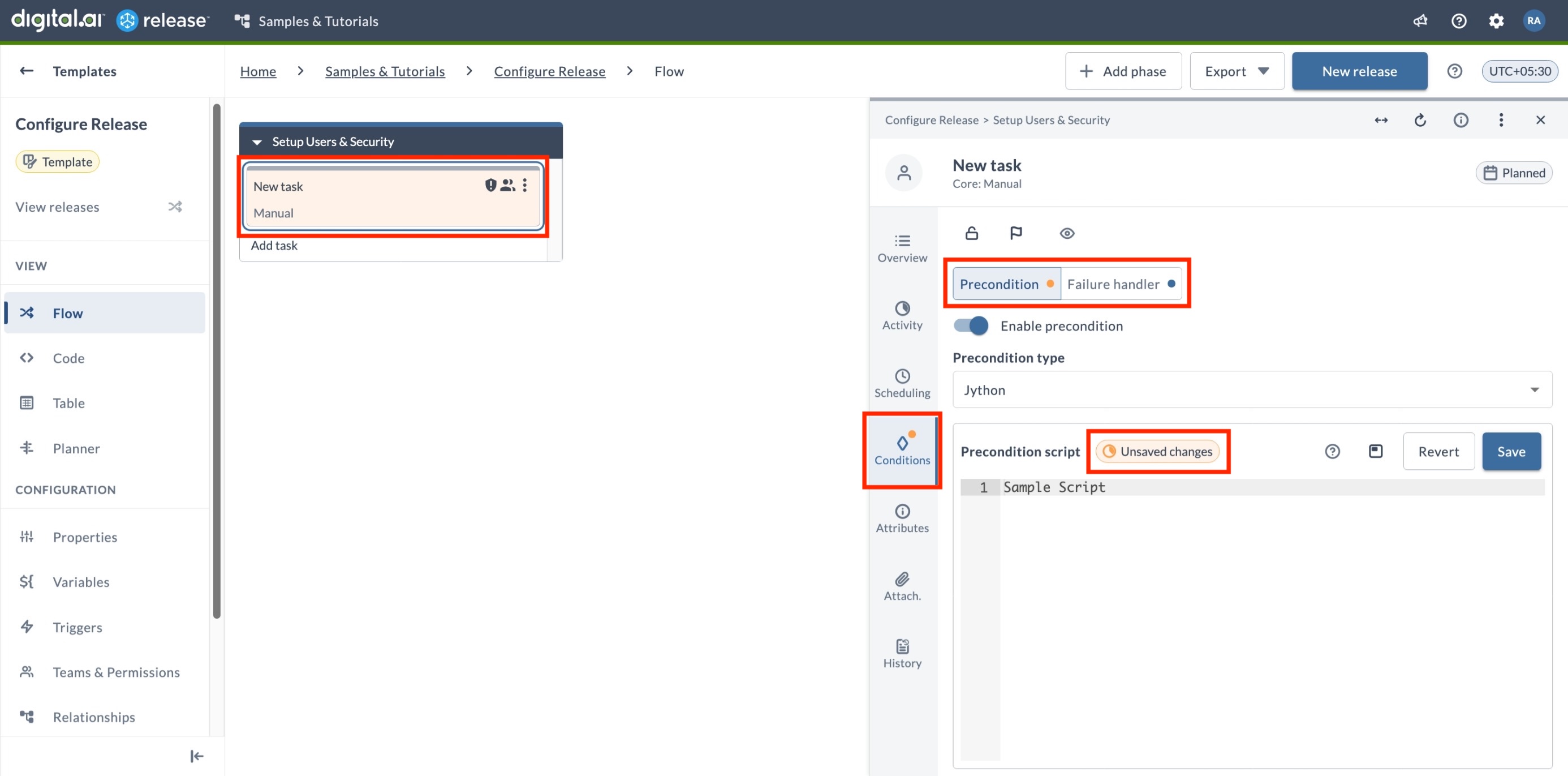
Release now preserves unsaved changes to script fields in the Task Drawer within your session so you don't lose work when navigating away from a task. This applies to the Script field in Jython Script, Groovy Script, and Webhook: Wait for JSON Event tasks, to precondition and failure handler scripts, and to custom tasks that include a script editor component. Unsaved changes are cleared on login. Unsaved changes are not considered when a task starts executing.
When a script field has unsaved changes, an unsaved changes badge appears in the Script editor field, an orange badge marks the affected tab in the Task Drawer, and the task card turns orange in the Template and Release Flow pages.
For more information, see Managing Tasks with the Task Drawer.
Configuration Indicators for Preconditions and Failure Handlers
The Conditions tab in the Task Drawer now shows a badge indicating the configuration state of preconditions and failure handlers, so you can see at a glance what is configured.
- Blue badge – the precondition or failure handler is configured and saved.
- Orange badge – the precondition or failure handler script has unsaved changes.
For more information, see Managing Tasks with the Task Drawer.
Connection Selection
The connection picker in the Task Drawer now groups connections by folder — global or a specific folder path — and displays the URL for each connection when it's configured in the connection settings. This helps you pick the right one when connections share similar names. Each entry also includes a link to open the connection details, available if you have the View connections or Edit connections permission for the folder where the connection is defined.
For more information, see Using the Saved Connection.
Filtering Improvements
Inline Filtering
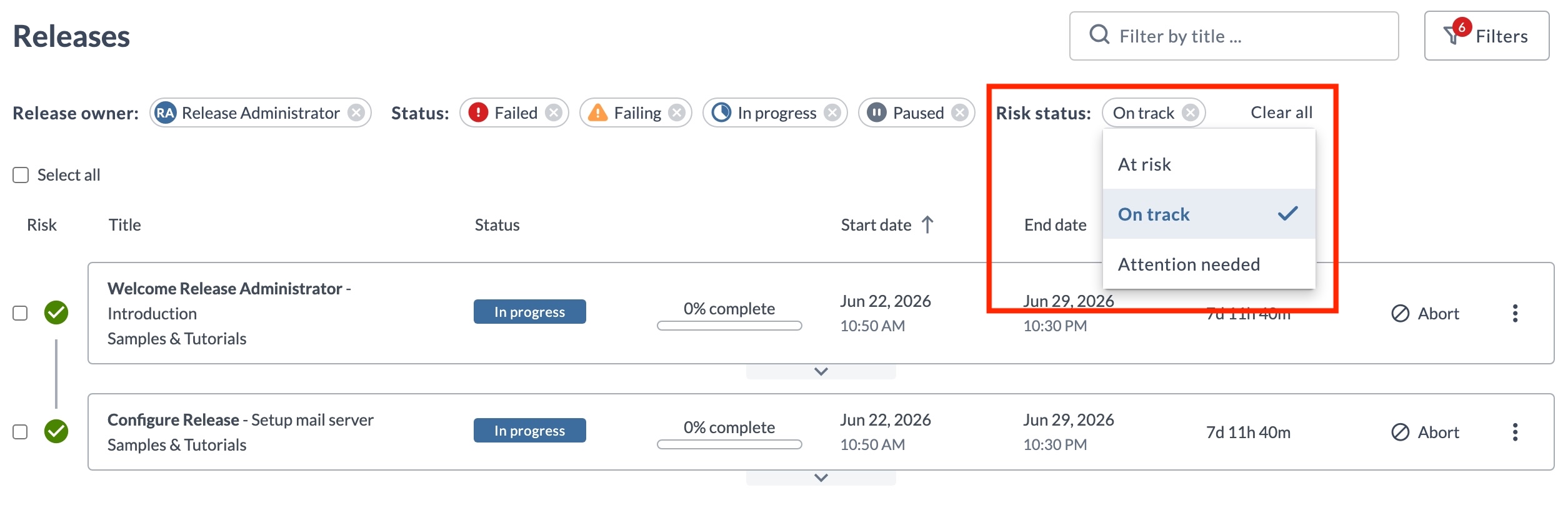
You can now change a filter's value directly from its pill — click the value displayed and choose a new one. This works on every page that uses the new filters, including Releases, Templates, Tasks, Workflow templates, Workflow executions, and Runners.
UI and Functional Enhancements
Homepage Layout Update
The default Homepage layout has been updated with new wording and an updated tile layout.
- No action required if you have not customized the Homepage — the updated layout is visible after upgrading, when setting up a new environment, or when enabling the Homepage for the first time.
- No impact if you have customized the Homepage — your custom layout is preserved and continues to display as configured.
For more information, see Release Homepage.
Plugins and Integrations
Argo CD Container Plugin
- Added App Annotations and App Labels fields to the Create Application (Container) and Update Application (Container) tasks. Define these as key-value pairs to apply annotations and labels to the Argo CD application.
- Added a Refresh field to the Sync Application (Container) task to control manifest refresh before sync. Set it to
nonefor no refresh,normalto re-fetch and re-render using the repo cache, orhardto ignore the repo cache.
For more information, see Argo CD Container Plugin.
Argo CD Plugin
The Create Or Update Application task now supports an Ignore Differences YAML field. Use it to add ignoreDifferences rules to the Argo CD application manifest so that Argo CD excludes specific fields from drift detection.
For more information, see Argo CD Plugin.
GitLab Plugin
Enhanced the Query Project task. Added a Kind input field to filter projects by namespace kind (for example, group or user), and expanded the output properties to return HTTP URL, Project Name, Namespace, Default Branch, Web URL, SSH URL, and Visibility in addition to Project ID.
For more information, see GitLab Plugin.
HashiCorp Vault Plugin
Fixed namespace handling so the plugin works correctly with Vault Enterprise. The X-Vault-Namespace header is now sent on both authentication and secret requests when a namespace is configured, and only when the namespace is set.
For more information, see HashiCorp Vault Plugin.
Release LLM Integration Container Plugin
The LLM Integration plugin is now released as an official Digital.ai plugin. It was previously available as a community plugin.
Added Anthropic as a supported LLM provider, alongside OpenAI, Gemini, and Digital.ai LLM. The AI: Prompt, AI: Chat, and AI: Agent tasks can now connect to Anthropic Claude models through an AI Model: Anthropic connection, which takes an API key and a model name (for example claude-opus-4-5).
For more information, see Release LLM Integration Container Plugin.
Administration
Runner Updates
On-Prem Runner Support
In addition to the cloud-based Release Runner managed by Digital.ai, you can now install and connect your own on-prem runners to your Release SaaS instance. Install a runner using Docker or the xl kube install command.
For more information, see Overview of Release Runner.
Runner Configuration Templates
You can now create runner configuration templates in Connections and automatically apply them to newly registered runners.
The active template, selected on the Runners page, overrides runner defaults only for the fields it defines. Fields left empty keep the runner's default values.
Templates can define capabilities, capacity, eviction time, idle time to live, and registry settings, making it easier to standardize runner configurations and support autoscaling.
For more information, see Runner Configuration Templates.
Runner Performance Improvements
Runner executor pods for container-based tasks now use higher default CPU and memory allocation. This reduces execution time for container plugin tasks noticeably. No configuration changes are required.
Runner Token Expiry Handling
Runners now receive the license token expiry date during registration with Release. This lets a Runner monitor its own token status and transition to a controlled degraded state when the token expires, instead of failing abruptly. As the expiry date approaches, the Runner logs a warning 24 hours and again 12 hours before the token expires.
For more information, see Token Expiry Handling.
Cloud-Based Runner for Release SaaS Trial
A cloud-based Release Runner is now provided and maintained by Digital.ai for Release SaaS Trial instances. It runs container-based plugin tasks and requires no setup.