Release SaaS - Demo Templates
Digital.ai Release SaaS includes six preconfigured demo templates in the Digital.ai demo folder. They are grouped into three subfolders by the kind of delivery flow they demonstrate, from AI and MCP automation to a full enterprise release pipeline.
All tasks in all six templates are wired with stubbed connections that point to a Digital.ai-hosted mock service, so you can create a release and run any template straight away. You do not need to change the supplied credentials or have the third-party products available.
Replace the stubbed connections with your own credentials at any time to try live integrations. For more information, see Connections.
Open and Run a Demo Template
- From the navigation pane, click Folders.
- Select the Digital.ai demo folder, then select the subfolder that holds the template you want.
- Click Templates, then select the template to open its Flow view.
- Click New release to create a release from the template.
- Start the release and follow the tasks through each phase.
For more information, see Start a Release from a template.
Agentic Automation
Three templates that demonstrate the AI and MCP task types from the Agent Orchestration Container plugin, ordered from a simple prompt chain to an autonomous agent. For the task reference, see Agent Orchestration Container Plugin.
1. MCP-Powered Insights
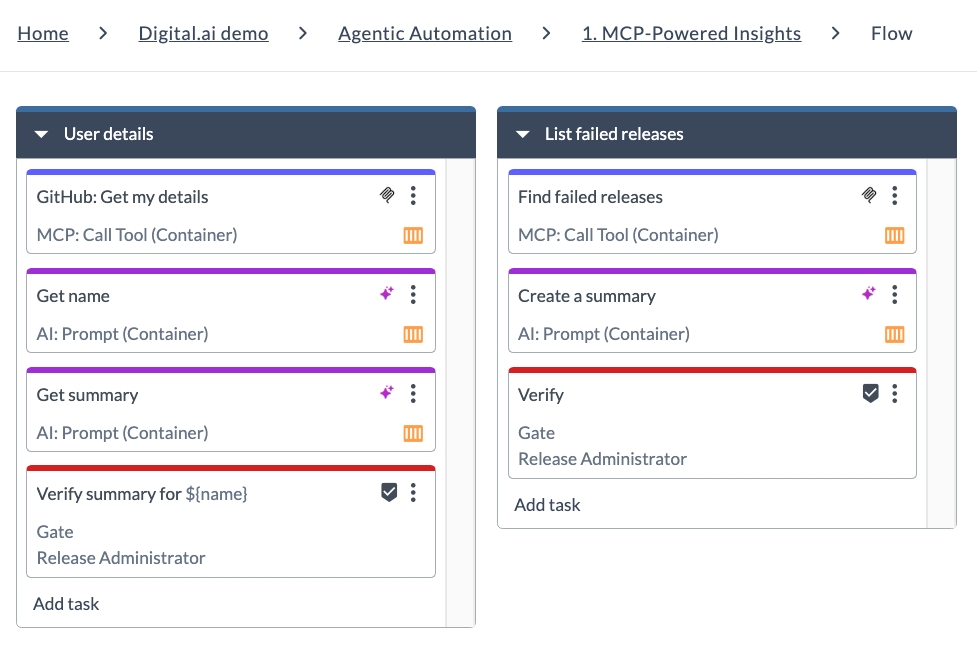
Shows how Release retrieves external or platform data through MCP, uses AI prompts to interpret and summarize the results, and adds human validation where needed. The two phases are unrelated to each other. One works with data from a GitHub MCP server, the other with data from Release itself.
| Phase | What happens |
|---|---|
| User details | Calls an MCP tool to get the authenticated GitHub user details, then two AI: Prompt tasks extract the name and write a summary. A gate titled Verify summary for ${name} asks you to confirm the result, which shows how a value produced by one task is reused later in the flow. |
| List failed releases | Queries Release itself through MCP for releases that have failed, has an AI: Prompt task summarize them, and holds at a gate for review. |
For more information, see Variables in Digital.ai Release and Gate Tasks.
2. Agentic Release Automation
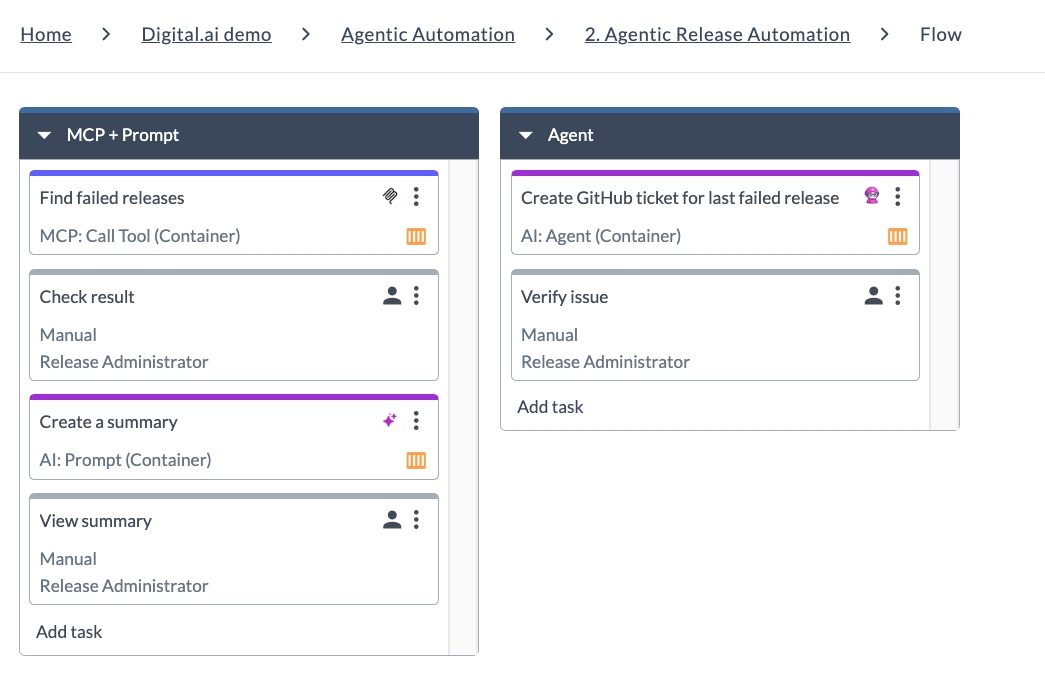
Shows the progression from step-by-step MCP retrieval and AI summarization to an autonomous agent that takes follow-up action. Both phases work from the same source, the failed releases in Release, so you can compare the two approaches and decide which fits your use case.
| Phase | What happens |
|---|---|
| MCP + Prompt | An MCP: Call Tool task finds failed releases and an AI: Prompt task summarizes them, with manual tasks in between so you can check the result and view the summary. Every step is spelled out in the flow. |
| Agent | A single AI: Agent task is given the goal of creating a GitHub ticket for the last failed release and decides for itself which MCP tools to call. It has both MCP servers available, which is how it gets from Release data to a GitHub issue in one task. A manual task follows so you can verify the issue it created. |
For more information, see AI: Agent.
3. Conversational AI Task
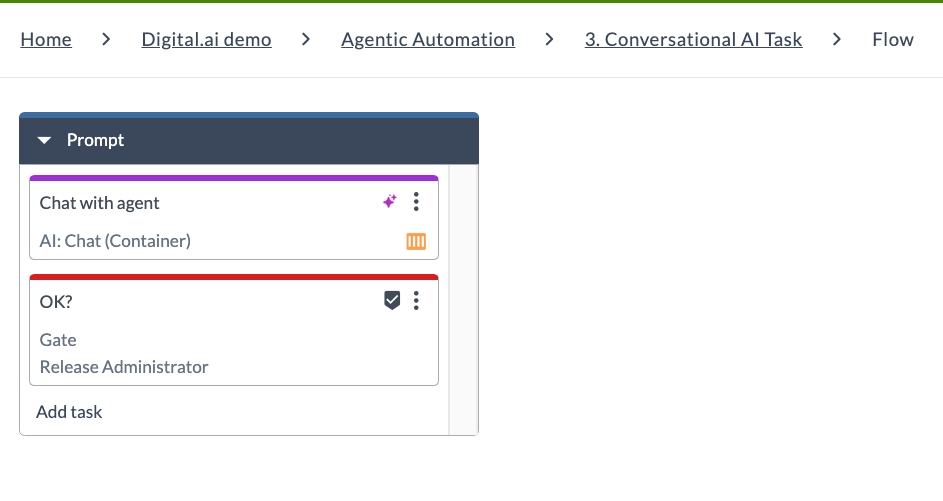
The smallest template, useful as a starting point. It embeds an interactive AI conversation directly in a running release so you can engage with the AI before the release proceeds. Use this pattern for human-in-the-loop steps such as approvals, troubleshooting, or gathering context before a decision.
| Phase | What happens |
|---|---|
| Prompt | An AI: Chat task opens a conversation with the LLM, then an OK? gate lets the Release Administrator confirm the outcome before the release continues. |
For more information, see AI: Chat.
Enterprise Delivery Orchestration
Two templates that show how Release coordinates work tracked in Digital.ai Agility across several teams and releases, using Patterns & Deliveries to report progress against portfolio items.
1. End-to-End Delivery Orchestration
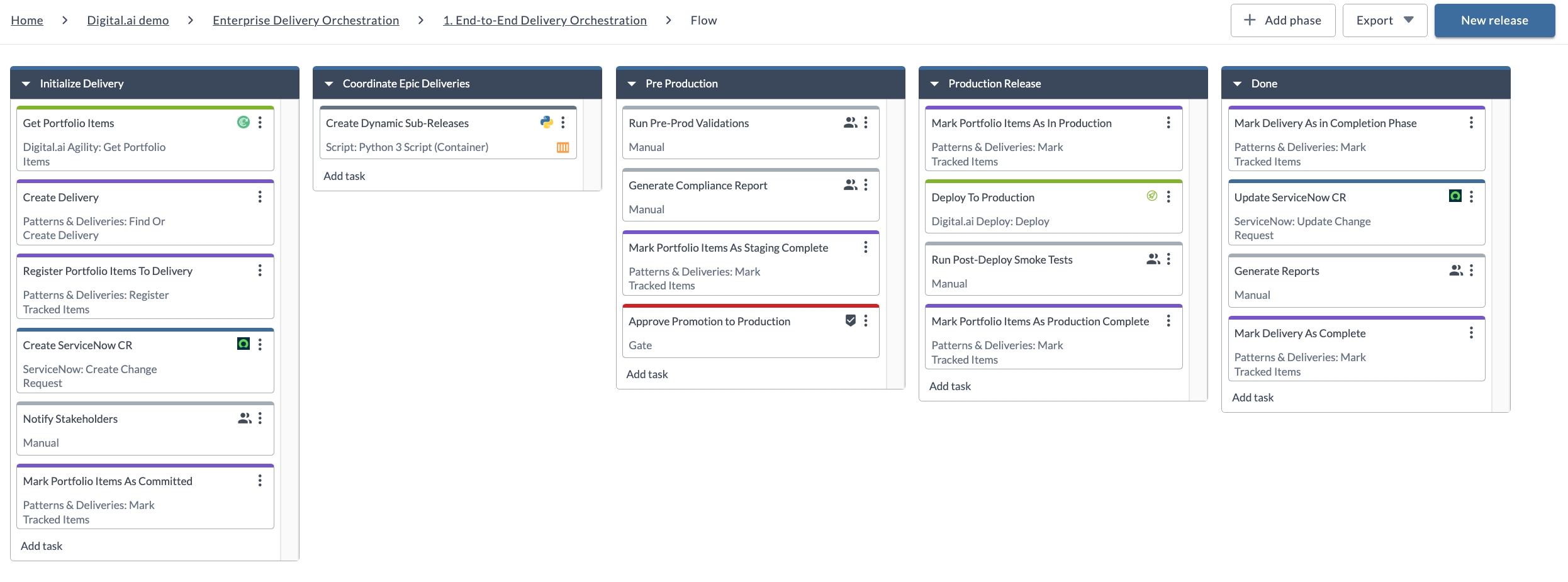
Orchestrates an enterprise delivery from portfolio planning through production deployment and completion. This is the parent flow of the two Enterprise Delivery Orchestration templates. It establishes the delivery record, then coordinates the downstream releases that carry out the work, keeping traceability end to end.
| Phase | What happens |
|---|---|
| Initialize Delivery | Pulls portfolio items from Digital.ai Agility, creates a delivery, registers those items as tracked items, raises a ServiceNow change request, notifies stakeholders, and marks the items as committed. |
| Coordinate Epic Deliveries | Runs a Python 3 script task that creates a sub-release for each epic, so team-level work runs in its own release. |
| Pre Production | Runs pre-production validations, generates a compliance report, marks the items as staging complete, and holds at a gate for approval to promote. |
| Production Release | Marks the items as in production, deploys with Digital.ai Deploy, runs post-deploy smoke tests, and marks the items as production complete. |
| Done | Moves the delivery into its completion phase, updates the ServiceNow change request, generates reports, and marks the delivery complete. |
For more information, see Introduction to Delivery Patterns, Delivery Tasks, Register a Tracked Item, and Python 3 Script (Container) Task.
2. Cross-Team Epic Delivery - Auto-Triggered
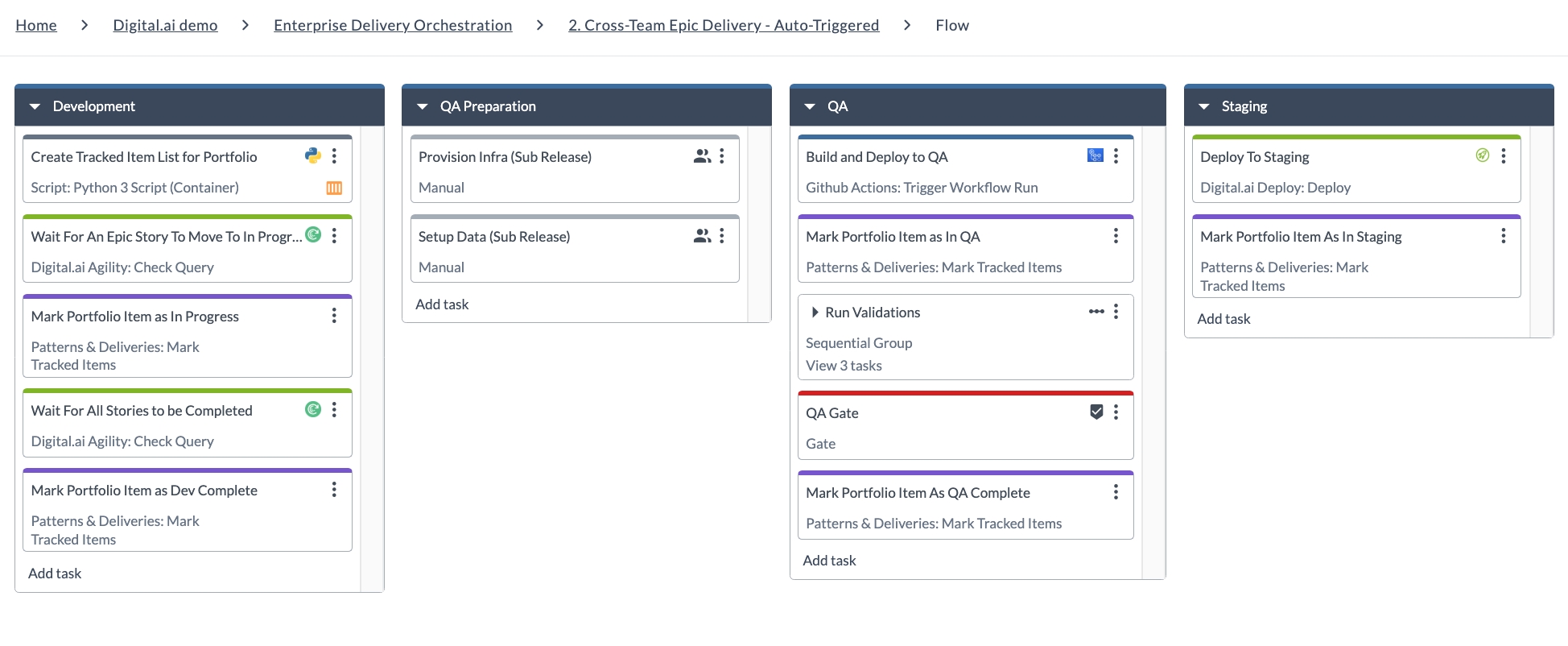
Follows a single epic through development, QA, and staging, keeping its portfolio item synchronized with execution status so progress stays visible at both the epic and the enterprise-delivery level.
You do not start this template yourself. 1. End-to-End Delivery Orchestration triggers it automatically for each epic it identifies for delivery, which is what the Create Dynamic Sub-Releases task in that template does.
| Phase | What happens |
|---|---|
| Development | Builds the tracked item list with a Python 3 script task, then Digital.ai Agility: Check Query tasks hold the flow until an epic story moves to In Progress and until all its stories are complete, marking the portfolio item at each point. |
| QA Preparation | Two manual tasks that represent the prerequisites for QA, which are provisioning the infrastructure and setting up the test data. |
| QA | Builds and deploys through GitHub Actions, marks the item as in QA, runs a sequential group of three validations, holds at the QA gate, and marks the item as QA complete. |
| Staging | Deploys to staging with Digital.ai Deploy and marks the item as in staging. |
For more information, see Agility Plugin, Github Plugin, and Create a Sequential Group.
Mobile Banking Delivery
One template that demonstrates a full enterprise release pipeline with governance, testing, and AI-assisted review across many integrations.
Mobile Banking Release Orchestration
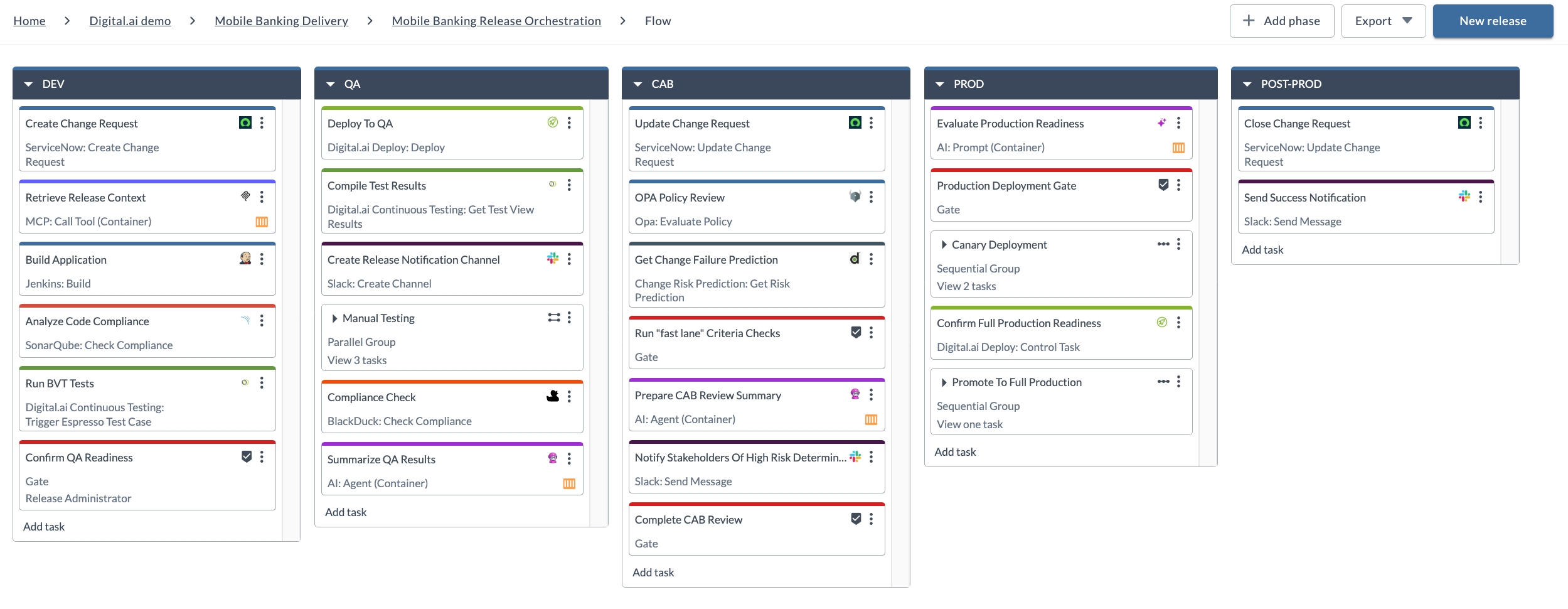
Automates the end-to-end release process for a mobile banking application, covering build, test, compliance, CAB approval, and production deployment. It is the most complete of the six templates.
| Phase | What happens |
|---|---|
| DEV | Raises a ServiceNow change request, reads the release context through MCP, builds with Jenkins, checks code compliance with SonarQube, runs BVT tests in Continuous Testing, and holds at a QA readiness gate. |
| QA | Deploys to QA with Digital.ai Deploy, compiles the test results, opens a Slack notification channel, runs three manual test tasks in parallel, checks compliance with BlackDuck, and has an AI agent summarize the results. |
| CAB | Updates the change request, reviews OPA policy, gets a change failure prediction, checks the fast lane criteria, has an AI agent prepare the CAB review summary, notifies stakeholders on Slack when risk is high, and holds at a CAB review gate. |
| PROD | Prompts an LLM to assess production readiness, gates on that assessment, runs a canary deployment with server health checks, confirms full production readiness, and promotes to full production. |
| POST-PROD | Closes the ServiceNow change request and sends a Slack success notification. |
For a task-by-task walkthrough of every phase, see Release SaaS - Mobile Banking Demo Template.