Release SaaS - Mobile Banking Demo Template
Digital.ai Release SaaS includes a preconfigured demo template named Mobile Banking Release Orchestration, in the Digital.ai demo > Mobile Banking Delivery folder.
It showcases an end-to-end delivery flow across DEV → QA → CAB → PROD → POST-PROD. All tasks are wired with stubbed connections so you can run the pipeline without connecting real systems.
For the other demo templates included with Release SaaS, see Release SaaS - Demo Templates.
You can replace the stubbed connections with your own credentials anytime to try live integrations. For more information, see Connections.
Open the Mobile Banking Release Orchestration Template
- From the navigation pane, click Folders.
- Select the Digital.ai demo folder, then select Mobile Banking Delivery.
- Click Templates, then select Mobile Banking Release Orchestration.
To run it:
- Click New release (top-right) to create a release from the template.
- Start the release and watch tasks move through each phase.
For more information, see Start a Release from a template.
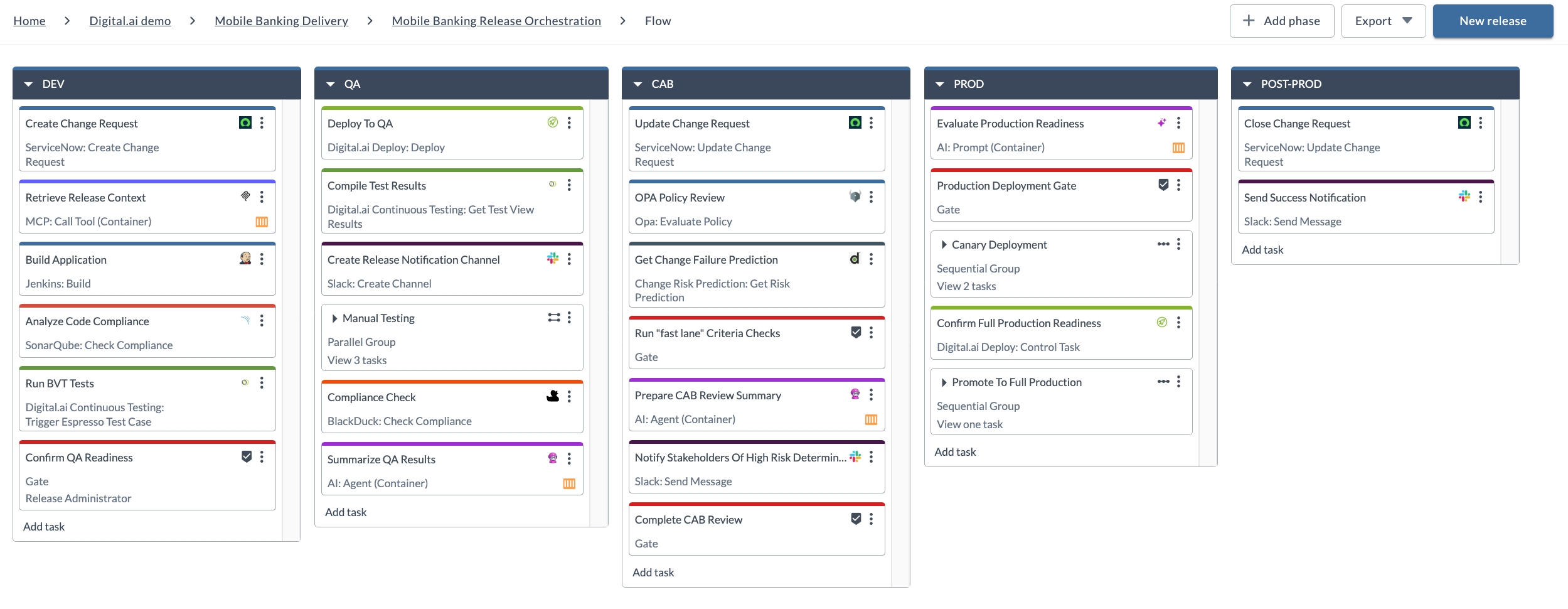
Phases and Tasks
Below are all phases and tasks exactly as they appear in the Mobile Banking Release Orchestration template. Each table lists the Task name, Task type, and a Description.
Learn more about managing and interacting with tasks in Managing Tasks Using Task Drawer.
Phase: DEV
| Task name | Task type | Description |
|---|---|---|
| Create Change Request | ServiceNow: Create Change Request | Creates a ServiceNow change request to track the proposed deployment. Learn more |
| Retrieve Release Context | MCP: Call Tool (Container) | Calls a tool on an MCP server to fetch the release context file from a GitHub repository and store it in a release variable for later tasks to use. The file covers information that should influence deployment decisions, such as application architecture, deployment strategy, security policies, and release gates. Learn more |
| Build Application | Jenkins: Build | Triggers a Jenkins job to build the application artifacts. Learn more |
| Analyze Code Compliance | SonarQube: Check Compliance | Checks code quality and security against the defined quality gates. Learn more |
| Run BVT Tests | Digital.ai Continuous Testing: Trigger Espresso Test Case | Runs the build verification test suite as an Espresso test case in Continuous Testing. Learn more |
| Confirm QA Readiness | Gate | Sign-off by the Release Administrator confirming the build is ready to move to QA. The gate carries an All tests pass condition. Learn more |
Phase: QA
| Task name | Task type | Description |
|---|---|---|
| Deploy To QA | Digital.ai Deploy: Deploy | Deploys the application build into QA. Learn more |
| Compile Test Results | Digital.ai Continuous Testing: Get Test View Results | Collects and compiles the automated QA test results. Learn more |
| Create Release Notification Channel | Slack: Create Channel | Creates a Slack channel for release updates and notifications. |
| Manual Testing | Parallel Group | Groups three manual QA validation tasks that run in parallel, which are Execute Exploratory Testing, Execute Security Penetration Testing, and Confirm Performance Testing Results. Learn more |
| Compliance Check | BlackDuck: Check Compliance | Performs an open-source license and security compliance check. Learn more |
| Summarize QA Results | AI: Agent (Container) | Runs an AI agent that produces a summary of the QA execution and the overall release quality. Learn more |
Phase: CAB
| Task name | Task type | Description |
|---|---|---|
| Update Change Request | ServiceNow: Update Change Request | Updates the ServiceNow change request with the QA results and current status. Learn more |
| OPA Policy Review | Opa: Evaluate Policy | Evaluates OPA (Open Policy Agent) rules to validate compliance and policy conditions. Learn more |
| Get Change Failure Prediction | Change Risk Prediction: Get Risk Prediction | Fetches a machine-learning driven change risk prediction score. Learn more |
| Run "fast lane" Criteria Checks | Gate | Gate that checks whether the change risk meets the criteria for CAB approval before the release proceeds. Learn more |
| Prepare CAB Review Summary | AI: Agent (Container) | Runs an AI agent that generates an executive summary for the CAB from the release evidence and context gathered so far. Learn more |
| Notify Stakeholders Of High Risk Determination | Slack: Send Message | Posts a Slack message when the risk prediction flags the change as high risk. |
| Complete CAB Review | Gate | Final CAB sign-off, where the reviewer checks the generated CAB assessment report. Learn more |
Phase: PROD
| Task name | Task type | Description |
|---|---|---|
| Evaluate Production Readiness | AI: Prompt (Container) | Prompts an LLM to assess whether the release is ready for production deployment. The assessment it produces is reviewed at the next gate. Learn more |
| Production Deployment Gate | Gate | Approval gate for entry into production, where the reviewer checks the generated production readiness assessment. Learn more |
| Canary Deployment | Sequential Group | Runs Deploy To Canary Production and Run Server Health Checks in order, releasing the new version to a small subset of targets and verifying it before a broader rollout. Learn more |
| Confirm Full Production Readiness | Digital.ai Deploy: Control Task | Runs a Deploy control task that verifies the deployment server is healthy before the full production rollout. Learn more |
| Promote To Full Production | Sequential Group | Promotes the application from the canary subset to the remaining infrastructure with a Deploy To Production task, once the canary is validated. Learn more |
Phase: POST-PROD
| Task name | Task type | Description |
|---|---|---|
| Close Change Request | ServiceNow: Update Change Request | Closes the ServiceNow change request after the production deployment completes. Learn more |
| Send Success Notification | Slack: Send Message | Posts a Slack message announcing the successful release. |