Kubernetes Plugin
The Kubernetes Plugin (Jython-based) integrates Digital.ai Release with Kubernetes to automate resource management, execute commands, and monitor workloads as part of your release workflows.
This plugin runs directly on the Release server and is best suited for lightweight Kubernetes operations via SSH or direct API access.
What You Can Do With This Plugin
- Create, update, and remove Kubernetes resources using JSON or YAML configuration
- Wait for resources to reach a desired state
- Execute
kubectlcommands on a Kubernetes host - Update manifests in a Kubernetes cluster
- Auto-discover Kubernetes connections using a kubeconfig file
Prerequisites
Before using this plugin, ensure the following:
Kubernetes Access
- Access to a Kubernetes cluster (self-managed, EKS, GKE, or similar)
- SSH access to a Unix host running
kubectl kubectlinstalled and configured with a validkubeconfigfile for authentication
Authentication
One of the following authentication methods must be configured:
- Token-based authentication (for AKS, EKS, or GKE)
- X.509 certificate-based authentication
- Username/Password-based authentication
Required Information
You should have the following details available:
- API endpoint — The URL for the RESTful interface provided by the Kubernetes API Server
- TLS certificate — Certificate for the master node
- SSH credentials — Host address, port, username, and password for the Unix host running Kubernetes
- Kubeconfig file path — For auto-discovery of cluster connections
When To Use This Plugin
Use the Kubernetes Plugin (Jython) when you need:
- Direct resource management on a Kubernetes cluster via SSH
- Lightweight orchestration without distributed execution
- Simple create, wait, and remove workflows for Kubernetes resources
For scalable, runner-based execution, use the Kubernetes Container Plugin.
Set Up a Connection to the Kubernetes Server
To set up a connection to a Unix server running Kubernetes:
- From the navigation pane, click Configuration > Connections.
- Click Add Unix Host.
- Provide the connection details:
Field Name Description Title* Symbolic name for the configuration. Connection Type* Type of SSH connection to create (for example, SUDO,SFTP,SFTP_CYGWIN,SFTP_WINSSHD,SFTP_OpenSSHD,SCP,SUorINTERACTIVE_SUDO).Temporary Directory Path Directory in which temporary files are stored. This directory will be cleaned up when the connection is closed. Jumpstation (Optional) Jumpstation that should be used to reach this host. Address* IP address or host name of the remote machine running the Kubernetes server. Port* Port on which the SSH server runs (for example, 22).Username* Username of the SSH user that Release uses to connect to the remote machine. Password (Optional) Password to use for authentication. Required if not using a private key. Private Key (Optional) Private key content to use for authentication. Private Key File (Optional) Path to a private key file to use for authentication. Passphrase (Optional) Passphrase for the private key specified in the private key file. SUDO Username (Optional) Username to sudoto when accessing files or executing commands (for example,root).SU Username (Optional) Username to suto when accessing files or executing commands.SU Password (Optional) Password of the user to suto when accessing files or executing commands. - Click Test to test the connection.
- Click Save to save the configuration.
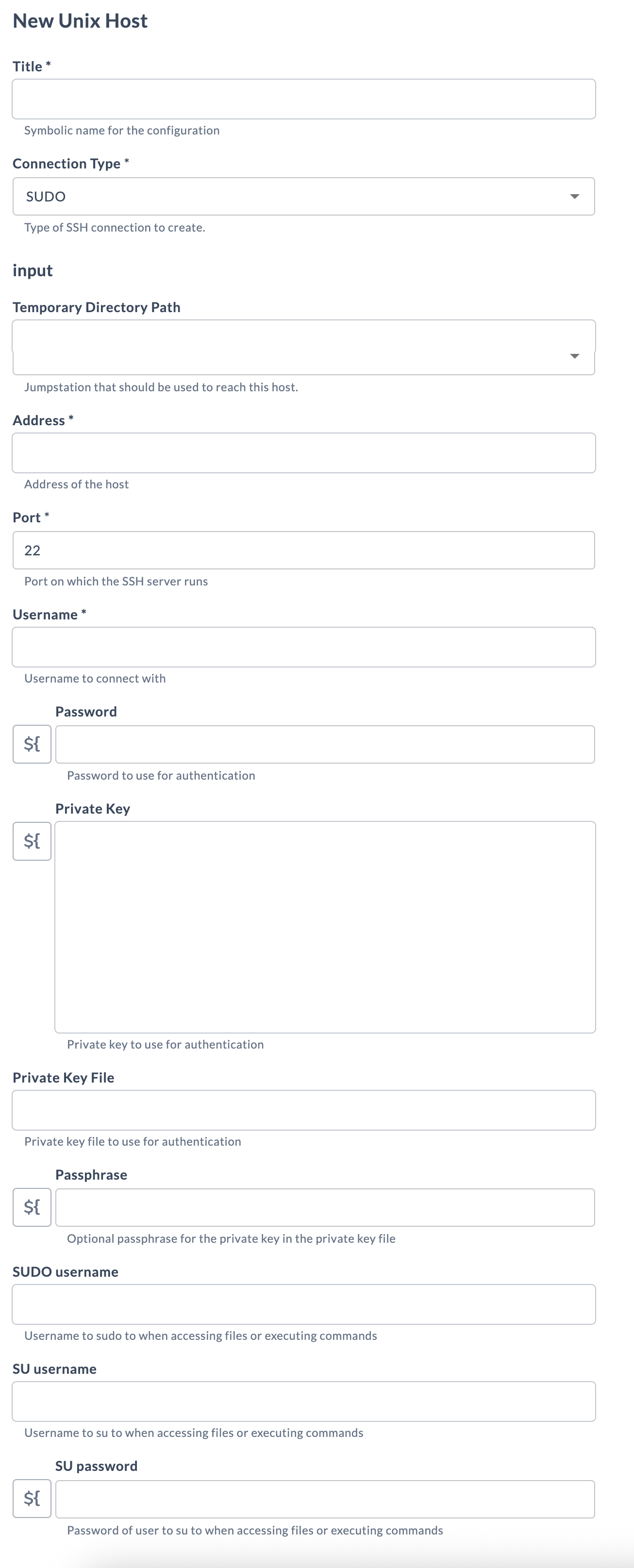
Auto-Discovery of Kubernetes Connections
You can auto-discover Kubernetes connections using a kubeconfig file. A dedicated Kubernetes: Kubectl Config connection type is available in Release, similar to the Kubernetes host connection.
-
From the navigation pane, click Configuration > Connections.
-
Under configurations, beside Kubernetes: Kubectl Config, click
 .
. -
Provide the connection details:
Field Name Description Title* Symbolic name for the configuration. Host* The Unix host (kubectl machine) where kubectlis installed. Select a configured Unix Host connection.Local Kubeconfig (Optional) Path to the kubeconfig file on the kubectl host or Release server (for example, ~/.kube/config).Context (Optional) Kubernetes context to use. Click the lookup button to discover available contexts from the kubeconfig. Kubectl Path* Complete path to the kubectlexecutable on the host (for example,/usr/local/bin/kubectl).Server (Optional) Address and port of the Kubernetes API server (for example, https://k8s-api.example.com:6443).Certificate Authority (Optional) Path to a certificate authority file for verifying the API server's TLS certificate. Client Certificate (Optional) Path to a client certificate file for TLS-based authentication. Client Key (Optional) Path to a client key file for TLS-based authentication. Token (Optional) Bearer token for authentication with managed Kubernetes services (AKS, EKS, or GKE). Insecure Skip TLS Verify If enabled, skips TLS certificate verification when connecting to the cluster. Namespace (Optional) Default namespace scope for all kubectlcommands executed through this connection.Additional command line parameters (Optional) Additional kubectlparameters to append to every command executed through this connection. -
Click Test to test the connection.
-
Click Save to save the configuration.
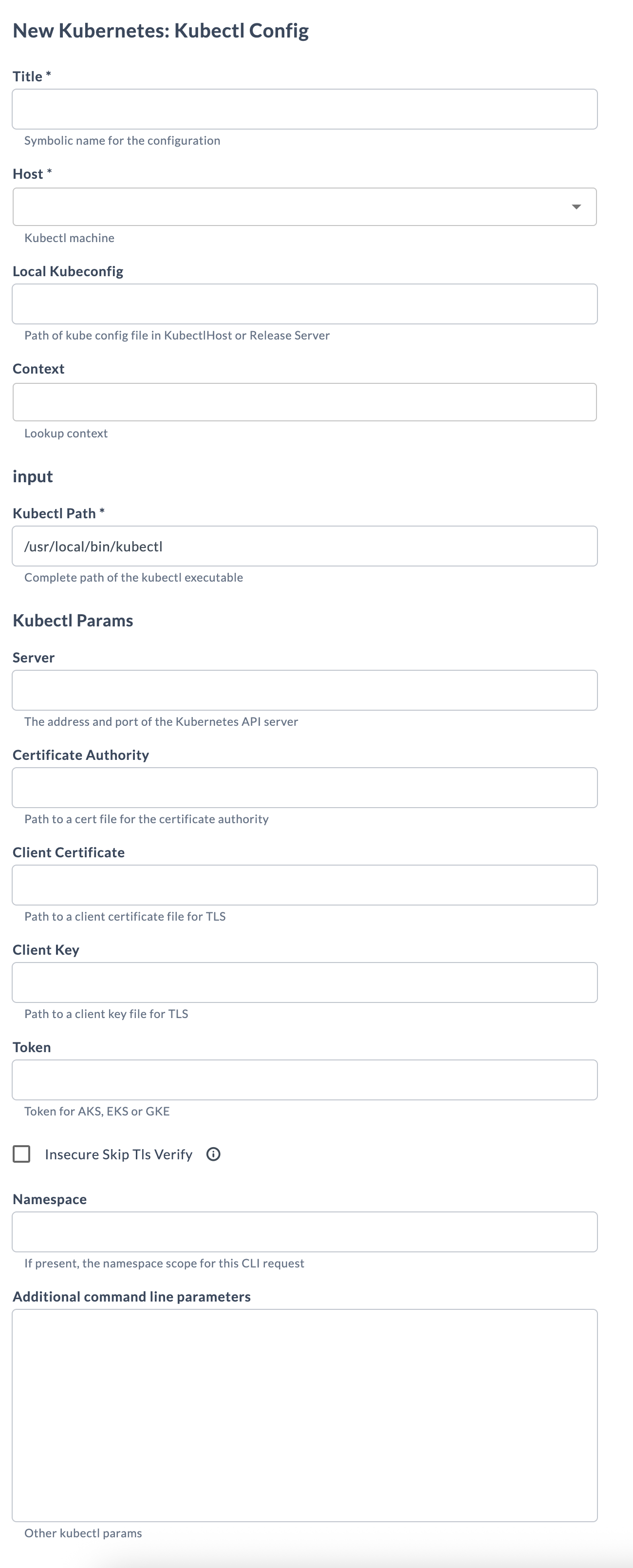
Available Tasks
The following tasks are available in Release:
- Kubernetes: Create Resource
- Kubernetes: Remove Resource
- Kubernetes: Update Manifest
In the release flow editor, Kubernetes tasks have a blue border.
Create Resource
This task creates a resource in Kubernetes using a JSON or YAML configuration. Use it to provision pods, services, deployments, or any other Kubernetes resource as part of your release workflow.
You can provide the resource configuration in one of two ways:
- Inline: Enter JSON or YAML directly in the Configuration file field.
- URL: Provide a URL to a JSON or YAML configuration file in the Url field. If the URL requires authentication, provide credentials in the Username and Password fields.
Input Fields
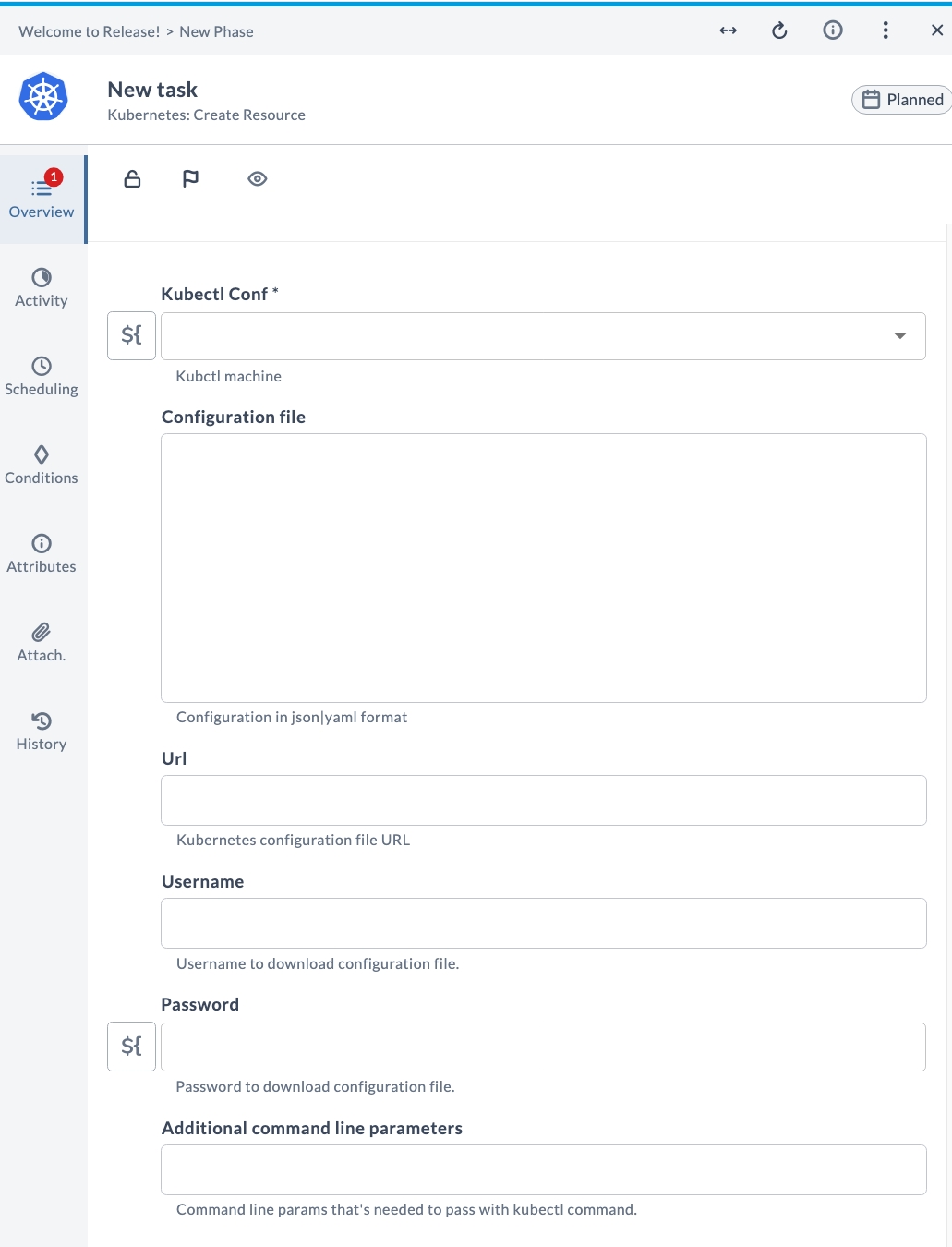
| Field Name | Description | Example |
|---|---|---|
| Kubectl Conf* | The configured Kubernetes Kubectl Config connection to use. | my-k8s-cluster |
| Configuration file | (Optional) Resource configuration in JSON or YAML format. Enter inline, or leave blank if using a URL. | (inline YAML/JSON) |
| Url | (Optional) URL to a JSON or YAML configuration file hosted externally. | https://.../deployment.yaml |
| Username | (Optional) Username for downloading the configuration file from an authenticated URL. | admin |
| Password | (Optional) Password for downloading the configuration file from an authenticated URL. | •••••• |
| Additional command line parameters | (Optional) Additional kubectl parameters to append to the create command. | --dry-run=client |
Example Usage
Suppose you want to create a Deployment named my-app using an inline YAML configuration:
| Field | Value |
|---|---|
| Kubectl Conf | my-k8s-cluster |
| Configuration file | apiVersion: apps/v1kind: Deploymentmetadata: name: my-app |
After running the task, the specified Kubernetes resource will be created in the cluster.
Alternatively, you can provide a URL to an externally hosted configuration file:
| Field | Value |
|---|---|
| Kubectl Conf | my-k8s-cluster |
| Url | https://example.com/configs/deployment.yaml |
| Username | admin |
| Password | •••••• |
Remove Resource
This task removes (destroys) a resource in Kubernetes. It requires you to specify a configuration in JSON or YAML format, either inline or via a URL, similar to the Create Resource task.
Input Fields
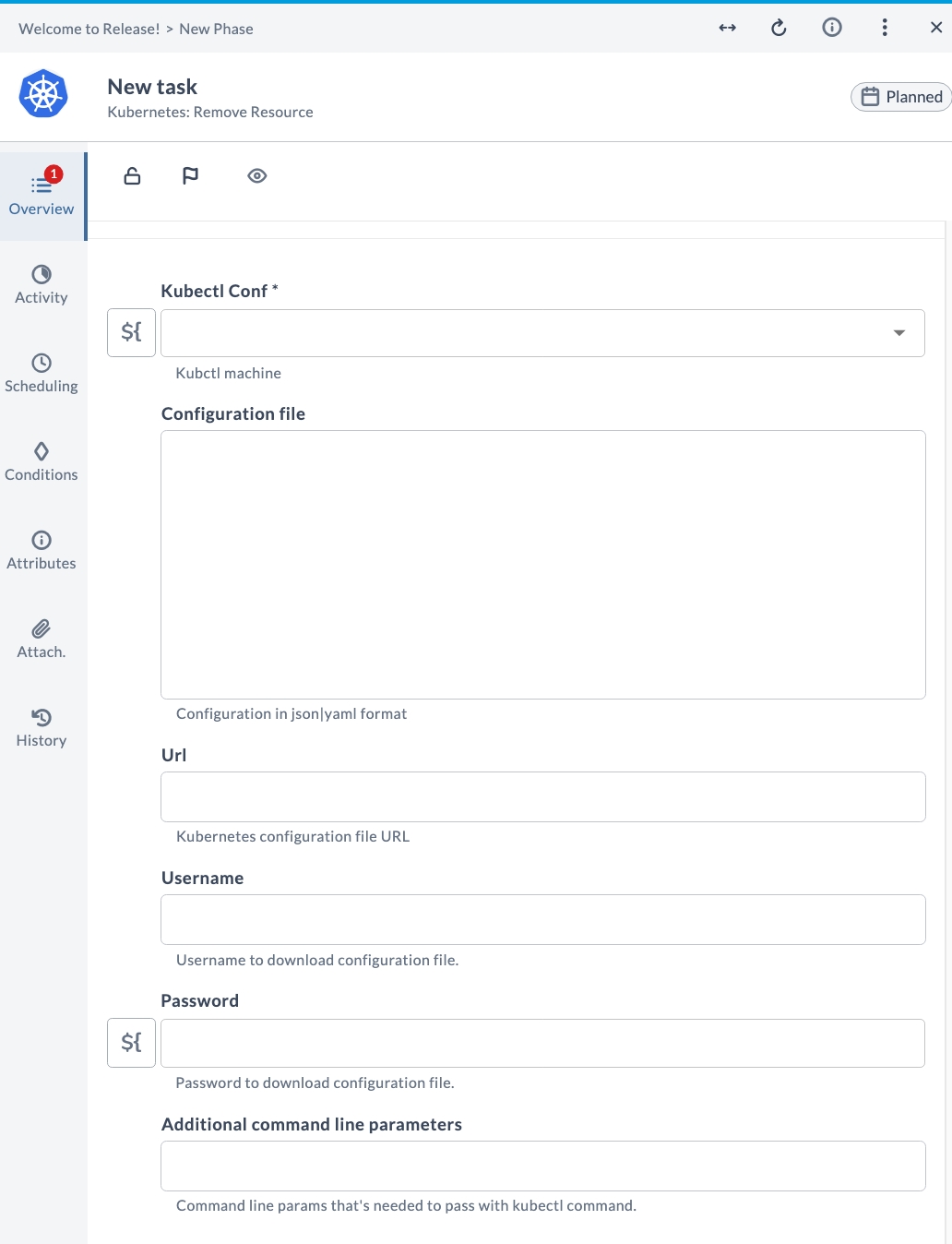
| Field Name | Description | Example |
|---|---|---|
| Kubectl Conf* | The configured Kubernetes Kubectl Config connection to use. | my-k8s-cluster |
| Configuration file | (Optional) Resource configuration in JSON or YAML format identifying the resource to remove. | (inline YAML/JSON) |
| Url | (Optional) URL to a JSON or YAML configuration file hosted externally. | https://.../deployment.yaml |
| Username | (Optional) Username for downloading the configuration file from an authenticated URL. | admin |
| Password | (Optional) Password for downloading the configuration file from an authenticated URL. | •••••• |
| Additional command line parameters | (Optional) Additional kubectl parameters to append to the delete command. | --grace-period=30 |
Example Usage
Suppose you want to remove a Deployment named my-app using the same YAML configuration used to create it:
| Field | Value |
|---|---|
| Kubectl Conf | my-k8s-cluster |
| Configuration file | apiVersion: apps/v1kind: Deploymentmetadata: name: my-app |
After running the task, the specified Kubernetes resource will be deleted from the cluster.
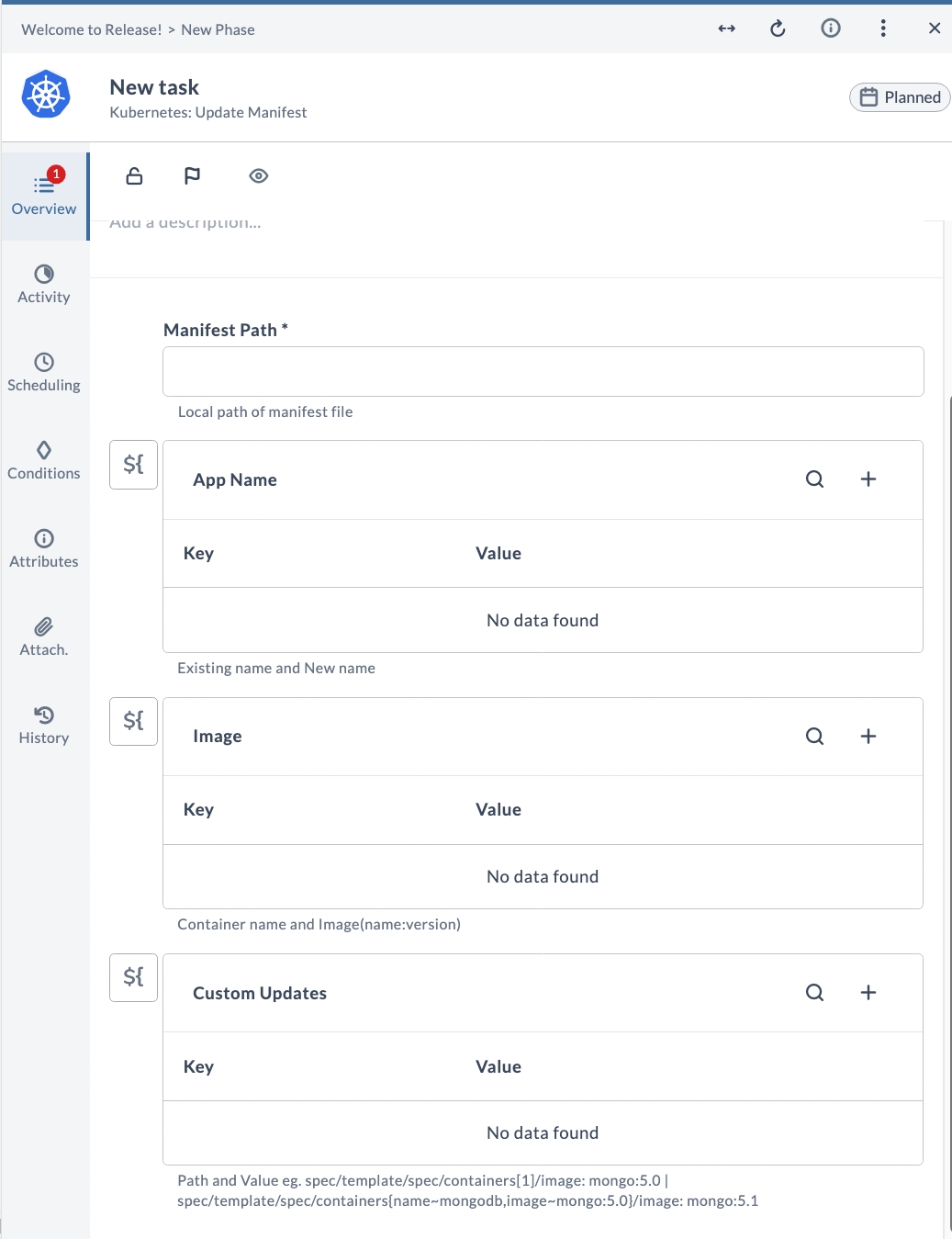
Update Manifest
This task updates manifests in a Kubernetes cluster. Use it to apply changes to resource definitions, ensuring that the cluster state matches the desired configuration. This is useful for updating container images, resource limits, labels, or any other manifest properties.
Input Fields
| Field Name | Description | Example |
|---|---|---|
| Manifest Path* | Local file path to the Kubernetes manifest file (YAML) to update. | /home/user/manifests/deployment.yaml |
| App Name | (Optional) Key-value map of existing resource name to new resource name. Use this to rename a resource in the manifest. | key: my-app, value: my-app-v2 |
| Image | (Optional) Key-value map of container name to image (name:version). Use this to update the container image in the manifest. | key: my-container, value: nginx:1.25 |
| Custom Updates | (Optional) Key-value map of YAML path and value for advanced updates. Use path expressions to target specific fields in the manifest. | key: spec/template/spec/containers[0]/image, value: mongo:5.1 |
Example Usage
Suppose you want to update the container image in a Deployment manifest located at /home/user/manifests/deployment.yaml:
| Field | Value |
|---|---|
| Manifest Path | /home/user/manifests/deployment.yaml |
| Image | key: web, value: nginx:1.25 |
After running the task, the manifest file will be updated with the new container image version.
Another example — using Custom Updates to change a specific container image using a path expression:
| Field | Value |
|---|---|
| Manifest Path | /home/user/manifests/deployment.yaml |
| Custom Updates | key: spec/template/spec/containers[name~mongodb]/image, value: mongo:6.0 |