Webhook Container Plugin
The Webhook Container Plugin integrates Digital.ai Release with external REST endpoints using the JSON Webhook (Container) task, which runs in a container on a Release Runner.
Release includes a built-in Webhook task that runs on the Release server, so it can only call endpoints the server can reach. When the target endpoint is on-premises or otherwise reachable only inside a private network (for example, a cloud or SaaS Release server that needs to call an internal application), the server-based task cannot reach it. This plugin runs the same JSON webhook logic on a Release Runner deployed inside that network, so the request originates from the runner and can reach the on-premises endpoint.
If the target endpoint is reachable from the Release server, use the built-in Webhook task instead.
What You Can Do With This Plugin
- Send HTTP requests to REST endpoints using GET, POST, PUT, PATCH, or DELETE
- Authenticate requests using HTTP Basic or Bearer token authentication
- Send custom request headers, and up to three sensitive header key-value pairs whose values are masked
- Route requests through a proxy server, with optional proxy authentication
- Extract up to three values from the JSON response using JSONPath expressions
- Reach on-premises endpoints by running on an on-premises Release Runner
Prerequisites
Before using this plugin, ensure the following:
Release Runner
- A Digital.ai Release Runner set up to run container tasks. The runner can be installed on a host or run as a Docker container. For more information, see Overview of Release Runner.
- Network connectivity from the Release Runner to the target endpoint.
Required Information
You should have the following details available before configuring the task:
- Endpoint URL (for example,
https://api.example.com/v1/deploy) - HTTP method the endpoint expects
- Authentication details (username and password, or a bearer token), if the endpoint requires them
- JSONPath expressions for any values you want to extract from the response
When To Use This Plugin
Use the Webhook Container Plugin when you need:
- To call endpoints that the Release server cannot reach, such as on-premises applications
- Containerized, runner-based execution of outgoing webhook requests
- To interact with a REST endpoint and extract values from its JSON response into release variables
This plugin sends outgoing webhook requests. It is independent of Release's incoming webhook (event) system. To wait for incoming events, see Webhook event tasks.
Common Pitfalls
Invalid or unreachable URL
The URL must include a scheme (for example, https://). A value such as 123 fails with a "No scheme supplied" error.
Method not allowed
The selected HTTP method must be supported by the endpoint. Calling an endpoint that does not allow the method fails with a 405 Method Not Allowed error.
Invalid or unmatched JSONPath expression The task fails if a JSONPath expression is invalid, does not match anything in the response, or the response cannot be parsed as JSON.
Conflicting authentication Provide either a Password (Basic authentication) or a Token (Bearer authentication), not both. If both are set, the task fails.
JSON Webhook (Container)
This task sends an HTTP request to a REST endpoint, parses the JSON response, and extracts up to three values into release variables. Use it to interact with external systems as part of your release workflow, including endpoints that are only reachable from an on-premises Release Runner. It is a container-based equivalent of the built-in Webhook task.
Provide either a username and password for Basic authentication or a token for Bearer authentication. These methods are mutually exclusive: if both a password and a token are set, the task fails.
Use the Custom Headers map for non-sensitive headers and the sensitive header key-value pairs for values that must be masked, such as API keys. Both can be used together, and headers can override defaults such as Content-Type and Authorization. Headers are applied in order (custom headers first, then sensitive headers 1 to 3), so a later header overrides an earlier one with the same key.
Input Fields
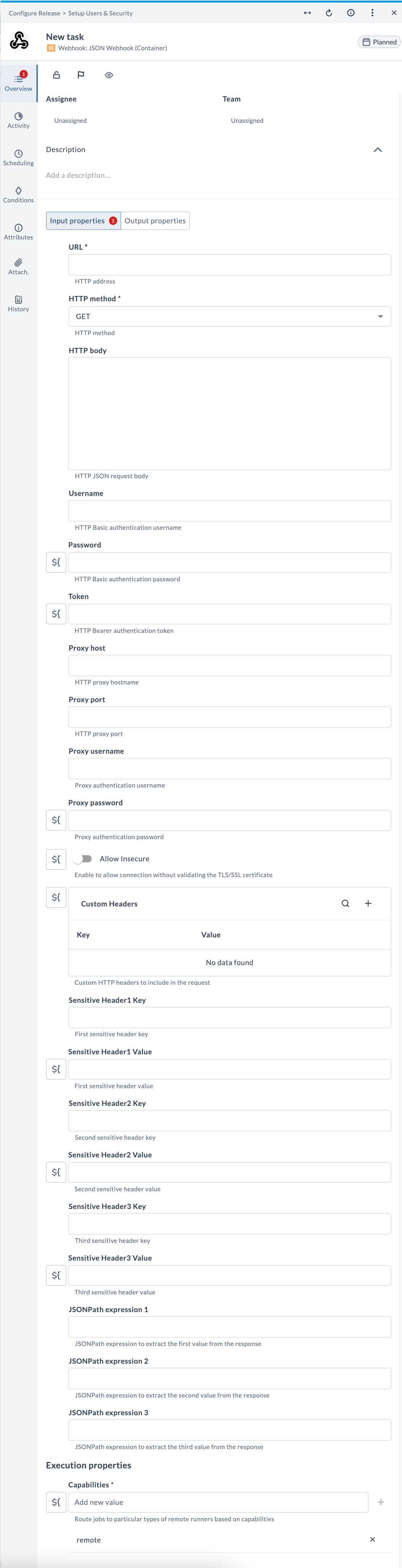
| Field Name | Description | Example |
|---|---|---|
| URL | The HTTP address to send the request to. Must include a scheme such as https://. | https://httpbin.org/post |
| HTTP method | The HTTP method for the request: GET, PUT, POST, DELETE, or PATCH. Default is GET. | POST |
| HTTP body | (Optional) The JSON request body to send with the request. | {"event": "deploy"} |
| Username | (Optional) Username for HTTP Basic authentication. | release-svc |
| Password | (Optional) Password for HTTP Basic authentication. | ******** |
| Token | (Optional) Token for HTTP Bearer authentication. | eyJhbGciOiJIUzI1... |
| Proxy host | (Optional) Hostname of the HTTP proxy to route the request through. | proxy.example.com |
| Proxy port | (Optional) Port of the HTTP proxy. | 8080 |
| Proxy username | (Optional) Username for proxy authentication. | proxy-user |
| Proxy password | (Optional) Password for proxy authentication. | ******** |
| Allow Insecure | (Optional) Enable to allow the connection without validating the TLS/SSL certificate. | false |
| Custom Headers | (Optional) Custom HTTP headers to include in the request, as key-value pairs. Values override default headers such as Content-Type. | Content-Type: application/json |
| Sensitive Header1 Key | (Optional) Key of the first sensitive header. | Authorization |
| Sensitive Header1 Value | (Optional) Value of the first sensitive header. The value is masked. | Bearer eyJhbGci... |
| Sensitive Header2 Key | (Optional) Key of the second sensitive header. | X-Api-Key |
| Sensitive Header2 Value | (Optional) Value of the second sensitive header. The value is masked. | ******** |
| Sensitive Header3 Key | (Optional) Key of the third sensitive header. | X-Signature |
| Sensitive Header3 Value | (Optional) Value of the third sensitive header. The value is masked. | ******** |
| JSONPath expression 1 | (Optional) JSONPath expression to extract the first value from the response. | $.json.event |
| JSONPath expression 2 | (Optional) JSONPath expression to extract the second value from the response. | $.headers.Host |
| JSONPath expression 3 | (Optional) JSONPath expression to extract the third value from the response. | $.url |
| Capabilities | Route jobs to particular types of Release Runners based on capabilities. | remote |
Output Fields
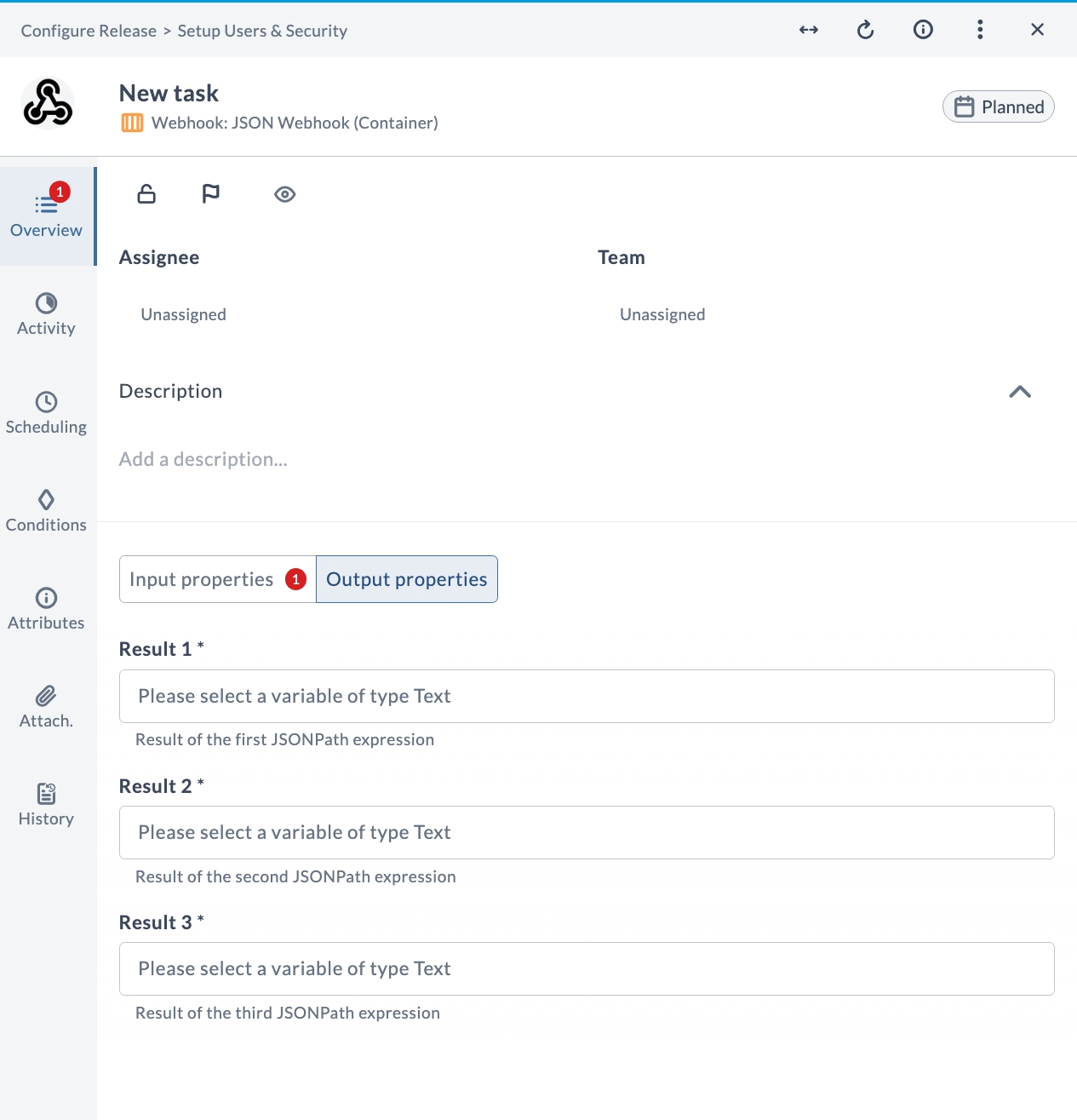
| Output Property | Description |
|---|---|
| Result 1 | The value extracted by the first JSONPath expression. |
| Result 2 | The value extracted by the second JSONPath expression. |
| Result 3 | The value extracted by the third JSONPath expression. |
Example Usage
Suppose you want to send a POST request to an on-premises endpoint and extract the event name from the JSON response:
| Field | Value |
|---|---|
| URL | https://httpbin.org/post |
| HTTP method | POST |
| HTTP body | {"event": "deploy"} |
| JSONPath expression 1 | $.json.event |
| Capabilities | remote |
After running the task, the output property Result 1 contains the value extracted by the JSONPath expression (for example, deploy), which you can map to a release variable for use by other tasks.