Cloud and Container Plugins
Digital.ai Release supports two execution models for plugins: traditional plugins and container plugins.
Traditional Plugins (Jython-based)
Traditional plugins run directly inside the Release server. They use the server’s shared runtime and rely on its environment for execution, which means plugins share resources and dependencies with the server itself. Setup is straightforward since there’s no need for an external runner. Traditional plugins also support features such as triggers and dashboard tiles.
This model is best for lightweight automation, event-driven workflows like webhooks or triggers, and situations where it doesn’t matter where the execution happens.
Container Plugins
Container plugins, on the other hand, execute tasks on remote Release Runners that have specific capabilities defined. Each Release Runner advertises its capabilities—such as supported tools, environments, or infrastructure—using labels. When a container plugin task is triggered, Release matches the task’s requirements to runners with the appropriate capabilities, ensuring the task runs in the right environment.
Each task runs inside its own isolated container, managing its own runtime and dependencies. This model supports scalable and distributed execution, making it suitable for cloud-native and containerized environments. Container plugins are ideal when you need to run tasks in secure or restricted infrastructure, handle heavy or parallel workloads, or use tooling that requires custom runtimes or dependencies.
If your delivery pipeline needs distributed execution across environments, integration with cloud, Kubernetes, or external platforms, secure execution boundaries, high scalability, or custom runtimes and tooling, container plugins are the recommended choice. They allow you to scale execution across multiple runners and ensure each task runs in its own isolated container. There’s no dependency on the Release server environment, which increases flexibility. Security is improved since credentials and execution are isolated from the core system. Finally, container plugins provide portability, delivering consistent execution across different environments.
Runner Capabilities
Capabilities are labels you assign to a Release Runner to define what types of tasks it can execute. Capabilities let you route tasks to specific runners, separate environments (such as dev, test, or prod), control execution based on infrastructure or tools, and optimize performance and locality. By matching tasks to runners with the right capabilities, you gain more control and flexibility over your automation.
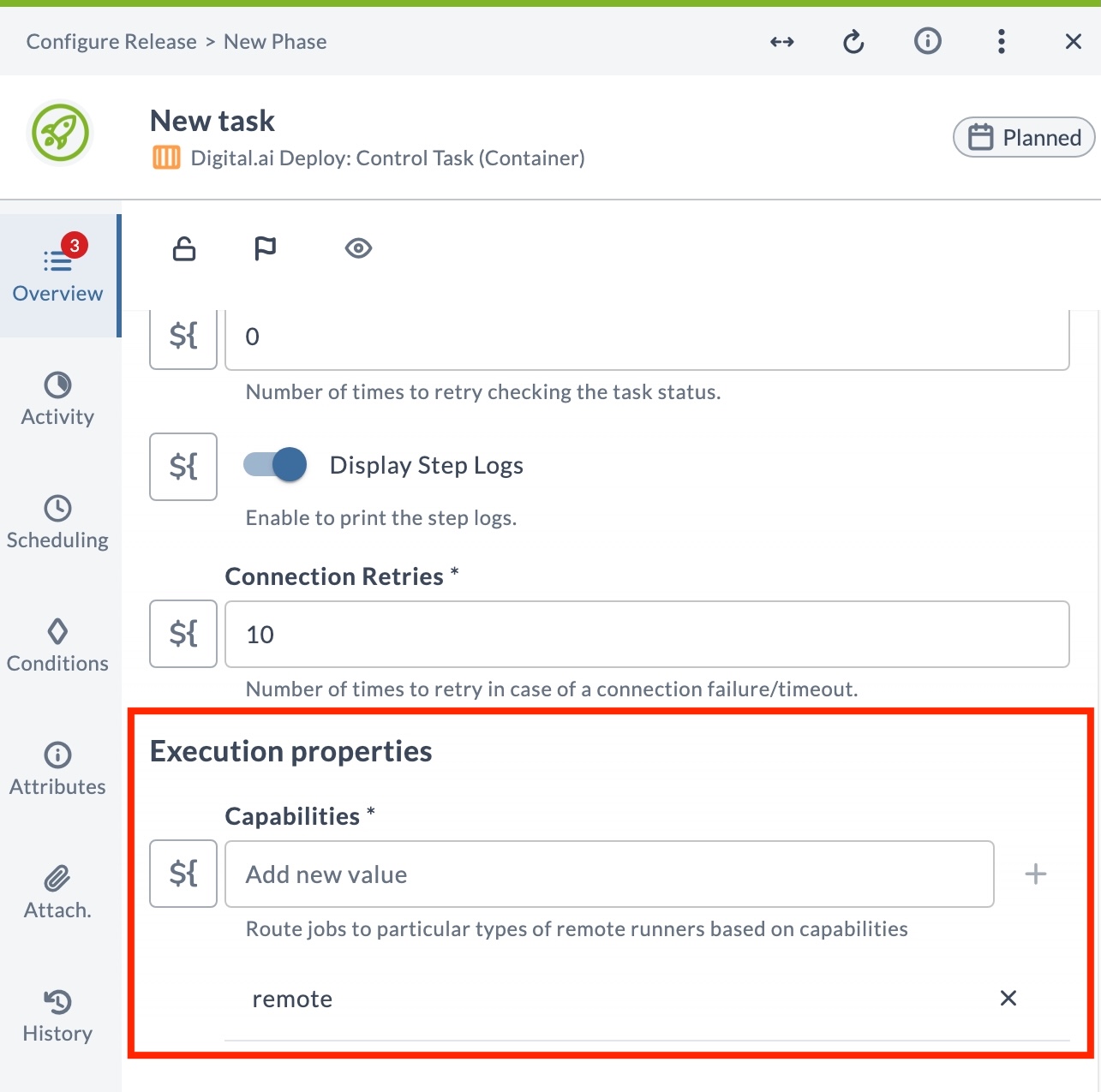
Every container task includes a Capabilities field under Execution properties at the bottom of the task configuration. Use this field to add the labels that route this task to a specific runner.
For more information, see Runner Capabilities.
Available Plugins
- Ansible Container Plugin – Run Ansible playbooks and roles from containerized tasks.
- Argo CD Container Plugin – Manage Argo CD applications and sync operations.
- Flux CD Container Plugin – Interact with Flux CD for GitOps-based delivery.
- Argo Workflows Container Plugin – Submit and monitor Argo Workflows.
- AWS Container Plugin – Interact with AWS services from Release.
- Azure Container Plugin – Interact with Azure services from Release.
- Conjur Container Plugin – Retrieve secrets from CyberArk Conjur.
- Deploy Container Plugin – Trigger deployments through Digital.ai Deploy.
- Deploy Container CI Plugin – Publish deployment packages to Digital.ai Deploy.
- GitLab Container Plugin – Interact with GitLab projects, pipelines, and merge requests.
- HashiCorp Vault Container Plugin – Retrieve secrets from HashiCorp Vault.
- Helm Container Plugin – Manage Helm chart releases on Kubernetes.
- Jenkins Container Plugin – Trigger and monitor Jenkins jobs.
- Kubernetes Container Plugin – Manage Kubernetes resources and workloads.
- OpenShift Container Plugin – Manage OpenShift projects and deployments.
- Python3 Script Container Plugin – Run custom Python 3 scripts in a container.
- SonarCloud Container Plugin – Check code quality gates in SonarCloud.
- SonarQube Container Plugin – Check code quality gates in SonarQube.
- Spinnaker Container Plugin – Trigger and monitor Spinnaker pipelines.
- Terraform Container Plugin – Run Terraform plans and applies.
- Terraform Enterprise Plugin – Manage Terraform Enterprise workspaces, variables, and runs.
- Tekton Container Plugin – Trigger and monitor Tekton pipeline runs.
- Webhook Container Plugin – Send HTTP requests to REST endpoints from a Release Runner, including on-premises endpoints.
- MongoDB Cloud Plugin – Manage MongoDB Atlas clusters and operations.