Ask Release
Ask Release is an AI-powered assistant built into Digital.ai Release. It gives you fast, natural-language access to your Release data within your permissions. Ask questions and get instant answers about status, risks, blockers, and more without navigating multiple screens.
This page describes Ask Release for on-premises deployments. On-premises, you run Ask Release with Docker alongside your existing Release instance. To deploy it, see the Ask Release Docker Deployment Guide.
Why Use Ask Release
Managing releases at scale is complex. Information is scattered across multiple screens and status checks are manual. Ask Release removes this friction by letting you ask questions directly and get answers based on live Release data.
Key Benefits
- Instant status visibility: Get quick insights into what is happening across your releases, including risks, blockers, and overdue tasks, without navigating multiple screens.
- Guided exploration: Discover templates, review configurations, and explore your release data through conversational queries.
- Activity and audit lookup: Access recent changes, user assignments, and audit history for tracking and compliance.
- Digital.ai Release expertise: Get answers specifically about releases, templates, tasks, phases, variables, configurations, and integrations within your Digital.ai Release instance.
How to Use Ask Release
- Log in to Digital.ai Release.
- In the top navigation bar, click the Ask Release icon.
The Ask Release chat panel opens on the right side of the screen.
- Type your question in the chat panel.
- Press ENTER or click the send icon.
Ask Release processes your question and displays the response in the conversation thread.
Context Awareness
Ask Release is context-aware. It scopes your queries based on the page you open it from, such as a specific release, folder, or the global view.
To pick up the latest state after making changes, click New chat to start a fresh session.
View Conversation History
- Click the History tab in the chat panel.
- Select a conversation to resume it.
Your previous conversations are sorted by most recent activity.
Start a New Conversation
To start a fresh conversation, click New chat in the Chat tab. The Chat tab also includes suggested prompts to help you get started.
What You Can Query
You can retrieve any information you have permission to access through natural-language queries, across the following categories:
Releases and tasks
Query the status, progress, and details of releases and tasks. Filter by status, tags, dates, or ownership, and review activity logs and failure details.
Example questions:
- "What releases are currently active?"
- "What is the status of [release name]?"
- "Show me failed tasks in [release name]"
- "List all releases in [folder name]"
- "Find releases tagged with [tag name]"
- "Show me all paused/failed/aborted releases"
- "How many releases are in progress?"
- "Show me activity logs for [release name]"
- "Find releases created between [date1] and [date2]"
Templates
Explore available templates, view their structure including phases and tasks, and review template configurations.
Example questions:
- "What templates are available in [folder name]?"
- "Show me template details for [template name]"
- "What phases are in [template name]?"
- "Find templates tagged with [tag name]"
Folders and variables
Navigate your folder hierarchy and inspect variables at global, folder, release, and template levels.
Example questions:
- "What folders are in [parent folder name]?"
- "Show me the folder structure"
- "List all global variables"
- "Show me variables in [release name]"
- "What is the value of variable [variable name] in [release name]?"
Integrations and configurations
Discover and view existing integration configurations for external systems such as Jenkins, Jira, Git, and ServiceNow.
Ask Release can view existing configurations but cannot test connections, create configurations, or troubleshoot integration issues.
Example questions:
- "Show me all Jenkins server configurations"
- "Find the Jira configuration named [name]"
- "What configurations are in [folder name]?"
Attachments
Access and analyze text-based attachments associated with releases and tasks, such as logs, JSON, XML, YAML, and CSV files.
Ask Release can only read text-based files. It cannot display or analyze images (PNG, JPG, GIF) or binary files (PDFs, executables).
Example questions:
- "Show me attachments on [release name]"
- "Show me the content of [attachment name]"
- "Search for [text] in [attachment name]"
Metadata and task types
Discover available task types, phase types, and configuration types in your instance.
Example questions:
- "What task types are available?"
- "What are the properties of [task type]?"
- "List all configuration types"
What You Get Back
Ask Release returns responses designed to be immediately useful:
- Clickable navigation: Direct links to releases, tasks, folders, and templates so you can open the exact item with one click.
- Structured data: Tables and lists that make it easy to scan multiple items, grouped and labeled clearly.
- Real-time information: Data that reflects the current state of your Release instance, including live status and current values.
What Ask Release Cannot Do
Ask Release is read-only and scoped to querying Digital.ai Release data. The following actions are not supported:
- Creating, modifying, or deleting releases, templates, tasks, or configurations
- Starting, stopping, or triggering releases or tasks
- Testing connections, validating configurations, or troubleshooting integration issues
- Managing users, teams, or permissions
- Accessing triggers, applications, environments, deliveries, patterns, or reports
- Generating predictions or forecasts
Tips for Effective Questions
You get better answers when you give Ask Release clear context and focus.
- Name specific items: Refer to releases, templates, folders, or tasks by name rather than asking broadly.
- Filter by status: Ask for releases or tasks in a specific state such as failed, active, paused, or at risk.
- Specify ownership: Include an owner or team name, or ask what is assigned to you.
- Add time ranges: Narrow results by asking about a specific period, such as "this week" or "in the last 30 days".
- Ask one thing at a time: Break complex questions into smaller, focused questions for more precise answers.
Architecture
Ask Release processes your questions through a set of services that authenticate your session, interpret your query, retrieve live Release data, and generate a response. On-premises, you run the Release Assistant and the LLM Service with Docker. Release provides the built-in MCP server that the Assistant uses to read your data.
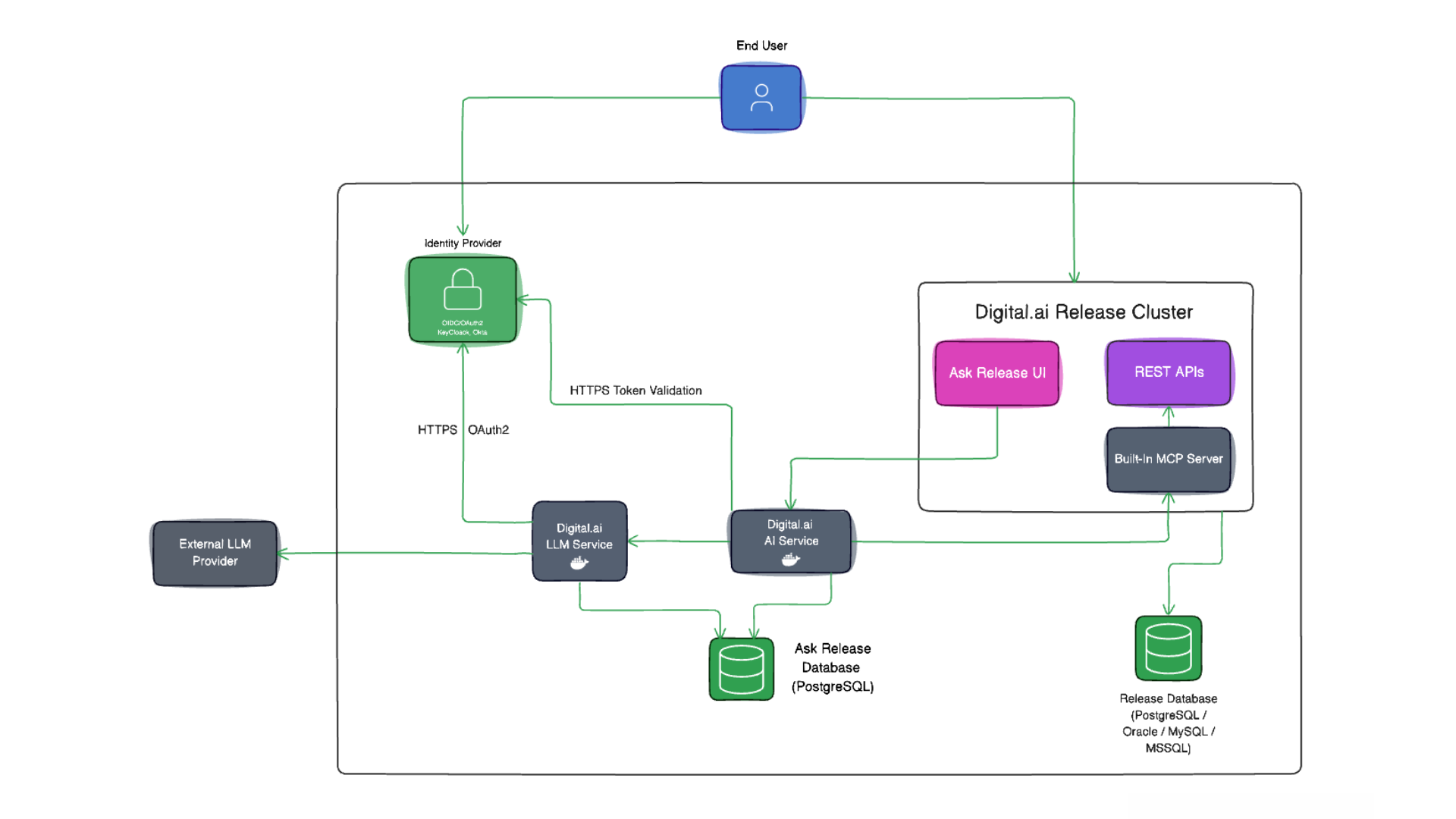
Data Flow
- You type a question in the Ask Release UI within Digital.ai Release.
- The UI sends the question, with your token, to the AI Service.
- The AI Service validates the token against your Identity provider.
- The AI Service calls Release's built-in MCP server with your token to fetch the required Release data. Release RBAC applies, so results are scoped to what you can access.
- The AI Service calls the LLM Service, which invokes your configured model provider to generate the response.
- The response streams back to the Ask Release UI with navigation links, tables, and summaries.
For the components you run, the prerequisites, and how to start and verify them, see the Ask Release Docker Deployment Guide.
Security and Data Handling
Ask Release is built with the following safeguards:
- Authenticated access: Uses your existing Release session through your configured OIDC provider. No separate credentials are required.
- Permission-scoped: Queries only return data you are authorized to view. If you cannot access a folder or release in the UI, Ask Release cannot access it either.
- Read-only: Ask Release retrieves and displays information only. It cannot start releases, approve tasks, modify variables, or make any changes to your data.
- Scoped to Release data: Queries run against Digital.ai Release only. Ask Release does not reach into external systems such as Jenkins, Jira, or Git, and cannot create or install plugins.
- Audit logged: Operations are recorded for compliance and traceability.
Do not include sensitive information such as passwords, API keys, or secrets in your prompts.
Availability and Deployment
Ask Release is available on Digital.ai Release on-premises, deployed with Docker alongside your existing Release instance. It requires Release with the built-in MCP server enabled and OIDC already configured.
To set it up, use these guides:
- Ask Release Docker Deployment Guide for the services you run, prerequisites, configuration, authentication, and deployment steps.
- Ask Release On-Prem Troubleshooting for common issues.
The Docker Compose files, helper scripts, and the full environment-variable reference are in the Ask Release Docker Repository.
FAQs
Why can't Ask Release find a release I know exists?
You may not have permission to view that release or folder. Ask Release can only show data you are authorized to access. Check with your administrator if you believe you should have access.
Can Ask Release make changes to my releases?
No. Ask Release is read-only. See Security and Data Handling for details.
I'm seeing an error message. What should I do?
See the Ask Release On-Prem Troubleshooting guide for common issues and how to resolve them.