Introduction to Delivery Patterns
The Delivery Patterns feature in Release allows you to use deliveries and tracked items to synchronize multiple releases together. This allows you to design delivery patterns that conform to the release standards being used by your organization, such as SAFe.
Why use Delivery Patterns
A single release already models one end-to-end pipeline, such as dev, build, QA, and deployment to production, for one deliverable. Delivery Patterns solve a different problem, which is coordinating multiple releases that each run that pipeline independently.
This matters when a single business outcome, such as a feature launch or a SAFe Program Increment, depends on several releases that don't share a pace, a team, or a pipeline. For example, a set of microservices owned by different teams may each need their own release to build, test, and deploy, but the organization still needs all of them to reach production together. While releases can synchronize via Gate task dependencies, deliveries offer a different approach: they provide shared tracking of items across releases with structured stages and transitions, such as requiring every microservice to complete a "Testing" stage before moving to a shared "Production Deployment" stage. This gives stakeholders visibility into cross-release progress and enables coordinated descoping of items.
For a worked example of this scenario, see Delivery Patterns Tutorial.
Delivery Patterns are a more comprehensive way to manage multiple releases together.
With Delivery Patterns, you can:
- Model your deliveries in patterns that represent your organization’s strategy for application development, testing, and deployment to production or any other environment
- Define the items of work that you want to track through the delivery process, no matter how many release processes support those items through their lifecycle
- Create delivery stages and transition points that synchronize the status of tracked items across release pipelines
- Establish and enforce a delivery schedule while allowing individual teams to work at their own pace
- Descope items from a delivery with full visibility and transparency for all stakeholders
How it works
The Delivery Patterns feature in Release uses Deliveries to link multiple releases together. Deliveries are designed patterns that define a flow of stages that a set of tracked items must go through. These tracked items are linked to tasks in a set of releases, and allow you to orchestrate the progress of each release so that they can be delivered together as part of a larger feature release.
The primary elements used in Delivery Patterns are described below:
Delivery patterns
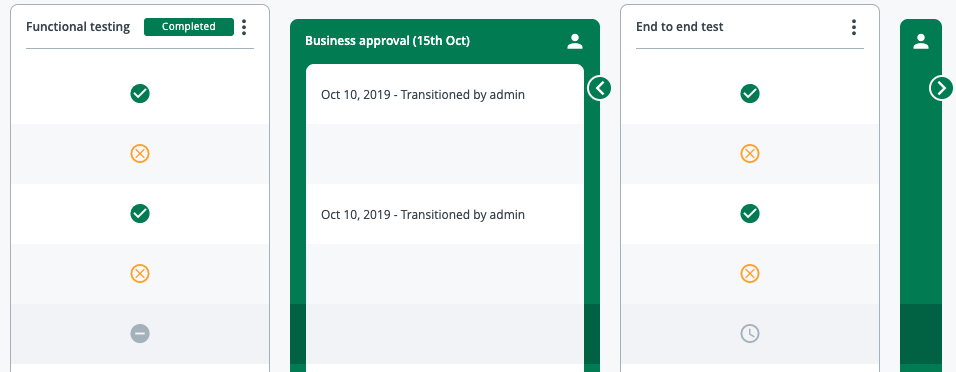
Deliveries are flows of stages that a set of tracked items must go through. These can be designed as reusable patterns, and can prevent releases from going forward until the tracked items they contain are completed. This allows you to synchronize multiple sub-releases into a larger release cycle.
Deliveries consist of stages and transitions. Stages contain tracked items, which are either completed from the releases, or can be manually completed in the Delivery screen. Transitions are manual stages that need to be completed before the delivery can move to the next phase. For example, an approval stage will often need to be inserted between building and testing, and marked complete by the relevant approvers.
For more information, see:
Tracked items
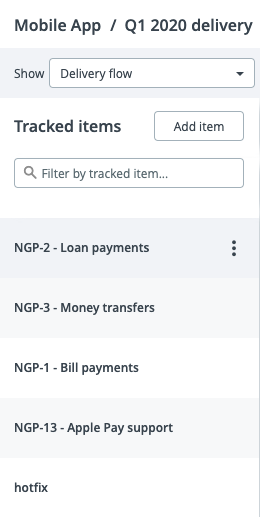
Tracked items are the primary elements used in a delivery, and move through the delivery stages as the releases progress. Tracked items allow you to link releases to each other within a delivery, and can be registered to releases using the Register tracked items task.
For more information, see Register a tracked item.
Tasks for Delivery Patterns
A set of Delivery tasks allow you to link releases to deliveries and instantiate deliveries from a release.
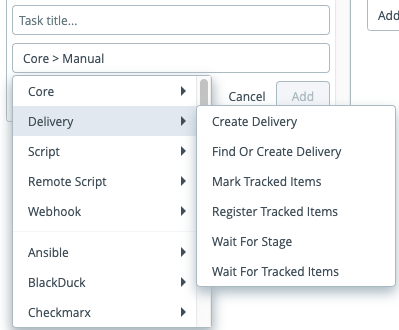
The following task types are provided:
| Task name | Purpose of task |
|---|---|
| Create delivery | Instantiates a new delivery from a delivery pattern |
| Find or create delivery | Searches for an existing delivery to link to the current release, or creates one if it doesn't exist |
| Mark tracked items | Completes or skips an item in a stage on a delivery |
| Register tracked items | Registers the task to a tracked item in a delivery |
| Wait for tracked items | Causes the release to wait for items to be completed or skipped in a stage on a delivery |
| Wait for stage | Causes the release to wait for a stage to be completed on a delivery |