Release Architecture
This page is for system administrators deploying or installing Digital.ai Release, and for anyone who wants a high-level map of its components. It covers the core server, Release Runner, AI Assistant and the MCP server, data storage, deployment options, and how these connect to your DevOps toolchain. For the concepts behind a release, such as phases, tasks, and templates, see Core Concepts. For day-to-day usage by role, see Getting Started by Role.
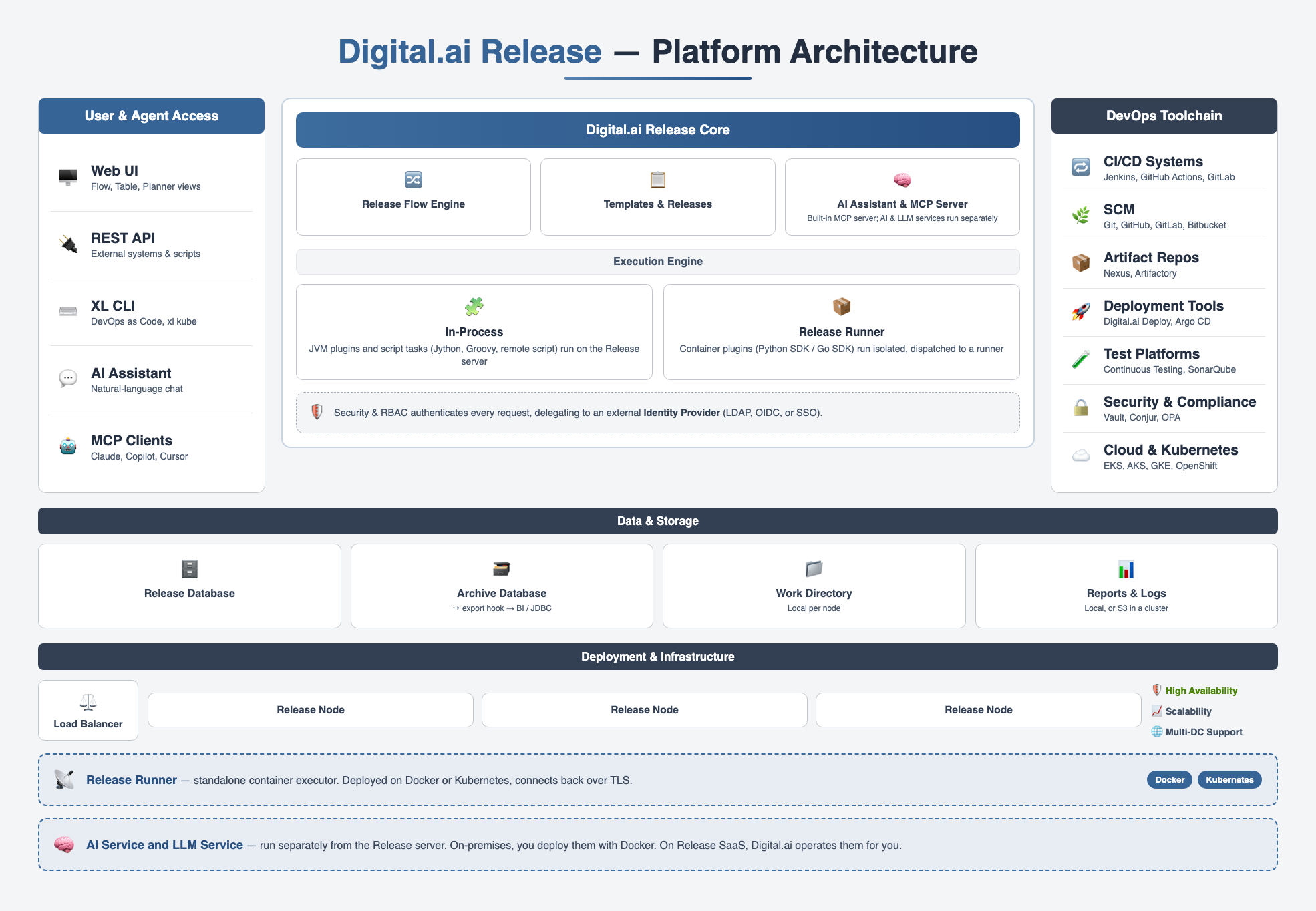
User and Agent Access
Release exposes the same functionality through several entry points:
- Web UI — The primary interface for release managers, release engineers, and administrators. Includes the Flow, Table, and Planner views.
- REST API — HTTP access for external systems and scripts, used to start releases, complete tasks, and query status. See REST API.
- XL CLI — The command-line interface for DevOps as Code, used to manage templates, folders, connections, and variables as YAML. It also installs, upgrades, checks, and cleans Release and Release Runner on Kubernetes through its
xl kubecommand. See Get Started with DevOps as Code and xl kube Command Reference. - AI Assistant — A chat panel built into the Web UI for natural-language, read-only queries against your Release data. See AI Assistant.
- MCP clients — External AI agents such as Claude Code, Cursor, or GitHub Copilot connect through the built-in MCP server using a personal access token. Read and write tools are both available by default, unless an administrator turns on read-only mode. See Release MCP Server Overview.
Digital.ai Release Core
The core server hosts release orchestration, security, and configuration. For the concepts the flow engine executes, such as phases, tasks, task types, and templates, see Core Concepts.
- Release Flow Engine — Executes phases and tasks in the order defined by a template, and advances a release from one state to the next.
- Templates and Releases — Stores template definitions and the releases created from them, including deliveries and release trains for multi-team coordination.
- Variables and Secrets — Resolves variables at the global, folder, template, and release scope, and integrates with external secrets managers such as HashiCorp Vault and CyberArk Conjur.
- Triggers and Webhooks — Starts releases automatically from a schedule, a Git or artifact repository event, or an inbound webhook. See Understanding Triggers and Webhooks Overview.
- Security and RBAC — Enforces global roles, folder teams, and release teams, and authenticates users through built-in accounts, LDAP, OIDC, or the Digital.ai Platform identity layer.
Execution Engine
Automated tasks run through one of two execution paths:
- In-process — JVM plugins and script tasks (Jython, Groovy, remote script over SSH/WinRM) run directly on the Release server. Used for custom UI screens, REST endpoints, event listeners, and long-established integrations such as Jenkins and Jira. See API and Scripting Overview.
- Release Runner — Container plugins, built on the Python SDK or Go SDK and packaged as Docker images, run isolated from the Release server and are dispatched to a runner. Bundled, official, custom, and community plugins all use this model for newer integrations such as Argo CD, Kubernetes, and Terraform.
Release Runner
Release Runner is a standalone application that executes container-based plugin tasks. It runs separately from the Release server, on Docker or on a Kubernetes cluster, and connects back to Release over TLS 1.2 or later, encrypted with AES-256 GCM. Because execution is detached from the Release server, you can scale runners independently and run them closer to target infrastructure, such as inside a VPC or behind a firewall.
Each runner is labeled with capabilities, such as prod, k8s, or gitlab. Container plugin tasks declare the capabilities they require, and Release routes each task to a runner whose capabilities match. This lets you separate environments and restrict sensitive tasks to specific runners. See Overview of Release Runner.
If the Release server is temporarily unavailable, a runner queues completed results and delivers them once the connection is restored.
AI Assistant and the MCP Server
Release includes a built-in Model Context Protocol (MCP) server, bundled through the Release MCP Tools Plugin. It powers AI Assistant and can also be used by any MCP-compatible external agent.
For AI Assistant, a question typed into the chat panel flows through three services:
- The Web UI sends the question, with your token, to the AI Service.
- The AI Service validates the token against your identity provider, then calls the built-in MCP server to fetch the Release data needed to answer the question. Release RBAC applies, so results are scoped to what you can access.
- The AI Service calls the LLM Service, which invokes your configured model provider to generate the response, and streams it back to the chat panel with navigation links, tables, and summaries.
AI Assistant itself only ever calls read-only tools, so it cannot start releases, approve tasks, or modify configuration, regardless of MCP server settings. The MCP server it shares with external agents is different: read and write tools are both available by default, and an administrator can restrict the server to read-only tools for all callers in System Settings > AI Settings. The AI Service and LLM Service run separately from the Release server. On-premises, you deploy them with Docker. See Architecture in the AI Assistant guide, AI Settings, and Production Deployment Using Docker. On Release SaaS, Digital.ai operates the equivalent services for you. See AI Assistant in the SaaS documentation.
DevOps Toolchain Integrations
Release coordinates the tools in your delivery pipeline rather than replacing them. Plugins, connections, triggers, and webhooks connect Release to:
- CI/CD systems, such as Jenkins, GitHub Actions, and GitLab.
- Source control, such as Git, GitHub, GitLab, and Bitbucket.
- Artifact repositories, such as Nexus and Artifactory.
- Deployment tools, such as Digital.ai Deploy, Argo CD, and Spinnaker.
- Test platforms, such as Digital.ai Testing and SonarQube.
- Security and compliance tools, such as HashiCorp Vault, CyberArk Conjur, Open Policy Agent, and Checkmarx.
- Cloud and Kubernetes platforms, such as Amazon EKS, Azure AKS, GCP GKE, and OpenShift.
For the full plugin catalog, see Getting Started for DevOps and Pipeline Engineers.
Data and Storage
Release persists state in a relational database, split into two roles:
- Release database — Active templates, releases, and configuration.
- Archive database — Completed and aborted releases, moved here by the archiving job. Archived releases are read-only. See How Archiving Works.
An export hook runs a Jython script each time a release is about to be archived, and can push the release data to an external system, such as a JDBC-compliant database used for reporting or a BI tool. See Create an Export Hook and Create a JDBC Export Hook.
The work directory, local to each Release server node, holds temporary files such as in-progress uploads and imports or exports. It is not shared storage, so in JVM cluster deployments each node has its own. Reports and task logs are a separate concern: by default they are written to the local file system, but in a JVM cluster you can configure them to be stored on Amazon S3 instead, so all nodes read and write the same reports and logs. See The Release Work Directory and Store Reports and Logs on S3 — JVM Cluster.
Deployment and Infrastructure
Release runs behind a load balancer, with one or more Release nodes sharing the same database for horizontal scalability and high availability. Multi-datacenter deployments add a standby set of nodes in a second data center. On-premises, Release supports installation on Kubernetes through the operator, on Docker, or directly on a JVM host. See Getting Started for System Administrators.
Release is also available as Release SaaS, a dedicated instance hosted and managed by Digital.ai. Digital.ai operates the infrastructure, security, updates, and maintenance, and user authentication is managed through the Digital.ai Platform. See Release SaaS.