Task Life Cycle
This topic illustrates the lifecycle of a task, detailing how tasks transition through different states in an active release.
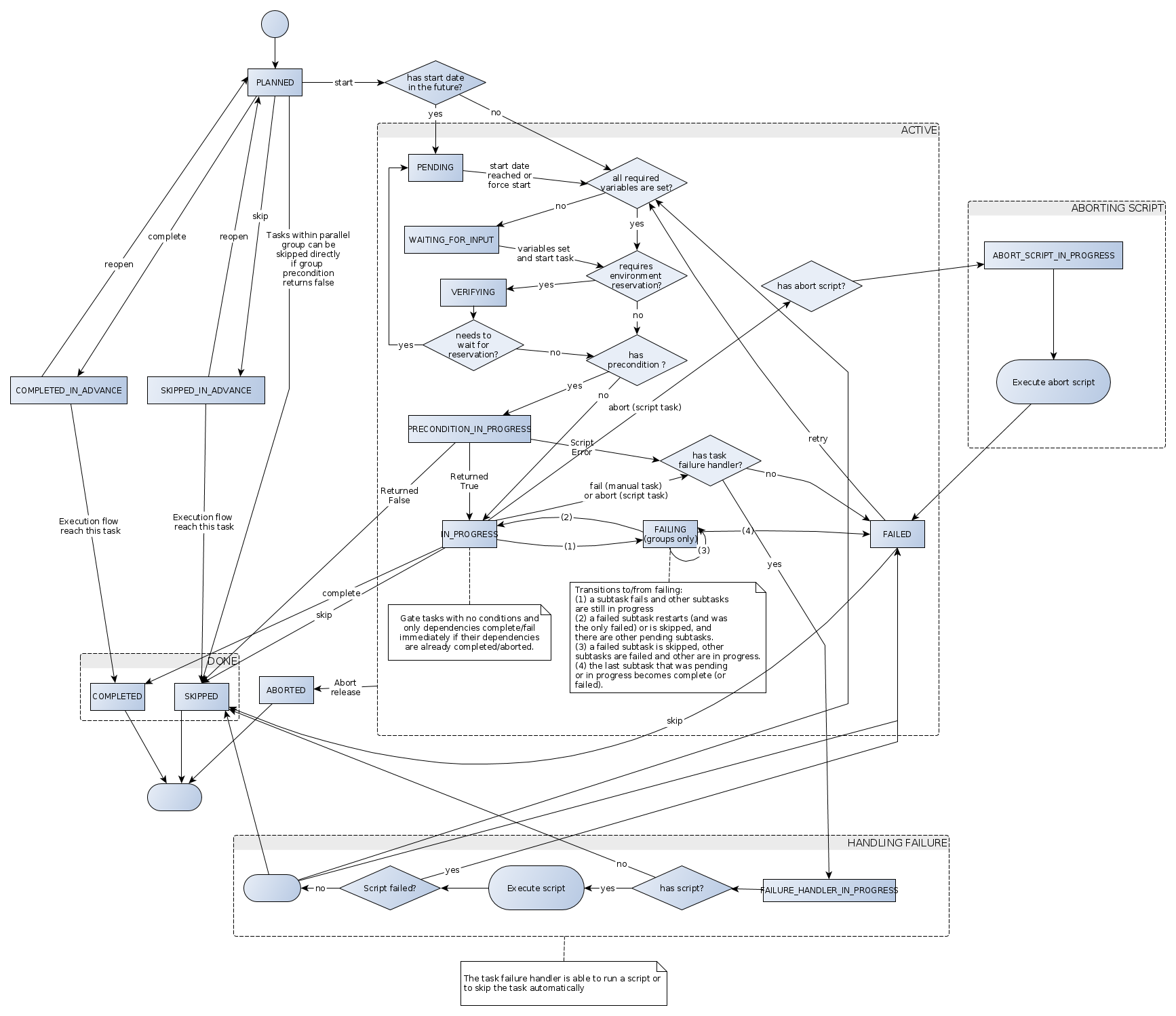
Tasks start in a planned state. In this state the tasks are not active yet. You can still edit all properties.
Active tasks
When the release flow reaches a task and it becomes active:
- If a scheduled start date is set and this date has not passed yet, the task is in pending state.
- If one or more required variables used in a task do not have a value set, the task enters the ask for input state.
When all variables are set or the user starts the task, it is evaluated for a precondition. The next state depends on the result of the precondition script. If it evaluates to:
- True: The next state is in progress. Notifications are sent to the task owner and you can trigger the next transition by clicking Complete, Skip, or Fail.
- False: The task is skipped.
Completion of tasks
When you complete a task or when an automated task is performed without errors, the task enters the completed state. This is an end state that means that the task has completed successfully. The release flow continues with the next task in the flow.
You can also skip a task that was in progress or failed. The task goes into the skipped state. The skipped state is functionally equivalent to completed. The only difference is that it implies that no work was done on the task.
Tasks may also be completed or skipped in advance, before the execution flow has reached the task. These tasks appear as completed, or skipped, in the release flow editor. Before the release flow has reached this task, it is still possible to reopen the task, moving it back in the planned state. When the release flow reaches a task that was completed or skipped in advance, the state is made definite and the task cannot be reopened.
Failed tasks
If a user fails a task or an automated task encounters an error, the task goes into the failed state, triggering a notification to the release owner. The task can then be either restarted (in progress state) or skipped if no more work will be done (skipped state).
If the task has the failure handler enabled, the task changes state to failure handler in progress and, depending of the configuration, the end state can be in progress, skipped, or failed.
If a user aborts a task manually, by default the task goes to failed state. If the user is aborting a script task that has an abort script, the abort script will be executed before the task goes to failed state.
Failing tasks
The failing state only applies to a parallel group task that contains subtasks. It indicates that one of the subtasks is in a failed state, but that other tasks are still running.
Transitions to and from the failing state are:
- In progress → failing: A subtask fails and other subtasks are still in progress.
- Failing → in progress: A failed subtask restarts (and was the only one failed) or is skipped, and there are other subtasks still pending or in progress.
- Failing → failing: A failed subtask is skipped, but of the remaining subtasks, some are failed and some are pending or in progress.
- Failing → failed: There are failed subtasks and the last subtask that was still pending or in progress, completes or fails.
Completion of gate tasks
Gate tasks with no conditions and only dependencies will complete immediately when their dependencies are complete. If all dependencies are complete but at least one of the dependencies is an aborted release, the gate task goes into a failed state. If any conditions are set, the owner of the task must complete the gate task manually.