Featured Dashboards
Featured dashboards allow Analytics Authors and Admins to curate a finalized list of dashboards that all users in an organization see first when visiting the Analytics page. This feature helps showcase frequently used dashboards and streamlines the user experience by highlighting the most important dashboards for your organization.
The Featured Dashboard is the organization’s landing page, providing a one-stop shop for finding any required dashboard.
Overview
When you visit the Analytics page, you see three tabs in the following order:
- Featured: Displays dashboards that have been designated as featured by Admins or Analytics Authors
- All: Shows all available dashboards (visible only to Admins and Analytics Authors)
- Favorites: Lists dashboards that you have personally marked as favorites
The Featured tab is displayed first by default, ensuring all users immediately see the curated list of important dashboards.
Who can feature dashboards
Only users with the following roles can add or remove dashboards from the Featured page:
AdminAnalytics-author
Add a dashboard to featured
- Click Dashboards in the left sidebar.
- Locate the dashboard you want to feature.
- Click the Actions menu (three dots) for the dashboard.
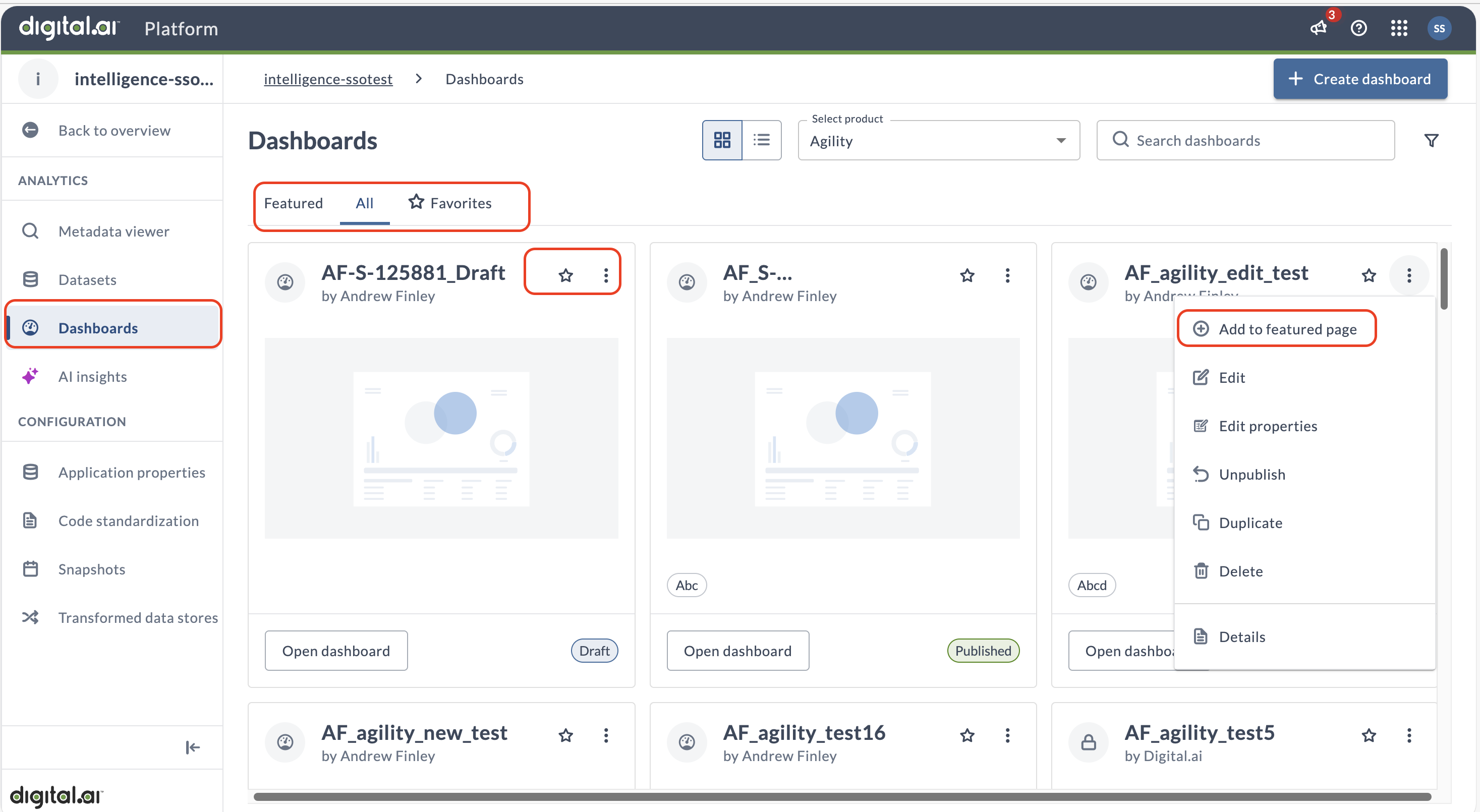
- Select Add to featured page.
- Review the confirmation dialog and click Add dashboard to featured.
The dashboard now appears on the Featured tab for all users in your organization.
Remove a dashboard from featured
- Click Dashboards in the left sidebar.
- Click the Featured tab.
- Locate the dashboard you want to remove from featured.
- Click the Actions menu (three dots) for the dashboard.
- Select Remove from featured page.
- Review the confirmation dialog and click Remove dashboard from featured.
The dashboard is removed from the Featured tab but remains available in the All tab (for users with appropriate permissions) and in individual users' Favorites if they previously favorited it.
View featured dashboards
All users in an organization, regardless of their role, can view the Featured tab.
When you access the Analytics page, the Featured tab displays by default. All dashboards designated as featured by Admins or Analytics Authors are listed here. You can add featured dashboards to your personal Favorites for quick access.
Users with the account-user role can see the Featured and Favorites tabs but cannot see the All tab. Only users with admin or author roles can access the All tab to view all dashboards.
Featured dashboards and favorites
Featured dashboards and favorites serve different purposes:
- Featured dashboards: Curated at the organization level by Admins and Analytics Authors. All users see the same list of featured dashboards. The Featured Dashboard serves as the organization’s landing page, providing a one-stop shop for finding any required dashboard.
- Favorites: Personal to each user. Users can mark any dashboard (including featured ones) as a favorite for their own quick access.
You can add a featured dashboard to your Favorites by clicking the star icon next to the dashboard name.
Important notes
- The order of dashboards on the Featured page can't be controlled. Dashboards appear in the order they were added to featured.
- All users in an organization see the same list of featured dashboards.
- Removing a dashboard from featured doesn't delete the dashboard or affect users who have it in their Favorites.
- You can add it back to featured anytime from the All dashboards tab.
Best practices
When curating featured dashboards for your organization:
-
Limit the number: Keep the featured list concise to avoid overwhelming users. Feature only the most frequently used or most important dashboards.
-
Review regularly: Periodically review the featured list to ensure it stays relevant to your users' needs.
-
Consider your audience: Feature dashboards that are relevant to the broadest audience in your organization.
-
Communicate changes: When adding or removing featured dashboards, consider informing your users about the changes and the reasoning behind them.
-
Use categories: Organize dashboards with meaningful categories to help users quickly find what they need, even within the featured list.