Git Poll Schedule
The Polling Interval field in the git.GitPoll configuration provides a schedule builder for defining how frequently Digital.ai Deploy checks a Git repository for changes. The schedule builder supports predefined polling intervals and manual cron expressions. For the full polling configuration, see Configure Deploy on Event.
Configure the polling interval
Follow these steps to set the polling frequency.
- Open the
git.GitPollconfiguration item (CI). - In the Schedule section, locate the Polling Interval field.
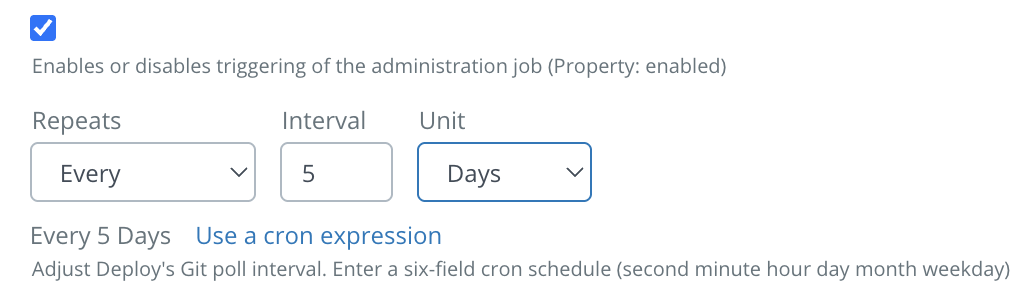
- Configure the polling frequency using the following controls:
- Repeats: Select Every, Every day, Every week, or Every month.
- Interval: Specify the polling interval.
- Unit: Select Minutes or Hours, where applicable.
For daily, weekly, or monthly schedules, additional day and time controls are displayed. A summary of the configured schedule is displayed below the controls.
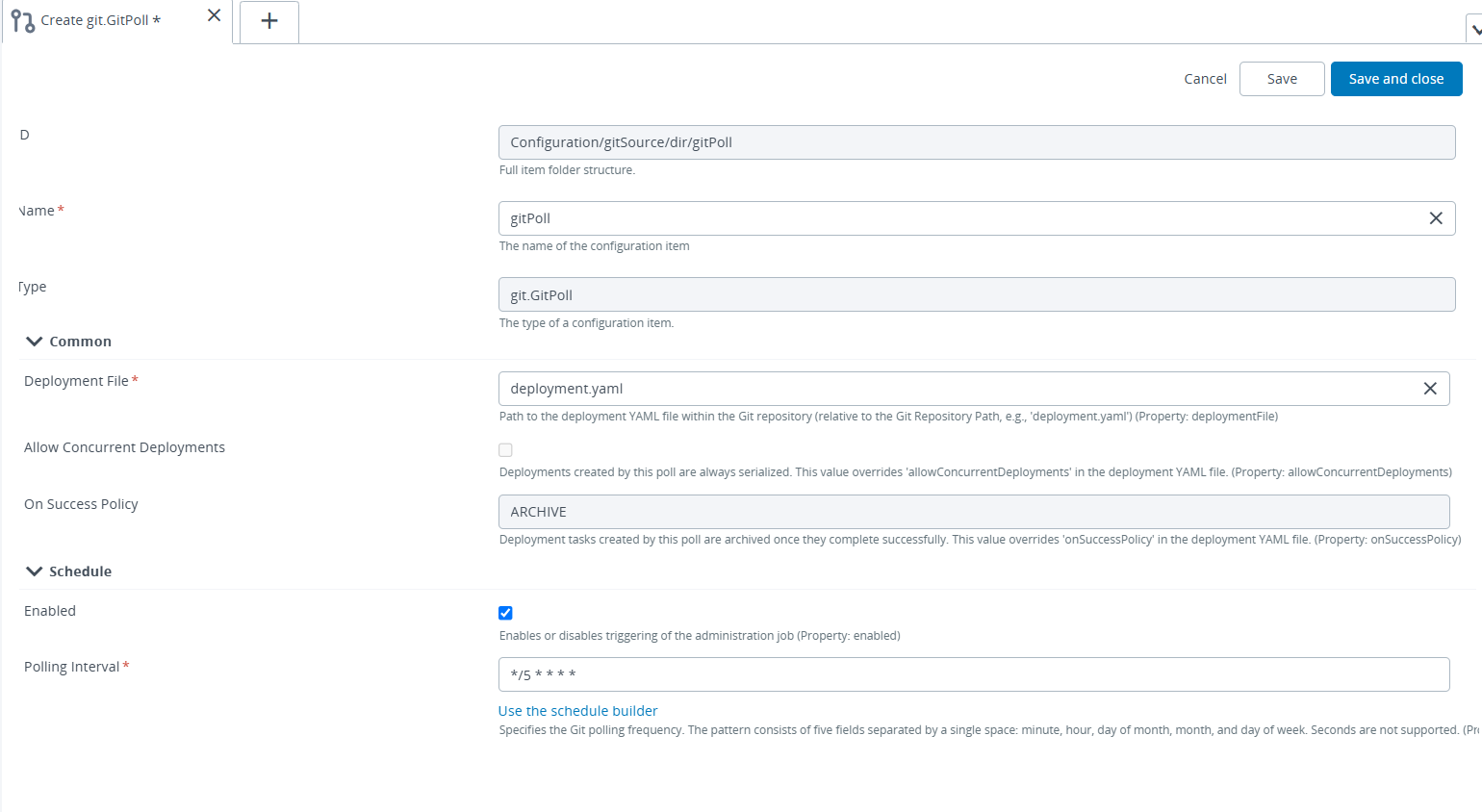
The schedule builder generates a five-field cron expression consisting of minute, hour, day of month, month, and day of week values. For example, selecting Every 5 Minutes generates the following cron expression:
*/5 * * * *
The generated expression is saved as part of the git.GitPoll configuration.
Use a cron expression
The Polling Interval field also supports manual entry of cron expressions.
- Click Use a cron expression to switch to the text field.
- Enter a five-field cron expression.
- Click Use the schedule builder to return to the schedule builder.
Both methods configure the same Polling Interval field.
Cron expression validation
The Polling Interval field in the git.GitPoll configuration requires a valid five-field cron expression. The following validation rules apply specifically to Git Poll schedules.
Seconds not supported
Seconds are not supported in Git Poll schedules. Entering a six-field cron expression, such as */5 * * * * *, triggers the following validation message:
Seconds are not supported. Enter a five-field cron expression.
When validation fails:
- The Schedule section header is highlighted in red.
- The Save and Save and close buttons remain disabled until a valid five-field cron expression is entered.

Fewer than five fields
Entering an expression with fewer than five fields, such as */5 * * *, triggers the following validation message:
Enter a valid five-field cron expression in this format: minute, hour, day of month, month, day of week.
The Save and Save and close buttons remain disabled until a valid expression is entered.
Switching to the schedule builder with an invalid expression
When the Polling Interval field contains an invalid or unsupported cron expression, switching to the schedule builder is prevented. Selecting Use the schedule builder keeps the field in cron expression mode and displays the following validation message:
Enter a supported cron expression before using schedule controls.
This prevents unsupported expressions from being silently overwritten when switching between configuration modes. The existing expression is preserved until a supported cron expression is entered.

Validation summary
The following table summarizes cron expression validation behavior for the Polling Interval field in the git.GitPoll configuration.
| Scenario | Example input | Validation message | Save |
|---|---|---|---|
| Six-field expression (seconds included) | */5 * * * * * | Seconds are not supported. Enter a five-field cron expression. | Disabled |
| Fewer than five fields | */5 * * * | Enter a valid five-field cron expression in this format: minute, hour, day of month, month, day of week. | Disabled |
| Switching to the schedule builder with an invalid expression | */5 * * * followed by Use the schedule builder | Enter a supported cron expression before using schedule controls. | Disabled |
| Valid five-field expression | */5 * * * * | No validation message. The schedule summary is displayed in the builder view. | Enabled |