Run the Docker containers with Docker Compose
This topic guides you to run the Docker Containers with Docker Compose for Digital.ai Deploy.
Version-specific Docker images Deploy are published to Docker Hub:
Run the container using the docker-compose.yaml file
To start Digital.ai Deploy with a persistent setup:
-
Download the Docker Compose file using the following command:
curl https://raw.githubusercontent.com/xebialabs/xl-docker-images/master/docker-compose-example/docker-compose.yaml > docker-compose.yaml -
Open the
docker-compose.yamlfile and change the ADMIN_PASSWORD to a secure password. -
Run the file with Docker Compose:
docker-compose up -d -
Access Deploy at
http://localhost:4516/.
You can now remove the password from the docker-compose.yaml file.
You must provide a valid license before you can log in. Browse to the above URL and paste the license for Digital.ai Deploy. If you do not have a license yet, apply for a Deploy trial license on the Digital.ai website.
Setup Deploy using Docker Compose
If you want to use Digital.ai Deploy with Docker Compose, you can use the following example configuration. This allows you to start the container and move all command line options into a file.
-
Create a file called
docker-compose.yamland copy the following contents inside:xld:image: xebialabs/xl-deploy:23.1.0container_name: xldports:- "4516:4516" -
Start both containers with this single command:
docker-compose up -d -
The container will start and the password can be viewed using these commands:
docker logs xld -
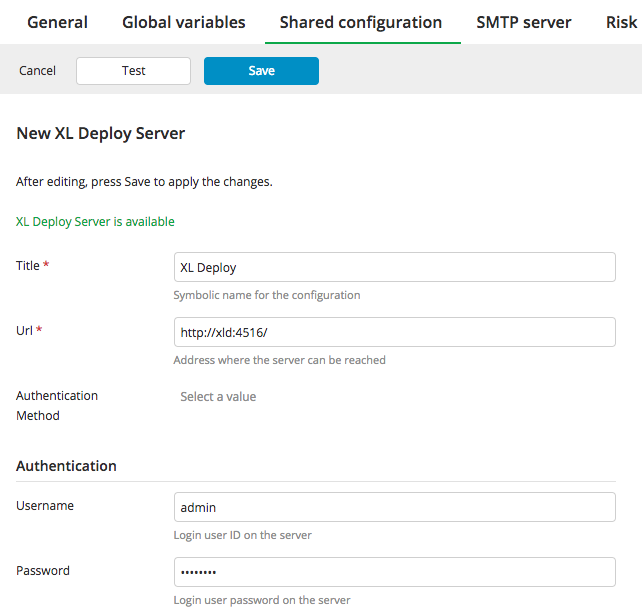
You can configure the Deploy server under Settings > Shared Configuration. Use the following settings:
You can run multiple containers by modifying the docker-compose.yaml file as needed.
Setup single and multi node Deploy instances using Docker Compose
You can deploy single node instances as well as multi node instances of Deploy using Docker Compose.
For details on setting up a single-node Deploy using Docker Compose, see Single-node docker deployments
For details on setting up a multi-node Deploy using Docker Compose, see Multi-node docker deployments
Upgrading single and multi node Deploy instances using Docker Compose
For details on upgrading a single-node Deploy using Docker Compose, see Single-node docker deployments
For details on upgrading a multi-node Deploy using Docker Compose, see Multi-node docker deployments