Fail Fast for Critical Tests
When executing large automated test suites, a failure in a critical test such as, a login flow or a database connectivity check can trigger a cascade of subsequent test failures. These downstream failures are often unrelated to the original issue, resulting in unnecessary test execution, longer run times, and wasted device resources.
Fail Fast capability in Smart Agent lets you designate specific tests as critical. When a critical test fails, Smart Agent immediately stops the remaining client-side test execution. This helps you identify and resolve the root cause quickly instead of spending additional time and device resources running tests that are likely to fail as a result.
How it works
You mark one or more tests as critical by adding their test IDs to the criticalTests list, under run: in your config.yml. This property is optional — configure it only if you want execution to stop whenever a critical test fails.
During execution, if a critical test fails and has exhausted all configured retries, the Smart Agent:
- Lets any tests currently running finish normally — it does not interrupt in-flight tests.
- Stops launching any new tests against devices.
- Marks all remaining queued tests as Skipped, with the cause
Skipped due to critical test failure: <TestCaseID>.
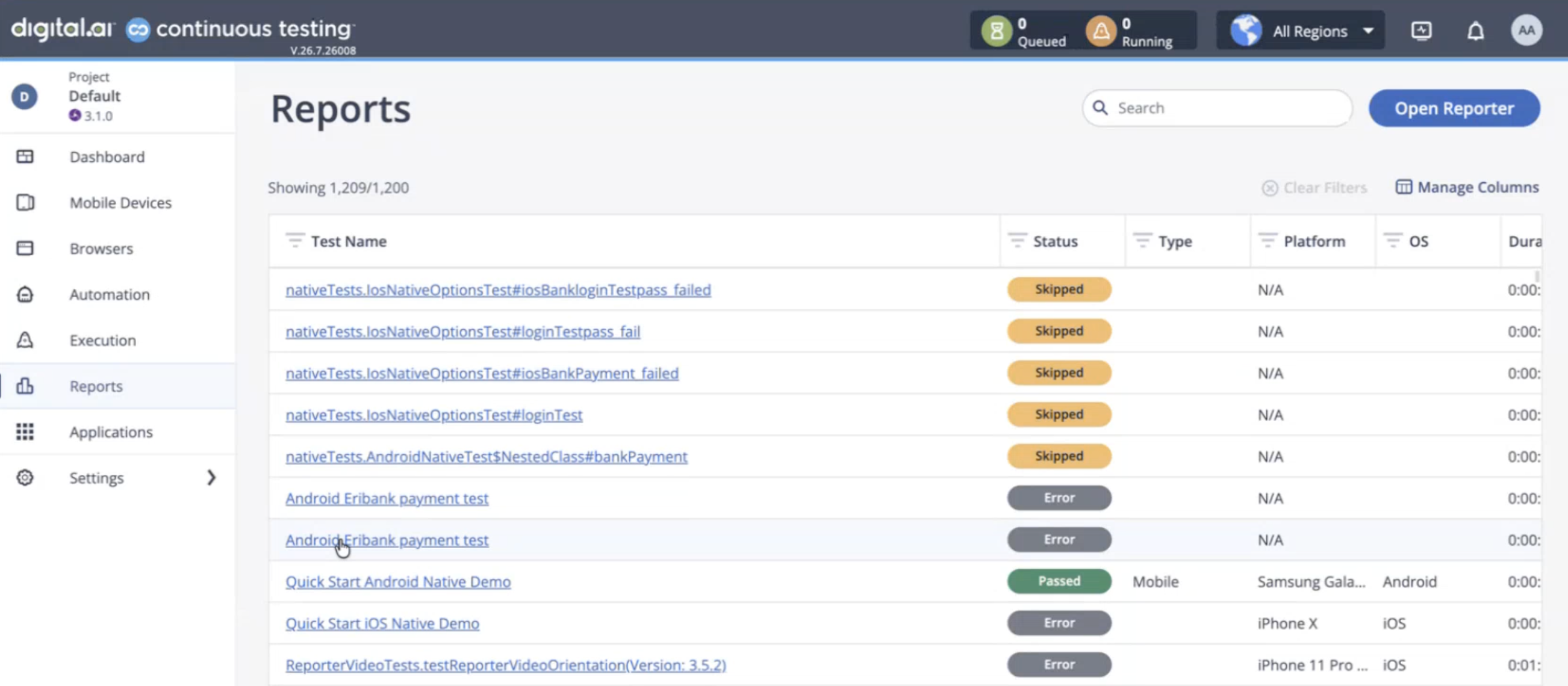
For example, out of 100 tests where the Bank Login test is 10th in the run order, the first 9 tests execute normally. If Bank Login then fails, tests 11 through 100 are all skipped.
Configuration
Add the critical test(s) and, optionally, a skip-report batch size under run: in config.yml:
run:
  skipReportBatchSize: 20 # Default: 20
  criticalTests:
    - nativeTests.AndroidNativeTest#bankLogin
-
The
criticalTestsproperty lists critical tests, and each entry uses the<ClassName>#<methodName>format. Unlike selectedTests, which can reference either an entire test class (for example, AndroidNativeTest) or an individual test, criticalTests only accepts individual test methods. You can't mark a whole class as critical by listing just the class name; to treat every test in a class as critical, list each of its test methods. -
The
skipReportBatchSizeproperty sets the number of skipped tests that Smart Agent reports to Cloud Reporter per batch when a critical test fails. It defaults to 20.
Synchronize Batch Size Settings
The Test Reporter has its own matching batch-size property, smart-agent.skip-tests-batch-size, also set to 20 by default. This is independently configurable, so if you increase skipReportBatchSize in config.yml without raising smart-agent.skip-tests-batch-size on the reporter side to match (or higher), the batch request fails with:
Number of tests (%d) exceeds the maximum batch size (%d). Please reduce the number of tests in the request.
Keep both values in sync, or ensure the reporter-side value is always equal to or greater than skipReportBatchSize.
Fail Fast Behavior
- If a listed critical test isn't part of the current test selection, it's ignored — Fail Fast has no effect.
- Tests that already ran before the critical test failed keep their original status and results; they are not affected retroactively.
- Skipped tests still get a report entry in the Cloud Reporter (see View Test Results in Test Reporter), showing status Skipped and the failure cause above. Available metadata (capabilities, device query, etc.) is retained, but no test steps, video, test data, device logs, or attachments are captured, since these tests never ran.
- Skipped tests are not retried, even if a retry count is configured.
Fail Fast results in Cloud Reporter
When Fail Fast skips the remaining tests after a critical test fails, Cloud Reporter still creates an entry for each skipped test. The skipped test displays a Skipped status and includes the reason in the Test Data section. For example, the cause field identifies the critical test that triggered the skip, such as:
Skipped due to critical test failure: nativeTests.AndroidNativeTest#bankLogin
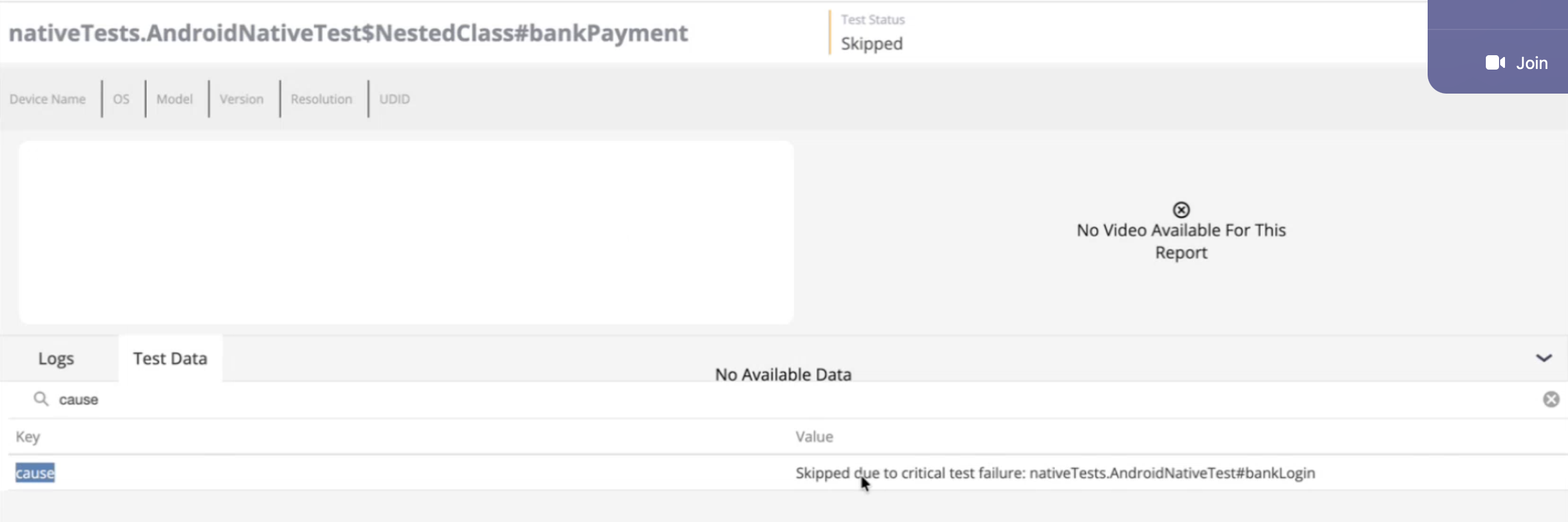
Because Smart Agent never executes the skipped tests, Cloud Reporter does not capture test steps, video, logs, attachments, or other runtime artifacts for those tests.