Digital.ai Testing 26.5 Release Notes
Now Supporting iOS 27 Beta
Digital.ai Testing supports iOS 27 Beta on real devices. Teams can run manual and automated tests during the beta window before iOS 27 public release reaches users at scale. Support is available on day zero, no additional configuration required.
Support for Apple CarPlay Instrument Cluster
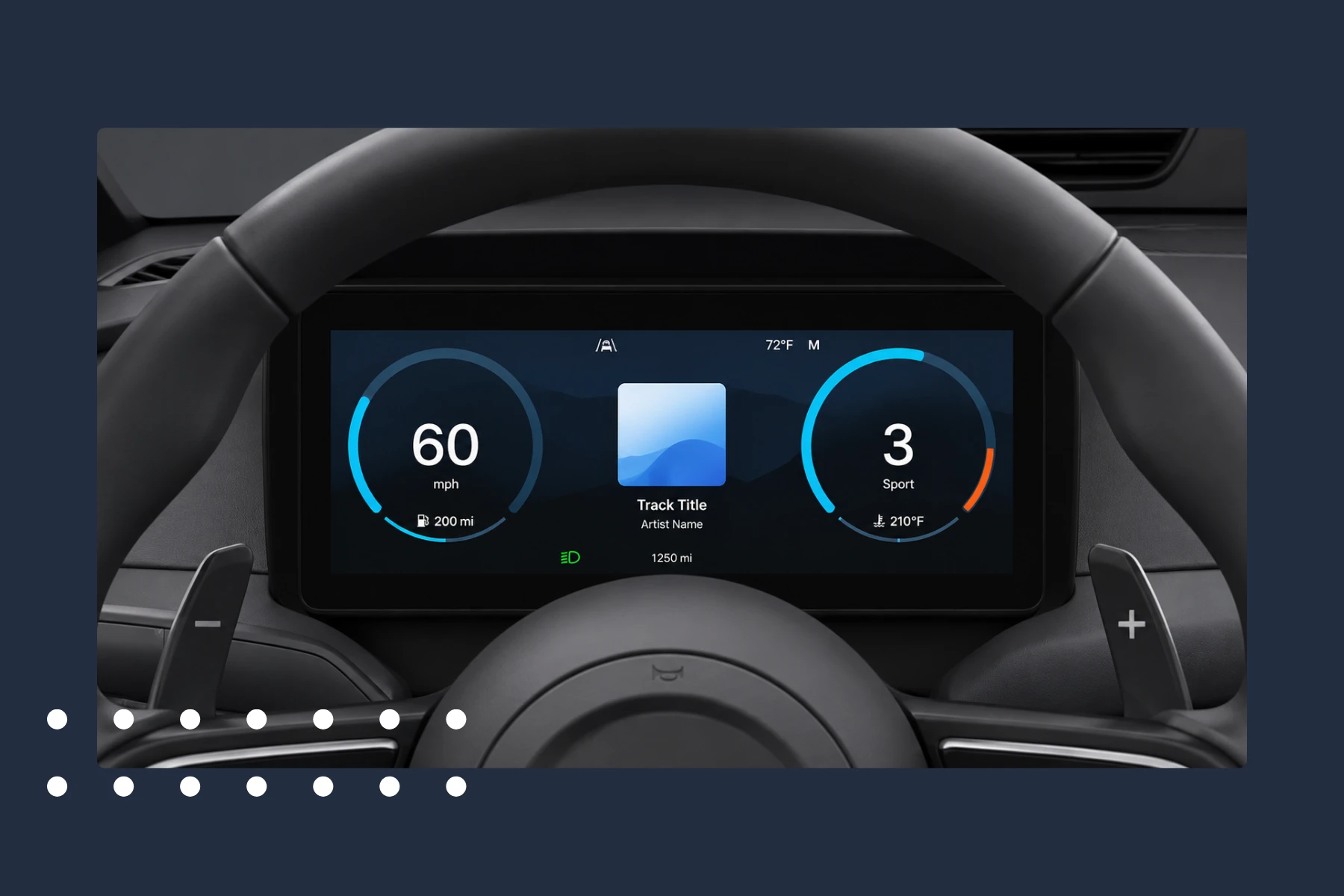
Automotive Testing now extends Apple CarPlay to include the Instrument Cluster display. Teams can configure the instrument cluster, capture screenshots, and capture video, enabling true end-to-end automated testing across both CarPlay displays without manual interaction.
For more information, see Test Execution with CarPlay.
Public URLs for Video Reports
You can now share video test reports via a secure link — no login required. Share results with anyone in your organization directly, without manual exports or access provisioning.
For more information, see Share Video Reports.

Bug Fixes and Improvements
This section highlights bug fixes and improvements included in this release.
-
Cloud
-
The Diagnose → System Information page has been improved with a new "Type" column in the Download Support Data dialog displaying each component's service type.
-
Fixed an issue where files with a missing storage ID in the File Repository could not be deleted via the DELETE REST API V1 files endpoint, which returned an "Invalid string length" error.
-
Fixed an issue in the REST API V1 assign endpoint where applications with different UniqueNames could not be assigned if they shared the same name, build, and release version. Applications are now saved based on their different UniqueName.
-
Fixed an issue that prevented the registration or reconnection of an Apple Developer account from the UI.
-
-
Mobile Studio
- Fixed a bug preventing Mobile Studio from launching when the Device Setup checklist is long.
- Fixed a UI issue in the Mobile Studio console view that caused unexpected white space to appear in the console popup title bar.
-
Android Support
- Fixed an issue where the launch with URL command failed to initialize Chrome, causing test execution to fail.
- Fixed an issue where Android devices would unexpectedly go into an error state.
- Optimized the handling of Chrome's first launch experience on Android. Please note that instructions have changed for when the property
android.chrome.avoid.first.launch.experienceis set totrue. For more information, see SetProperty Command.
-
iOS Support
- Fixed an intermittent issue where the
IsElementFound()command caused unexpected delays in test execution time.
- Fixed an intermittent issue where the
-
Appium Server
- The Appium server library has been upgraded to version 3.4.2 (including changes from 3.3.0 and 3.3.1) for both Docker Swarm and Local Appium modes.
- Android screenshot capture via the
getScreenshotAscommand is now significantly faster. This means faster test execution and shorter feedback cycles for your Android test suites, bringing screenshot performance on par with iOS. - Fixed an issue where the Region Proxy component could freeze and drop automation calls under high concurrency, causing widespread session failures for both Appium Grid and Appium OSS. If you run large-scale parallel tests, your sessions will no longer be disrupted by proxy crashes, eliminating the need for manual Region Proxy restarts.
-
Cross Browser Testing
-
This release enhances the reliability and observability of Playwright test execution on the cloud:
- Browser version in reports - Test reports now display the browser version used during execution.
- Trace file support - Playwright trace files (trace.zip) are attached to reports for easy debugging via Trace Viewer.
- ESM compatibility fix - Resolved an issue where the report status incorrectly showed errors when using ECMAScript Modules.
- Selenium Grid Experimental - Support for running Playwright tests on Selenium Grid has been added. For more information, see Executing Playwright in Selenium Agent.
-
Fixed an issue where non-QWERTY keyboard layouts (such as AZERTY) produced incorrect character input when typing in Browser Studio.
Known Issues
-
iOS 27 beta
- SetNetworkConnection command is not working in
airplane_mode. - The SetNetworkConnection command does not turn Bluetooth OFF if Bluetooth is already enabled.
- Device passcode cannot be enabled or disabled using either the Web Studio UI or the SetPasscode Appium command.
- SetNetworkConnection command is not working in
Cloud Management and On-Premises Deployment
Release notes related to Cloud Management and On-Premises Deployment are published in On-Premises Cloud Management Release Notes.
This separation improves clarity for On-Premises cloud administrators and includes installation, platform support, and infrastructure-related changes.
Latest Browser and OS Version Support
 |  |  |  |  |  |  | |
|---|---|---|---|---|---|---|---|
| Official | 15.8.X - 26.5 26.5.1** 18.7.4 | 9-16 | 150 | 152 | 150 | 26 | 131 |
| Beta | 27 beta | 17 beta 2 One UI 9 beta | - | 153 | 149 | - | - |
**26.5.1 is supported for iPhone 17 Series only.
Limitations on Android 12 - 16 devices are mentioned here and iOS limitations can be found here.
For browser testing limitations, read more here.
Maintenance Update 1
Release Date: June 23rd, 2026
- SSO: Fixed an “Invalid CORS Request” error that occurred when the
saml-identity-provider-urlproperty was not configured with the IdP metadata URL. To learn more, see Service Provider Configuration.
Next Release
Due date: July 10th, 2026 (or prior)
The due date and highlights of the next release are as anticipated by Digital.ai Testing on the date of release of the current version, and are forward-looking statements. Actual due dates and highlights may vary.