Digital.ai Testing 26.4 Release Notes
Automotive Testing: Start & Stop Commands for Android Auto & CarPlay
Automotive testing now supports dynamically starting and stopping Android Auto and iOS CarPlay projections during test execution. Seamlessly switch between projection mode and standard device testing within the same session, without manually managing projection state.
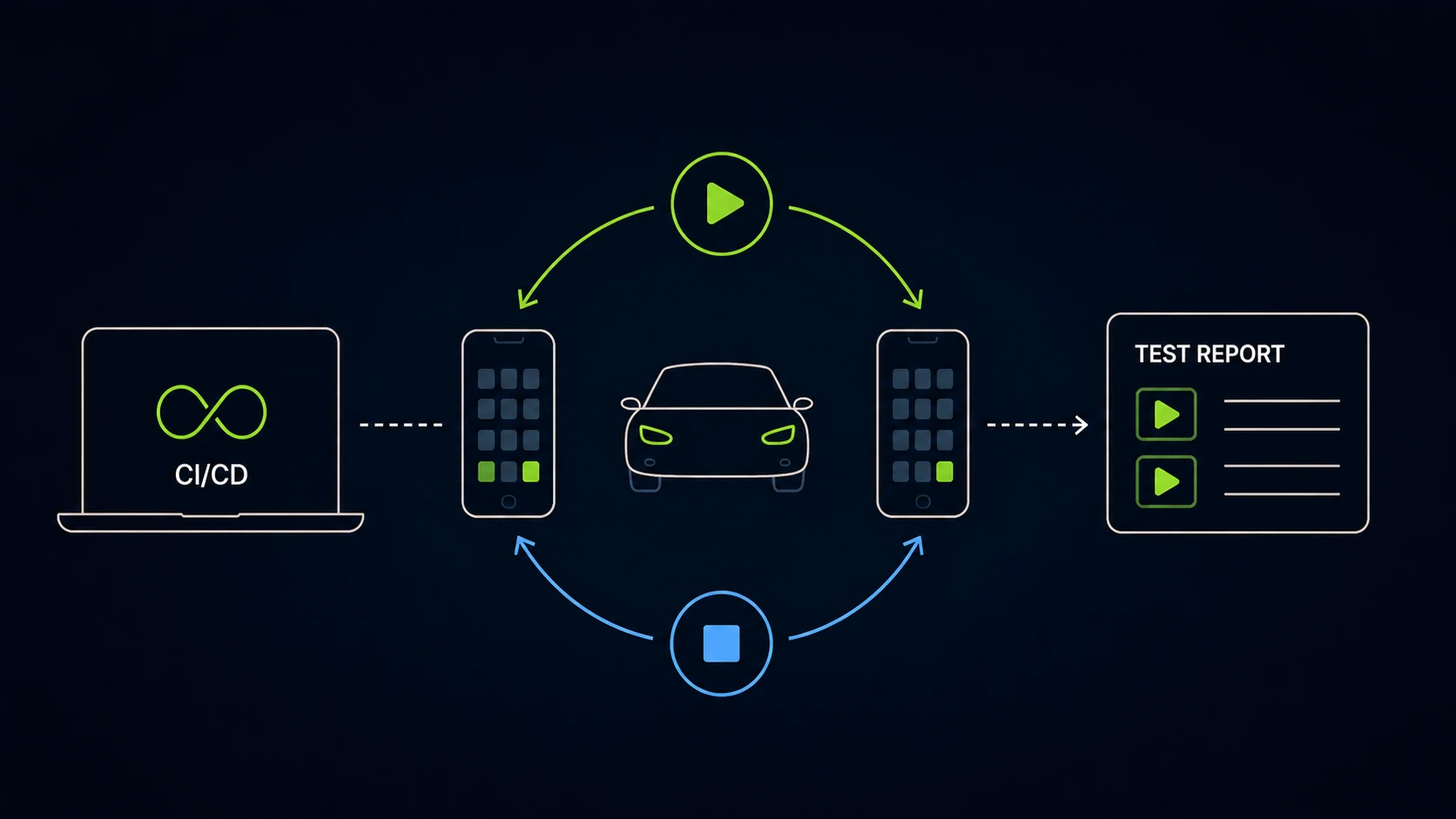
See Control Automotive Sessions in CarPlay and Android, Test Execution with Android Auto, and Test Execution with CarPlay for implementation details and examples.
Proxy Authentication for Manual Browser Sessions
Manual browser sessions now support authenticated proxy configuration directly from the UI. Configure proxy settings through a new dialog when launching sessions. Supported on Chrome, Firefox, Edge, and Opera (Windows and macOS). Safari is not supported.
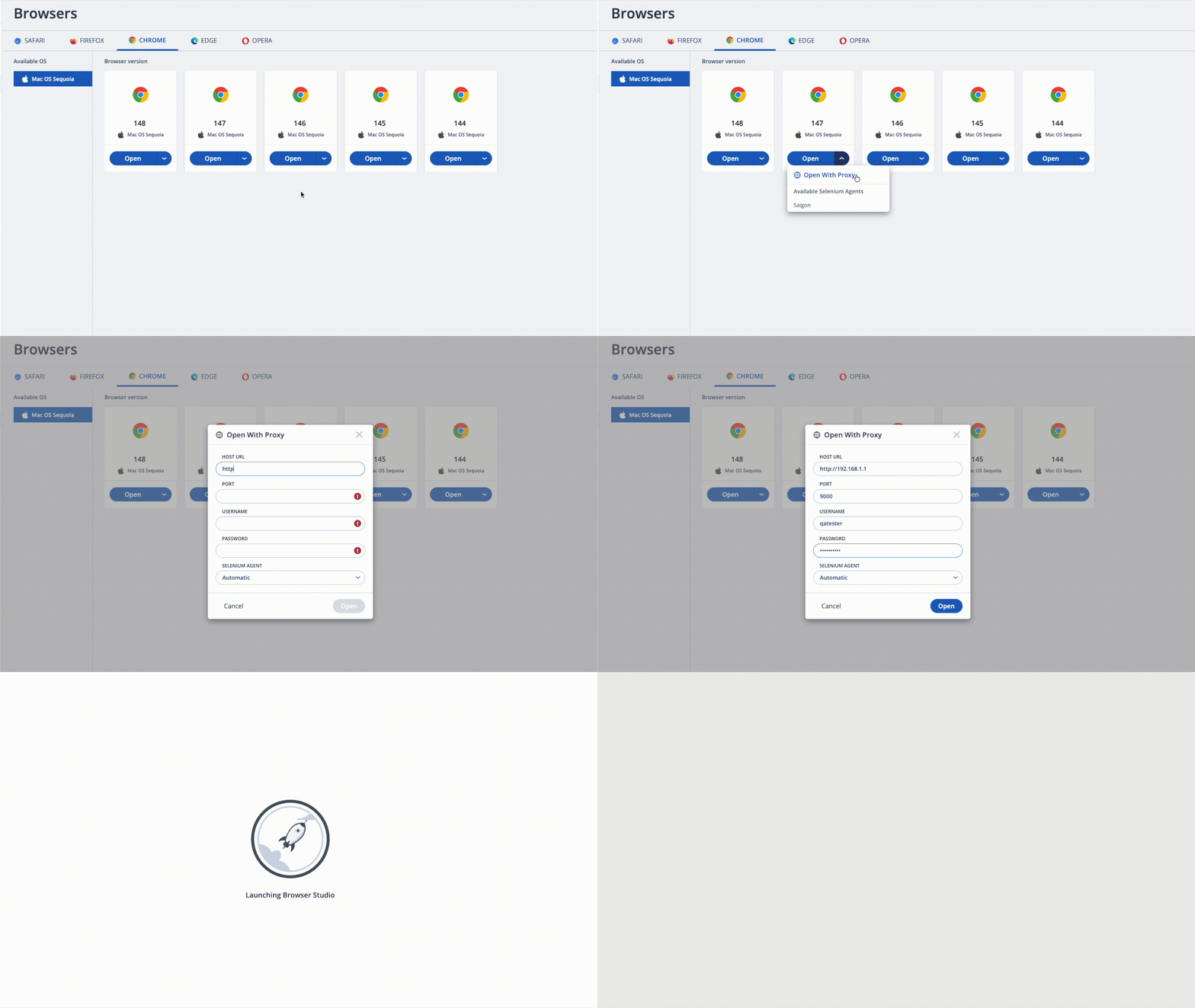
See Proxy Authentication for Manual Browser Sessions for configuration steps and supported browsers.
Bug Fixes and Improvements
This section highlights bug fixes and improvements included in this release.
-
Cloud
- We now support CSP Nonce. You can add CSP directives or replace unsafe-inline with Nonce placeholder. Learn more.
- Fixed an issue where deletion of users could fail if the users ran any tests before the 26.1 release.
-
Shared Devices
- Fixed an issue where Chrome notification pop-ups could cause mobile web tests to fail on Shared Devices.
-
Mobile Studio
- Fixed a Content Security Policy (CSP) violation that caused skins to appear blank due to an inline style error.
- Fixed a UI issue where Manage Columns and Previous buttons could become misaligned or hidden when the Application Manager window was resized.
-
Reporter
- Fixed an issue causing iOS (XCUITest) videos to become unresponsive during playback in reports.
-
Android Support
- Fixed an issue where launching the SeeTest client via URL command could intermittently fail with a
TimeoutException.
- Fixed an issue where launching the SeeTest client via URL command could intermittently fail with a
-
iOS Support
- Fixed an issue where application installation with Auto-Trust failed on specific iPhone devices.
- Fixed an issue where cleanup failures caused default region and language settings to be missing on the device.
- Fixed an issue where application installation with Auto-Trust failed due to a socket timeout.
- Fixed an issue where iOS devices intermittently entered an unauthorized state during a session.
-
Appium Server
- Resolved an issue where video recordings were intermittently unavailable in test reports when multiple sessions ran in parallel.
-
Cross Browser Testing
- WebGL Support for Chrome Manual Sessions (Windows)
- You can now enable WebGL rendering in Chrome manual sessions on Windows by setting the
enable-webglproperty totruein the Selenium Agent configuration.
- You can now enable WebGL rendering in Chrome manual sessions on Windows by setting the
- Playwright: Enhanced Test Reporting with Browser Version and Trace File Support
- Playwright test reports now include the browser version used during execution and automatically attach trace files (
trace.zip) for failed tests, providing detailed step-by-step execution data to help diagnose test failures more efficiently.
- Playwright test reports now include the browser version used during execution and automatically attach trace files (
- WebGL Support for Chrome Manual Sessions (Windows)
Known Issues
-
Adding or reconnecting an Apple developer account fails with the error
Wrong credentials. Please try again.Workaround: Upload the provisioning profile manually as described here.
Cloud Management and On-Premises Deployment
Release notes related to Cloud Management and On-Premises Deployment are published in On-Premises Cloud Management Release Notes.
This separation improves clarity for On-Premises cloud administrators and includes installation, platform support, and infrastructure-related changes.
 |  |  |  |  |  |  | |
|---|---|---|---|---|---|---|---|
| Official | 15.8.X - 26.5 18.7.4 | 9-16 | 148 | 150 | 147 | 26 | 131 |
| Beta | - | 17 beta 2 Android 17 QPR1 Beta 1 | - | 151 | 148 | - | - |
Limitations on Android 12 - 16 devices are mentioned here and iOS limitations can be found here.
For browser testing limitations, read more here.
Maintenance Update 1
Release Date: May 25th, 2026
-
Region Proxy: Resolved an issue that could cause automation test executions to hang or disconnect under high load.
-
Android: Fixed an issue that prevented Chrome 148 from launching on some Android devices.
-
Android: Resolved an issue that could cause instrumented applications to log out after being brought back from the background.
-
Android: Fixed an issue where QR code uploads via Simulate Capture would remain stuck on the camera view.
-
iOS: Added support for iOS 26.5 (23F77).
-
Cloud: Resolved an issue that led to a 404 page when clicking on a Device Group from the Device Info panel on the Mobile Devices page.
-
Browser Studio: Resolved an issue on Windows-based browsers where AZERTY keyboard input was not handled correctly.
-
Selenium Agent: Resolved an issue where tests could fail when running with ieMode capability enabled.
For the latest installer updates, visit our On-Premises Cloud Management Release Notes page.
Next Release
Due date: June 10th, 2026 (or prior)
The due date and highlights of the next release are as anticipated by Digital.ai Testing on the date of release of the current version, and are forward-looking statements. Actual due dates and highlights may vary.