Digital.ai Agility version 26.2 Release Notes
📅 25 Jul 2026
Release Summary
Enhancements and bug fixes in Digital.ai Agility version 26.2
Digital.ai Agility
Enhancements
- View release details in a tooltip by hovering over a Release column header on the Release Planning Board
- View closed releases in the new Release Planning List view
- Group work items by Release on Planning Boards
- View work items in Release Details, organized by type across Agility Core and Rooms 2
- View release child items in a consolidated grid from the Child Items tab in the release details drawer
- Export OKRs to Excel from the Objectives list view
- Report on Release Planning 2.0 data now available in the Data Mart
- Report on OKRs data now available in the Data Mart
- The Guest Collaborator feature can be enabled with a feature toggle in the UI (disabled by default)
- The Team Scheduling feature can be enabled with a feature toggle in the UI (disabled by default)
- The Classic Portfolio Tree feature can be enabled with a feature toggle in the UI (disabled by default)
View Release Details from the Column Header
Hover over any Release column header on the Release Planning Board to display a tooltip with key release details, so you can review the release timeline and progress without leaving the board or opening the release.
What changed:
- Hovering over a Release column header displays a view-only tooltip after a brief pause
- Tooltip shows the release title and description, Target Date, and the time remaining until the Target Date (for example, "24 days left")
- Tooltip displays Overdue in red when the Target Date has passed
- Progress bar shows completed work items versus the total (for example, "2 / 8 work items"), where items in a Done or Closed state count as completed
- Progress bar turns red when the current date passes the Target Date, signaling that the release is behind schedule
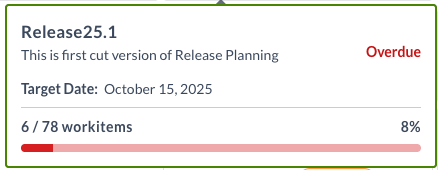
Check a release's timeline and progress at a glance while planning work across releases.
For more information, see Release Planning Board.
View Closed Releases in the Release Planning List View
Release Planning includes a new List view alongside the existing Board view. The List view shows all releases in a value stream in a table and includes a toggle to display closed releases, so you can review historic release information and the work items associated with completed releases.
What changed:
- New List View added to Release Planning, alongside the existing Board View
- List view displays releases with Name, Date, Version, Created By, Last Edited By, and Asset State columns
- Show closed releases toggle displays closed releases along with active releases
- Select a release to view its details and associated work items, such as stories and defects
Review historic release information and track work items from closed releases without leaving Release Planning.
For more information, see Release Planning.
Group by Release on Planning Boards
You can now group work items by their assigned release directly on your planning boards, so you can see how work is distributed across releases and assess whether scope is balanced without switching to a dedicated release view. In Agility Core, this option is available on the Portfolio Kanban Board, Storyboard, Sprint Planning Board, and Dependency Board. In Rooms 2.0, it is available on the Storyboard, Iteration Planning, and Portfolio Kanban.
To group by release in Agility Core, open the Customize option for the board and select Release from the Group By list. Work items appear under their respective release groups, and items that are not assigned to a release appear under a separate group labeled Release: (None) so they remain visible. On the Portfolio Kanban Board, grouping is based on the epic's Planned Release attribute.
For more information, see the following topics:
- Customizing the Storyboard
- Work with Portfolio Kanban Board
- Add Swimlanes to the Portfolio Kanban Board
- Dependency Board
- Sprint or Iteration Planning
- Portfolio Kanban View in Rooms 2
- Managing Sprint Execution in Rooms 2
- Executing Sprint Planning in Rooms 2
View Work Items in Release Details
The Release Details view in Agility Core and Rooms 2 now displays associated work items organized by type. When you open a Release, you can view all related Portfolio Items, Stories, and Defects in separate sections. This organization makes it easier to understand the scope and contents of each release at a glance.
In Rooms 2, access these work items through the new Child Items navigation option, which provides quick access to all Portfolio Items, Stories, and Defects associated with the release.
For more information, see Viewing Project or Release Details and Release Planning Board.
Release Child Items View
The Release Asset Details view includes a Child Items tab that displays all work items associated with the release in a consolidated grid. Review release scope, track progress, and identify owners without navigating away from the release details drawer.
What changed:
- Child Items tab added to release details drawer in Release Planning Board
- Work items grid displays Portfolio Items, Stories, and Defects associated with the release
- Columns include Name, Number, Owners, and Status for quick reference
- Sections for Portfolio Items, Stories, and Defects with item counts displayed (e.g., "Stories (80)")
- Filter icon available to narrow down work items by criteria
- Pagination controls for releases with many associated work items (e.g., "1-10 of 80")
- Grid loads in context within the release drawer, no separate navigation required
Assess release health at a glance by reviewing work item statuses (Done, In Progress, Ready for Dev) and identify responsible owners for each item. Use the grid to answer "what's included in this release, who owns it, and is it complete?" during team reviews and status meetings.
For more information, see Viewing Project or Release Details.
Export OKRs to Excel from the List View
The Objectives list view includes an Export to Excel option that downloads your OKRs to an Excel file. The export includes both Objectives and their associated Key Results, so you can review or share your OKR data outside of Agility.
What changed:
- Export to Excel option added to the Objectives list view menu
- Export includes Objectives along with their associated Key Results
- Exported file reflects your selected columns, including standard fields, relationships such as Linked Objectives, and custom columns
- File downloads in XLSX format
Share OKR progress with stakeholders or analyze objectives and key results offline by exporting the list to Excel.
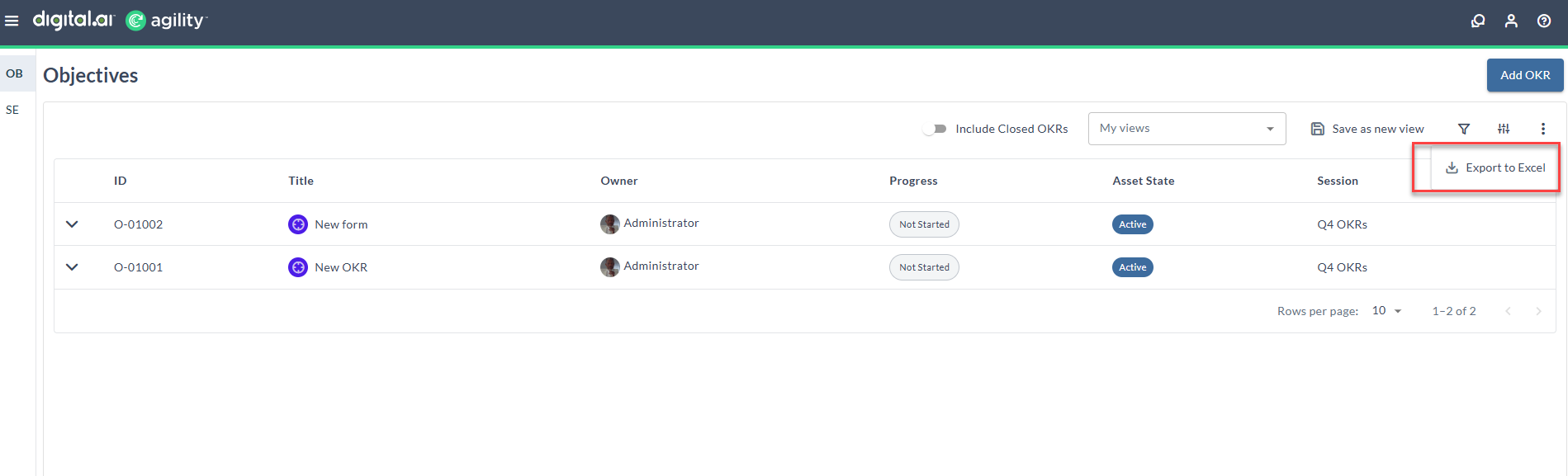
For more information, see Export OKRs in Agility.
Release Objects Available in the Data Mart
Release Planning 2.0 data is now included in the Data Mart. Release objects, including metadata such as name, date, status, and associated work items, are extracted, transformed, and loaded into the Data Mart on a scheduled cadence. Analysts and product owners can query and build reports using release objects as a dimension or filter to analyze release performance and make decisions from consolidated, curated release information.
OKRs Data Available in the Data Mart
OKRs data is now included in the Data Mart. Objectives, Key Results, and their associated work items are loaded into the Data Mart so that product and program managers can build custom reports and dashboards on OKR data. This release populates the OKR dimension and bridge tables; fact tables may be added in a future release based on customer requirements.
Enable Guest Collaborator in the UI
The Guest Collaborator feature is disabled by default in the user interface. You can enable it with a feature toggle. While the feature is disabled, related elements are hidden across the application, including navigation menu options, the Guest Collaborator Admin page, the Invite Guest Collaborator option on the Asset Detail and TeamRoom Conversations panels, and the Conversation Lite View. The toggle affects the UI only and doesn't change the API.
What changed:
- The Guest Collaborator feature is disabled by default in the UI
- You can enable the feature with a feature toggle
- While disabled, Guest Collaborator elements are hidden across the application, including navigation menu options, the Guest Collaborator Admin page, the Invite Guest Collaborator option on the Asset Detail and TeamRoom Conversations panels, and the Conversation Lite View
- The toggle affects the UI only and doesn't change the API
- To enable the feature, add
<add key="AreGuestCollaboratorsEnabled" value="true" />touser.config
The Guest Collaborator feature remains available through this toggle until version 27.0, when it will be permanently removed.
Enable Team Scheduling in the UI
The Team Scheduling feature is disabled by default in the user interface. You can enable it with a feature toggle. While the feature is disabled, related elements are hidden across the application, including navigation menu options and the Team Assignment page. The toggle affects the UI only and doesn't change the API.
What changed:
- The Team Scheduling feature is disabled by default in the UI
- You can enable the feature with a feature toggle
- While disabled, Team Scheduling elements are hidden across the application, including navigation menu options and the Team Assignment page
- The toggle affects the UI only and doesn't change the API
- To enable the feature, add
<add key="IsTeamSchedulingEnabled" value="true" />touser.config
The Team Scheduling feature remains available through this toggle until version 27.0, when it will be permanently removed.
Enable Classic Portfolio Tree in the UI
The Classic Portfolio Tree feature is disabled by default in the user interface. You can enable it with a feature toggle. While the feature is disabled, related elements are hidden across the application, including navigation menu options, the Classic View on the Epics Portfolio Planning page, and the Use Classic Portfolio Item Tree checkbox in user preferences. The toggle affects the UI only and doesn't change the API.
What changed:
- The Classic Portfolio Tree feature is disabled by default in the UI
- You can enable the feature with a feature toggle
- While disabled, Classic Portfolio Tree elements are hidden across the application, including navigation menu options, the Classic View on the Epics Portfolio Planning page, and the Use Classic Portfolio Item Tree checkbox in user preferences
- The toggle affects the UI only and doesn't change the API
- To enable the feature, add
<add key="IsClassicPortfolioTreeEnabled" value="true" />touser.config
The Classic Portfolio Tree feature remains available through this toggle until version 27.0, when it will be permanently removed.
Feature Deprecation Notice: Guest Collaborator, Team Scheduling, and Classic Portfolio Tree
The Guest Collaborator, Team Scheduling, and Classic Portfolio Tree features are deprecated and are disabled by default starting in version 26.2. You can enable each feature with its feature toggle in user.config until version 27.0, when these features will be permanently removed. Plan to transition away from these features before upgrading to version 27.0.
The user.config settings above apply to on-site (self-hosted) deployments only. On-demand (hosted) customers should contact Support to enable any of these features.
Fixes
Version Filters Failed to Parse on Non-English Windows Locales
Fixed an issue where metadata loaded on a background thread using the culture of the process owner instead of a fixed culture. On servers with a non-English Windows locale, such as French, this caused version and numeric filters like Progress<'1.0' to fail to parse because the expected decimal format did not match the locale's format.
What changed:
- Metadata now loads using a fixed, culture-invariant format regardless of the server's Windows locale
- Version and numeric filters such as
Progress<'1.0'parse correctly on non-English locales
This fix ensures filters parse reliably on servers configured with any Windows locale.
Agility Sync
Enhancements
- Manual refresh for the View Logs page, so it no longer auto-refreshes after cancel or resync actions
- Status-based tabs on the View Logs page for quicker filtering of events by status
- Configurable Auto Resync to automatically retry failed events
- Improved MongoDB connectivity efficiency for better performance and stability
- Support for Epic sync from GitLab to Agility
- Support for JIRA Data Center 10.3.X
Manual Refresh for the View Logs Page
The View Logs page no longer refreshes automatically after you cancel a failed event or trigger a manual resync. Previously, the page reloaded after each cancel or resync action, so you had to wait for the reload to finish before acting on another event. On mappings with a large number of events, these repeated reloads added wait time and could cause errors or an inconsistent experience when you tried to act on more events during a reload.
What changed:
- The View Logs page no longer auto-refreshes after you cancel a failed event or trigger a manual resync.
- After you trigger a resync, the message "Resync of data is in progress. Please refresh the page after some time to view updated status." is displayed.
- You can cancel or resync multiple events without waiting for the page to reload between actions.
- Refresh the page manually when you are ready to view the updated event status.
This change lets you work through multiple events without intermediate reloads and wait time, then refresh once to see the updated status.
For more information, see Mappings List Page.
Status-Based Tabs on the View Logs Page
The View Logs page now loads log entries by status instead of loading all entries at once. Previously, the page loaded Success, Failed, and Skipped entries together in a single view. For mappings with a large number of events, loading and rendering all entries at the same time made the page slow and could cause request timeouts.
What changed:
- The Quick Summary section is replaced with three clickable status tabs: Success, Failed, and Skipped.
- Each tab continues to display the number of Success, Failure, and Skipped events as before. For better readability, the counts are now rounded off. To see the exact count, hover over the displayed number to view the precise value.
- The Success tab is selected by default, and only Success entries load.
- Selecting the Failed or Skipped tab loads only the entries for that status.
- Source ID and Destination ID search, pagination, sorting, Load More, and optional column configuration are retained on all tabs.
- A search performed on one tab persists across all tabs, so matching entries for the searched ID appear under Success, Failed, and Skipped without searching again.
- Click the options (three dots) menu to configure your columns, that is, to show or hide the optional columns. User-selected optional columns are retained when you switch tabs and when you refresh the page.
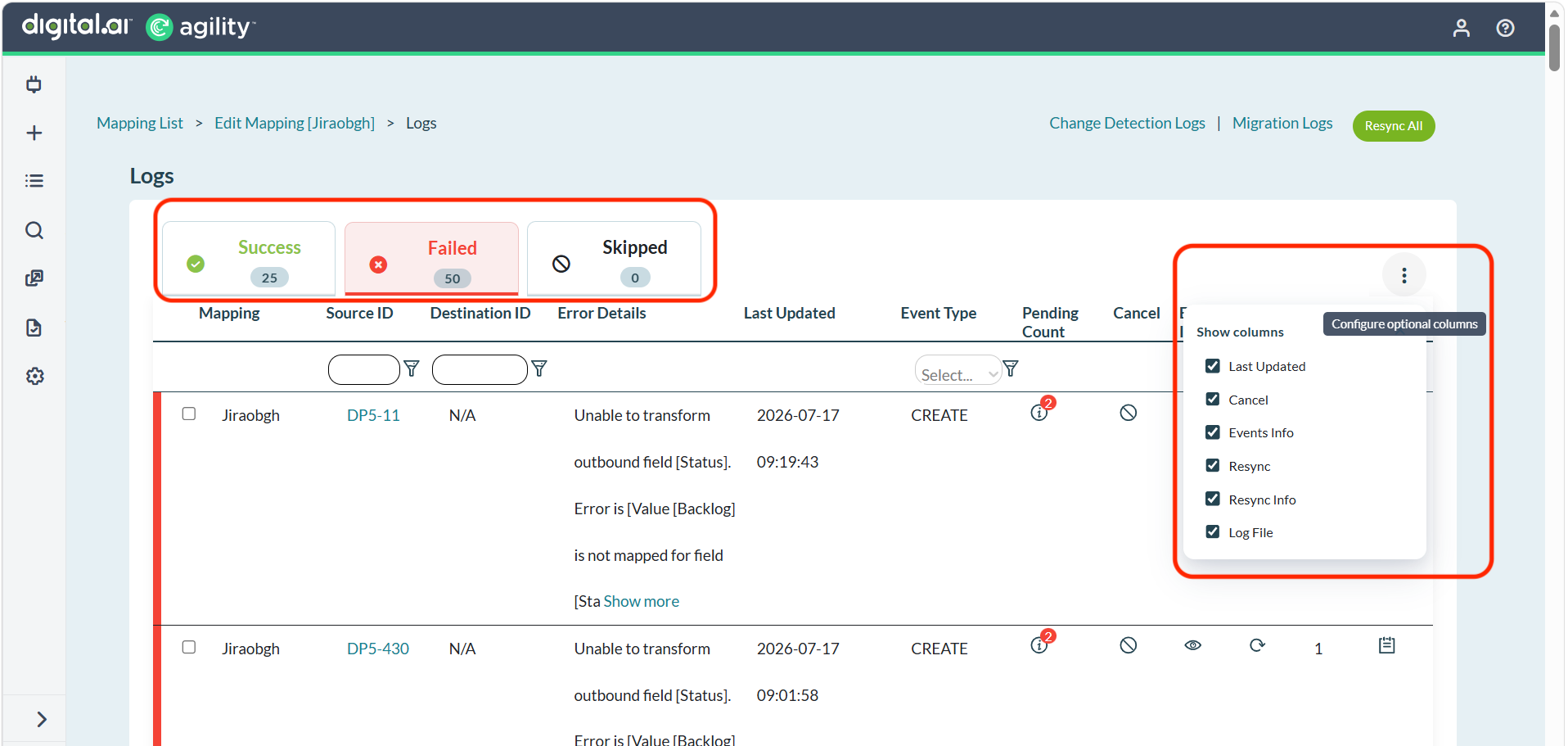
This change reduces page load time for mappings with large datasets and gives you a more responsive experience when you review logs by status.
For more information, see Mappings List Page.
Configurable Auto Resync
Auto Resync is now a configurable option that you control from the Agility Sync settings. Previously, when an event failed on the View Logs page, Agility Sync automatically attempted to resync the event up to five times at ten-minute intervals. This default behavior helped recover events that failed due to temporary glitches, but it added little value when a mapping had a large number of events failing for a persistent reason, because the sync job kept retrying without resolving the failures.
What changed:
- Auto Resync is controlled by a UI option instead of running by default.
- Go to Settings > System to find the Auto Resync Disabled option.
- Auto Resync is enabled by default.
- Select the Auto Resync Disabled checkbox and click Save to turn off automatic resync. When selected, automatic resync no longer occurs.
This change gives you control over whether Agility Sync retries failed events automatically, so you can turn off retries when failures require manual attention rather than repeated automatic attempts.
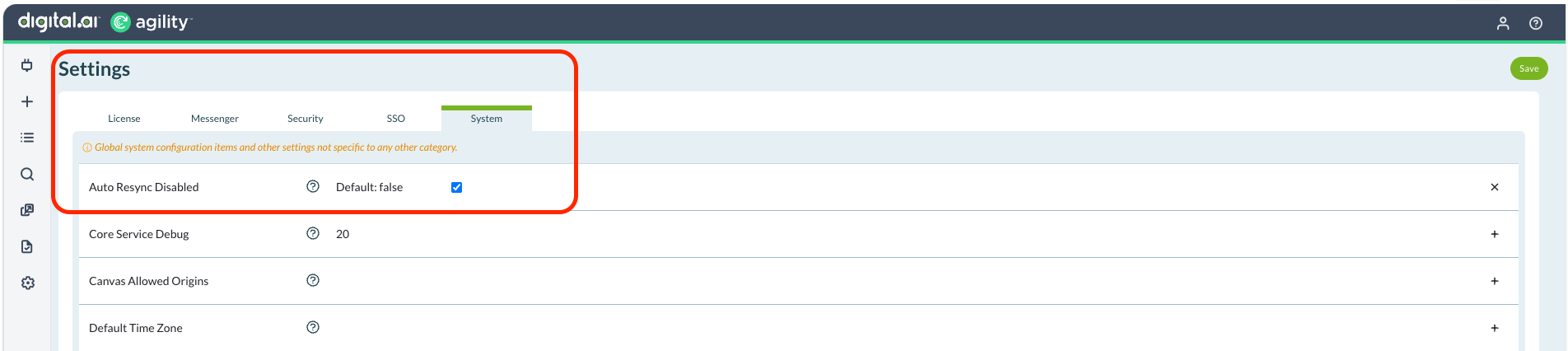
For more information, see Mappings List Page.
Improved MongoDB Connectivity Efficiency
Agility Sync now handles MongoDB connections more efficiently. Agility Sync uses PyMongo to manage its MongoDB connections. Previously, the application created multiple PyMongo instances within a single process, leading to inefficient connection handling. Agility Sync now maintains a single PyMongo instance per process and lets it manage the required number of connections.
What changed:
- Agility Sync maintains a single PyMongo instance per process instead of creating multiple instances.
- Database connections are managed more efficiently.
This change improves connection handling and overall stability for Agility Sync environments that use MongoDB.
Support for Epic Sync from GitLab to Agility
Agility Sync now supports syncing Epics from GitLab to Agility. Previously, configuring a mapping to sync Epics in the GitLab to Agility direction failed during setup because the required webhook could not be created in GitLab, which prevented the mapping from being created. Mappings configured in the Agility to GitLab direction were not affected.
What changed:
- You can now create a mapping to sync Epics from GitLab to Agility.
- The webhook required for the mapping is created successfully in GitLab during setup.
- Epic synchronization is supported in both the GitLab to Agility and Agility to GitLab directions.
This change enables Epic synchronization from GitLab to Agility, so you can keep Epics aligned across both systems regardless of the direction you configure.
For more information, see GitLab Integration.
Support for JIRA Data Center 10.3.X
Agility Sync now supports JIRA Data Center 9.15.X and 10.3.X.
For more information, see Agility JIRA Integration.
Fixes
Concurrent Cancellation or Resync of the Same Failed Event Returned an Error
Fixed an issue with how Agility Sync handled a failed event that was cancelled or resynced concurrently from multiple browser tabs or by multiple users. Previously, cancelling or resyncing the same failed event from multiple browser tabs or by multiple users could display the error "Given inbound id [...] does not exist."
What changed:
- Subsequent Cancel or Resync requests for an already cancelled event now display the message "Given inbound id [...] is already cancelled." instead of an error.
- The event is removed from the View Logs page.
This fix improves the handling of concurrent cancellation and resync actions, so acting on the same failed event from multiple browser tabs or by multiple users no longer returns an error.
Parent Information Not Synced During Migrate Update from JIRA
Fixed an issue where parent information was not synced from JIRA to Agility during a migrate update. When a mapping was deactivated and reactivated, and a story was then updated in JIRA with parent information, the event synced as a migrate update but the parent information was missing in Agility.
What changed:
- Parent information is now picked up and synced from JIRA to Agility during migrate update events.
- Story-to-Epic parent relationships update correctly in Agility after a mapping is deactivated and reactivated.
This fix ensures parent relationships between work items are accurately reflected in Agility when updates are synced from JIRA.
Story to Feature Link Removed When a Child Task Is Deleted in Azure
Fixed an issue where the parent link between a Story and a Feature was incorrectly removed in Agility when a child Task under the Story was deleted, removed, or moved in Azure Boards. When the change synced through Agility Sync, the Story-to-Feature link was removed instead of only the Task association.
What changed:
- Deleting, removing, or moving a child Task in Azure Boards no longer removes the Story-to-Feature parent link in Agility.
- The Story remains linked to its Feature after a child Task is changed in Azure Boards.
This fix ensures parent relationships between Stories and Features are preserved in Agility when child Tasks are changed in Azure Boards.
Enhanced View Logs Page Performance
Fixed an issue where the View Logs page returned random 504 timeout errors for certain mappings. Regardless of the amount of data in the logs, the page sometimes failed to load within the expected time, though it occasionally loaded correctly.
What changed:
- View Logs page performance has been improved.
- The View Logs page loads reliably without random 504 timeout errors.
This fix ensures you can access the View Logs page consistently without timeout errors.
Slowness When You Create or Update Agility Comments
Fixed an issue that caused slowness when comments were created or updated in Agility through Agility Sync. Comments that included a story ID were getting stuck in the job queue and were not processed promptly, and comments without a story ID that should have been skipped were not being skipped. These unhandled scenarios contributed to the overall slowness.
What changed:
- Comments that include a story ID are processed promptly instead of getting stuck in the job queue.
- Comments without a story ID are skipped as expected.
- Creating and updating Agility comments through Agility Sync is faster.
This fix improves performance and reliability when synchronizing comment creates and updates with Agility.
Resync Fails After You Disable the JIRA to Agility Direction
Fixed an issue where the Resync operation failed with a "'bool' object is not subscriptable" error after the JIRA to Agility direction was disabled for Conflict Resolution field. Conflict Resolution is available only for bidirectional mappings. When Conflict Resolution was enabled on a bidirectional mapping and the field was later changed to a single direction, the Conflict Resolution section became disabled in the UI while the direction remained enabled. This inconsistent state caused resync to fail even after the original sync issue was resolved.
What changed:
Conflict Resolution is supported only for bidirectional mappings. Changing the field mapping to a single direction is not allowed and disables that field, so the field mapping works as expected and resync no longer fails with the error.
This fix ensures resync works reliably after you change a mapping from bidirectional to a single direction.
Duplicate Work Items Created When Events Arrive Out of Sequence
Fixed an issue where duplicate work items could be created in the destination system when sync events did not arrive in the proper sequence. Agility Sync checked for existing cross-reference IDs on update events but not on create events, so a create event could produce a duplicate work item when a matching item had already been synced.
What changed:
- Agility Sync now checks for existing cross-reference IDs on create events, as it already does for update events.
- A create event is skipped when the work item has already been synced.
This fix prevents duplicate work items from being created in the destination system when sync events arrive out of sequence.
Same Job Scheduled Twice in the Job Queue
Fixed an issue where a single triggered job created two identical entries in the Job Queue instead of one. When multiple schedulers were running, each scheduler created its own entry for the same job, and the entries were created at the same time or within a few milliseconds of each other. The check that keeps a scheduled job unique did not catch the duplicate because of this timing.
What changed:
- A triggered job now creates a single entry in the Job Queue.
- Duplicate entries are no longer created when multiple schedulers run.
This fix prevents duplicate job entries in the Job Queue when a job is triggered.
Slowness When JIRA Issue Link Events Pile Up in the Job Queue
Fixed an issue that caused sync slowness when JIRA issue link events accumulated in the job queue. When an issue link was added or deleted in JIRA, the event did not include the project and work item it was associated with. To find these details, Agility Sync queried its own events collection, which became slow as the collection grew and caused issue link events to pile up in the job queue. Agility Sync now queries JIRA directly for the work item and project associated with the issue link instead of querying the events collection.
What changed:
- Agility Sync retrieves the work item and project associated with an issue link from JIRA instead of from its events collection.
- JIRA issue link events no longer pile up in the job queue as the events collection grows.
This fix improves sync performance when JIRA issue links are added or deleted.
Upgrade Schedule
| How to Upgrade | Agility Enterprise | Agility Ultimate |
|---|---|---|
| On-demand (auto-upgrade) | ||
| If your system is not in the auto-upgrade program, contact support to be added to the program or to schedule your upgrade. | Jul 25 (Trial) | Aug 1 (On demand) |
| On site | ||
| Contact Us if you need a 2026 annual license for your on-site system. | Contact Us | Contact Us |