Agility 26.3 Point Release 2
Overview
Enhancements and bug fixes in Digital.ai Agility.
Enhancements
- Edit Detail Estimate and To Do hours inline on the Asset Summary view
- Warning when removing or merging tags used by closed, deleted, or inaccessible assets
Edit Detail Estimate and To Do Hours Inline
Enhanced the Asset Summary view to allow inline viewing and editing of To Do and Detail Estimate hours without entering edit mode.
For more information, see Manage Backlog Items and Manage Defects.
Warning for Removing or Merging Tags Used by Closed or Deleted Assets
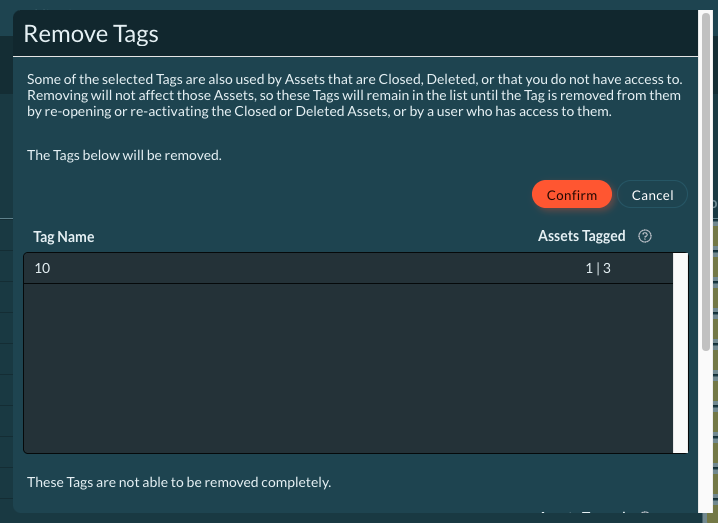
When you remove or merge a tag that's also used by closed, deleted, or inaccessible assets, Agility now displays a warning before completing the action. Removing or merging only updates assets that are open and accessible to you; it doesn't affect closed, deleted, or inaccessible assets using that tag.
What changed:
- Removing or merging a single tag that's also used by closed, deleted, or inaccessible assets shows a confirmation warning before completing the action.
- Removing or merging multiple tags shows which tags will be fully removed or merged and which tags will remain in the list because they're still used by closed, deleted, or inaccessible assets.
- The Assets Tagged column on the Tags page now shows two distinct counts: the number of open assets you have access to, and the total number of assets using the tag, including closed, deleted, and inaccessible assets.
For more information, see Removing Tags and Merging Tags.
Fixes
Blocking Issue List Not Loading on First Open
Resolved an issue where the list of existing issues didn't load the first time you opened the dialog to block a backlog item with an existing issue (More Actions > Block > With Existing Issue). The list loaded only after closing and reopening the dialog. The dialog now loads the issue list and filters search results correctly on the first attempt.
Rooms 2 Updates
Rooms 2 is updated weekly. To know more about the enhancements and fixes of Rooms 2, see Rooms 2 Weekly Updates.
Point Releases
| How to Upgrade | Agility Enterprise | Agility Ultimate |
|---|---|---|
| On-demand (auto-upgrade) | November 14, 2026 | November 14, 2026 |
| If your system is not in the auto-upgrade program, contact support to be added to the program or to schedule your upgrade. | Contact us | Contact us |
| On site | ||
| Contact us if you need a 2026 annual license for your on-site system. | Contact us | Contact us |