Agility 26.3 Point Release 1
Overview
Enhancements and bug fixes in Digital.ai Agility and Agility Sync.
Digital.ai Agility
Enhancements
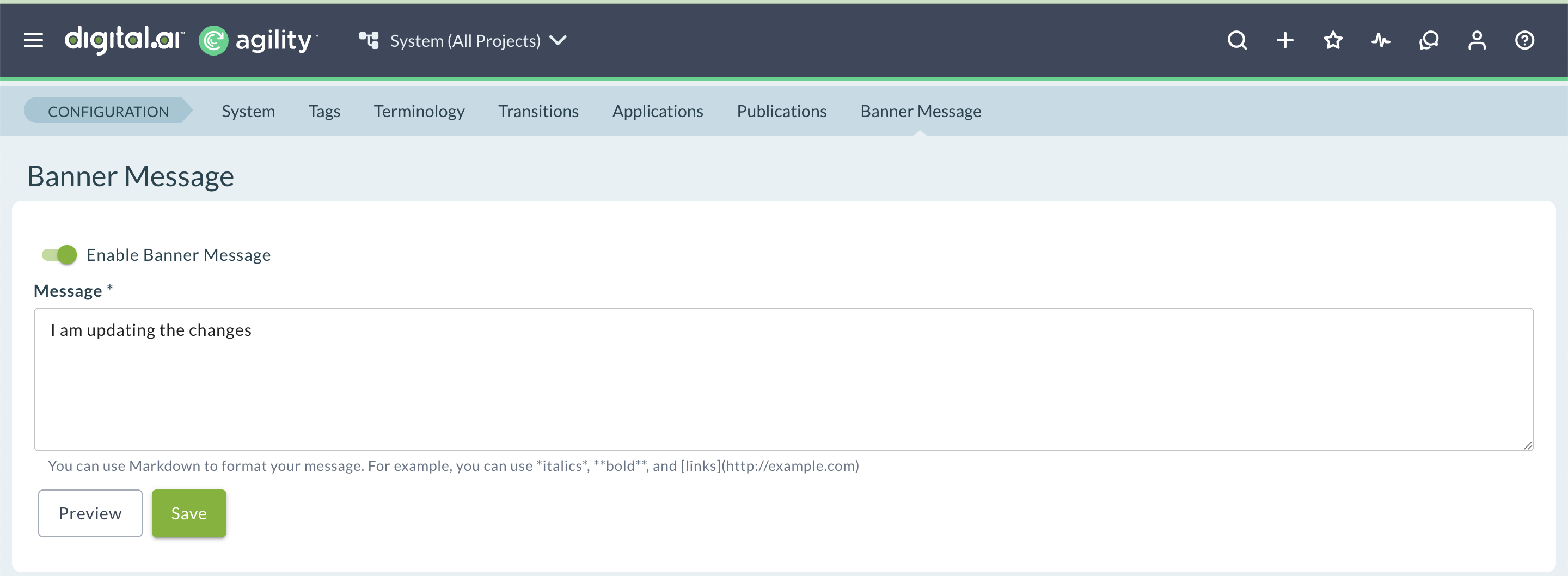
- Format banner messages using Markdown, including bold and italic text, bulleted lists, and hyperlinks
- Update multiple fields on selected cards from board views, including custom fields
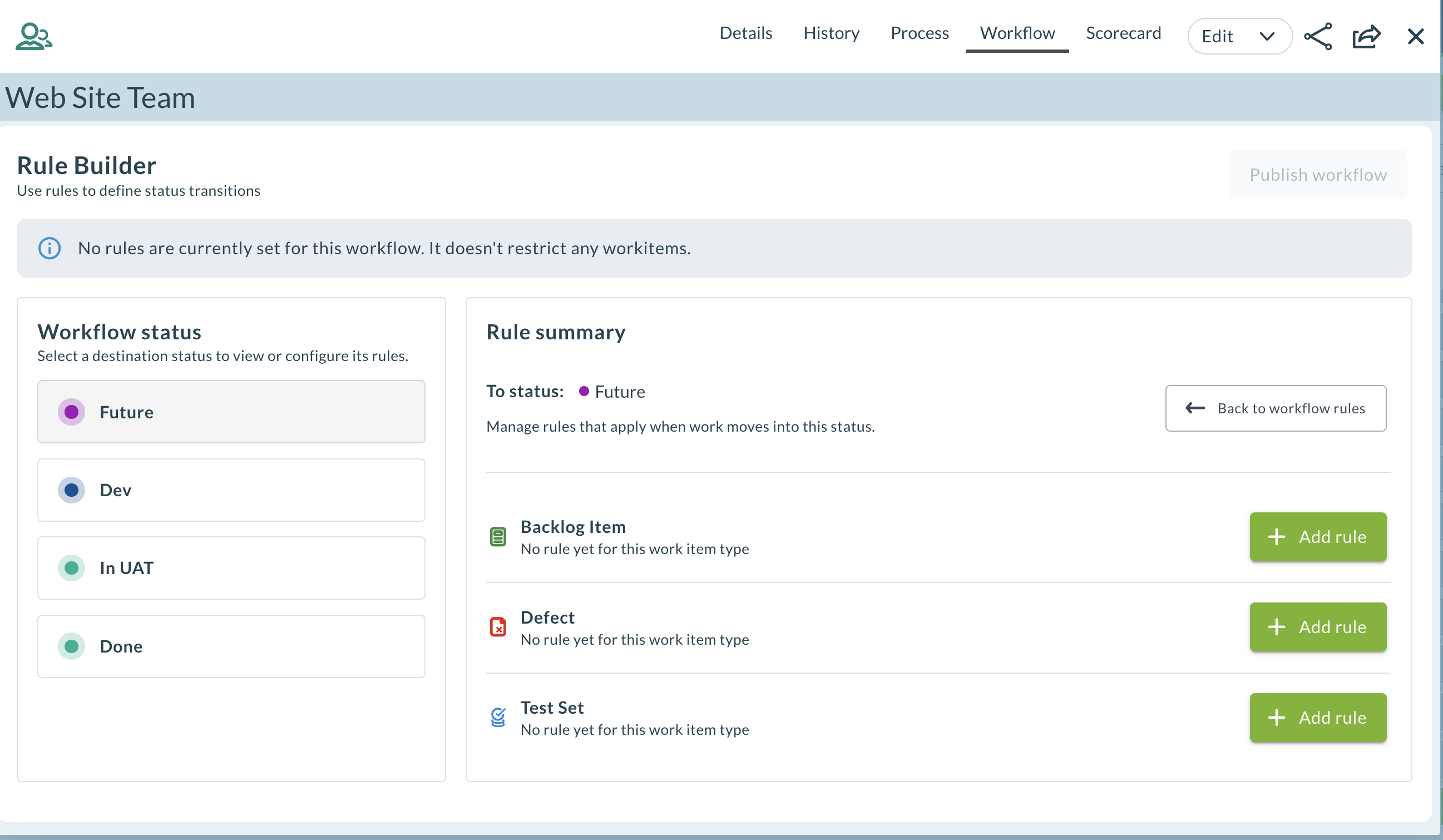
- Configure workflow transition rules for a team from the Workflow tab, by work item type and project role
- Replace illegal XML control characters in REST API responses with a new
replaceIllegalCharsquery parameter
Format Banner Messages with Markdown
Banner messages now support Markdown formatting, so you can highlight important information and link to relevant pages without leaving Agility. This uses the same Markdown syntax already supported in Rooms 2 conversations.
Key capabilities:
- Format banner message text with bold and italic styling
- Add a bulleted list to a banner message
- Insert hyperlinks directly in a banner message
For complete instructions, see Configure Banner Messages.
Update Multiple Fields from Board Cards
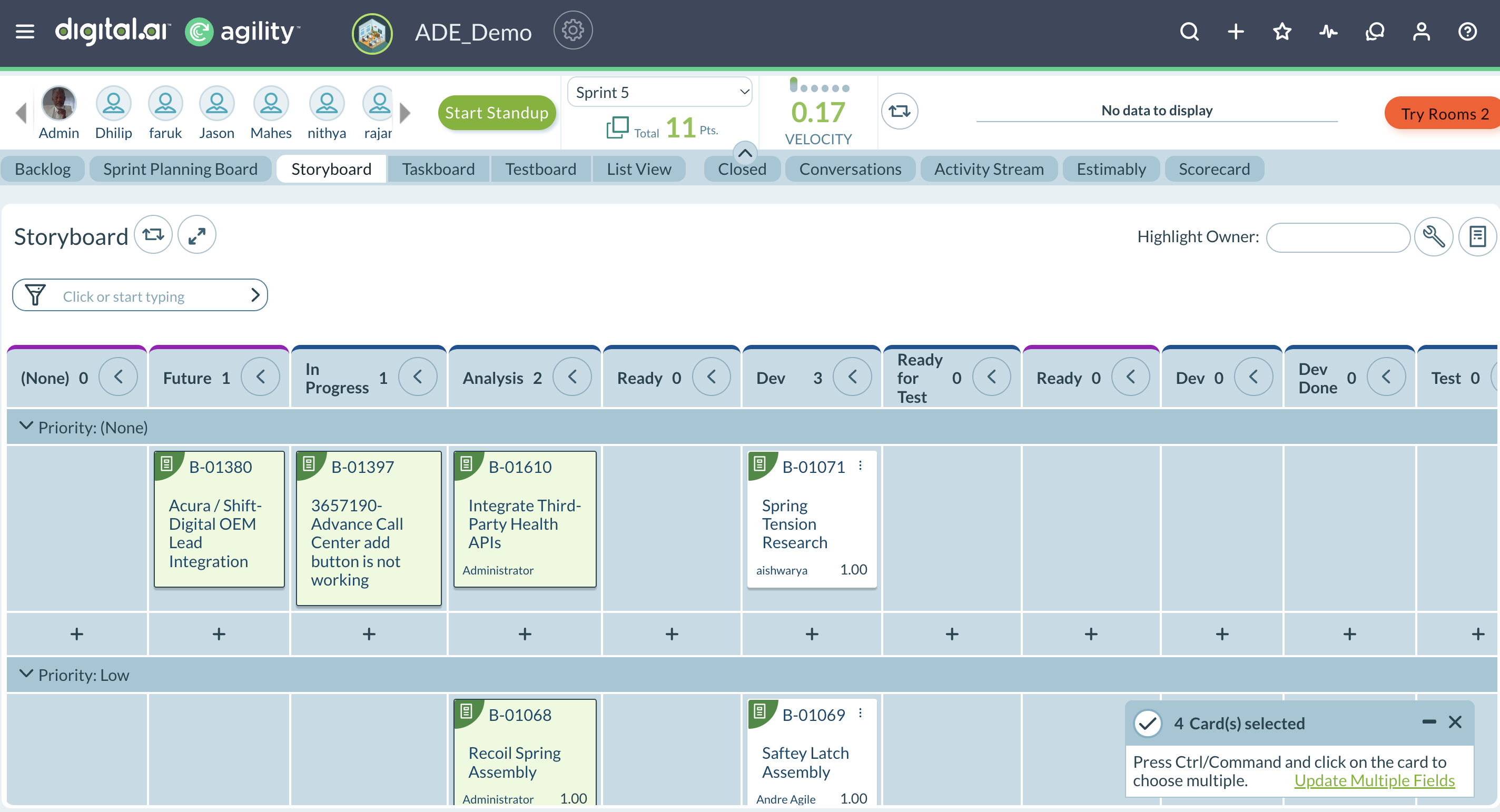
Apply the same update to several work items at once from card-based boards, instead of editing each card individually. Select multiple cards and update fields such as State, Priority, Iteration, Release, Team, and Owner in a single action. You can also update custom fields.
Where You Can Use It:
- Team Room: Iteration Storyboard and Kanban Storyboard
- Planning Room: Portfolio Kanban
- Iteration: Storyboard
- Portfolio: Portfolio Kanban
The custom fields shown depend on the type of item. For Backlog items, the custom fields added under Backlog appear. For Epics, the custom fields added under Epic appear.
For complete instructions, see Update Multiple Fields.
Configure Workflow Transition Rules for a Team
Control status changes for work items by configuring workflow transitions directly from the Workflow tab on the Team Details page. For each status, define which statuses a work item is allowed to move from into that status (To Status → From Allowed Status), configured separately for each work item type: Story, Defect, and Test Set.
What You Can Do:
- Add, edit, or delete a rule for a status and work item type in the Rule Builder.
- Select one or more From statuses for each rule.
- Restrict a transition to one or more project roles, so only members in those roles can make that move (for example, only a Project Lead can move an item from In Testing to Done). Members with the System Admin role can always make any transition.
- Publish your changes. Until you publish, changes stay in draft mode and are accessible only to the user who made them.
Once a workflow is published, Agility enforces its rules wherever a status can change, including the Storyboard (Agility Core and Rooms 2), the work item details view or drawer, bulk updates, and inline edits. An action that violates a transition rule is blocked, and an attempt by a member outside the allowed roles is also blocked, each with an error notification.
System Admins, Member Admins, Project Admins, and Project Leads can define the rules at the team process level.
For more information, see Workflow Transition Rules.
Replace Illegal XML Characters in REST API Responses
Text fields in Agility can contain control characters that aren't valid in the XML 1.0 specification, such as vertical tab or form feed characters. Previously, the REST API encoded these characters as illegal character references, which caused standard, conforming XML parsers to reject the response.
Add the replaceIllegalChars=true query parameter to a REST API request to replace these characters with the Unicode replacement character (U+FFFD) instead, so the response parses correctly in standard XML parsers.
What changed:
- The REST API accepts a new optional query parameter:
?replaceIllegalChars=true. - When set to
true, illegal control characters (all control characters other than tab, newline, and carriage return) are replaced with U+FFFD. - If any characters are replaced, the containing XML element includes a
replacedIllegalChars="true"attribute.
Fixes
Process Tab on the Team Details Page
Resolved an issue where the Process tab on the Team Details page became unresponsive after you switched to another tab, such as Details or History, and back. The Process tab now updates correctly when you switch between tabs.
Release Forecasting Page Error
Resolved an issue where the Release Forecasting page displayed an "Invalid parameter value. Parameter name: optimistic" error after you entered forecast criteria and clicked Go. The Release Forecasting page now loads forecast results correctly.
Deprecated Features
Removed in This Release
- Legacy Project Workspace Assets UI — The Switch to legacy UI option no longer appears on the Project Workspace Assets screen, so every Project Workspace Asset page now uses the new user interface. Bookmarked or direct URLs that reference the legacy Assets UI automatically redirect to the corresponding page in the new Project Workspace Assets UI.
- Community of Practice — Removed, including Communities and Topics, as previously announced in Feature Deprecation Notice: Community of Practice Feature. This removes the feature's UI, including its navigation options, from the application.
To be Removed in a Future Release
- Agility Dashboards — Will be removed in version 27.2 (currently slated for GA release in July 2027). Plan to transition away from Agility Dashboards before upgrading to that release.
Agility Sync
Enhancements
- Agility Sync now supports Python 3.12
- View a change log for Agility Sync mappings
Python 3.12 Support for Agility Sync
Starting with this release, Agility Sync on RHEL 8.x, RHEL 9.x, and Ubuntu 22.04 environments supports Python 3.12. Python 3.9 is no longer supported.
For complete requirements, see Agility Sync Server Requirements.
View the Change Log for Agility Sync Mappings
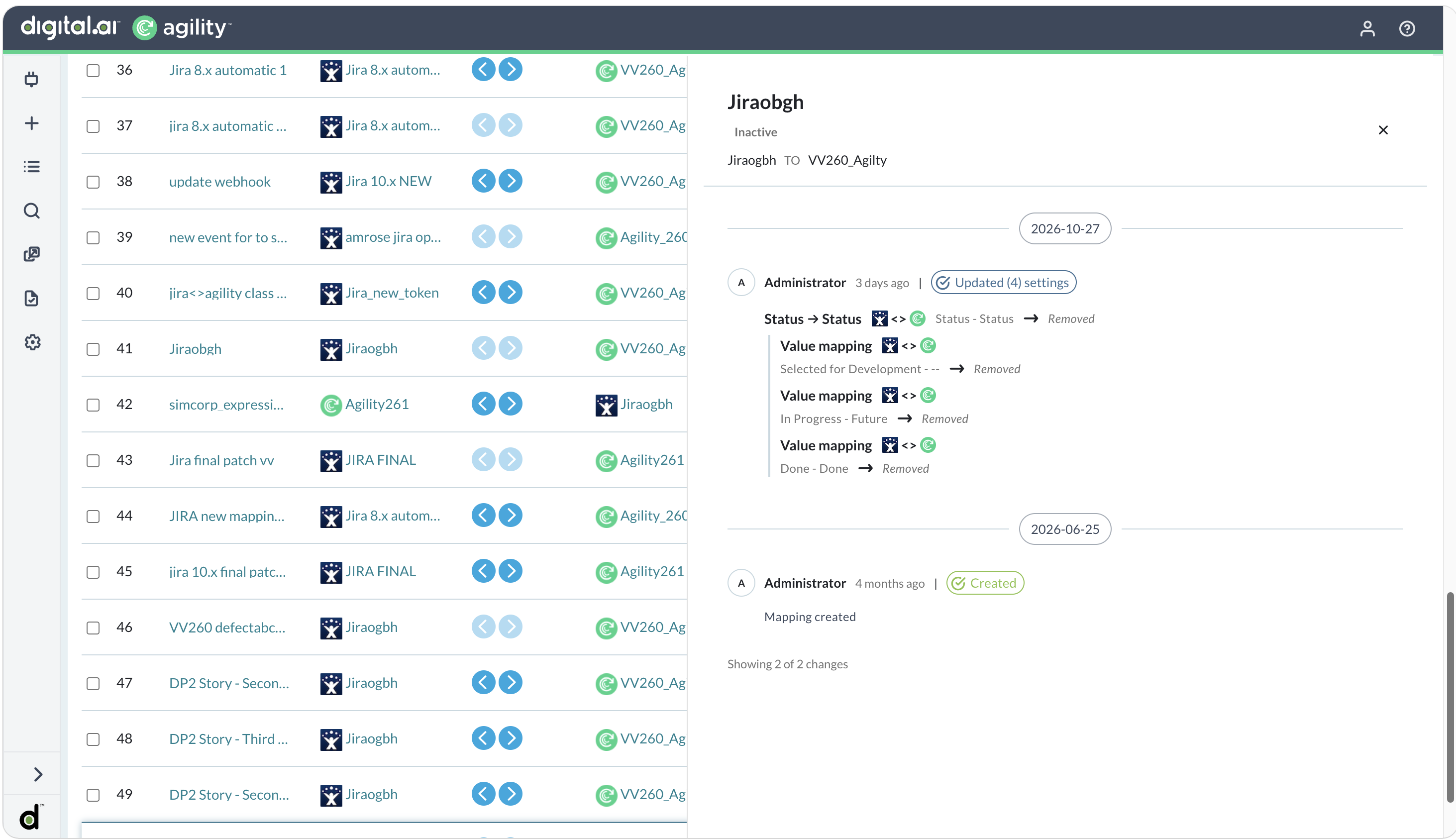
Agility Sync now logs a change log for each sync mapping, so you can see who changed a mapping's configuration and when.
Key capabilities:
- Open the change log from the options menu (⋮) next to a mapping, using the change log icon
- View changes to both a mapping's core settings and its field mappings, with the previous and new value for each changed field
- See changes grouped by day, newest first, with the user, how long ago, and the number of settings changed
- Change log entries are permanent and can't be edited or deleted
For complete instructions, see The Mappings List Page.
Rooms 2 Updates
Rooms 2 is updated weekly. To know more about the enhancements and fixes of Rooms 2, see Rooms 2 Weekly Updates.
Point Releases
| How to Upgrade | Agility Enterprise | Agility Ultimate |
|---|---|---|
| On-demand (auto-upgrade) | October 31, 2026 | October 31, 2026 |
| If your system is not in the auto-upgrade program, contact support to be added to the program or to schedule your upgrade. | Contact us | Contact us |
| On site | ||
| Contact us if you need a 2026 annual license for your on-site system. | Contact us | Contact us |