Agility 26.1 Point Release 7
Overview
Enhancements and bug fixes in Digital.ai Agility.
Enhancements
- Assign a value stream to a TeamRoom and filter the backlog by release
Filter the TeamRoom Backlog by Release
You can assign a value stream to a TeamRoom and filter the TeamRoom backlog by release. Previously, a TeamRoom scoped its work items only by planning level, which made the backlog difficult to manage for teams that plan with releases instead of using a release as their planning level. Assigning a value stream adds a release filter to the TeamRoom so team members can focus the backlog on the release they're working on.
To assign a value stream to a TeamRoom:
- Click the hamburger menu > Rooms > All TeamRooms.
- Click the name of the TeamRoom you want to configure.
- Click the gear icon next to the TeamRoom name to open Room Settings.
- On the Properties tab, select a value stream from the ValueStream list. The list shows all active value streams and defaults to Select a value stream.
- Click Save, and then click Back to Room.
You can also assign a value stream when you create a TeamRoom.
After a value stream is assigned, a release list appears in the TeamRoom header next to the Start Standup button in Agility Core, and as a Release filter at the top right of the Sprint Planning page in Rooms 2. Both lists show the active releases that belong to the selected value stream, and no release is selected by default.
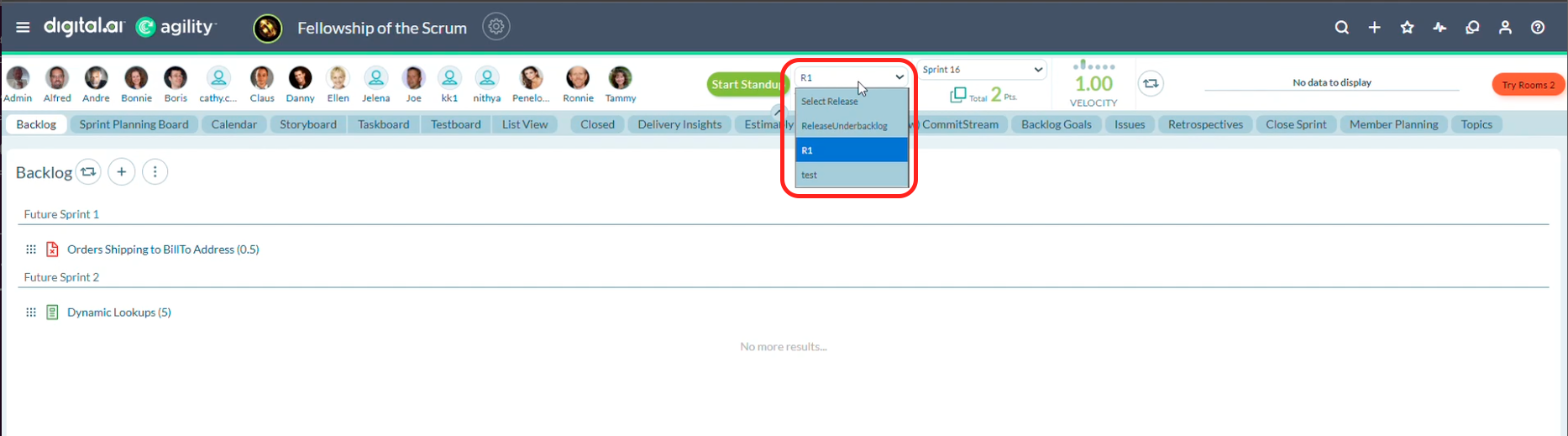
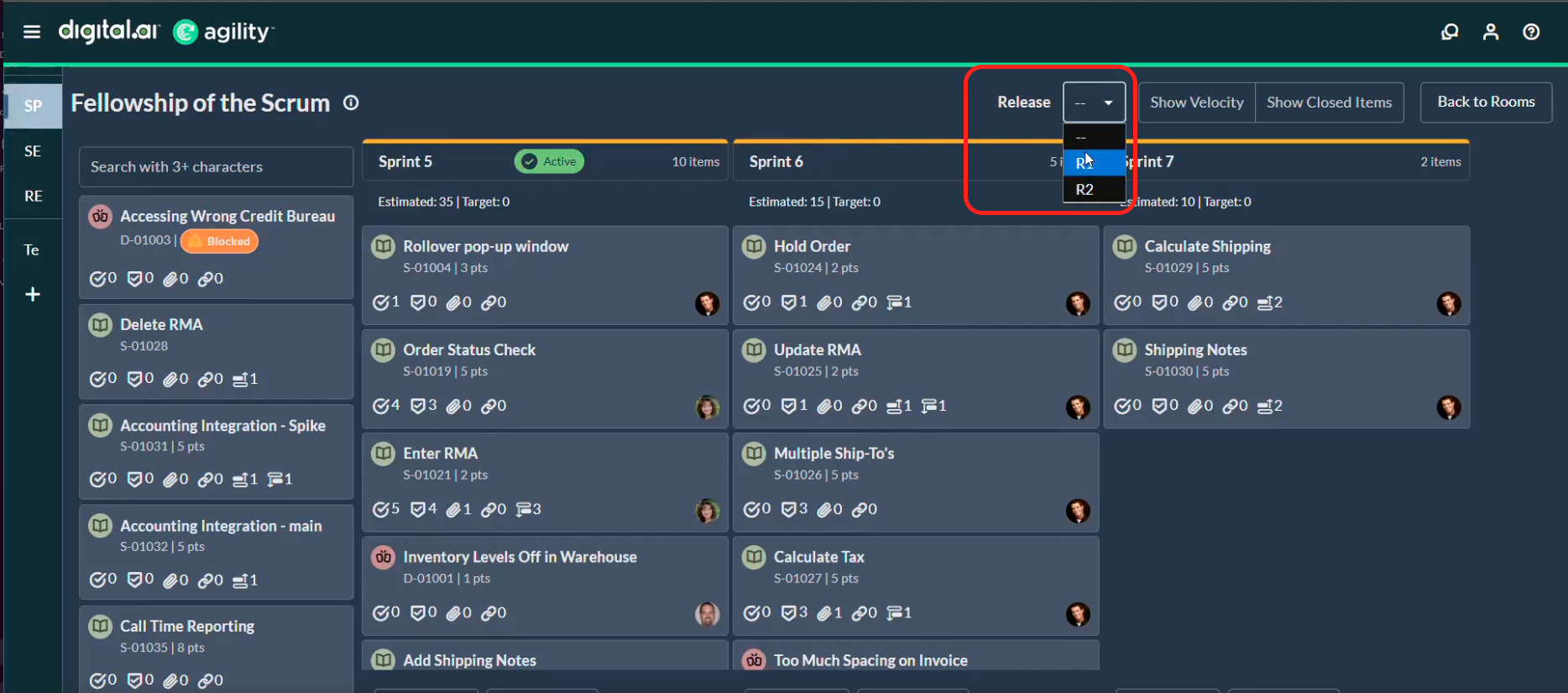
Selecting a release filters the Backlog panel to the work items assigned to that release. In Agility Core, the filter applies to the Backlog panel only, as noted by the *Backlog panel only label below the list. Other panels, such as the Storyboard, Taskboard, and List View, aren't affected.
The ValueStream list and the release filter appear only when Release Planning is enabled in the admin settings.
For more information, see the following topics:
Fixes
Metadata Load Failure on Systems with Non-English Regional Settings
Resolved an issue where metadata loaded on a background thread using the regional settings of the account that runs the Agility process instead of a culture-independent format. On a host configured for a locale that uses a different decimal separator, such as French Windows, numeric filter expressions such as Progress<'1.0' failed to parse, which caused metadata loading to fail and prevented the application from starting. Metadata now loads using a culture-independent format, so numeric values are interpreted consistently regardless of the regional settings of the host system.
Pagination on the ProjectRoles API
Resolved an issue where requests to the ProjectRoles API that included the page parameter failed with the error Non-negative number required. Parameter name: capacity. Requests that specify a page size now return results as expected.
Closed Releases in the Backlog Filter
Resolved an issue where closed releases created in Release Planning weren't available in the backlog filter when the grid was set to include closed work items. Closed releases now appear in the filter, so you can filter the grid by a release after it is closed.
Portfolio Items in Release Details
Resolved an issue where the Asset Details view for a release listed portfolio items that weren't associated with that release. The view now lists only the portfolio items associated with the release.
Datamart
Enhancements
- Report on Release Planning 2.0 data in the Data Mart
- Report on OKR data in the Data Mart
Report on Release Data in the Data Mart
The Data Mart includes Release Planning 2.0 data. Release objects, including metadata such as name, date, status, and associated work items, are extracted, transformed, and loaded into the Data Mart on a scheduled cadence. Analysts and product owners can query and build reports using release objects as a dimension or filter to analyze release performance and make decisions from consolidated, curated release information.
For more information, see Custom Reporting and Data Mart.
Report on OKR Data in the Data Mart
The Data Mart includes OKR data. Objectives, Key Results, and their associated work items are loaded into the Data Mart so that product and program managers can build custom reports and dashboards on OKR data.
For more information, see Custom Reporting and Data Mart.
Point Releases
| How to Upgrade | Agility Enterprise | Agility Ultimate |
|---|---|---|
| On-demand (auto-upgrade) | August 1, 2026 | August 1, 2026 |
| If your system is not in the auto-upgrade program, contact support to be added to the program or to schedule your upgrade. | Contact us | Contact us |
| On site | ||
| Contact us if you need a 2026 annual license for your on-site system. | Contact us | Contact us |