Agility Version 26.0 Point Release 5
Overview
Enhancements and bug fixes in Digital.ai Agility.
Enhancements
- Group Roadmap items by Objectives and Key Results in Board and Timeline views.
- Group Roadmap items by Planned Release in Board and Timeline views.
- Clickable Objective and Key Result links in list views.
Group by Objectives and Key Results in Roadmap Views
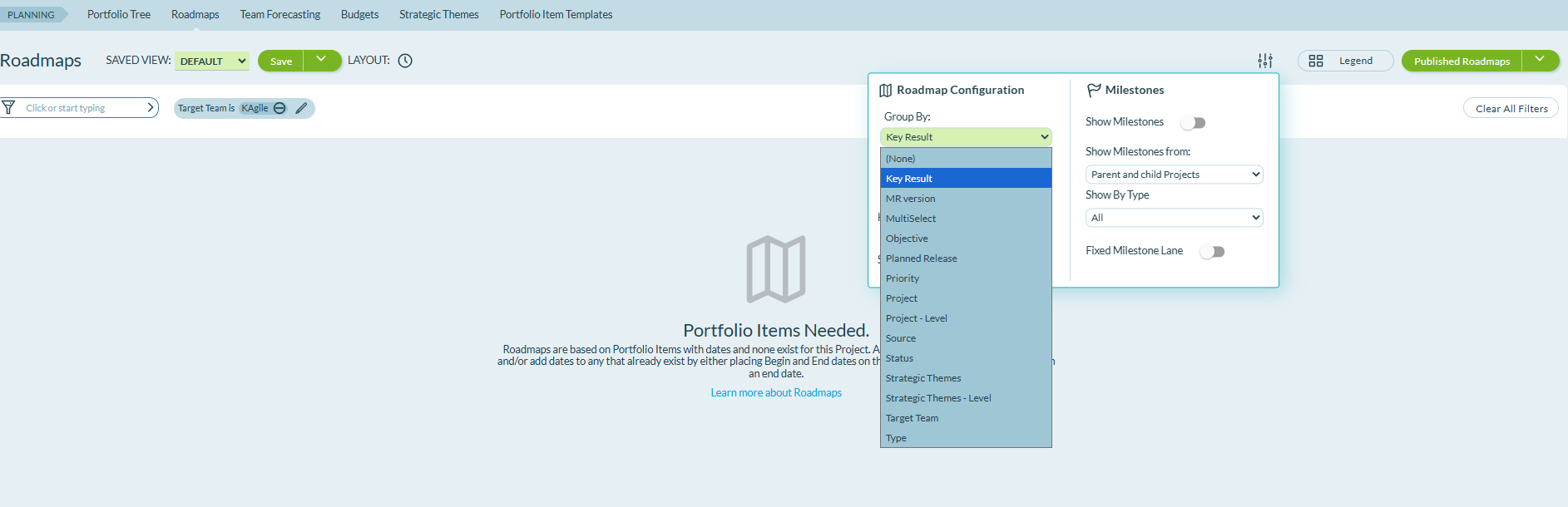
The Roadmap Configuration includes Objective and Key Result as grouping options in both Board and Timeline views. These grouping options show how your roadmap items align with specific outcomes and goals.
Select Objective or Key Result from the Group By dropdown in the Roadmap Configuration panel to organize Portfolio Items by their associations. When a Portfolio Item is associated with multiple Objectives or Key Results, it appears in separate rows for each association, showing all relationships and dependencies across your portfolio.
Group by Planned Release in Roadmap Views
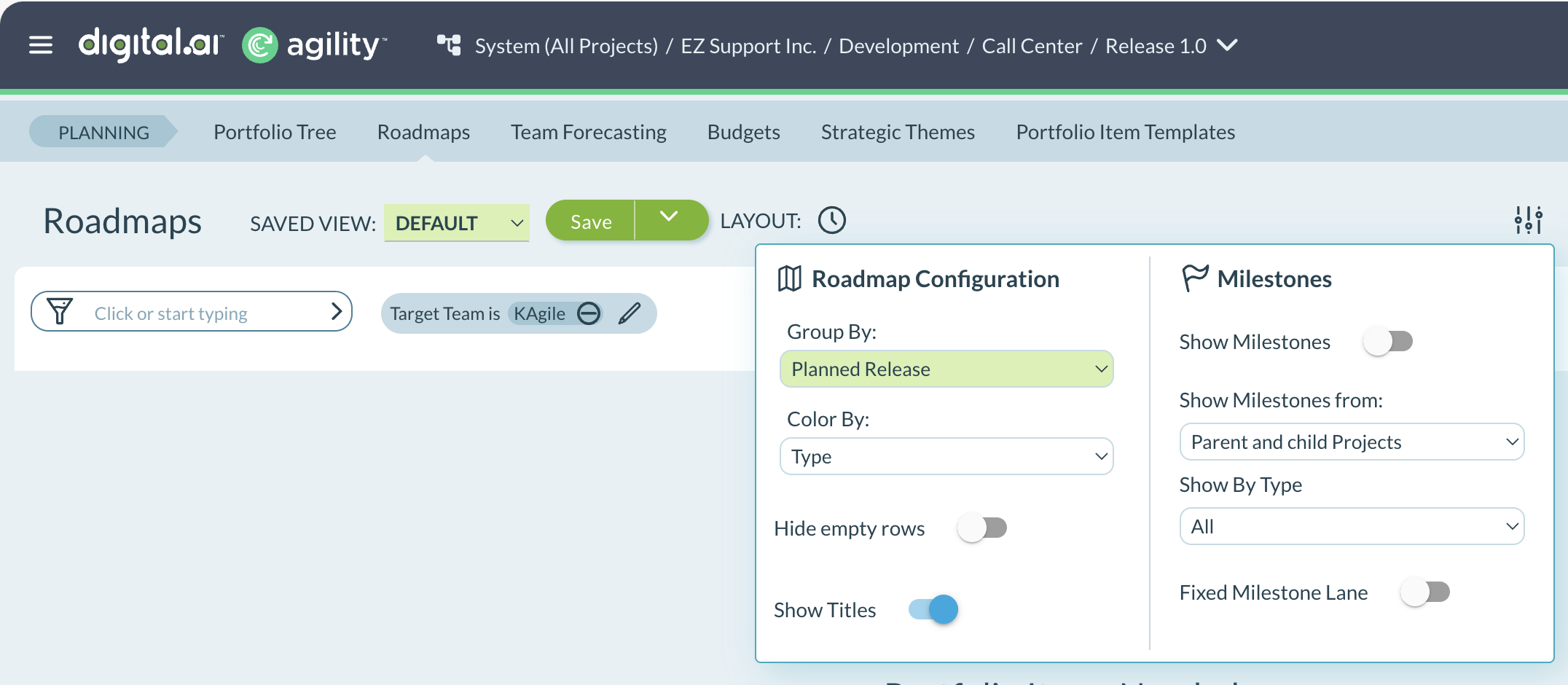
The Roadmap Configuration includes Planned Release as a grouping option in both Board and Timeline views. This grouping option shows how your Portfolio Items are aligned with each release.
Select Planned Release from the Group By dropdown in the Roadmap Configuration panel to organize Portfolio Items by their assigned releases. The view shows which Portfolio Items are planned for each release.
Clickable Objective and Key Result Links
Objective IDs and Key Result IDs are clickable links in Planning Room, Portfolio Tree, and Backlog views. When you click an Objective or Key Result ID, the corresponding item opens in the Rooms 2 asset detail window. The Details tab displays all OKR fields including objective associations, current values, target values, and descriptions.
Fixes
There are no fixes in this point release.
Agility Sync
Enhancement
Simplified Data Migration Activation
The Activate/De-activate Data Migration & Data Sync toggle has been removed from the mapping settings. Previously, this toggle attempted to automatically enable live sync after data migration completed, but technical limitations prevented webhooks from being properly activated in the integrated systems, causing the feature to not work as intended.
What changed:
- Data migration and data sync now have separate activation controls.
- After completing data migration, you must manually activate the Activate/De-activate Data Sync toggle to enable live synchronization.
- This approach provides clearer control over when live sync begins and ensures webhooks are properly configured.
This change improves the reliability of the migration-to-sync workflow and gives you explicit control over when to transition from migration to ongoing synchronization.
Fixes
Jira Polling and Missing Events
Fixed an issue where Jira polling failed with HTTP 410 errors because Agility Sync was using deprecated Jira API endpoints. The missing events polling job was unable to fetch issues from Jira, causing sync failures during data migration and ongoing synchronization. Agility Sync now uses the current Jira API endpoints, resolving missing events failures and ensuring reliable polling for both data migration and live sync operations.
SonarQube Security Issues
Resolved critical security issues identified during SonarQube security scans. These fixes improve the overall security posture of Agility Sync and address vulnerabilities discovered through automated security scanning.
Missing Events Sync Timeouts
Fixed an issue where missing events synchronization failed due to API timeout errors and event processing failures when polling Agility for missing events. The system encountered 500 Server Errors with messages indicating timeout periods elapsed during REST API operations. These errors prevented the missing events job from completing successfully during data migration. The fix improves timeout handling and error recovery, ensuring reliable missing events processing for Agility synchronization.
View Logs Search Performance
Resolved timeout issues in the View Logs page when filtering by source ID or destination ID. When mappings contained large volumes of sync events (hundreds of thousands of records), the View Logs page experienced timeouts during search operations and failed to display the Quick Summary. The search functionality now performs exact match queries efficiently, allowing users to filter by source ID or destination ID without timeouts, even with large data volumes.
View Logs and List Mapping Page Performance
Improved responsiveness of the View Logs and List Mapping pages for environments with high data volume. Mappings with more than 600,000 sync events previously encountered 504 timeout errors when loading these pages. Performance optimizations ensure both pages load successfully regardless of sync event volume.
RHEL8 Jira Integration Dependency
Resolved an issue where Jira test connections and data migrations failed on RHEL8 systems with an ImportError indicating the libjpeg.so.62 library could not be found. The missing third-party package prevented the system from initializing the Jira client during connection tests and migration operations. Agility Sync now includes the required libjpeg dependency, ensuring Jira integrations function correctly on RHEL8 environments.
Rooms 2 Updates
Rooms 2 is updated weekly. To know more about the enhancements and fixes of Rooms 2, see Rooms 2 Weekly Updates.
Point Releases
| How to Upgrade | Agility Enterprise | Agility Ultimate |
|---|---|---|
| On-demand (auto-upgrade) | March 28, 2026 | March 28, 2026 |
| If your system is not in the auto-upgrade program, contact support to be added to the program or to schedule your upgrade. | Contact us | Contact us |
| On site | ||
| Contact us if you need a 2026 annual license for your on-site system. | Contact us | Contact us |